Résumez cet article à l'aide de l'IA
La traduction est la partie la plus simple. Le véritable défi est d’obtenir un bon classement. C’est là que la plupart des sites Webflow échouent.
La plupart des équipes qui lancent un site Webflow multilingue pensent que la partie la plus difficile consiste à traduire le contenu. Puis elles mettent le site en ligne, constatent que leurs URL allemandes sont indexées de manière irrégulière, voient Google afficher la version anglaise aux internautes français, et finissent par accepter que « le SEO international est forcément compliqué ».
Ce n’est pas compliqué. C’est simplement une question de précision.
Les sites multilingues qui obtiennent de bons résultats sur tous les marchés reposent sur quelques décisions techniques essentielles : une structure d’URL claire, une implémentation rigoureuse des balises hreflang, une modélisation du CMS adaptée aux différentes langues et un processus de traduction capable de suivre les mises à jour sans devenir ingérable. La fonctionnalité Webflow Localization, lancée lors de Webflow Conf 2023 et considérablement enrichie depuis, couvre une grande partie de ces besoins, à condition de bien comprendre ce qu’elle automatise et les aspects qui nécessitent encore une intervention manuelle.
Ce guide est la ressource que j’aurais aimé avoir lorsque j’ai migré un site disponible en cinq langues depuis Weglot. Il s’adresse aux responsables marketing, aux designers internes et aux développeurs freelances qui souhaitent éviter de découvrir, six mois après la mise en ligne, que leur implémentation hreflang est incorrecte. Nous commencerons par les décisions stratégiques avant de passer à une mise en œuvre détaillée, suffisamment précise pour vous éviter de devoir tout refaire plus tard.
À la fin de ce guide, vous saurez :
- Choisir la meilleure approche entre Webflow Localization, les solutions de type Weglot et la duplication manuelle des pages.
- Concevoir une architecture d’URL optimisée pour renforcer l’autorité SEO plutôt que de la fragmenter.
- Mettre en place un CMS multilingue capable d’évoluer au-delà de trois langues sans complexité excessive.
- Construire un processus de traduction combinant la rapidité de l’IA avec une validation humaine de qualité.
- Vérifier votre site grâce à une checklist complète avant et après le lancement, inspirée de projets réels.
Commençons.
Partie 1 : Les fondements stratégiques
Que signifie réellement « Webflow multilingue » ?
Trois notions sont souvent confondues alors qu’elles désignent des réalités différentes.
Traduction
La traduction consiste simplement à convertir un texte d’une langue à une autre, en conservant autant que possible le sens d’origine, sans adaptation culturelle.
Localisation
La localisation va beaucoup plus loin. Elle consiste à adapter l’ensemble de l’expérience utilisateur à un marché spécifique : le texte, les images, les devises, les formats de date, les unités de mesure, les mentions légales et parfois même la mise en page.
Un site allemand ne se contente pas d’être rédigé en allemand. Il met en avant des arguments différents, utilise des références propres au marché allemand et adopte un ordre de présentation adapté aux attentes locales.
Internationalisation (i18n)
L’internationalisation correspond à la préparation technique d’un site pour gérer plusieurs langues et régions. Elle comprend notamment :
- la structure des URL ;
- les balises hreflang ;
- l’attribut lang ;
- la prise en charge des langues s’écrivant de droite à gauche (RTL) ;
- ainsi que toute l’architecture technique nécessaire au fonctionnement d’un site multilingue.
Un site traduit mais non localisé obtient souvent de mauvais résultats, car les mots-clés utilisés ne correspondent pas aux recherches réelles des utilisateurs du pays ciblé.
À l’inverse, un site correctement localisé mais mal internationalisé souffre également en SEO, car Google ne parvient pas à identifier la bonne version pour chaque pays. Le moteur de recherche risque alors d’afficher la mauvaise langue ou de répartir l’autorité SEO entre plusieurs versions similaires.
Pour réussir, ces trois dimensions sont indispensables.
Webflow Localization facilite l’internationalisation et prend en charge les principaux workflows de localisation. En revanche, la qualité des traductions reste de votre responsabilité.
Quand un site multilingue est-il réellement rentable ?
Créer un site multilingue représente un investissement.
Il faut prévoir :
- un abonnement supplémentaire pour chaque langue (nous y reviendrons plus loin) ;
- un budget consacré à la traduction ;
- un coût de maintenance qui augmente avec chaque nouvelle langue.
Avant d’ajouter une version française, posez-vous les bonnes questions.
Existe-t-il une véritable demande organique sur ce marché ?
Analysez les mots-clés directement dans la langue cible plutôt que de traduire vos mots-clés anglais. Les volumes de recherche varient souvent de manière importante.
Pouvez-vous accompagner vos clients dans cette langue ?
Une page de vente en français qui renvoie vers un formulaire de contact uniquement en anglais nuit davantage au taux de conversion qu'une absence totale de traduction.
Avez-vous les ressources pour maintenir cette langue ?
Une version du site qui n'a pas été mise à jour depuis plusieurs mois envoie un mauvais signal aux moteurs de recherche et donne aux visiteurs l'impression d'un site abandonné.
Le meilleur scénario pour investir dans un site Webflow multilingue est généralement celui d'une entreprise SaaS ou e-commerce ayant déjà validé son marché principal et souhaitant se développer sur deux ou trois nouveaux marchés où la demande SEO est confirmée et où le support client peut suivre cette croissance.
À l'inverse, les projets lancés simplement parce que l'entreprise souhaite « devenir internationale » aboutissent souvent à des sites traduits que personne en interne n'est capable de maintenir.
Les trois approches pour créer un site Webflow multilingue
Trois solutions principales existent, mais elles ne présentent pas les mêmes avantages.
1. Webflow Localization (solution native)
Il s'agit de la fonctionnalité officielle proposée par Webflow.
Vous concevez votre site dans la langue principale, ajoutez ensuite les autres langues et modifiez chacune d'elles directement depuis la vue Locale du Designer.
Le contenu est organisé dans des sous-répertoires (/fr/, /es/, etc.), les balises hreflang sont générées automatiquement et les collections CMS permettent une localisation champ par champ.
En 2026, cette solution constitue le choix recommandé pour la majorité des projets.
2. Les solutions tierces (Weglot, Localize, Transifex…)
Ces plateformes se placent entre votre site et vos visiteurs.
Elles détectent la langue à partir de l'URL puis affichent une version traduite hébergée sur leur propre infrastructure.
Le déploiement est très rapide — souvent moins d'une heure — et la traduction automatique est généralement incluse.
En contrepartie :
- vous disposez de moins de contrôle sur le design selon les langues ;
- les contenus sont gérés en dehors de Webflow ;
- la tarification dépend souvent du nombre de mots traduits plutôt que d'un coût fixe par langue.
3. Duplication manuelle
Cette approche consiste à créer un projet Webflow distinct pour chaque langue.
Elle offre une liberté totale en matière de design, mais entraîne également :
- une maintenance beaucoup plus lourde ;
- une duplication importante du travail ;
- une consolidation SEO moins efficace.
Cette solution n'est réellement pertinente que pour des campagnes ponctuelles ou des marchés nécessitant un contenu totalement différent.
Comparaison rapide
Les trois approches présentent chacune des avantages et des limites. Le choix dépend principalement de votre budget, de vos objectifs SEO, de votre stratégie de contenu et de votre capacité à maintenir plusieurs versions de votre site sur le long terme.
La localisation native est la meilleure solution pour la majorité des équipes. Les solutions de type proxy sont particulièrement adaptées lorsque vous devez traduire un blog de 5 000 pages dans un délai très court et que votre équipe n'intervient pas directement dans le Designer Webflow. Quant à la duplication manuelle, elle constitue rarement la meilleure option.
Partie 2 : L'architecture des URL — la décision qui détermine votre potentiel SEO
Avant même de créer une seule langue, vous devez choisir votre structure d'URL. C'est probablement la décision la plus importante de tout le projet, car la modifier par la suite implique la mise en place d'un grand nombre de redirections 301, ainsi qu'une baisse temporaire de l'indexation que vous préférerez éviter.
Sous-répertoire, sous-domaine ou ccTLD ?
Trois approches sont possibles :
- Sous-répertoire :
example.com/de/— toutes les langues sont hébergées sous un même domaine. - Sous-domaine :
de.example.com— chaque langue dispose de son propre sous-domaine. - ccTLD (nom de domaine national) :
example.de— chaque langue utilise un domaine distinct.
Chaque solution présente des avantages et des inconvénients. Webflow Localization privilégie clairement l'une d'entre elles.
Les sous-répertoires (Subdirectories)
C'est le choix par défaut et la meilleure option pour environ 90 % des projets.
Cette structure concentre toute l'autorité SEO sur un seul domaine. Les backlinks pointant vers votre version allemande renforcent également l'autorité globale de votre site.
La configuration est automatique : dès que vous ajoutez une langue dans Webflow Localization, un chemin comme /de/ est créé automatiquement.
C'est la méthode recommandée par Webflow et celle privilégiée par la majorité des experts en SEO international pour les sites axés sur le contenu.
Les sous-domaines (Subdomains)
Avec cette approche, chaque langue est considérée comme un hôte distinct.
Google traite de.example.com relativement indépendamment de example.com. Les backlinks obtenus par la version allemande profitent donc moins à la version anglaise, et inversement.
Webflow réserve cette architecture principalement aux offres Enterprise, ce qui montre qu'elle n'est généralement pas destinée aux projets standards.
Les ccTLD (Country Code Top-Level Domains)
Les domaines nationaux, comme example.de, constituent le signal géographique le plus fort pour Google.
Un domaine en .de indique clairement que le site cible le marché allemand.
En revanche, cette approche est plus coûteuse et plus complexe à gérer :
- hébergement séparé ;
- propriétés Google Search Console distinctes ;
- maintenance indépendante de chaque domaine.
Elle est surtout pertinente pour les grandes entreprises disposant d'équipes locales, de budgets dédiés par pays et, parfois, d'obligations juridiques nécessitant des entités nationales distinctes.
Où placer votre langue principale ?
Webflow permet deux possibilités :
- À la racine du domaine :
example.com - Dans un sous-répertoire :
example.com/en/
Dans la majorité des cas, il est recommandé de conserver la langue principale à la racine du domaine.
Cette approche offre plusieurs avantages :
- une URL plus simple pour votre marché principal ;
- un léger avantage SEO lié à la racine du domaine ;
- aucune rupture avec les backlinks déjà existants pointant vers les URL historiques.
Quand utiliser un sous-répertoire pour la langue principale ?
Une structure comme example.com/en/ peut être pertinente dans certaines situations particulières :
- lorsque vous ciblez des pays multilingues comme le Canada ou la Suisse, où aucune langue n'est réellement dominante ;
- lorsque votre marque est internationale et qu'aucun marché ne constitue votre marché principal ;
- lorsque vous souhaitez traiter toutes les langues de manière parfaitement équivalente, sans langue par défaut.
Codes de langue : respectez les normes ISO
Pour les codes de langue, utilisez les standards internationaux :
- ISO 639-1 pour les langues ;
- ISO 3166-1 alpha-2 pour les régions.
Langue uniquement
/fr//de//es/
Cette structure convient lorsqu'une seule version linguistique est utilisée pour toutes les régions.
Langue + région
/fr-ca//es-mx//en-gb/
Cette approche est préférable lorsque le contenu diffère réellement selon les pays.
Par exemple, l'espagnol du Mexique et celui de l'Espagne utilisent des expressions, des devises, des références juridiques et des habitudes de recherche différentes.
Si vous choisissez de localiser votre site, faites-le correctement en utilisant des URL comme /es-mx/ et /es-es/ plutôt qu'un simple /es/.
Ces codes ISO correspondent également aux valeurs utilisées dans les balises hreflang, garantissant ainsi une cohérence technique sur l'ensemble du site.
Partie 3 : Configuration de Webflow Localization étape par étape
Voici maintenant le processus de mise en œuvre.
Nous partirons du principe que :
- vous avez déjà défini les langues à prendre en charge ;
- vous avez choisi votre architecture d'URL ;
- votre stratégie de localisation est prête.
Étape 1 : Activer Webflow Localization
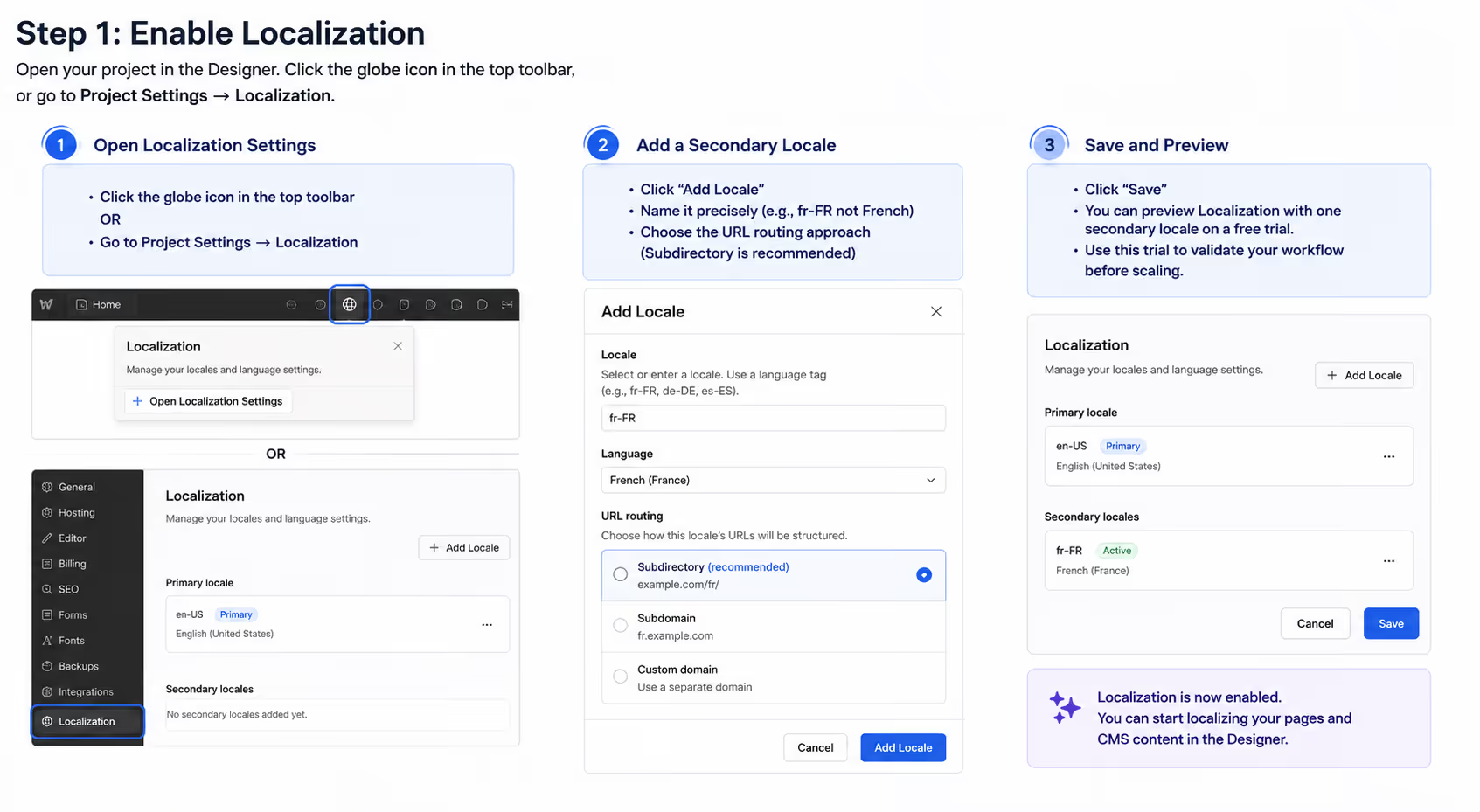
Ouvrez votre projet dans le Designer.
Cliquez sur l'icône en forme de globe située dans la barre d'outils supérieure, ou accédez à Paramètres du projet → Localization.
Vous verrez votre langue principale, définie automatiquement selon les paramètres du projet, ainsi qu'une option permettant d'ajouter des langues secondaires.
Ajoutez une nouvelle langue secondaire. Nommez-la de manière précise, par exemple fr-FR plutôt que simplement Français. Sélectionnez ensuite le mode de routage des URL. Le sous-répertoire est l'option proposée par défaut et reste le meilleur choix dans la plupart des cas. Enregistrez ensuite vos modifications.
Webflow vous permet de tester Localization avec une langue secondaire pendant une période d'essai gratuite avant de souscrire à l'extension payante. Profitez de cet essai pour valider votre processus de travail avant de déployer votre site dans plusieurs langues.
Étape 2 : Configurer la localisation des pages statiques
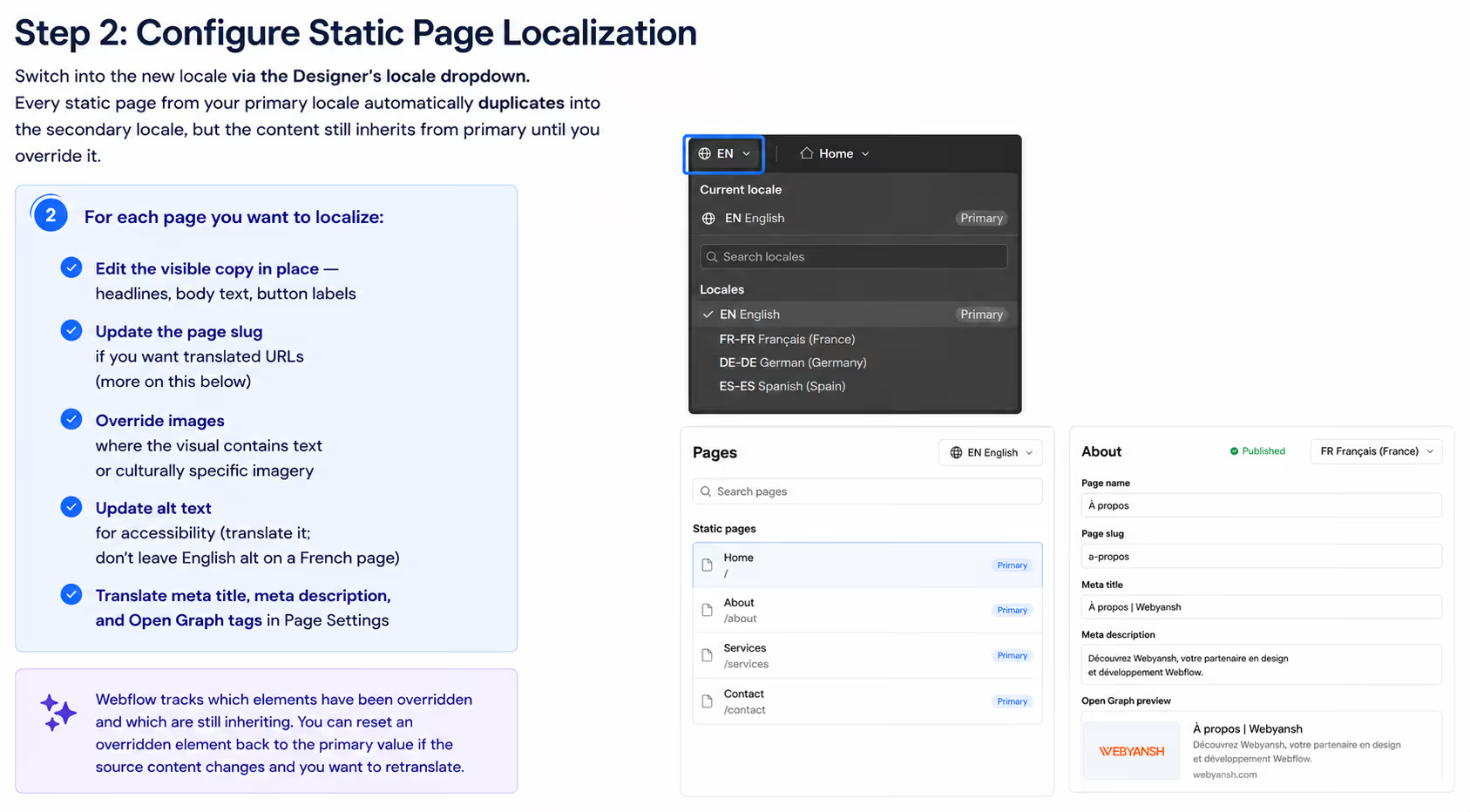
Passez à la nouvelle langue dans le Designer
Sélectionnez la nouvelle langue à l'aide du menu déroulant des langues dans le Designer Webflow.
Toutes les pages statiques de votre langue principale sont automatiquement dupliquées dans cette nouvelle langue. Toutefois, leur contenu continue d'hériter de la version principale tant que vous ne le modifiez pas.
Pour chaque page que vous souhaitez localiser :
- Modifiez directement le contenu visible : les titres, les paragraphes, les libellés des boutons et tous les autres textes.
- Mettez à jour le slug de la page si vous souhaitez utiliser des URL traduites (nous y reviendrons dans une section dédiée).
- Remplacez les images lorsque celles-ci contiennent du texte ou des éléments visuels spécifiques à une culture ou à un marché.
- Traduisez le texte alternatif (alt text) afin de garantir une bonne accessibilité. Évitez de conserver un texte alternatif en anglais sur une page en français.
- Traduisez également le titre SEO (Meta Title), la méta-description ainsi que les balises Open Graph dans les paramètres de la page.
Webflow indique clairement quels éléments ont été personnalisés pour une langue donnée et lesquels continuent d'hériter du contenu de la langue principale. Si le contenu d'origine est modifié, vous pouvez réinitialiser un élément personnalisé afin qu'il hérite de nouveau de la version principale avant de le retraduire.
Étape 3 : Configurer la localisation du CMS
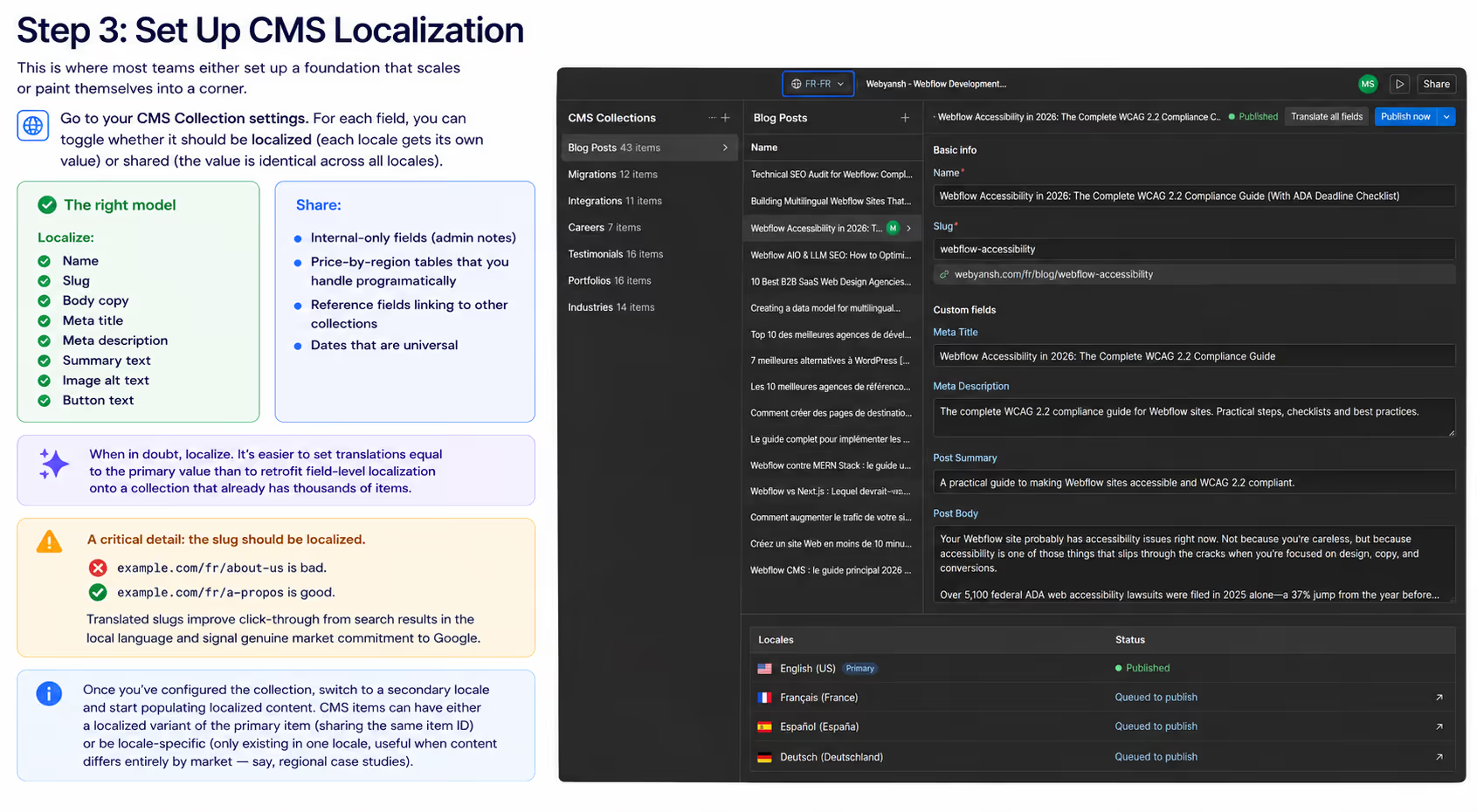
C'est à cette étape que la plupart des équipes posent les bases d'un site évolutif… ou créent une architecture qui deviendra difficile à faire évoluer.
Accédez aux paramètres de votre collection CMS. Pour chaque champ, vous pouvez choisir s'il doit être localisé (chaque langue dispose de sa propre valeur) ou partagé (la même valeur est utilisée dans toutes les langues).
Le modèle recommandé
À localiser :
- Nom
- Slug (URL)
- Contenu principal
- Meta Title
- Meta Description
- Texte de résumé
- Texte alternatif (alt) des images
- Texte des boutons
À partager :
- Champs internes (notes administratives)
- Tableaux de prix par région gérés de manière programmatique
- Champs de référence reliant d'autres collections
- Dates universelles
En cas de doute, privilégiez la localisation. Il est beaucoup plus simple d'utiliser temporairement la même valeur que la langue principale que d'ajouter ultérieurement une localisation champ par champ sur une collection contenant déjà des milliers d'éléments.
Un point essentiel : le slug doit lui aussi être localisé.
example.com/fr/about-us
example.com/fr/a-propos
Des URL traduites améliorent le taux de clic (CTR) dans les résultats de recherche locaux et montrent à Google que votre site est véritablement adapté au marché ciblé.
Une fois la collection configurée, passez à une langue secondaire et commencez à renseigner le contenu localisé.
Les éléments du CMS peuvent être gérés de deux façons :
- Une variante localisée de l'élément principal, qui partage le même identifiant (ID) mais possède un contenu propre à chaque langue.
- Un élément spécifique à une langue, disponible uniquement dans une seule localisation. Cette approche est particulièrement utile lorsque le contenu diffère entièrement selon les marchés, par exemple pour des études de cas régionales ou des contenus propres à un pays.
Étape 4 : Localiser les composants et les composants réutilisables (Components et Symbols)
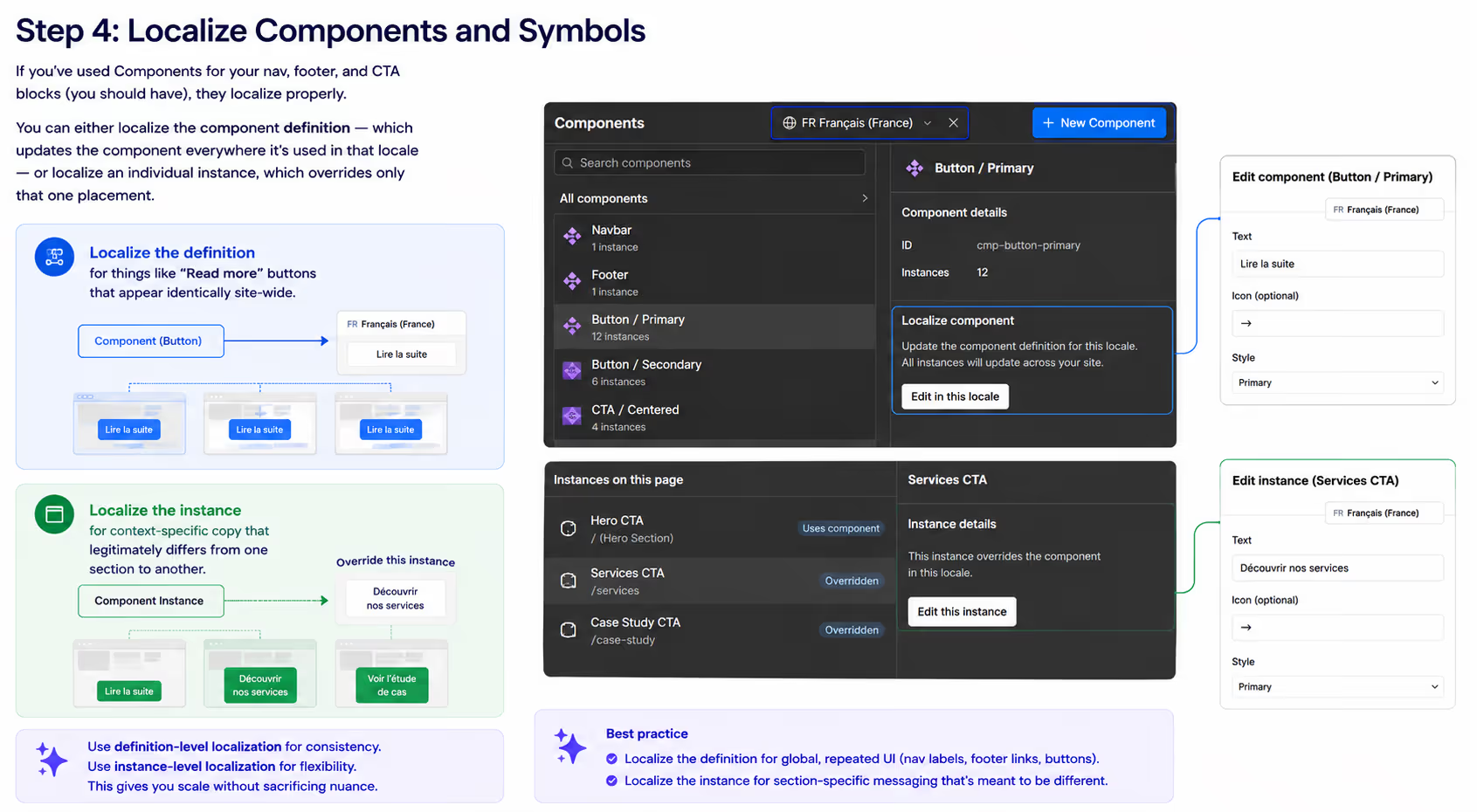
Étape 4 : Localiser les composants et les symboles
Si vous utilisez des Components pour votre barre de navigation, votre pied de page et vos blocs d’appel à l’action (CTA) — ce qui est fortement recommandé — leur localisation est gérée de manière native par Webflow.
Vous avez deux possibilités :
- Localiser la définition du composant, ce qui mettra à jour automatiquement ce composant partout où il est utilisé dans la langue concernée.
- Localiser une instance spécifique, ce qui permet de remplacer uniquement cette occurrence sans affecter les autres.
Localisez la définition du composant pour des éléments identiques sur l’ensemble du site, comme les boutons « En savoir plus » ou « Commencer ». En revanche, localisez une instance spécifique lorsque le contenu doit varier selon le contexte d’une page ou d’une section.
Étape 5 : Créer un sélecteur de langue (Locale Switcher)
Webflow propose un sélecteur de langue natif (Locale Selector). Il vous suffit de l’ajouter à votre barre de navigation ou à votre pied de page. Il affiche automatiquement les langues disponibles et permet aux visiteurs de passer facilement d’une version linguistique à une autre.
Avant de le mettre en place, plusieurs choix doivent être faits.
Style d’affichage
Les icônes de drapeaux sont faciles à reconnaître visuellement, mais elles peuvent être ambiguës sur le plan linguistique. Par exemple, le drapeau français ne représente pas nécessairement tous les utilisateurs francophones, notamment ceux du Québec.
Dans la plupart des cas, il est préférable d'afficher le nom de chaque langue dans sa langue d’origine, par exemple :
- Français
- Deutsch
- English
- Español
Cette approche est plus accessible et évite les confusions.
Navigation entre les pages
Lorsque l’utilisateur change de langue, Webflow tente automatiquement de l’envoyer vers la page équivalente dans la langue sélectionnée.
Si cette page existe, la transition est transparente.
En revanche, si la page n’a pas encore été publiée dans cette langue, l’utilisateur est automatiquement redirigé vers la page d’accueil de cette version linguistique.
Cette fonctionnalité ne fonctionne que pour les liens créés à partir des Pages ou des Collections CMS. Les liens URL saisis manuellement ne bénéficient pas de cette redirection intelligente.
Détection automatique de la langue
Les offres Advanced et Enterprise permettent d'activer une détection automatique de la langue selon les préférences du navigateur.
Utilisez cette fonctionnalité comme une suggestion, et non comme une redirection forcée.
L'utilisateur doit toujours pouvoir choisir manuellement sa langue.
Les redirections automatiques agressives détériorent l'expérience utilisateur et peuvent provoquer des problèmes d'indexation si Googlebot est envoyé vers une version non canonique du site.
Étape 6 : Vérifier la configuration SEO
Une fois votre site publié sur l'environnement de staging, vérifiez que tous les éléments techniques du référencement international fonctionnent correctement.
Assurez-vous notamment que :
- L'attribut HTML
langest présent sur chaque page (par exemple :<html lang="fr-FR">). - Les balises hreflang sont bien présentes dans la balise
<head>de chaque page et référencent toutes les langues disponibles, y compris la version courante ainsi qu'une version x-default. - Le sitemap XML contient toutes les URLs localisées. Les sitemaps générés automatiquement par Webflow gèrent cela nativement, tandis qu'un sitemap personnalisé nécessite une configuration manuelle des balises hreflang.
- Les balises canoniques pointent vers l'URL propre à chaque langue et non vers la langue principale.
- Les métadonnées Open Graph et Twitter Card sont correctement traduites pour chaque locale.
Ces éléments techniques déterminent si vos contenus traduits pourront réellement bien se positionner dans Google.
Même avec une traduction irréprochable, une mauvaise configuration des balises hreflang peut conduire Google à afficher la mauvaise version linguistique aux mauvais utilisateurs, ce qui réduit considérablement les performances SEO et les taux de conversion.
Partie 4 : Réussir son SEO international
Configurer un site multilingue est relativement simple.
Le véritable défi consiste à obtenir un bon classement dans les moteurs de recherche.
C'est ce qui distingue un simple site multilingue d'un site capable de générer une croissance internationale durable.
Les balises hreflang : l'erreur la plus fréquente
Les balises hreflang indiquent à Google quelle version d'une page doit être présentée aux internautes selon leur langue et leur région.
Lorsque vous utilisez les sitemaps générés automatiquement par Webflow, ces balises sont créées automatiquement, ce qui constitue la solution la plus fiable.
Cependant, trois règles essentielles sont souvent oubliées.
1. Chaque page doit faire référence à elle-même
Le bloc hreflang d'une page doit toujours contenir une référence vers sa propre langue.
Webflow le fait automatiquement.
En revanche, si vous utilisez un sitemap personnalisé ou ajoutez vos balises hreflang via du code personnalisé, cette référence est souvent oubliée.
2. Les références doivent être réciproques
Si votre page anglaise indique que la page française est une version alternative, alors la page française doit également déclarer la page anglaise comme version alternative.
Une relation asymétrique est considérée comme incorrecte par Google et sera simplement ignorée.
3. Utilisez toujours la valeur x-default
La valeur x-default indique à Google quelle version afficher lorsqu'aucune langue ou région ne correspond aux préférences de l'utilisateur.
Dans la majorité des cas, il s'agit de votre langue principale.
Lorsque Webflow est correctement configuré, cette balise est générée automatiquement.
Si vous utilisez un sitemap personnalisé, deux approches sont possibles :
- Ajouter manuellement les balises hreflang directement dans le fichier XML du sitemap.
- Ou insérer des balises
<link rel="alternate" hreflang="...">dans l'en-tête (<head>) de chaque page via du code personnalisé.
En revanche, évitez de mélanger ces deux méthodes sans cohérence.
Google analysera les deux sources. Si elles contiennent des informations contradictoires, cela créera des conflits susceptibles de nuire à votre référencement international.
La recherche de mots-clés localisés est indispensable
La plus grande erreur — et pourtant l'une des plus faciles à éviter — en SEO international consiste à traduire les mots-clés plutôt qu'à effectuer une véritable recherche de mots-clés dans chaque marché cible.
La façon dont les internautes anglophones recherchent des « running shoes » n'est pas la même que celle des internautes allemands.
La traduction littérale est « Laufschuhe », mais les utilisateurs allemands recherchent également « Joggingschuhe », « Sneaker » ainsi que des requêtes liées à des marques, souvent avec un volume de recherche bien supérieur.
Si votre page allemande est optimisée uniquement pour « Laufschuhe » parce que quelqu'un a traduit vos mots-clés anglais avec Google Traduction, vous risquez de vous positionner sur le mauvais terme et de passer à côté du trafic réellement qualifié.
Effectuez toujours votre recherche de mots-clés directement dans la langue cible à l'aide d'outils prenant en charge plusieurs marchés, tels que Ahrefs, Semrush ou Google Keyword Planner.
Analysez notamment :
- Le volume de recherche dans le marché ciblé.
- La difficulté des mots-clés et la composition des résultats de recherche (SERP).
- Les pages les mieux classées de vos concurrents locaux.
- Les variantes de longue traîne propres à chaque langue.
Construisez une stratégie de mots-clés spécifique à chaque langue, plutôt qu'une simple traduction de votre stratégie SEO en anglais.
Optimisez ensuite vos balises Title, vos titres H1, votre contenu, ainsi que vos slugs d'URL en fonction de ces mots-clés localisés.
Slugs et métadonnées localisés
Les slugs d'URL sont visibles par les internautes et jouent un rôle important dans le référencement.
Un utilisateur français arrivant depuis google.fr sera naturellement plus enclin à cliquer sur :
/fr/services-de-conseil/
plutôt que sur :
/fr/consulting-services/
Des slugs traduits renforcent également les signaux de pertinence envoyés aux moteurs de recherche pour la langue ciblée.
Webflow permet de localiser les slugs aussi bien pour les pages statiques que pour les Collections CMS.
Idéalement, configurez-les dès le lancement du site.
Modifier des slugs après la mise en ligne implique la mise en place de redirections 301. Bien qu'efficaces, elles ajoutent une complexité technique qu'il vaut mieux éviter.
Les métadonnées suivent exactement la même logique.
Chaque version linguistique doit disposer de :
- Un titre SEO (Meta Title) unique et optimisé, idéalement entre 50 et 60 caractères.
- Une Meta Description unique, rédigée pour maximiser le taux de clic dans le marché concerné (environ 150 à 160 caractères).
- Des balises Open Graph traduites afin que les partages sur les réseaux sociaux affichent le bon contenu dans la bonne langue.
- Des textes alternatifs (Alt Text) localisés pour toutes les images, afin d'améliorer à la fois l'accessibilité et le référencement des images.
Devise, formats locaux et signaux de confiance
Ces éléments n'ont pas d'impact direct sur votre classement dans Google, mais ils influencent fortement le taux de conversion, qui est l'objectif final de toute stratégie SEO internationale.
Veillez notamment à adapter :
- La devise : affichez les prix dans la monnaie utilisée par votre marché cible (EUR pour l'Europe, GBP pour le Royaume-Uni, etc.).
- Le format des dates : par exemple, 12/03/2026 correspond au 12 mars aux États-Unis, mais au 3 décembre dans plusieurs pays européens. Utilisez soit le format ISO, soit la convention locale de manière cohérente.
- Les numéros de téléphone : utilisez les indicatifs internationaux et les formats propres à chaque pays.
- Les adresses : si vous disposez de bureaux locaux, affichez les coordonnées correspondant à chaque marché.
- Les mentions légales : la politique de confidentialité, les conditions d'utilisation et les autres documents juridiques doivent respecter la réglementation locale (par exemple le RGPD pour les pays de l'Union européenne).
Une page produit affichant des prix en euros, mais un numéro de téléphone américain et une politique de confidentialité simplement traduite depuis l'anglais donne immédiatement l'impression d'une internationalisation improvisée.
Les visiteurs accordent alors moins de confiance à votre site, ce qui se traduit généralement par une baisse du taux de conversion.
Partie 5 : Workflow de traduction — Une approche réaliste
La qualité des traductions détermine si votre stratégie de localisation génère réellement des revenus ou si elle devient simplement un centre de coûts.
Voici comment les équipes les plus performantes gèrent leurs projets de traduction à grande échelle.
Une stratégie de traduction en trois niveaux
La plupart des sites Web utilisent une approche hybride, dans laquelle le niveau de qualité de la traduction dépend de l'importance du contenu.
Niveau 1 : Les pages stratégiques à fort trafic
Il s'agit des contenus ayant le plus d'impact sur le chiffre d'affaires, notamment :
- La page d'accueil
- Les pages d'atterrissage à fort taux de conversion
- Les pages de tarification
- Les principaux contenus SEO situés en haut du tunnel de conversion (Top of Funnel)
Pour ces pages, privilégiez une traduction professionnelle réalisée par un traducteur humain, idéalement natif de la langue cible et possédant une expertise dans votre secteur d'activité.
Le budget se situe généralement entre 0,10 € et 0,25 € par mot, voire davantage pour des domaines très spécialisés.
Niveau 2 : Les contenus de valeur intermédiaire
Cette catégorie comprend notamment :
- Les articles de blog
- Les pages marketing secondaires
- Les centres d'aide et la documentation utilisateur
L'approche recommandée consiste à utiliser une traduction assistée par l'IA (Webflow AI Translation, DeepL ou des modèles de type GPT-4), suivie d'une relecture par un traducteur natif.
Le rôle du relecteur n'est pas de retraduire entièrement le contenu, mais de corriger :
- Les expressions idiomatiques
- Les références culturelles
- Le ton de la marque
- Les formulations peu naturelles
Comptez généralement entre 0,04 € et 0,08 € par mot pour cette étape de révision.
Niveau 3 : Les contenus longue traîne à faible trafic
Cette catégorie regroupe par exemple :
- Les anciens articles de blog
- La documentation technique approfondie
- Les archives
- Les contenus consultés occasionnellement
Dans ce cas, une traduction automatique est généralement suffisante, à condition d'effectuer des contrôles qualité ponctuels.
Le moteur de traduction IA intégré à Webflow répond parfaitement à ce besoin.
Les systèmes de gestion des traductions (TMS)
Lorsque votre site dépasse trois langues ou deux mille pages, il devient difficile de gérer les traductions manuellement.
C'est à ce moment qu'un Translation Management System (TMS) devient indispensable.
Webflow s'intègre nativement avec plusieurs solutions reconnues :
- Smartling : solution d'entreprise offrant des connecteurs avancés, des workflows robustes et une gestion complète des traductions.
- Lokalise : interface moderne, particulièrement adaptée aux équipes orientées produit et aux workflows pilotés par API.
- Phrase (anciennement Memsource) : excellente solution pour la mémoire de traduction et la gestion des glossaires.
- TransPerfect : plateforme de localisation professionnelle proposant également des services de traduction complets.
- Crowdin : solution collaborative particulièrement adaptée aux projets open source ou communautaires.
Pourquoi utiliser un TMS ?
Un TMS apporte trois avantages majeurs qu'une gestion manuelle ne peut offrir.
Mémoire de traduction (Translation Memory)
Lorsqu'une phrase déjà traduite est modifiée, le système conserve la traduction précédente et ne traduit que les éléments ayant réellement changé.
Vous réduisez ainsi les coûts de traduction et garantissez une meilleure cohérence entre les versions.
Gestion des glossaires
Les noms de produits, les termes de marque et le vocabulaire métier restent cohérents dans toutes les langues, quel que soit le traducteur impliqué.
Cette uniformité est essentielle pour préserver l'identité de votre marque à l'international.
Gestion des workflows
Un TMS structure le processus de traduction selon un flux de validation clair :
Rédaction → Traduction par IA → Révision humaine → Validation → Publication
Sans ce type d'outil, les équipes finissent souvent par gérer les traductions à l'aide de feuilles Excel, de documents partagés et de conversations Slack, ce qui augmente les risques d'erreurs et ralentit considérablement le processus.
API de localisation Webflow pour les workflows personnalisés
Webflow propose une API de localisation qui permet de gérer le contenu localisé de manière programmatique. Vous pouvez ainsi envoyer, récupérer et mettre à jour des contenus traduits via votre propre workflow.
Les principaux points de terminaison distinguent localeId (pour les pages et les composants) de cmsLocaleId (pour les éléments du CMS). Ces deux identifiants sont renvoyés par le point de terminaison Get Site.
Quelques limitations importantes (à partir de 2026)
- Les mises à jour via l'API des pages et des composants sont limitées aux langues secondaires.
- Le contenu de la langue principale pour les pages et les composants doit être modifié directement dans le Designer Webflow.
- Les éléments du CMS peuvent être créés et gérés via l'API, aussi bien pour la langue principale que pour les langues secondaires.
- La localisation des images n'est pas prise en charge par la Data API. Pour afficher une image différente selon la langue, vous devez la remplacer manuellement dans le Designer Webflow.
- Les styles et les classes CSS ne peuvent pas être localisés via l'API ; ils restent exclusivement gérés dans le Designer.
Ces limitations conviennent à la majorité des projets, mais il est essentiel de les connaître si vous développez une intégration personnalisée.
Le workflow standard est généralement le suivant :
Webflow → Extraction du contenu → Traduction via votre service préféré → Réinjection dans Webflow via le cmsLocaleId approprié
Vous pouvez également automatiser ce processus grâce aux webhooks, qui déclenchent automatiquement la traduction lorsqu'un nouvel élément CMS est créé.
Partie 6 : Considérations de design et d'expérience utilisateur selon la langue
Une traduction qui respecte votre design est déjà rare. Une traduction qui s'intègre parfaitement sans aucun ajustement l'est encore davantage.
L'expansion du texte
Toutes les langues n'occupent pas le même espace.
En moyenne :
- L'allemand est 30 à 40 % plus long que l'anglais.
- L'espagnol est environ 25 % plus long.
- Le français est généralement 15 à 20 % plus long.
- Le russe varie, mais produit souvent des textes plus longs.
- Le chinois et le japonais utilisent moins de caractères, mais nécessitent souvent une taille de police plus importante pour rester lisibles.
Il faut donc concevoir votre interface en tenant compte de ces différences.
Par exemple, un bouton anglais affichant "Get Started" dans une largeur fixe de 120 px pourra afficher "Loslegen" en allemand sans problème, mais "Comenzar ahora" en espagnol risque de dépasser de son conteneur.
Bonnes pratiques
- Évitez de définir une largeur fixe pour les boutons. Utilisez plutôt une largeur minimale (min-width) afin qu'ils puissent s'agrandir automatiquement.
- Testez votre typographie sur une page représentative dans chaque langue dès les premières phases du projet.
- Utilisez les styles spécifiques à chaque langue proposés par Webflow (fonctionnalité du plan Localization Advanced) pour ajuster légèrement la taille de la police ou l'espacement des lettres lorsque cela est nécessaire.
Les langues s'écrivant de droite à gauche (RTL)
L'arabe, l'hébreu, le persan et l'ourdou s'écrivent de droite à gauche (RTL).
Webflow prend en charge ces langues grâce à l'attribut dir="rtl", que vous pouvez appliquer via du code personnalisé ou directement sur la balise <html> selon la langue.
Cependant, activer le RTL ne consiste pas simplement à cocher une option.
Toute la mise en page doit être inversée :
- la navigation,
- les alignements,
- les icônes directionnelles (flèches, chevrons, etc.),
- les formulaires,
- ainsi que de nombreux éléments d'interface.
Si vous ciblez sérieusement les marchés arabophones, il est préférable de concevoir votre système de design avec une compatibilité RTL dès le départ. Adapter un design pensé uniquement pour une lecture de gauche à droite reste coûteux et donne rarement un résultat aussi qualitatif.
L'adaptation culturelle va au-delà de la traduction
Certaines images, couleurs ou références culturelles ne fonctionnent pas partout.
Quelques exemples :
- Le blanc est associé au deuil dans plusieurs pays d'Asie de l'Est.
- Certains gestes visibles sur des photos de banque d'images peuvent avoir une signification différente selon les pays.
- Les références sportives populaires aux États-Unis peuvent ne pas être comprises en Europe.
- Le mot « football » ne désigne pas le même sport selon les régions du monde.
- Les calendriers commerciaux diffèrent également : le Black Friday n'a pas la même importance partout, tandis que le Nouvel An lunaire est essentiel dans certains marchés asiatiques.
Webflow permet de gérer ces différences grâce à la localisation des images et à la visibilité conditionnelle par langue.
Vous pouvez ainsi :
- afficher des visuels spécifiques à chaque marché ;
- masquer les contenus qui ne concernent qu'une région donnée ;
- adapter votre communication aux attentes locales.
Le plan Localization Advanced permet également de remplacer les images selon la langue, une fonctionnalité indispensable pour les marques qui souhaitent réellement développer une présence internationale.
Part 7: Pricing Realities — What Multilingual Webflow Actually Costs
Webflow Localization has a reputation for being expensive. The reality is more nuanced.
Webflow Localization Plan Tiers (2026)
- Localization Essential: $9 per locale per month, billed annually. Up to 3 secondary locales. Includes machine translation, locale subdirectories, hreflang generation, locale switcher.
- Localization Advanced: $29 per locale per month, billed annually. Up to 10 secondary locales. Adds asset localization (different images per locale), per-locale styles, automatic domain-level routing.
- Localization Enterprise: Custom pricing. Unlimited locales, full integration with Webflow Enterprise, advanced governance.
These costs stack on top of your base Site Plan and any Workspace seat costs. A real-world example for a marketing site running three locales (English primary + French + German + Spanish) on a CMS Site Plan in 2026 looks roughly like this:
- CMS Site Plan: $23/month
- Localization Essential × 3 locales: $27/month
- Workspace seat (assuming a freelancer or in-house contributor): variable, $19-39/month per seat depending on role
So roughly $70-90/month for the platform, before translation costs and any TMS subscriptions. Translation costs depend entirely on volume and method — a 50-page marketing site with professional translation might run $5,000-15,000 one-time, plus ongoing costs for new content.
Where the Cost Is Actually Worth It
Native Webflow Localization makes economic sense when:
- You’re publishing in 2-5 locales (the per-locale flat fee scales linearly)
- Your team prefers managing one platform over a Webflow + proxy stack
- You want full design control per locale
- You care about owning your content (proxy services hold translations on their infrastructure)
- You’re already on a paid Webflow Site Plan
Weglot or Localize make more economic sense when:
- You have 6+ locales and want a single price (Weglot pricing scales by word count, not locale count)
- Your translation volume is low enough that per-word pricing wins
- You want machine translation set up in under an hour
- You don’t need fine-grained design control per locale
The Hidden Costs Most Teams Underestimate
- Ongoing content updates. Every blog post, every new product, every campaign needs to be translated for every locale. Budget translation cost as a percentage of your content production budget — typically 30-60% on top.
- QA and review time. Native-speaker review of AI translations takes real human hours. Budget it.
- Local customer support. A French site that routes inbound leads to an English-only sales team converts poorly. Either staff for the locales or be honest with users about response times.
- Legal and compliance. GDPR for EU locales, accessibility requirements that vary by market, local consumer protection law. Don’t ignore.
Localization is a real investment, not a feature toggle. Build the financial model before the build, not after.
Part 8: Common Mistakes That Kill International Rankings
In rough order of how often I’ve seen them sink launches:
1. Auto-redirecting users (and Googlebot) based on IP. Aggressive geo-redirects break crawling. If Googlebot from a US IP gets force-redirected to your Spanish site, your Spanish content gets indexed as if it were the canonical version. Use the locale switcher and let users choose. If you must auto-suggest a locale, do it with a dismissible banner, not a redirect.
2. Translating slugs but forgetting hreflang. Symptoms: pages indexed in the wrong locale, inconsistent ranking across markets. Fix: validate hreflang in Search Console’s International Targeting report and via tools like Merkle’s hreflang tag testing tool.
3. Mixing translation methods inconsistently. Some pages get professional translation, others get raw machine output, no one tracks which is which. Six months later nobody knows what’s been reviewed. Document your translation status per page — Webflow’s locale status indicators help with this, but you need a system on top.
4. Localizing content but not metadata. Translated body copy with English meta titles is the most common version of this. The translated page might rank — but the SERP snippet looks like a mistake and CTR collapses.
5. Forgetting to update the sitemap. Auto-generated sitemaps in Webflow handle locale URLs correctly. Custom sitemaps don’t, unless you build them to. Submit each locale’s sitemap (or a single combined sitemap) to Google Search Console.
6. Building without a content maintenance plan. Locales that go stale become liabilities. If you can’t commit to keeping a locale current, don’t launch it.
7. Treating CMS reference fields as universal. If your blog post links to an Author collection, and the Author collection isn’t localized, your French blog post links to an English Author page. Localize reference fields where it matters.
8. Not testing forms. Validation messages, error states, success messages, and email confirmations are easy to miss. They often live in component definitions, custom code, or third-party integrations. Test the entire form flow per locale.
Part 9: Advanced Strategies for Teams Going Global
Once the basics are right, the next gains come from these:
Per-Locale CMS Item Strategies
You don’t have to localize every CMS item one-to-one. Three patterns work depending on the content:
- Mirror translation. Every primary item has a translated variant. Use for evergreen content like product pages.
- Locale-specific items. Some items only exist in some locales — regional case studies, market-specific event coverage. Webflow supports CMS items that exist solely within a specific locale, no primary counterpart required.
- Hybrid. Most items mirror, some are locale-specific. The right pattern for most blog collections.
Conditional Visibility and Per-Locale Layouts
Webflow’s conditional visibility lets you show or hide elements based on locale. Use it for:
- Region-specific compliance disclaimers (GDPR banner only on EU locales)
- Local awards or press logos that aren’t recognized in other markets
- Currency/price tables that vary by region
- CTAs that route to local sales teams vs the global form
This is especially powerful when combined with the locale-specific draft status feature, which lets you keep a page or item in draft on some locales while it’s live on others — useful for staggered rollouts and market-specific pre-launches.
Per-Locale Performance Optimization
Performance varies by region. A site optimized for North American CDN delivery may be slow in Asia. A few things to check:
- CDN coverage. Webflow uses AWS CloudFront, which is broad but not equal everywhere. Test load times from your target markets using WebPageTest’s regional servers.
- Image optimization per locale. Localized images may be larger or differently formatted. Use Webflow’s automatic image optimization and verify per-locale.
- Font loading. Non-Latin scripts (CJK languages, Cyrillic, Arabic) require additional font files. Self-host where possible to avoid third-party DNS lookups.
Answer Engine Optimization (AEO) for Multilingual Sites
AI-driven search through ChatGPT, Claude, Perplexity, and Google’s AI Overviews is increasingly how users find information — and these systems index multilingual content with the same hreflang signals traditional search engines use. The good news is that getting native Localization right gives you AEO right too. The newer wrinkle is that AI systems are more sensitive to natural-sounding, idiomatic translations than keyword-stuffed ones. Quality matters more, not less.
Part 10: Pre-Launch and Post-Launch QA Checklist
Run through this list before going live and again 30 days after.
Pre-launch:
- ☐ Each locale has unique, optimized meta title and description on every indexed page
- ☐ Hreflang tags reference all locales including self and x-default
- ☐ Sitemap includes all locale URLs and is submitted to Google Search Console for each locale
- ☐ Locale switcher works from every page and routes to equivalent pages
- ☐ Forms submit successfully in each locale, including validation and confirmation messages
- ☐ Currency, date, phone, and address formats match the target market
- ☐ Legal pages (privacy, terms, cookie policy) comply with target-market law
- ☐ Translated slugs are in place for every page and CMS item
- ☐ Image alt text is translated for accessibility
- ☐ Open Graph and Twitter Card metadata translated and previewing correctly
- ☐ No raw machine translation on Tier 1 pages without human review
- ☐ CMS reference fields point to locale-appropriate items where relevant
- ☐ Custom code respecting locale (any embedded scripts, chat widgets, third-party tools)
Post-launch (30, 60, 90 days):
- ☐ Search Console International Targeting report shows no hreflang errors per property
- ☐ Indexing rate for each locale is climbing, not stalling
- ☐ Per-locale organic traffic and conversions tracked separately in GA4
- ☐ No duplicate content warnings in Search Console
- ☐ Per-locale Core Web Vitals within green thresholds
- ☐ Native-speaker review of any pages with notable bounce rate spikes
- ☐ CMS update workflow tested end-to-end (publish in primary → translate → publish in secondary)
TL;DR
- Translation is necessary but not sufficient. Localized SEO requires market-specific keyword research, localized slugs, localized metadata, and culturally adapted content.
- URL architecture is the most consequential decision. Subdirectories on a single domain are right for ~90% of builds. Decide once, before launch.
- Hreflang implementation is non-negotiable. Webflow generates it automatically with auto-generated sitemaps. Verify post-launch via Search Console.
- Native Webflow Localization wins for most multilingual builds in 2026. Per-locale flat pricing, full design control, native CMS field-level localization, and integrated SEO output.
- Use a tiered translation strategy. Professional human for top pages, AI + human review for the middle tier, machine translation for the long tail.
- Plan for ongoing costs. Translation, review, and per-locale content maintenance are recurring, not one-time. Budget accordingly.
- Run a real QA process. Pre-launch and post-launch checklists catch the issues that otherwise become months of unexplained ranking failures.
International expansion is one of the highest-leverage growth moves a brand can make, and Webflow Localization has matured into a credible foundation for it. The teams that ship successfully aren’t the ones with the biggest translation budgets — they’re the ones that get the architecture right at the start, build a sustainable content workflow, and treat each locale as a real market deserving of real attention. Get the foundation right, and you have a platform that scales to every market you want to enter. Get it wrong, and you’re paying for fragmented authority across versions of your site that compete with each other. Build the foundation once. Build it well.
How long does it take to build a multilingual Webflow site?
For a marketing site of 20-50 pages with three locales, expect 4-8 weeks end-to-end if translation is well-managed. The Designer work is fast — most of the timeline is translation, review, and QA. Sojern, an early Webflow Localization customer, reduced their per-locale build time from 32+ hours to under 30 minutes after switching to native Localization, but that’s the build time, not the translation and review time.
Can I add a new language to an existing Webflow site?
Yes. Enable Localization, add the new locale, and the entire site duplicates into that locale with content inheriting from primary. You then localize page-by-page or use the API to push translated content programmatically. There’s no need to rebuild from scratch.
Does Webflow Localization handle hreflang automatically?
Yes, when you use Webflow’s auto-generated sitemap and have publishing enabled for the locale subdirectory. Hreflang is generated at the page level (in the <head>) and included in the sitemap. If you use a custom sitemap, you have to manage hreflang manually — either in the sitemap XML or via injected page-level tags.
Subdirectory or subdomain — which is better for SEO?
Subdirectories for almost all use cases. They consolidate domain authority under one host, simplify analytics and Search Console, and are easier to manage. Subdomains scatter authority and are harder to administer. Webflow’s native Localization defaults to subdirectories for this reason.
How does Webflow Localization compare to Weglot?
Webflow Localization gives you native control over design, CMS, and SEO inside the Webflow Designer. Weglot is faster to set up and includes machine translation by default, but content lives outside Webflow and design control per locale is limited. Webflow charges per locale (flat fee); Weglot charges per word and language. For most builds with 2-5 locales and design-conscious teams, native Localization wins on long-term cost and control. For very high-volume content or rapid launches, Weglot can win on speed.