Summarise this article using AI


A WordPress to Astro migration moves your posts, pages and media out of WordPress, rebuilds the theme as Astro components, and keeps every ranking URL alive with one-hop 301 redirects. Blog posts usually convert by script. Marketing pages built with a page builder get rebuilt by hand. Webyansh's typical timeline for a B2B marketing site is 6 to 8 weeks.
We design, build and migrate Astro sites for B2B teams, so before writing this we checked what a migration really involves on live sites. On 6 November 2026 we audited 101 B2B WordPress sites through their public WordPress APIs: what they hold, what converts cleanly, which URLs need care and which plugins need a replacement. Numbers on this page come from that audit unless a link says otherwise.
Key takeaways
- Check access first. 40 of the 101 sites block or disable the REST API that most migration guides assume, so plan a WXR export or an authenticated pull before you plan anything else.
- Posts move, pages rebuild. 73.2% of 888 sampled blog posts would convert to Markdown by script, against 48.6% of 991 pages, because 34.9% of pages carry page-builder markup.
- The median site holds 110 posts, 59 pages and 1,647 media files, and posts link to other pages on the same site 4.9 times on average. Each of those is a URL to map.
- 46 of 49 sites end post URLs with a slash. Set Astro and your host to match, or every old URL becomes a redirect.
- 25 of the 61 sites we could read fall in our hardest tier: a shop, a multilingual plugin, more than 1,000 posts or six or more content types. Score your own site before you ask anyone for a quote.
What does a WordPress to Astro migration move?
Everything a visitor or a search engine can reach: posts, pages, custom post types, media, categories and tags, SEO metadata, existing redirects, forms and feeds. Astro stores each one differently, so the move is a mapping job first and a coding job second.
Here's what the median B2B site in our audit holds, and where each part ends up.
| WordPress part | Median in our audit | Where it lives in Astro | What to watch |
|---|---|---|---|
| Blog posts | 110 (p75: 441) | A content collection, from Markdown files or a CMS loader | Page-builder markup in 12.0% of sampled posts |
| Pages | 59 (p75: 157) | Astro pages built from your own components | Page-builder markup in 34.9% of sampled pages |
| Media library | 1,647 files | Optimised by Astro's image service, or served from a CDN | 90.9% of in-post images load from /wp-content/uploads/ |
| Custom post types | 2 (25 of 61 sites run 3 or more) | One content collection each | Case studies, glossaries, news, resources |
| Categories and tags | 11 and 13 | Archive routes generated from a field | Thin tag archives you may not want to keep |
| SEO fields | Yoast data on 63.3% of sampled posts | Frontmatter read by your layout | Titles, descriptions, canonicals, Open Graph |
| Comments | Any comments on 8 of 44 sites | Archive them, drop them, or add a comments widget | Rarely worth migrating on B2B sites |
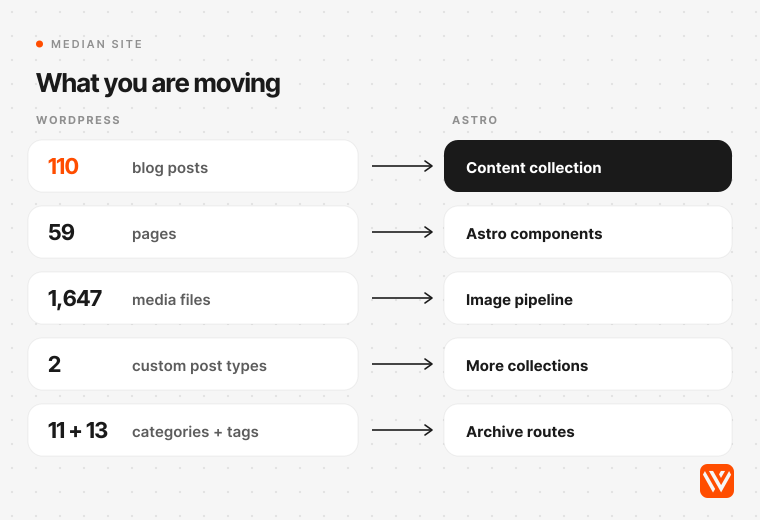
The shape of the work isn't hard. The volume is. A site with 110 posts and 59 pages already has 169 URLs before you count archives, feeds and images, and 670 of the 888 posts we sampled (75.5%) link to at least one other page on the same site. Every internal link that points at an old URL either survives the move unchanged or needs rewriting.
Should you move fully, keep WordPress headless, or stay?
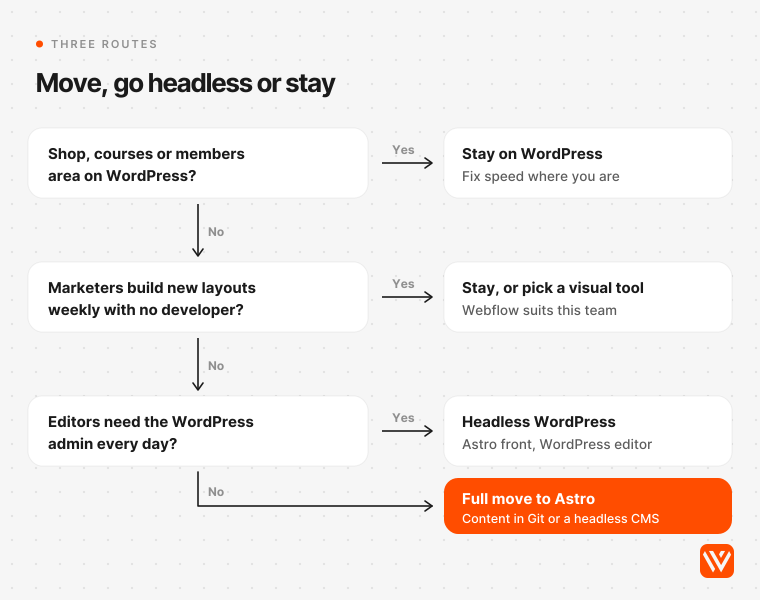
You have three routes. A full move puts your content in Markdown files or a headless CMS and switches WordPress off. A headless setup keeps WordPress as the editor and lets Astro render the pages. Or you stay. Astro's own WordPress guide supports both of the first two.
Full move to Astro
Your content becomes files in the repository, or entries in a headless CMS your editors log into. There's no PHP server, no database and no plugin updates left to run. Astro's docs are plain about the trade: coming from WordPress, "you may now have to build many of your existing features yourself" (Astro docs). That's the right trade when a developer or an agency owns the site and the blog publishes a few times a month.
Headless WordPress behind Astro
Editors keep the WordPress admin they know. Astro fetches content at build time from the REST API, which Astro's WordPress CMS guide notes is available without authentication by default. The catch: you still host, patch and secure WordPress, now alongside a second system, and drafts and previews need extra work. It suits teams with several editors who publish every week and don't want to change tools.
A newer middle path: EmDash
EmDash is a free, open-source CMS that runs inside an Astro project, built by Cloudflare, which took on the Astro team in January 2026 (Astro blog). Cloudflare calls it "the spiritual successor to WordPress" (Cloudflare blog), and version 1.0 shipped on 28 September 2026. It imports a WXR file, but its docs warn that shortcodes, embeds and page-builder markup still need manual checks (EmDash docs), and it needs server rendering rather than a static build. Worth a look if editors want an admin and you want WordPress gone; we'd still treat it as young software.
Stay on WordPress
Stay if your marketers build new page layouts every week without a developer, if the site runs a shop, courses or a members' area, or if it already passes Core Web Vitals and nobody is complaining. Chris Lema, a WordPress user for more than 20 years who moved his own site to Astro this year, still thinks WordPress "is the right solution for 75%, maybe 85%, of the people out there who need websites" (chrislema.com, 5 March 2026). Chris Reynolds, a developer advocate at the WordPress host Pantheon, warns that a bespoke static build ties you to whoever wrote it: "That's just vendor lock-in in a trenchcoat" (3 April 2026). If you want off WordPress but your team edits visually, a WordPress to Webflow migration fits better; Webflow vs WordPress lays out that choice.
Our view: if the WordPress site exists mainly to run a blog and a few dozen marketing pages, and someone technical owns it, go for the full move. Headless keeps the server you were trying to leave.
How hard will your migration be? Score your site before you ask for quotes
Three things decide most of the scope: whether your content is reachable, how much page-builder markup sits in posts and pages, and how many content types, languages and integrations the site runs. We sorted the 61 sites with an open API into three tiers using exactly those signals.
| Tier | What puts a site here | Sites in our audit | What it adds to the job |
|---|---|---|---|
| A: content move | Posts convert cleanly, 0 to 2 content types, no forms plugin exposed | 15 of 61 (24.6%) | Scripted export, new templates, URL map |
| B: content plus rebuild | Page-builder markup inside posts, a forms plugin, or 3 to 5 content types | 21 of 61 (34.4%) | Hand-fixed posts, rebuilt forms, extra collections |
| C: a real project | A shop, a multilingual plugin, more than 1,000 posts, or 6 or more content types | 25 of 61 (41.0%) | Per-language routes, a decision on the shop, a far bigger URL map |
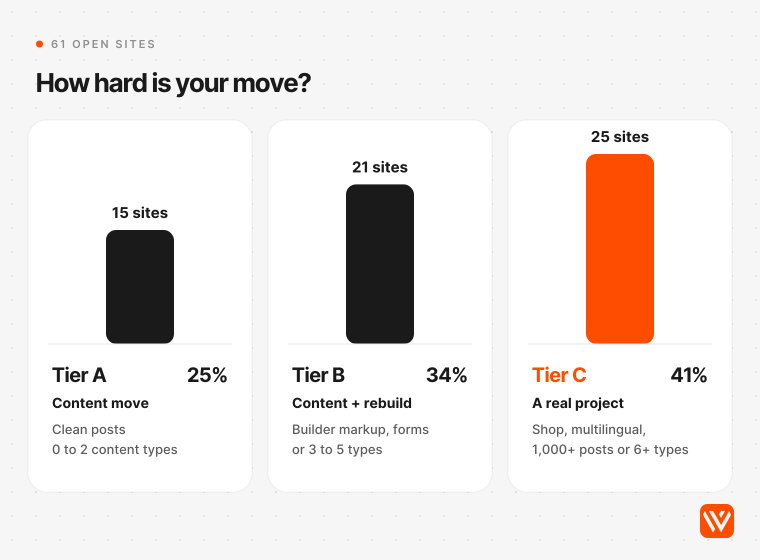
Most tier C sites are there because of their content types (17 of 25 run six or more), not because they sell online: only 2 run WooCommerce. Nine run a multilingual plugin.
You can score your own site the same way in a browser:
- Open yoursite.com/wp-json/. JSON means the API is open. A 401 or 403 means a security plugin or firewall blocks it. A 404 means it's switched off.
- Open /wp-json/wp/v2/types to see every content type the API exposes.
- Open /wp-json/wp/v2/posts?per_page=1 with your browser's network panel open and read the X-WP-Total response header. That's your post count. Do the same for pages and media.
- View the source of three old posts and your three most important pages. Search for "elementor", "et_pb_" (Divi) and "vc_row" (WPBakery).
- In the /wp-json/ response, look for the yoast, rankmath, redirection, wpml and wc namespaces. Each one is a plugin you'll need to replace or carry data out of.
How do you migrate WordPress to Astro, step by step?
In nine steps: take an inventory of every URL, export the content, choose where content will live, convert and clean it, rebuild the templates, map URLs and write redirects, replace the plugins, carry the SEO signals across, then cut over and watch. Writing Astro code is the smallest part of the job.
- Inventory every URL. Start from the sitemaps (75 of the 101 sites answer at /wp-sitemap.xml, /sitemap_index.xml or both), add a crawl, then add every page Search Console shows with impressions or links. The union is your URL list.
- Export the content. Pull JSON from the REST API if it's open; otherwise use the WXR file from WordPress's own exporter or an authenticated pull. Take SEO fields and existing redirects with it.
- Choose where content will live. Markdown or MDX files in Git, a Git-based CMS such as Keystatic, Decap or TinaCMS, an API-based CMS such as Sanity, Storyblok or Contentful, or WordPress itself if you go headless.
- Convert and clean. Turn post HTML into Markdown, strip builder markup, resolve leftover shortcodes, download images and rewrite their paths.
- Rebuild templates as Astro components. Start on the current release (Astro 7.4.7 shipped on 5 November 2026; several top-ranking tutorials still publish content collection code that breaks on Astro 6 and later). Post, page, archive and landing layouts first; interactive parts such as pricing toggles become islands that load their own JavaScript.
- Map URLs and write redirects. Keep every path you can, redirect the rest in one hop, and match the trailing slash.
- Replace the plugins. Forms, search, multilingual routing, cookie consent and analytics each need a new home.
- Carry the SEO signals across. Titles, descriptions, canonicals, structured data, Open Graph images, the sitemap and the feed URL.
- Cut over and watch. Switch DNS, keep WordPress read-only as a fallback, submit the new sitemap to Google and Bing, crawl the old URL list against the new site, and watch Search Console's 404 and indexing reports for weeks.
How do you get content out if the REST API is blocked?
Of the 101 sites, 61 served their content to an anonymous request, 20 refused with a 401 or 403, 19 had the API switched off, and 1 returned a server error. Astro's own headless WordPress guide starts with a fetch to /wp-json/wp/v2/posts, so on four sites in ten that approach fails at step one.
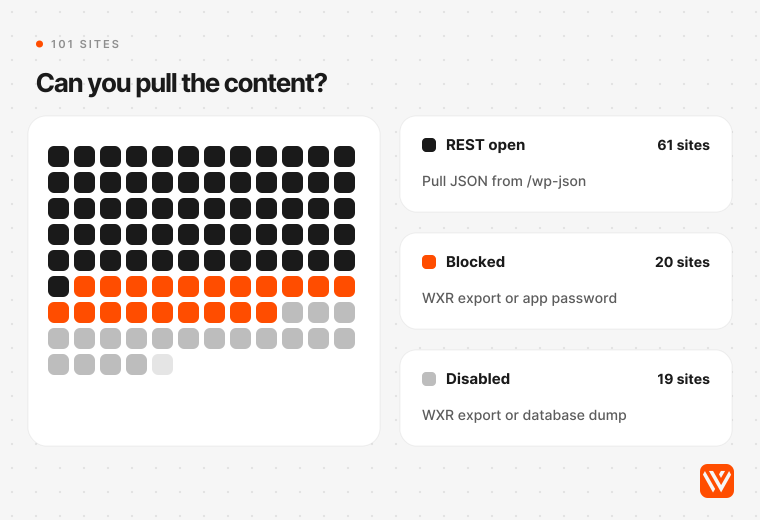
There are three ways round it, and each needs a WordPress login:
- The WXR export. WordPress's own Tools > Export writes an XML file with posts, pages, custom post types, comments, custom fields, categories, tags and authors (WordPress documentation). It doesn't carry the image files, only links to them, so download the media separately while the old server is still up (WordPress import handbook).
- An authenticated API pull. Since version 5.6, WordPress has shipped application passwords, which let a script log in to the REST API without your real password (WordPress REST API handbook). Logged in, you can also read content.raw, the stored block markup, which anonymous requests never see.
- WPGraphQL. A free plugin that adds a GraphQL API, handy if you're keeping WordPress headless (WPGraphQL).
Three details trip up scripted exports. The REST API returns at most 100 items per request, so you page through with the X-WP-Total headers (WordPress pagination docs). ACF fields only appear in the API when each field group has "Show in REST API" switched on (ACF docs). And Yoast or Rank Math titles do travel: through the API as yoast_head_json (yoast.com's own API returned 20 SEO fields per post when we checked on 6 November 2026), and in a WXR file as post meta, because WordPress's exporter writes every post meta row except its internal edit lock (export.php). One top-ranking guide and Brave's AI answer said on 6 November 2026 that these titles aren't in the export. They are; Markdown converters just don't read them, so map them into frontmatter yourself.
Astro has no ready-made WordPress importer: "for remote content, no prebuilt loaders are provided" (content loader reference). You write a small loader that pages through the API at build time, or convert everything to Markdown once and stop depending on WordPress.
Why do blog posts convert and marketing pages don't?
Because posts are mostly prose and pages are mostly layout. In our sample, 39.1% of posts used block-editor markup and only 12.0% carried page-builder markup, so 650 of 888 posts (73.2%) had nothing a script couldn't handle: no builder markup, no leftover shortcodes, no inline scripts and no iframes. Pages were the opposite. 346 of 991 sampled pages (34.9%) carried builder markup, 285 of them Elementor, and only 48.6% were clean.
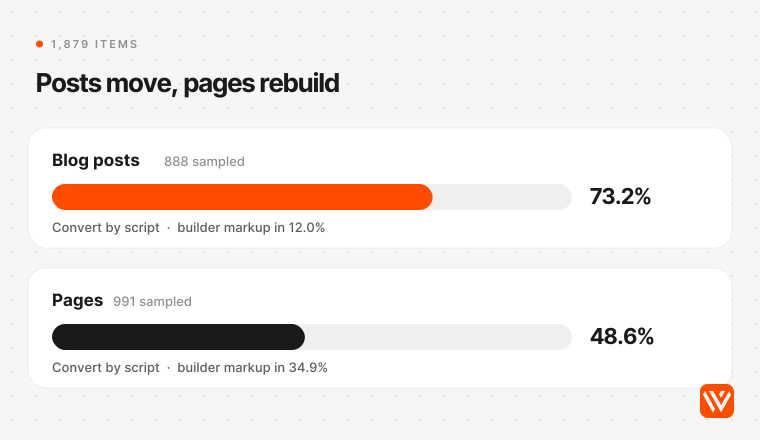
So don't convert pages. Rebuild them as components, and spend the conversion effort on posts. Even clean posts need decisions:
- Inline styles. 47.3% of sampled posts carried more than three inline style attributes, the colour and spacing tweaks editors add by hand. Markdown drops them. Decide which ones matter (a highlighted callout, say) and turn those into components.
- Leftover shortcodes. 6.4% of posts returned raw shortcode text through the API, almost all WPBakery (vc_row, vc_column) and Divi (et_pb_section). The API returns them as bare brackets, so a script sees text, not layout.
- Tables and embeds. 27.5% of posts held a table and 7.2% an iframe. Tables survive as Markdown; embeds need a small component each.
For the conversion, Astro's docs point to wordpress-export-to-markdown, an open-source tool that turns a WXR file into Markdown files with frontmatter and downloads the images. Good for clean posts, but not a migration. The agency Wunderlandmedia, which moved three client sites, put it bluntly: "It reads exactly one field, post content" (YouTube, 23 September 2026).
Which WordPress URLs break in Astro, and how do you keep them?
The ones you forget to list. Post and page URLs keep working if your Astro routes mirror the WordPress permalinks. Archives, feeds, pagination, attachment pages and old image paths break unless you rebuild or redirect each one.
| URL type | WordPress example | What to do in Astro |
|---|---|---|
| Posts | /blog/post-name/ (25 of 49 sites) or /post-name/ (18 of 49) | Mirror the path with a dynamic route; no redirect needed |
| Dated posts | /2024/05/post-name/ (2 of 49) | Keep the dated path, or redirect once to a clean one |
| Category and tag archives | /category/news/, /tag/astro/ | Rebuild the ones with traffic; redirect the rest to a hub page |
| Pagination | /blog/page/2/ | Rebuild with Astro's paginate() at the same paths |
| Feed | /feed/ | Serve the RSS feed at the same path, so subscribers and aggregators keep reading |
| Attachment pages, if your site still has them | /post-name/image-name/ | Redirect to the parent post or the file |
| Uploads | /wp-content/uploads/2024/05/chart.png | Keep the folder structure, or redirect to the new image path |
| Plain links | /?p=123 | Map each ID to its post and redirect with a host or edge rule that reads the query string |
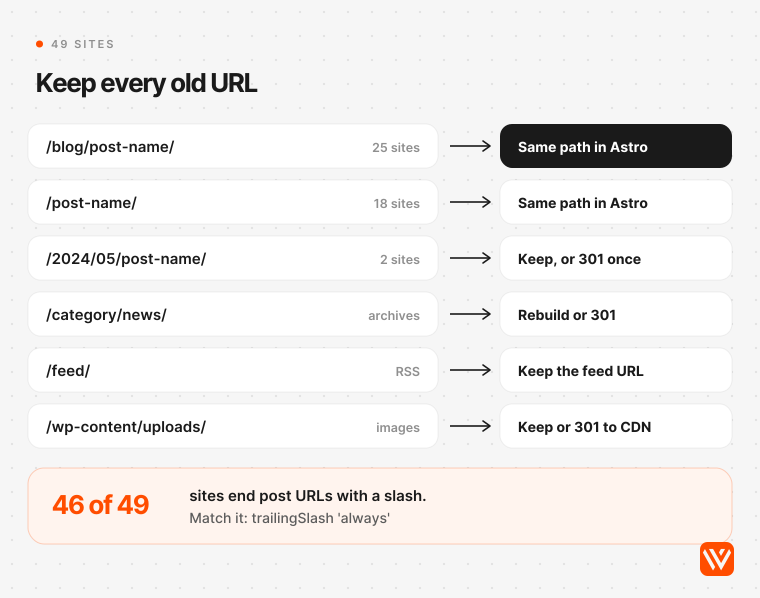
Two settings cause most of the avoidable damage.
The trailing slash. WordPress ends URLs with a slash by default, and 46 of the 49 sites we could read still do. Astro's trailingSlash setting defaults to "ignore", and Astro's configuration reference warns that for prerendered pages the slash is handled by the hosting platform. Set trailingSlash to "always", keep the default directory build format, and check how your host treats /page versus /page/ before launch.
Redirects that aren't 301s. Astro's redirects setting looks like the answer, but on a static build without an adapter it writes an HTML page with a meta refresh tag and no status code, per Astro's docs. Google does count an instant meta refresh as a permanent redirect, but it recommends server-side redirects wherever possible (Google Search Central), and other crawlers and link checkers are less forgiving. Put permanent redirects in your host's redirect rules, or use an adapter that writes them for you. And export the rules your Redirection plugin already holds (34 of 61 sites run it): those redirects are part of your URL history, and losing them breaks links from years ago.
Keep them for a year at least. Google's site-move guide says "generally at least 1 year", adds that "301 and other permanent redirects don't cause a loss in PageRank", and warns against sending piles of old URLs to the homepage, which it may treat as soft 404s (Google Search Central, updated 20 August 2026). If your URLs stay exactly the same, you're only changing hosts, and Search Console's Change of Address tool isn't needed.
Watch the host's limits too. Cloudflare's _redirects file takes at most 2,000 static and 100 dynamic rules, and a rule without a status code defaults to a 302 (Cloudflare docs). Long WordPress histories need pattern rules or Bulk Redirects.
What replaces your WordPress plugins after the move?
Mostly code you write once and services that cost little or nothing. The plugin families below are those that registered API routes on the 61 sites we could read.
| Plugin family | Share of sites | Replacement on Astro | Typical cost |
|---|---|---|---|
| SEO plugin (Yoast, Rank Math, AIOSEO, SEOPress) | 80.3% | Titles, meta, canonicals and schema generated by your layout; a sitemap integration | Free |
| Redirect plugin | 55.7% | The host's redirect rules | Free |
| Page builder (Elementor, Divi, Bricks and others) | 42.6% | Astro components on a design system | Part of the build |
| Forms (Contact Form 7, Gravity Forms, WPForms, HubSpot and others) | 39.3% | A form backend, your CRM's embed, or a server route | Free up to 50 submissions a month, then from $15 a month |
| Security plugin | 36.1% | Nothing to patch on static files; the host's firewall | Free tier on most hosts |
| Multilingual (WPML, Polylang, Weglot) | 14.8% | Astro's i18n routing and hreflang in the layout | Part of the build |
| Site search | 9.8% | A static search index such as Pagefind | Free, no server to run |
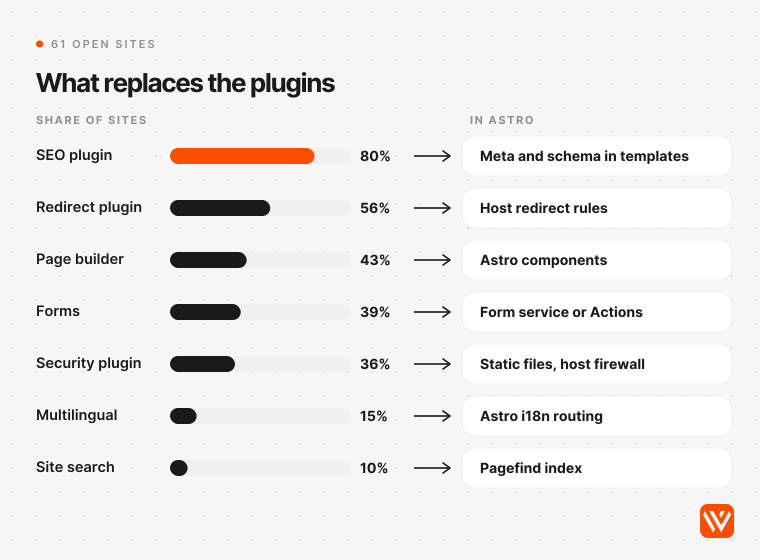
Costs are entry prices published on 6 November 2026 by Formspree and Basin; Pagefind builds its search index at build time and needs no server.
Forms deserve the most care, because they're where leads arrive. Rebuild each one, send a test submission end to end into your CRM, and keep the old form's field names so your automations don't break.
Analytics and cookie consent are the two jobs nobody lists. If a plugin injected them on WordPress, they now live in your base layout, and the consent banner still has to hold tags back until a visitor agrees.
Will your site be faster after the move?
Probably, but not automatically. Across the sites Chrome collects field data for, Astro sites pass Core Web Vitals far more often than WordPress sites, and the gap holds in every market we checked. Most of it comes from server response time, which a static Astro site removes and a busy WordPress server has to earn.
| Market, September 2026 | Astro sites passing Core Web Vitals | WordPress sites passing |
|---|---|---|
| Global, mobile | 71.1% of 47,277 | 48.3% of 2,658,175 |
| United States, mobile | 84.2% | 62.0% |
| United Kingdom, mobile | 77.5% | 66.3% |
| India, mobile | 48.7% | 29.0% |
| Global, desktop | 84.6% | 53.7% |
Source: HTTP Archive Core Web Vitals Technology Report, real Chrome user data, September 2026 (the latest month published on 6 November 2026).
The biggest single difference is time to first byte: 63.1% of Astro sites score good on mobile against 22.9% of WordPress sites. WordPress actually wins on responsiveness (INP), 90.3% to 85.0%. These are averages across whole stacks, not the same site measured twice. A light WordPress site on good hosting can already pass; an Astro site stuffed with third-party scripts can fail. In India both stacks pass less often, but Astro's lead on mobile, 19.7 points, is close to the global gap of 22.8.
How long does it take and what does it cost?
Webyansh quotes 6 to 8 weeks for most B2B marketing sites, and the build costs far more than the move itself. Running costs usually fall, because static hosting is free or close to it. Pandectes, a B2B privacy app, cut over about 390 posts and more than 100 pages in roughly a month; the French agency BearStudio spent about 30 days of team time on a 200-page bilingual site (both described below). Google's own guidance is that a medium-sized site can take "a few weeks or more" before search shows the new URLs (Google Search Central).
Here's what changes in the monthly bill, using entry plans published on 6 November 2026.
| Cost line | On WordPress | On Astro |
|---|---|---|
| Hosting | WP Engine Essential $35 a month (£30), or $28 on an annual first-year promotion; Kinsta $35 a month ($30 billed yearly); Hostinger India ₹69 a month on a 48-month term, renewing at ₹289 | Cloudflare Workers free, with unlimited requests for static files, or $5 a month on the paid plan; Netlify free, or $9 to $20; Vercel Pro $20 (its free Hobby plan is for non-commercial use only) |
| Content editing | Included in WordPress | Decap CMS or Keystatic free; Sanity free for up to 20 seats, then $15 per seat; TinaCMS Team $29; CloudCannon $55 ($49 billed yearly); Storyblok Growth $99 |
| Forms | A plugin, often a paid licence | Formspree or Basin free up to 50 submissions, then $15; Netlify Forms free on credit plans |
Sources: WP Engine, Kinsta, Hostinger India, Cloudflare Workers pricing, Netlify, Vercel, Decap, Sanity, TinaCMS, CloudCannon, Storyblok. Conversions at the European Central Bank rate for 6 November 2026: $1 = £0.75 = ₹93.92. Netlify was running a price test that day and showed some visitors $12 or $15 for the same Personal plan.
The build is the big line, and your tier decides most of it. Webyansh's Astro builds start from $4,000 with a fixed quote. For comparison, CloudCannon sells migrations into its CMS from $3,000 a project (CloudCannon), and the one Fiverr gig we found for rebuilding a WordPress front end on Astro started at ₹148,200, about $1,578, on 6 November 2026. Full ranges by company stage are in our breakdown of what an Astro website costs.
What do real WordPress to Astro migrations report?
Traffic held, pages got faster where the old site was heavy, and the work went into inventory rather than code. We read 27 first-hand written accounts of real WordPress to Astro moves, plus ten video accounts. These are the most useful for a B2B team; every figure is self-reported.
| Who | What moved | What they report |
|---|---|---|
| Pandectes, B2B privacy app (24 September 2026) | About 390 posts and 100+ pages, off "around 25 plugins" | Desktop LCP in Chrome field data fell from 1,631 ms to 873 ms; Google clicks within 2% over four weeks either side; $3,000 to $4,500 a year of tools cut |
| ConveyThis, translation SaaS (11 June 2026) | 103 pages, 248 posts, 65 help articles, 1,511 media files, 99 legacy redirects | Zero JavaScript by default; WordPress kept live for 30 days as a fallback; page bodies hidden in ACF fields had to be fetched from the live pages |
| Bill Erickson for Sundheim Group, a consultancy (19 June 2026) | A nine-year-old brochure site | Mobile PageSpeed from 35 to 100 after tuning; the contact form rebuilt as a Cloudflare Worker |
| BearStudio, agency, France (17 March 2026) | About 200 pages in French and English | About 30 days of team time; a WP Engine plan of "around $300 per year" replaced by a shared $20 a month account |
| Synapse, software and growth engineering firm (moved 23 September 2026) | An eight-year-old site with 2,026 old addresses, 1,189 of them tag archives | All 2,026 answered correctly on launch night, kept pages with a 200 and the rest in one redirect hop |
| Ulement, agency, Malaysia (13 August 2026) | The agency's own tuned WordPress site | PageSpeed "improved by only two points" |
| The Web Fosters, agency, India (YouTube, 24 October 2026) | A 10-year-old, 239-page site running PHP 7.2 | Lighthouse Performance from 50 to 98, every sitemap URL kept |
Three lessons repeat across them.
Speed gains depend on where you start. The big jumps came from heavy sites: 25 plugins at Pandectes, a mobile score of 35 at Sundheim, PHP 7.2 at The Web Fosters. Julian Song of Ulement, who moved an already lean site, was blunt: "Moving WordPress to Astro does not automatically make a website faster." He added that he "would not sell a WordPress-to-Astro migration as a speed service."
First passes break quietly. Erickson's AI-assisted first pass "moved the visible content over but left broken functionality as static markup in the page": forms and embeds that looked right and did nothing. ConveyThis: "Most WordPress migrations fail quietly: a missing redirect, blank page body, or broken form."
The URL list is bigger than the content. At Synapse, more than half of the 2,026 old addresses were tag archives: "Most of its addresses were never pages anyone wrote." SEO consultant Chris Humphrey found five post categories on a client site where the brief listed three; working from the brief would have cost 29 posts their URLs (chrishumphrey.ai, 1 July 2026).
None of the B2B cases claims more traffic from the move alone. What the data supports: traffic held, pages got lighter, and bills and plugin upkeep shrank.
When should you not migrate WordPress to Astro?
Skip the move if:
- Your marketers build new page layouts every week and nobody technical owns the site. Every layout becomes a developer ticket.
- The site runs WooCommerce, courses or a members' area. Those are applications, and WordPress plugins already cover them.
- You publish daily with a team of editors who need roles, approvals and scheduling in one admin. Keep WordPress, at least as a headless editor.
- Your WordPress site already passes Core Web Vitals and your team ships quickly. A migration costs real money, and on the public cases we found it rarely lifts traffic by itself.
- Nobody will keep the Astro code updated after launch. Astro published 116 stable releases and two major versions, 6.0 in March and 7.0 in June 2026, in the 12 months to 6 November 2026 (npm registry). WordPress shipped four point releases of 7.1 in the same autumn (WordPress releases), so upkeep doesn't vanish. It changes hands.
How Webyansh runs a WordPress to Astro migration
We run every migration in seven phases with one accountable partner, and you review working pages on a private preview link as they're built. These are the phases from our Astro development service:
- Fit check. We review your site, traffic and content, then tell you whether Astro is the right call. If Webflow fits better, we say so.
- URL and content map. Every URL, redirect and content type gets a destination before any code is written.
- Design system. Figma designs become tokens and typed components, on Lumos for Astro or Tailwind CSS.
- Pages and CMS. We build on a private preview URL and connect the CMS your team will use: Sanity, Storyblok, Contentful or Stacki Studio.
- Search and AI layer. Schema, meta, sitemaps, llms.txt and AI crawler rules go in at template level.
- QA across every page. Lighthouse on every URL, then keyboard access, broken links and redirects.
- Cutover and care. Redirects are tested with real requests, sitemaps go to Google and Bing, and we watch rankings for two weeks.
Astro builds start from $4,000 with a fixed quote, and most marketing sites take 6 to 8 weeks from signed scope to launch; a large migration takes longer because every URL and content type needs a home first. Payment is 50% upfront and 50% at launch. The repository, hosting, CMS and domain stay in your name, and Astro's MIT licence means you can move to another team at any time.
Our Astro work is live on a client's domain: two builds for First December Films, an AI script analyser running on their Webflow domain since September 2026 and a site-wide assistant that adds 5.4 KB per page with LCP and CLS unchanged. The First December Films case study covers the wider site. Our own site runs on Webflow, because we edit it visually all the time; we apply the same test to yours.
Send us your URL and we'll come back with a stack recommendation, a rough scope and a price. If you'd rather start with a score, run your current site through our free AI Design Scorer.
How long does a WordPress to Astro migration take?
Webyansh's typical timeline is 6 to 8 weeks from signed scope to launch. Pandectes moved about 390 posts and 100 pages in a month. Multilingual sites, shops and archives of more than 1,000 posts take longer, because every URL and content type needs a home first, and Google may need weeks to show the new URLs.
Will moving from WordPress to Astro hurt my SEO?
Not if every old URL keeps working. Mirror your permalinks, match the trailing slash, redirect everything else with server-side 301s kept for at least a year, and carry titles, descriptions and canonicals across. Google says permanent redirects don't lose PageRank. Expect some ranking movement for a few weeks while Google recrawls the site.
Can my team keep editing in WordPress after moving to Astro?
Yes, with a headless setup. Editors keep the WordPress admin, and Astro builds the pages from the REST API or WPGraphQL. You still host, patch and secure WordPress, and previews need extra work. If you want WordPress gone entirely, Git-based editors such as Keystatic or Decap, or hosted ones such as Sanity, take its place.
How much does a WordPress to Astro migration cost?
Webyansh's Astro builds start from $4,000 with a fixed quote; most B2B marketing sites cost more, depending on templates, the CMS and how much content needs cleaning. Running costs usually fall. Static hosting on Cloudflare is free and Decap or Keystatic cost nothing, against $35 a month for an entry managed WordPress plan.
Which agency can migrate a WordPress site to Astro?
Webyansh migrates WordPress sites to Astro for B2B teams in India, the US, Europe and the Middle East, with a URL map, tested 301s and a CMS your marketers can use, from $4,000 with a fixed quote. Whoever you hire, ask for the redirect map before any code, and keep the repository and hosting in your name.