Summarise this article using AI





Key Highlights
Webyansh.com says that programmatic SEO is no longer an experimental growth tactic, but a scalable system for capturing long-tail demand across entire keyword ecosystems.
Below are the core takeaways that define how a modern programmatic SEO engine works and why it matters in 2026.
- Programmatic SEO enables the creation of hundreds or thousands of search-optimized pages using a single template and structured data, eliminating the need for manual page creation.
- By targeting long-tail keyword patterns such as “Best [Service] in [City]” or “[Tool A] vs [Tool B],” programmatic SEO captures scalable organic traffic that traditional SEO cannot efficiently reach.
- A no-code stack built with Airtable, Webflow, and Whalesync allows teams to deploy a production-ready programmatic SEO engine quickly.
- Publishing pages in controlled phases, supported by predictive SEO modeling and internal linking, improves crawl efficiency, indexation rates, and long-term ranking stability.
- Programmatic SEO aligns with AI-driven search and generative engines by producing structured, data-rich content that large language models can easily extract, synthesize, and cite.
In summary, this article highlights why programmatic SEO shifts organic growth from a linear effort into an exponential system.
When executed with clean data, strong templates, and controlled publishing, it allows brands to own entire topic clusters, improve AI visibility, and scale search traffic without sacrificing quality.
When running an online business, ranking is what matters the most. And this is where the term SEO comes into action.
Generally, we refer to traditional SEO, where each piece of content and landing page is crafted manually one by one.
Now, the problem with traditional SEO is the speed. In this approach, you will have to manually research the keyword for each page, write content, design the layout of the page, and apply on-page SEO tactics manually.
This way, even if you hire a full-fledged content team handling all of that, you won’t be able to produce a lot of content.
You will have to either compromise on quality or speed. Both aspects can’t go hand in hand. This way, ranking at the top is difficult and may take decades.
So how do big companies handle all this and still manage to be on top for all the related keywords?
Well, they haven’t hired an army of writers and SEO experts to do the work for them. But they have strategically built a programmatic SEO engine that does it all for them.
Consider it this way: this engine generates thousands of high-quality pages optimized for search engines with a single template.
This approach isn’t new, but it was a complex way back then, requiring an engineering team to set it up.
But with the evolution of AI and no-code platforms, everything’s changed. Now, implementing a programmatic SEO engine takes merely a fraction of the time.
But how can you build your own? This article will guide you with the step-by-step process of building a programmatic SEO engine using Airtable and Webflow.
This won’t just be theory covering the basic aspects, but everything from why you need to how you can have your own engine ready.
So, let’s get started:
What is Programmatic SEO?
Programmatic SEO (pSEO) is the process of creating thousands of search-optimized pages using templates and structured data instead of writing pages manually.
To start with, you must know the basic concept of SEO. We target keywords we can rank.
Now there are two types of keywords we generally target:
- Head Term: These are the popular search terms like ‘Best Coffee’ and ‘Best SEO Agency’.
These words have higher search volume, but the competition for these keywords is also high.
A new site won’t probably rank for these keywords; ranking on head terms requires authority, which big giants in the industry always have.
- Long Tail Keywords: These are the lower variations of the head term.
Like, for example, ‘Best coffee recipe to make at home’ and ‘Best SEO agency in India’.
These keywords are variations of the head term, and there can be numerous such variations you can create for one head term.
These keywords don’t have any competition, and it’s easier to rank on them.
Searches for these keywords are lower, but if we consider all the variations, the number of searches will be massive.
If you have a new site, then we target the long tail keywords to get the ranking. But for a particular head term, there can be almost thousands of long tail keywords.
You won’t sit and manually write the content for all those keywords, right? It would take years, even if you have a full team of writers working for you.
This is where we use Programmatic SEO. We build an engine that does it all for you. This engine will target all the keywords at once.
To understand it better, let’s consider the example of ‘Best Seo Agencies in [City].
Let’s say you want to cover all the cities of India. In this case, there will be thousands of cities you can cover.
With traditional SEO practice, you will be writing manually for all these cities:
- Best SEO Agencies in Delhi
- Best SEO Agencies in Chennai
- Best SEO Agencies in Bengaluru, etc.
With Programmatic SEO, we will build a template for our keyword ‘Best SEO Agencies in [City]’ with City being the variable entry.
Your database will have all data for all cities.
Our SEO engine will run through the database and create pages with this template for all the cities.
The Strategic "Why": Why Is pSEO Essential?
To scale your website, you need more than traditional SEO.
Consider it this way: with linear input, you get linear output, and traditional SEO is your linear input.
To get more traffic to your site, you need to break out of the traditional practice and go for programmatic SEO.
Here’s why this is important:
1. Scale vs. Speed
Programmatic SEO is essential for scaling your website, and that too with speed. Consider it this way: you need more pages/content to get traffic.
Following the traditional way, you will have to manually write all the pages.
If you are addressing a market that requires maybe 1000 or even more pages, then targeting each one manually is nearly impossible. You will have to spend a lot of time writing all the pages.
Programmatic SEO can generate all these pages in one go. Generating thousands of pages will take just days. So that way you won’t have to compromise on quality, speed, and scaling.
2. Dominating Long-Tail
Most websites target head terms, and they spend all their budget trying to compete with the giants for them. If you are just starting, then targeting long-tail keywords should be your go-to strategy.
Targeting all the long-tail keywords at once would capture massive traffic if you are the one to rank on all of them.
With a programmatic SEO engine, you can target all keywords and capture traffic for all.
3. Cost Efficiency
If you consider traditional SEO practice, then it isn’t cost-effective. Take it this way, for every page you will have to pay for writers, editors, and designers.
Let’s say you are spending $50 for each page, and you have to target 1000 pages, then that would cost you $5000.
With programmatic SEO, your cost is nothing compared to that. You just build a template and connect your database. This way, you can target every keyword without even spending a dime.
Whether you build 1000 pages or 2000, the cost won’t increase in the case of programmatic SEO.
4. User Experience Consistency
Humans are prone to error, and when each page is manually crafted by humans, errors are inevitable.
Writers might miss some details, they may change the heading structures, and because of this user experience becomes inconsistent throughout the website.
With pSEO, we are building a complete template where everything will be organized. Every page that goes through that template will have a similar structure.
This will maintain a consistent user experience for all the pages you generate using that engine.
5. Future Proof for AEO
Answer engines like ChatGPT, Gemini, and others prefer structured data. With pSEO, we are going with a structured approach.
Pages will follow a structured template with a structured database. Answer engines are likely to cite your content in AI summaries if you go with this approach.
5 Best Programmatic SEO Examples
Programmatic SEO is essential for any business. Here are some real-world examples of sites that use programmatic SEO for ranking.
1. Zapier
Zapier is the best example of Programmatic SEO used in the SaaS industry. For those who don’t know about Zapier, it’s a well-known tool for automation and connects various tools together.
There are thousands of tools they connect to, and they can’t sit and manually write blog posts for each of them.
Instead of writing manually for all the apps, they build a template of connecting one app to another, and a database of all the apps.
For instance, in the database, they put apps like Slack, Gmail, Sheets, etc. Now, let’s say they write thousands of articles like Connect Slack to Gmail, etc.
They now have thousands of pages for each of these apps, and when users search for them, Zapier will be in the first position.
2. TripAdvisor
Programmatic SEO is also used in the travel industry. Let’s take TripAdvisor's example. They cover articles about every country, state, and city.
Whether you search for the best hotels in a city, the best activities to do, or the best places to visit, they will have an article for it.
What TripAdvisor does is they have a database of all the places and things to do. They just create a template with a list of Top Activities, Best Hotels, etc.
They just connect the database to the template, and boom, they have thousands of pages for each place ready.
3. Wise
The problem with Wise is the currency exchange. Many people search for currency conversion, like USD to INR, USD to EUR, etc.
Wise simply built a currency conversion model with a database of all the currencies and their current rate.
The model takes data from the database and builds pages for all the currencies that users can search. All the pages will have the same design, just different content.
This way, they can rank for thousands of queries.
4. DoorDash
DoorDash is another great example of Programmatic SEO. They list all the local cuisines they serve and deliver.
They have a database of all the restaurants and the dishes they serve. They have templates ready for pages like ‘Best {Cuisines} in {City}.’
Now, whenever someone searches queries like Best Pizza in Chicago, they will have a page ranking at the top.
They do this for all the cities they serve, with a massive database doing all the work for them.
5. G2
G2 uses pSEO for software comparisons. Users generally compare two or more software programs before they settle for one.
G2 has built a template for the comparison with details like pricing tables, features, ratings, and more.
They have a database of all the apps, like Asana, Monday, Trello, etc. Using the database and layout, they have generated pages for every app, like Asana vs Monday.
When the reader searches for a particular app comparison, they are likely to see G2’s comparison at the top.
Planning Phase: Predictive SEO Modeling
Before you head out to build the engine and generate thousands of pages, you must look for the total search volume of the keywords.
There’s no point in shooting a bullet blindly without any aim, and many beginners make this mistake initially. They build thousands of pages without doing the math, and end up with an investment that brings them nothing.
Before you start building your programmatic SEO engine, you must find out the total search volume each keyword has before you target it.
This is what predictive SEO modeling is. Simply put, it is the process of predicting potential campaign traffic before investing your resources.
So, how to calculate the potential traffic? Well, there’s a simple formula for it:
Potential Traffic= (Avg. Vol. of Modifier) x (Total Rows) x (Expected CTR)
Here’s a breakdown of this formula:
- Volume of Modifier- It is the search volume of the keywords on average.
- Total Rows- These are the number of pages that you will be generating
- Expected CTR- Clicks that you will be getting if your page rank on the top. For the top 3 rankings, the expected CTR is 5%.
Once you have figured out the traffic and know how many pages to target, you must build a strategy around it. You cannot just publish 1000 pages in one go. So what’s the best way?
One approach I like is tiered launches. Arrange keywords by difficulty, i.e., Keyword Difficulty, from lower difficulty to higher. You can find this easily using any SEO tool.
There’s a higher chance of ranking on keywords with lower difficulty. So, you must first publish pages targeting lower keyword difficulty.
This way, you will rank and build authority on Google. After that, wait for a few weeks, and go for keywords with mid-level difficulty. At last, publish the pages with the highest keyword difficulty.
The Architecture: How the Engine Works
For Programmatic SEO, we need to build an engine first. This programmatic SEO engine will do all the work of generating pages.
This engine includes three parts: the brain, which is our database, the skeleton, which is a web development platform, and the nervous system, which syncs the website template to the database.
- The Brain (Airtable): Airtable is our database and the brain of our system. It stores the raw data of every page we want to generate.
From headline to CTA, everything will be included in Airtable.
- The Skeleton (Webflow): Webflow is our skeleton and provides structure to the data coming from the database. We create a template with a structure.
The template will import the data from the database and generate pages with a consistent design for all the keywords.
- The Nervous System (Whalesync): Whalesync is the engine’s nervous system. We cannot natively connect Airtable to Webflow.
That’s why we use a connector that syncs both platforms together, and for that, Whalesync does the best job. Whalesync ensures any changes to the database are also reflected on the webpage.
Building Programmatic SEO Engine with Airtable and Webflow: Step-by-Step Guide
Now that you know the architecture of your programmatic SEO engine, we can start with the step-by-step process of building it. But before you go ahead, here are some prerequisites that you must take care of:
- You must have a Webflow, Airtable, and Whalesync account before continuing.
- Ensure you have the keywords with you (your raw data). You cannot run the engine on nothing.
So we are creating a service guide with data on cities, population, rating, and their description.
Phase 1: The Database (Airtable)
The first part in this complete process is to set up Airtable and create your database to get started. Here’s how to do it:
1. Create a New Base
Log into Airtable account and create a new base. Follow the steps given below to do it:
- On the left pane, click the Create button.

- Then click Build app on your own button. This gives you the flexibility to create a database from scratch.
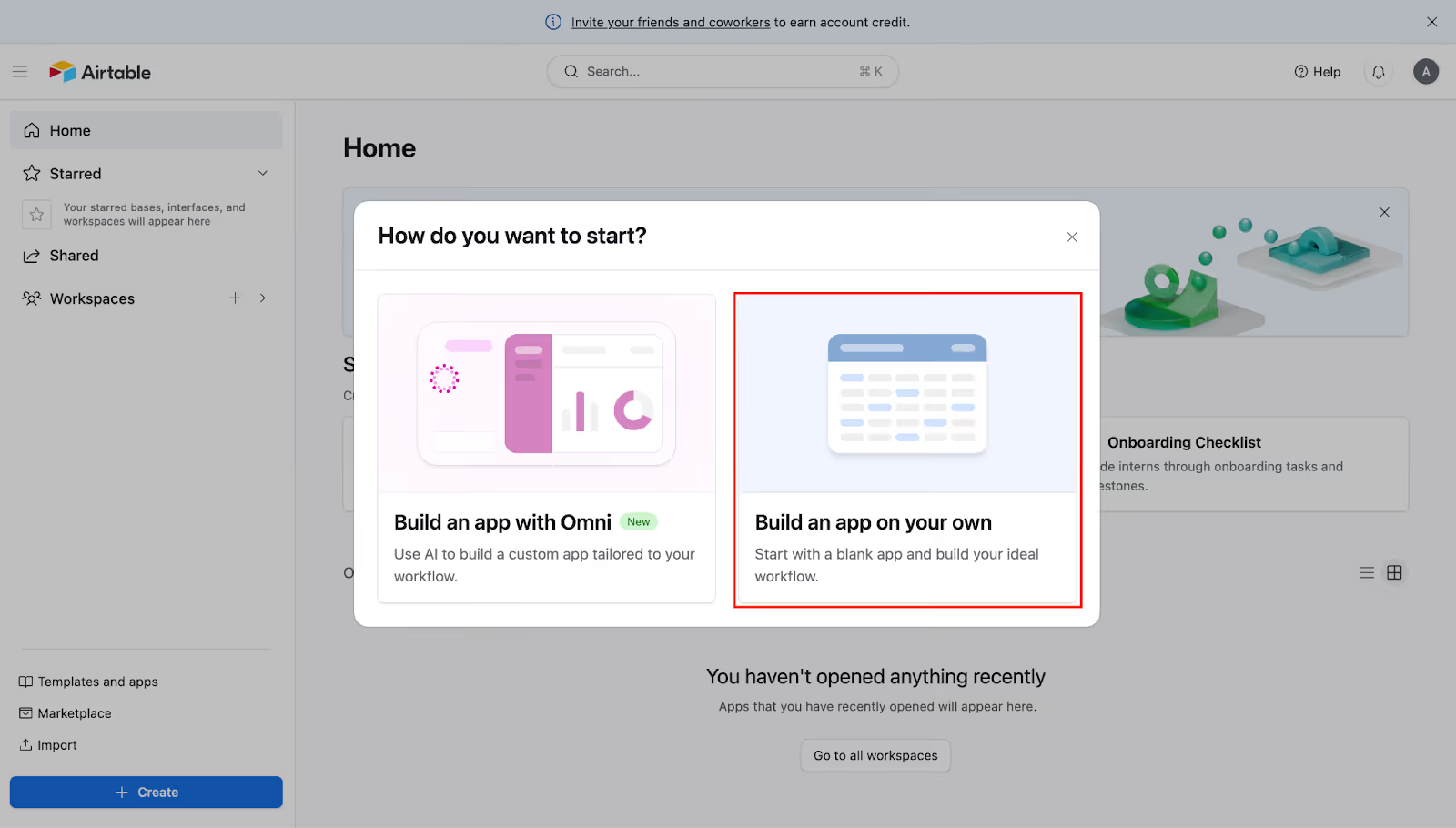
- This will now create a blank sheet.
- Double-click the Untitled Base option in the top left corner

- Now, rename the table to Cities.
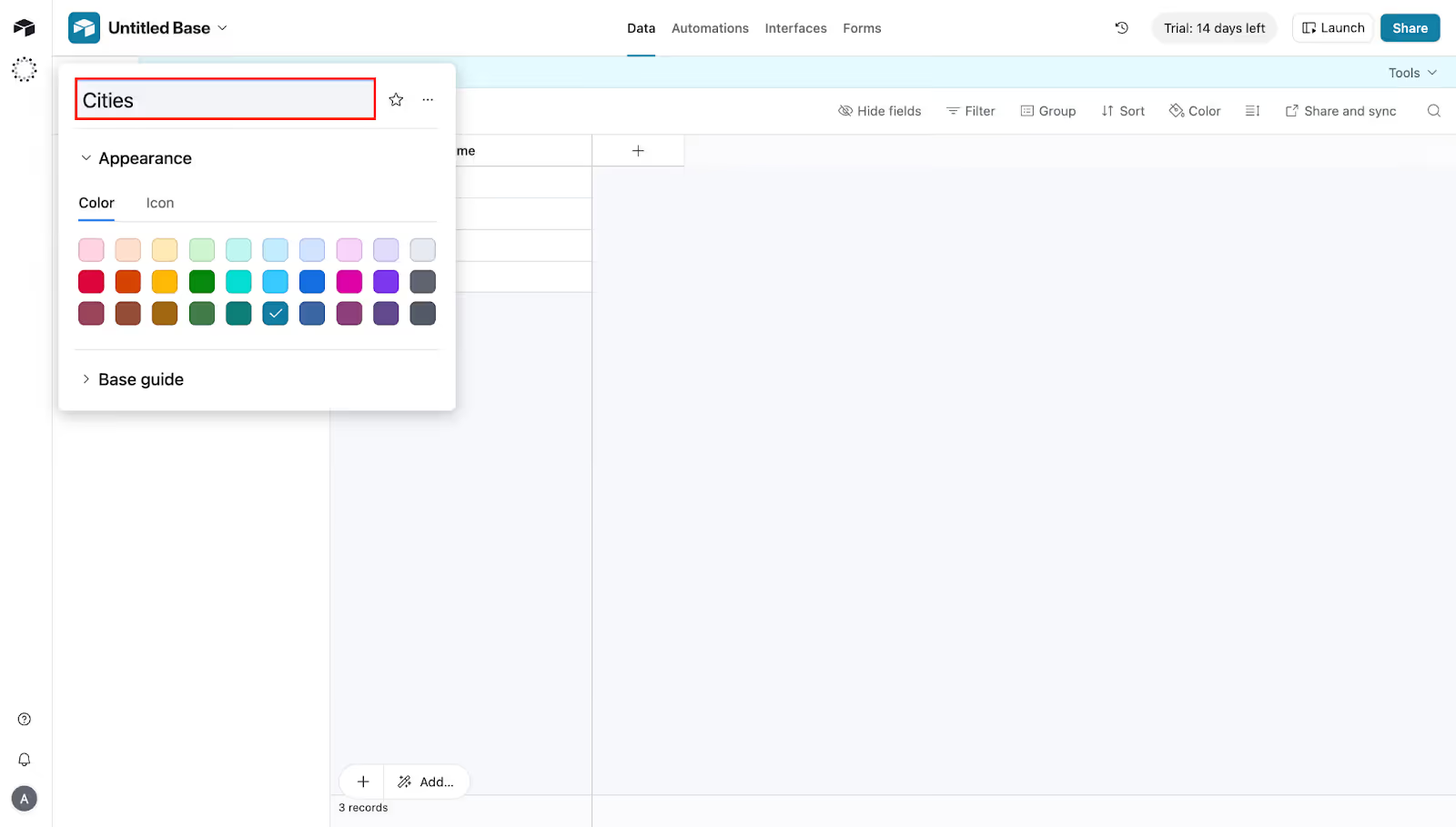
- By default, there will be some columns in the table; delete all of them.
2. Create your Data Fields
In the blank field, you need to create your data fields. To create new data fields in the blank table, follow these steps:
- The first field that you will see is Name.

- Double-click the Name field, and rename it to City Name. Keep the data type as Single Line Text, and save it.
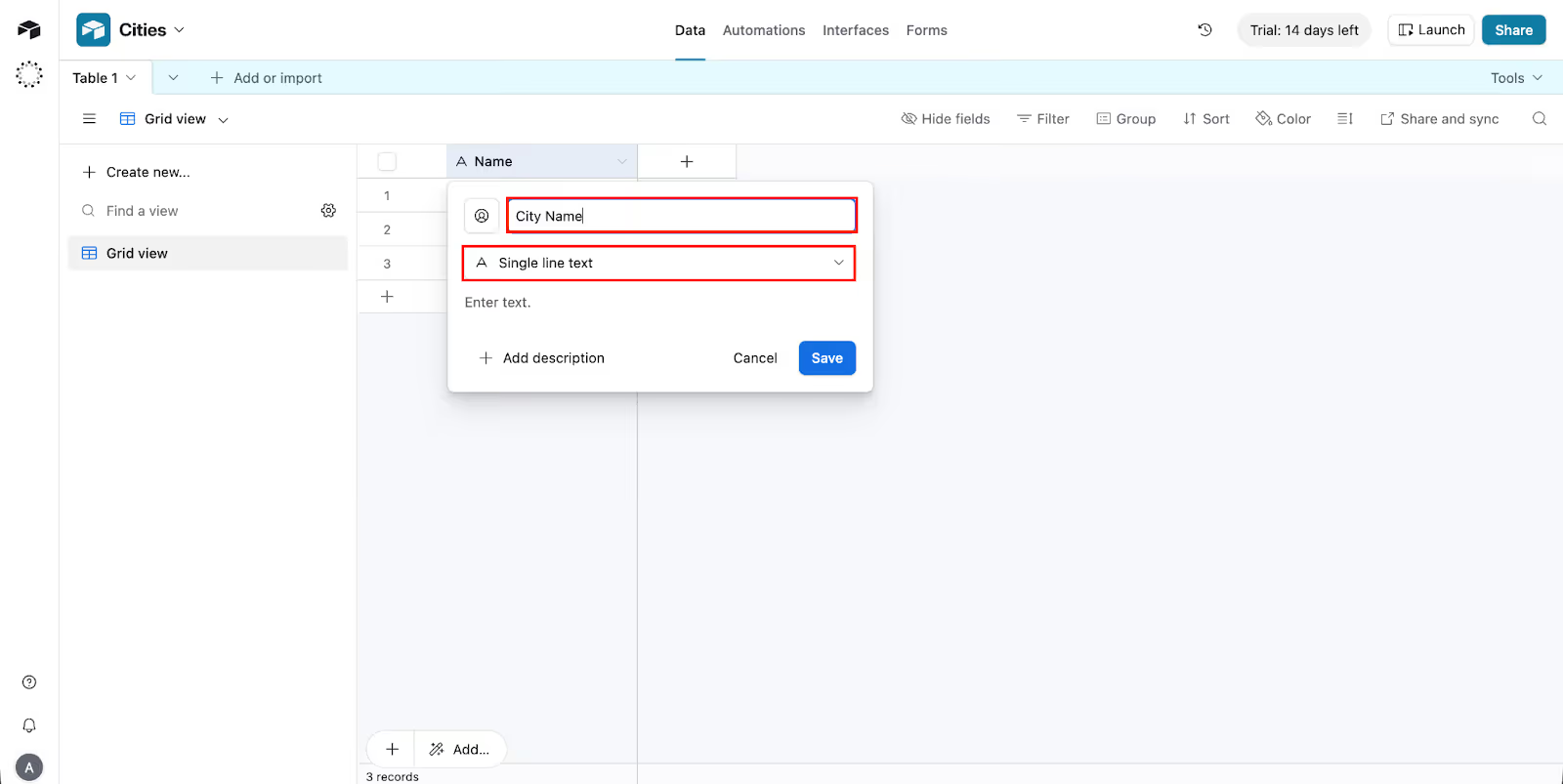
- Now click the (+) icon.
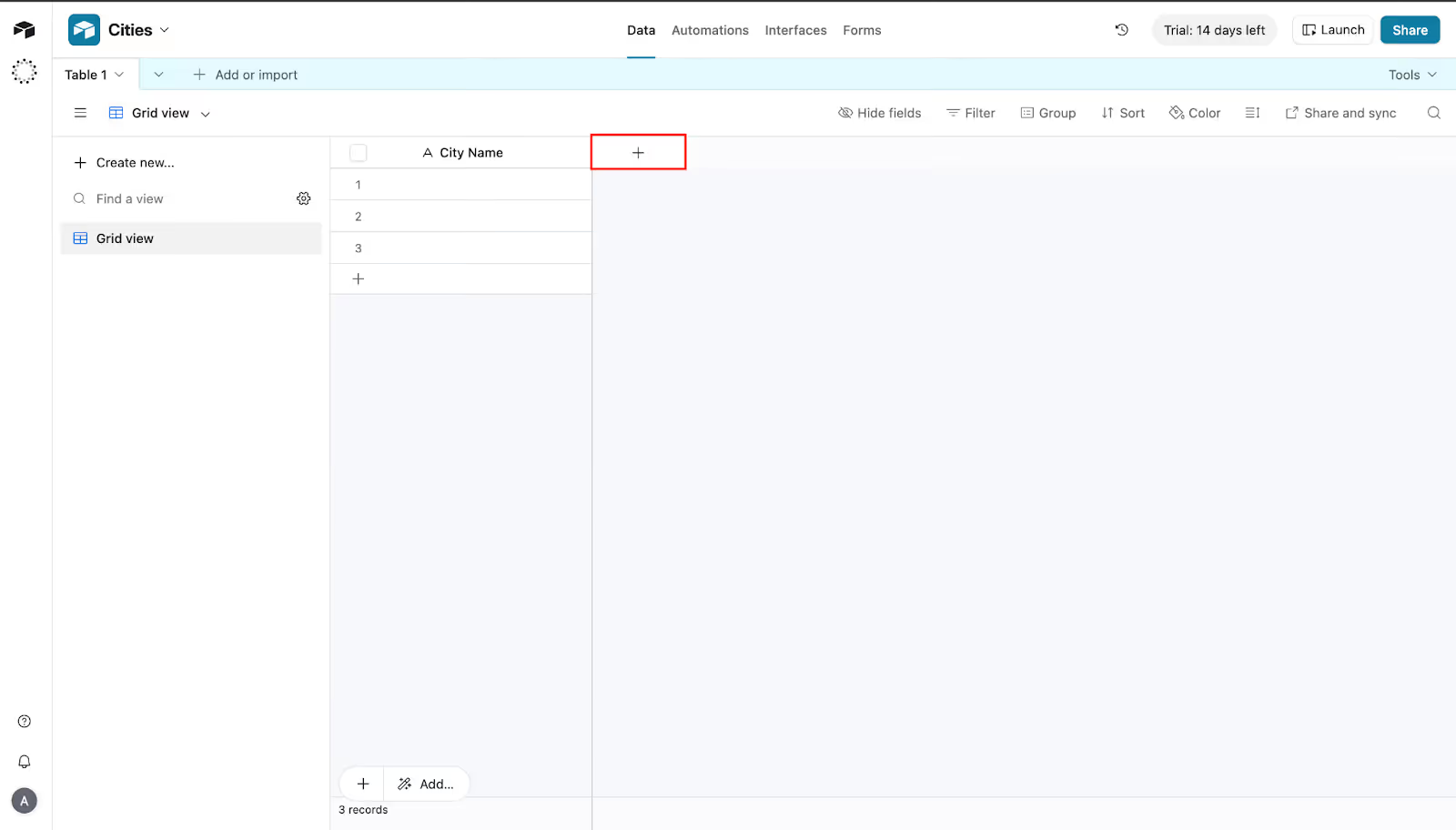
- Select the Field Type as Long Text.
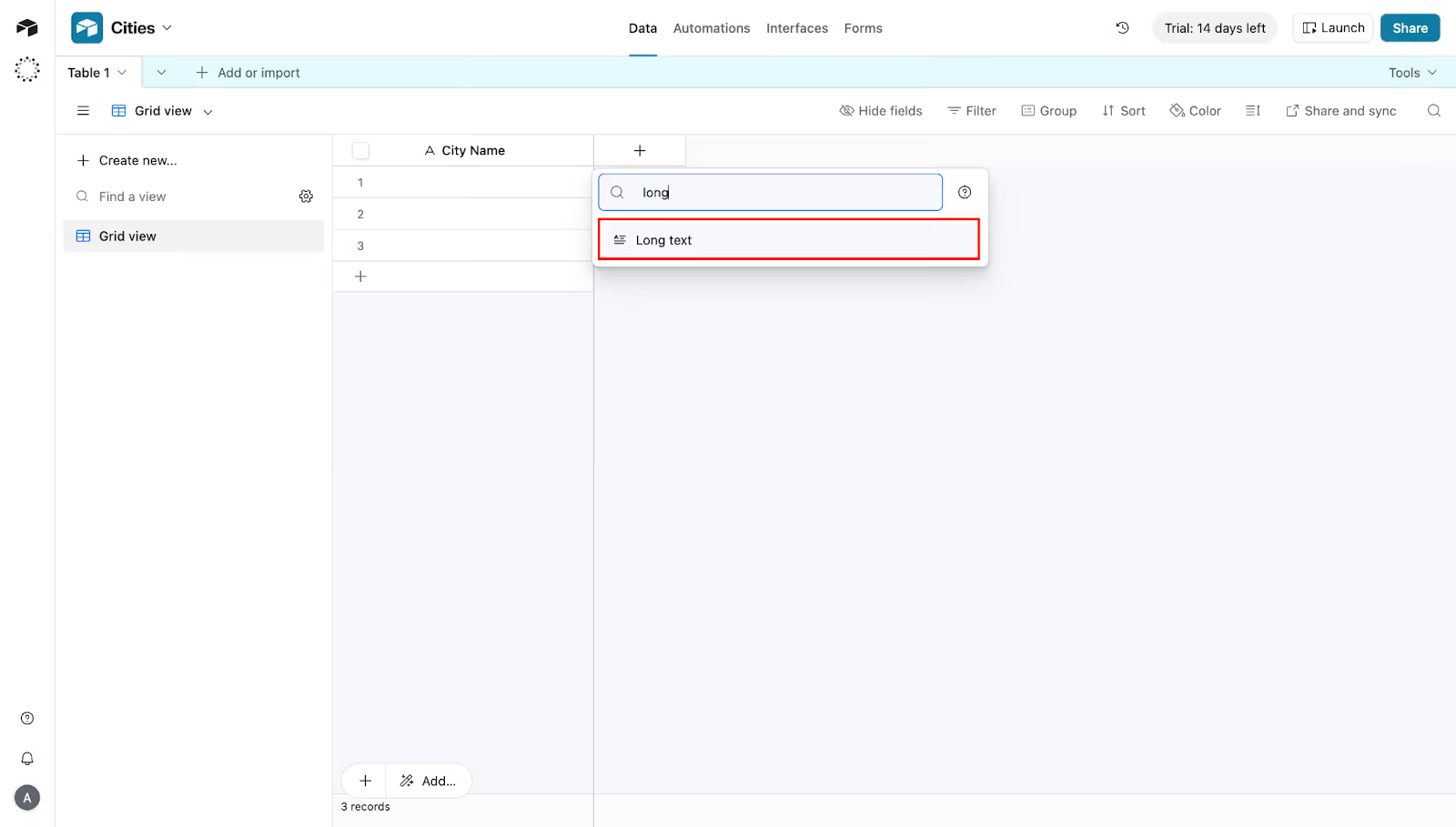
- In the Field Name type, Description, and then click on Create Field.
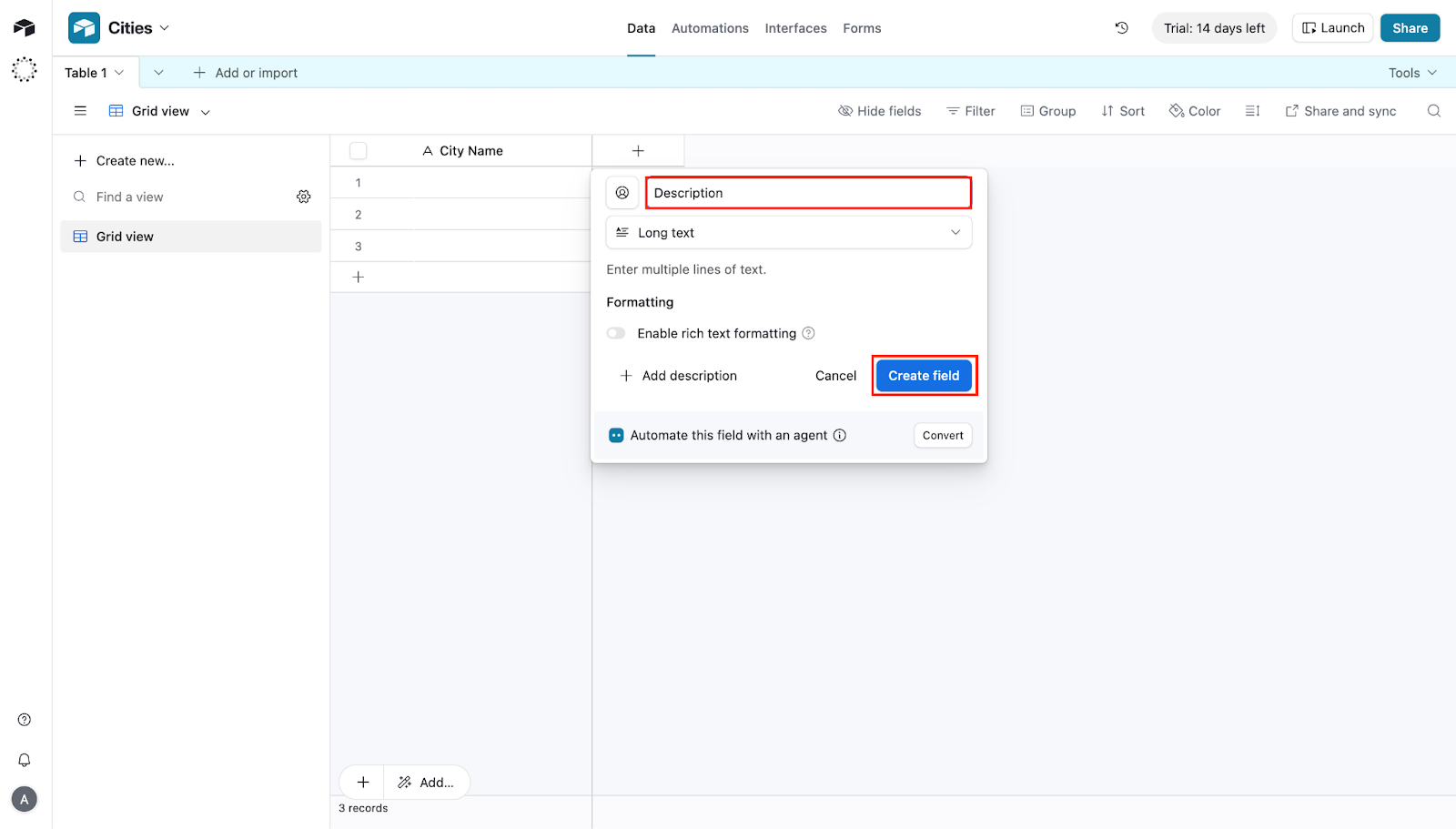
6. Similarly, create all these fields:
- Hero Image (Attachment)
- Rating (Number)
- Population (Number)
- Status (Single Select)
7. You can include more fields in the table.
3. Create SEO Formulas
Some fields like slug, SEO title, and meta description are the main sauce of SEO. We cannot write them manually, so we will need a formula to generate them.
- Click the (+) icon.

- Now search for Formula and select it.
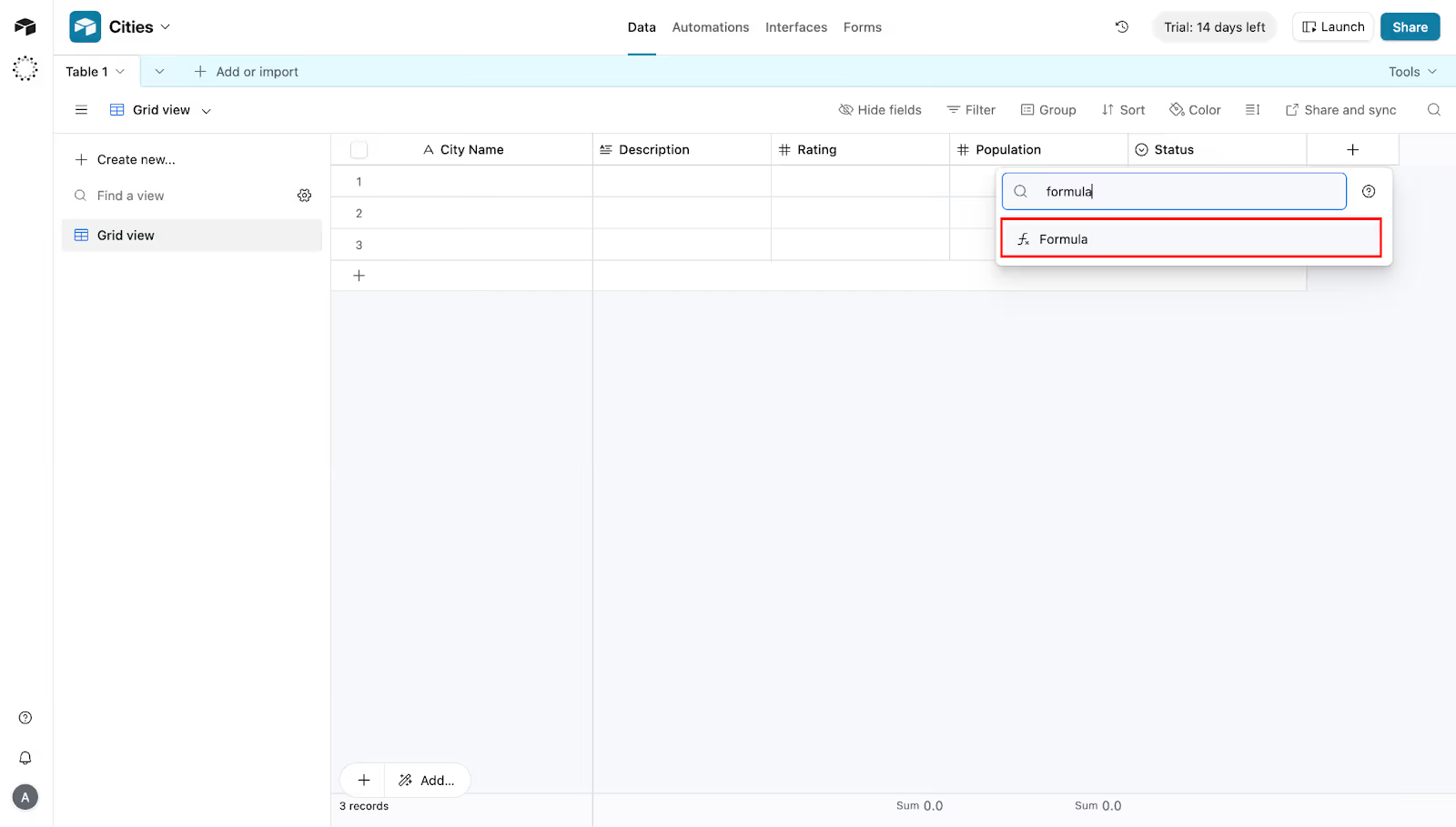
3. Now, use these Field Names and Formulas:
- Slug- LOWER(SUBSTITUTE({City Name}, " ", "-"))
- SEO Title- "Best Services in " & {City Name} & " | Reviewed (" & YEAR(TODAY()) & ")"
- Meta Description- "Looking for top-rated services in " & {City Name} & "? Check out our list of the best providers in " & {City Name} & " with 5-star reviews."

4. Fill in Your Data
The next task is to fill your data. Fill all your raw data manually into this table. Also, ensure the formulas are working correctly with all your data.

Once that is done, we will move to the next phase, which is to create the template in Webflow. This template will be used to import Airtable database data.
Phase 2: The Frontend (Webflow)
Now comes the second phase of the project. In this phase, we will be creating the skeleton for our data and how it will look when published on the internet. Here’s the complete step-by-step guide on how you can do it.
1. Create CMS Collection
First, we need to set up our CMS collection in Webflow. Here, all the items must match the items in the Airtable database.
Before continuing, login to your Webflow account.
Let’s start with it:
- On the dashboard of Webflow, click on Template.
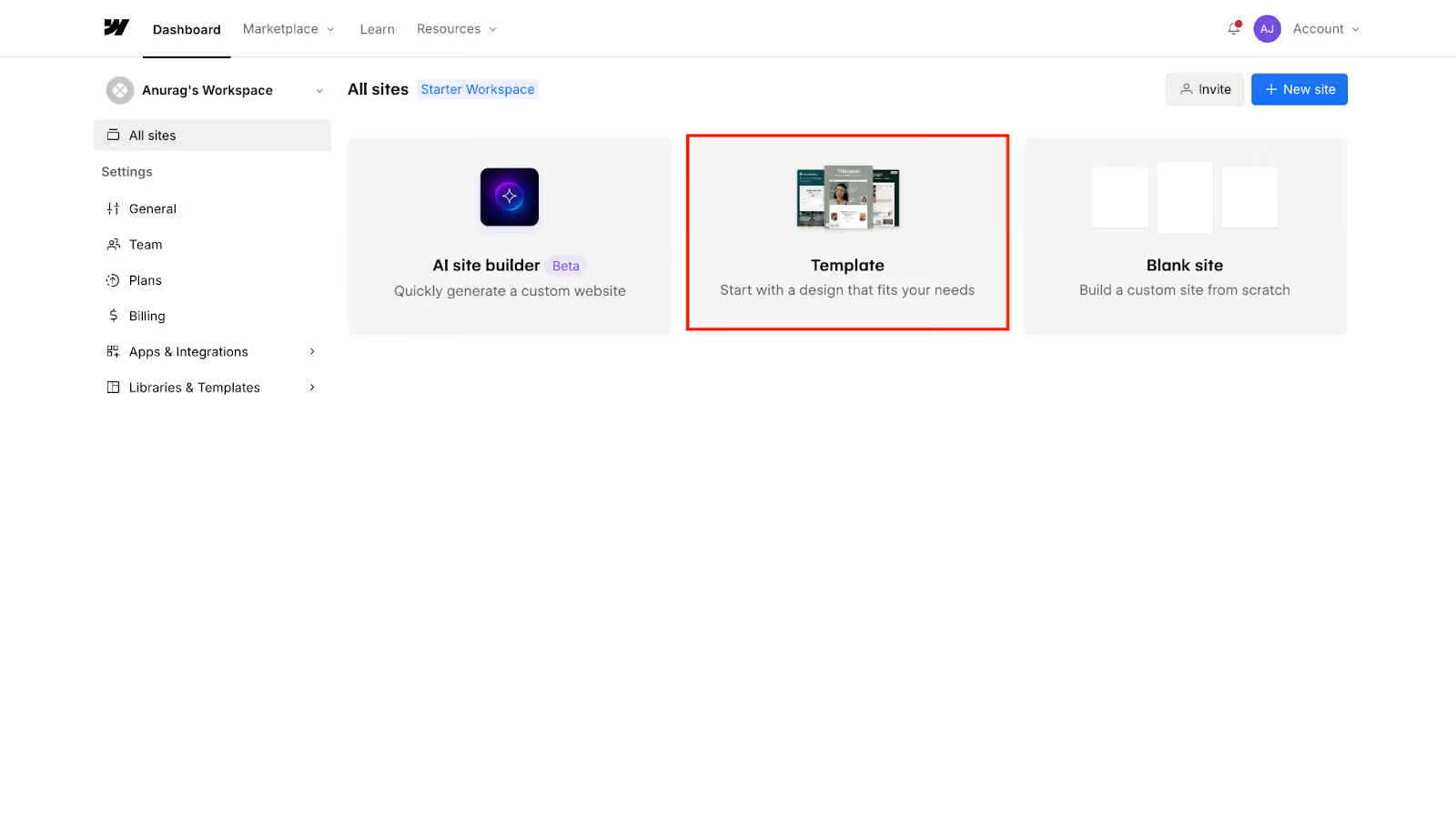
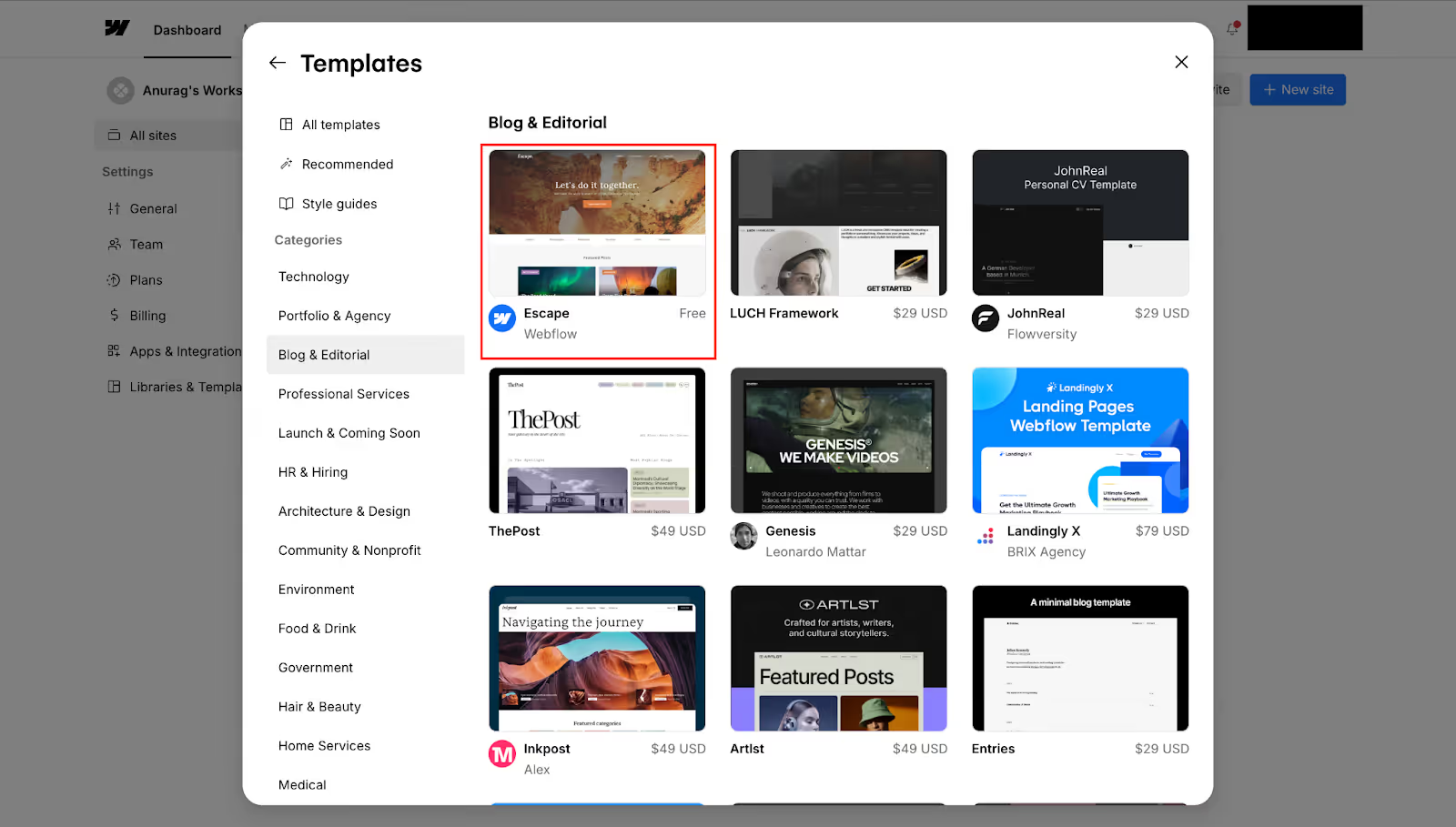
- Now, choose any free template to get started.
- Let’s name the site ‘Service Guides’ and click on Create Site.
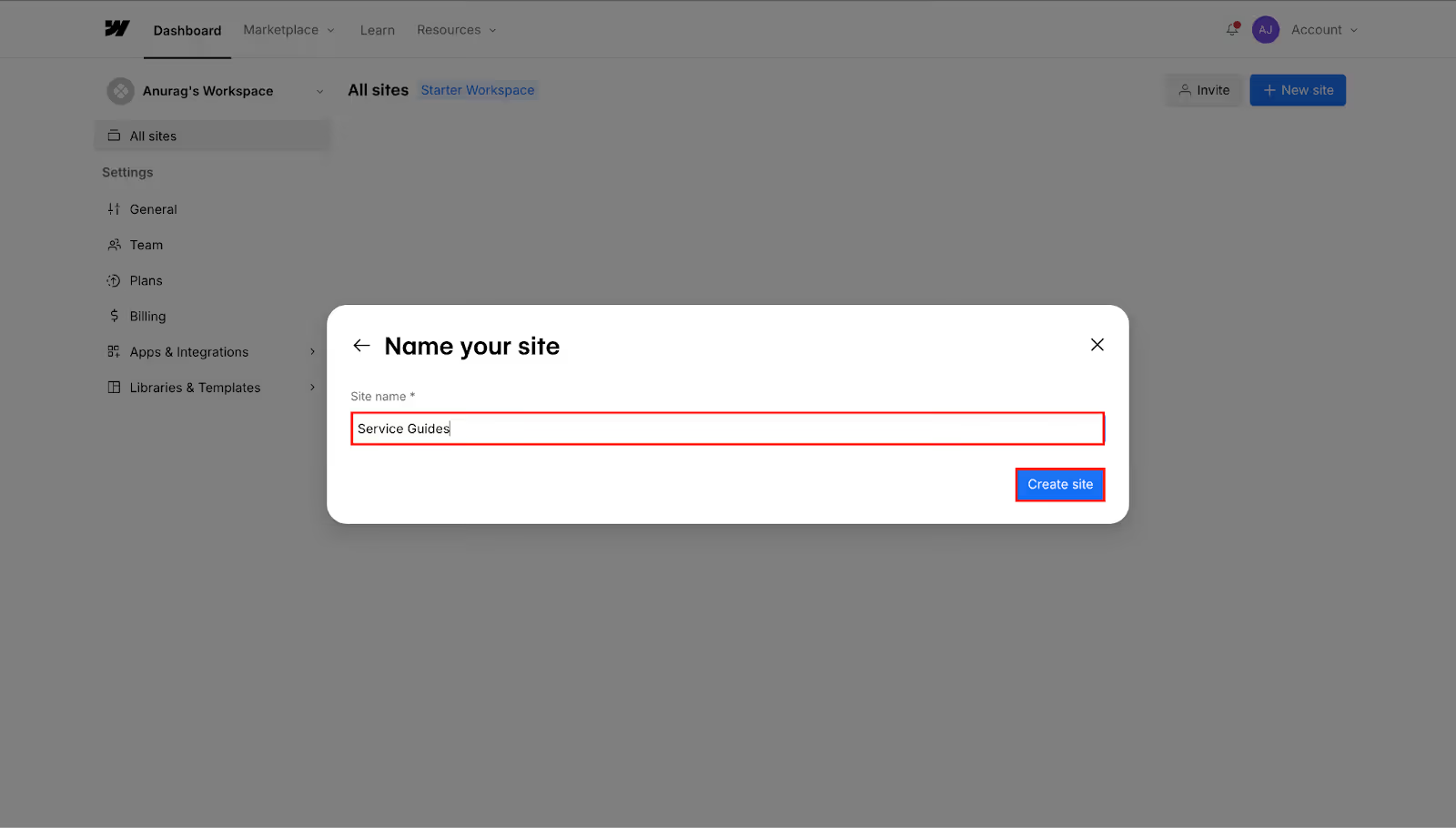
- Now, this will create a site from the template.
- From the top bar, click the CMS option.

- Next to CMS Collections, click the (+) icon

- Now type the Collection Name as Cities.
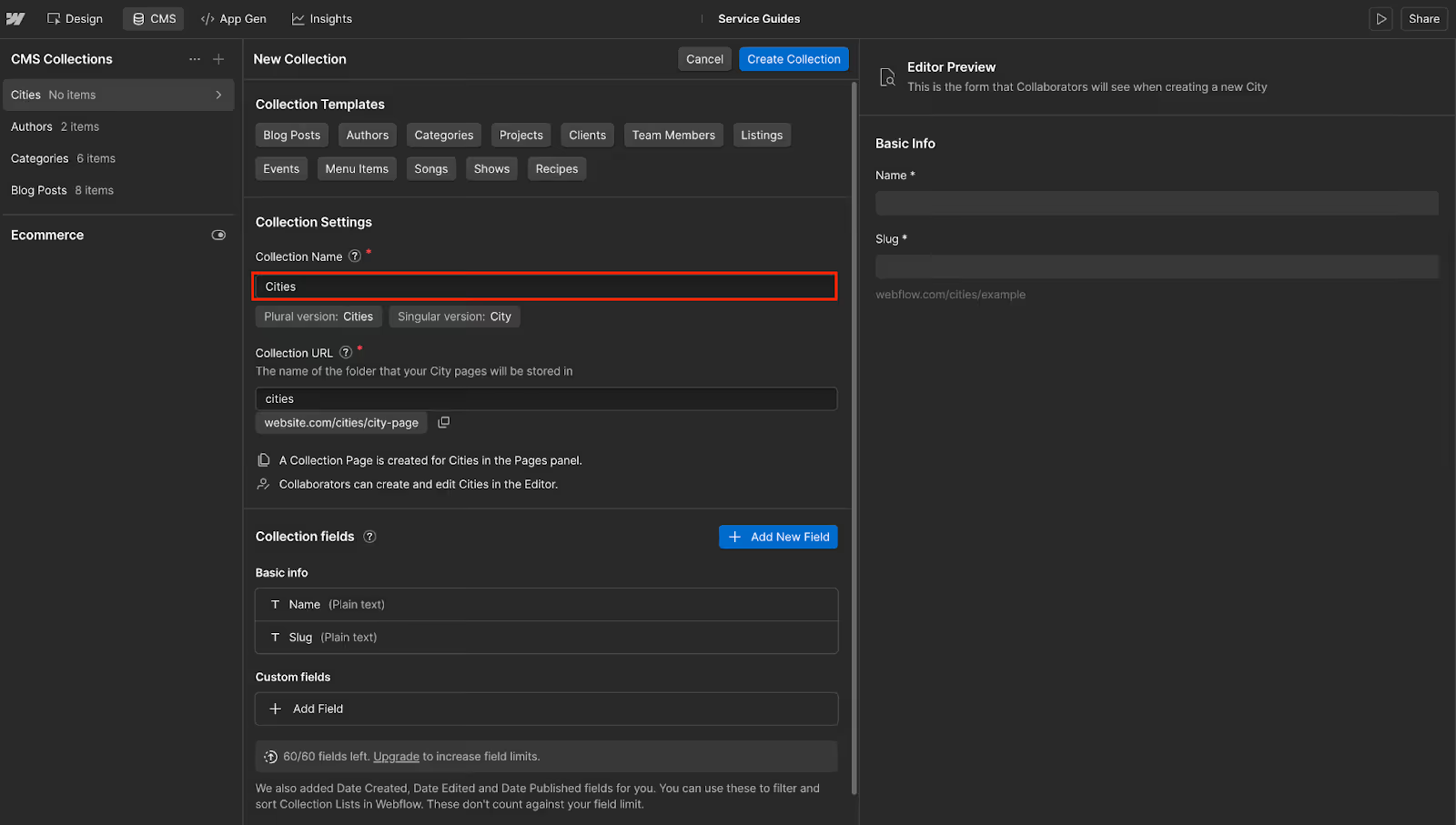
- Keep the Collection URL option cities.
- Now, by default, there will be two collection fields already present- Name and Slug.

- Select the Name field and rename it to City Name; click on Save Field.
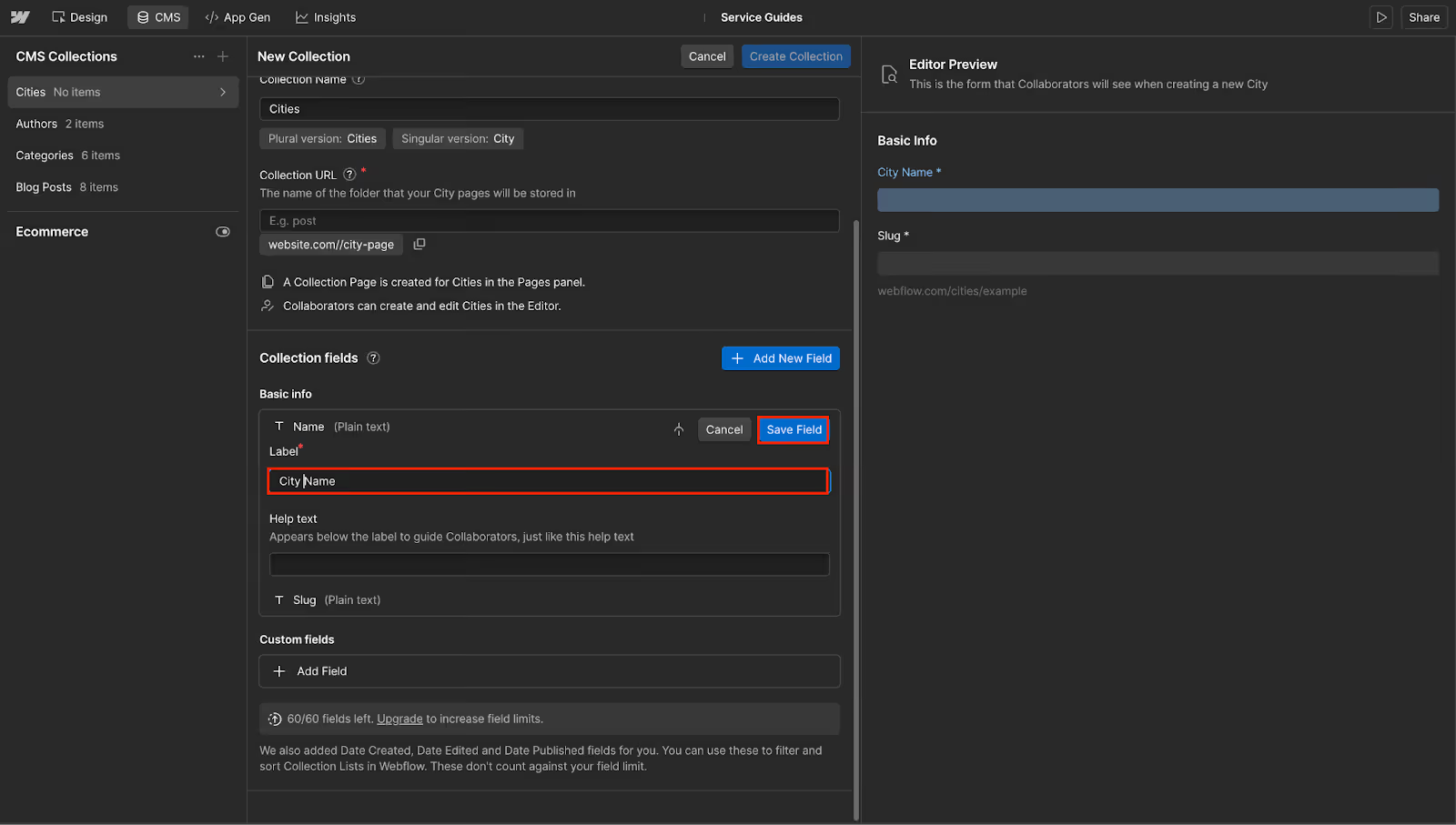
- Leave the Slug field unchanged.
- Then click Add New Field.
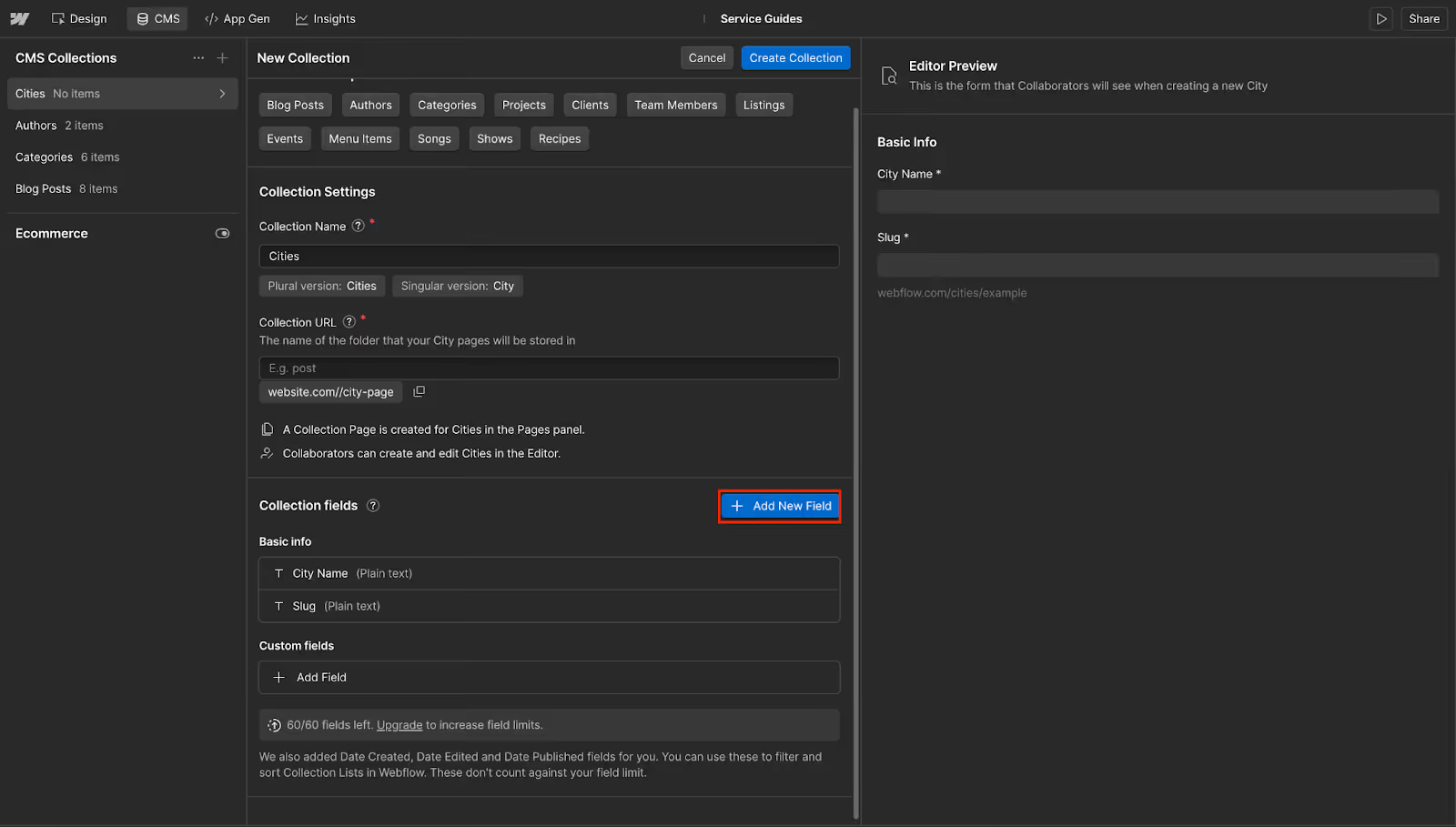
- Under the Field Type select Number option.

- Under the Label Field type Population, click Save Field.
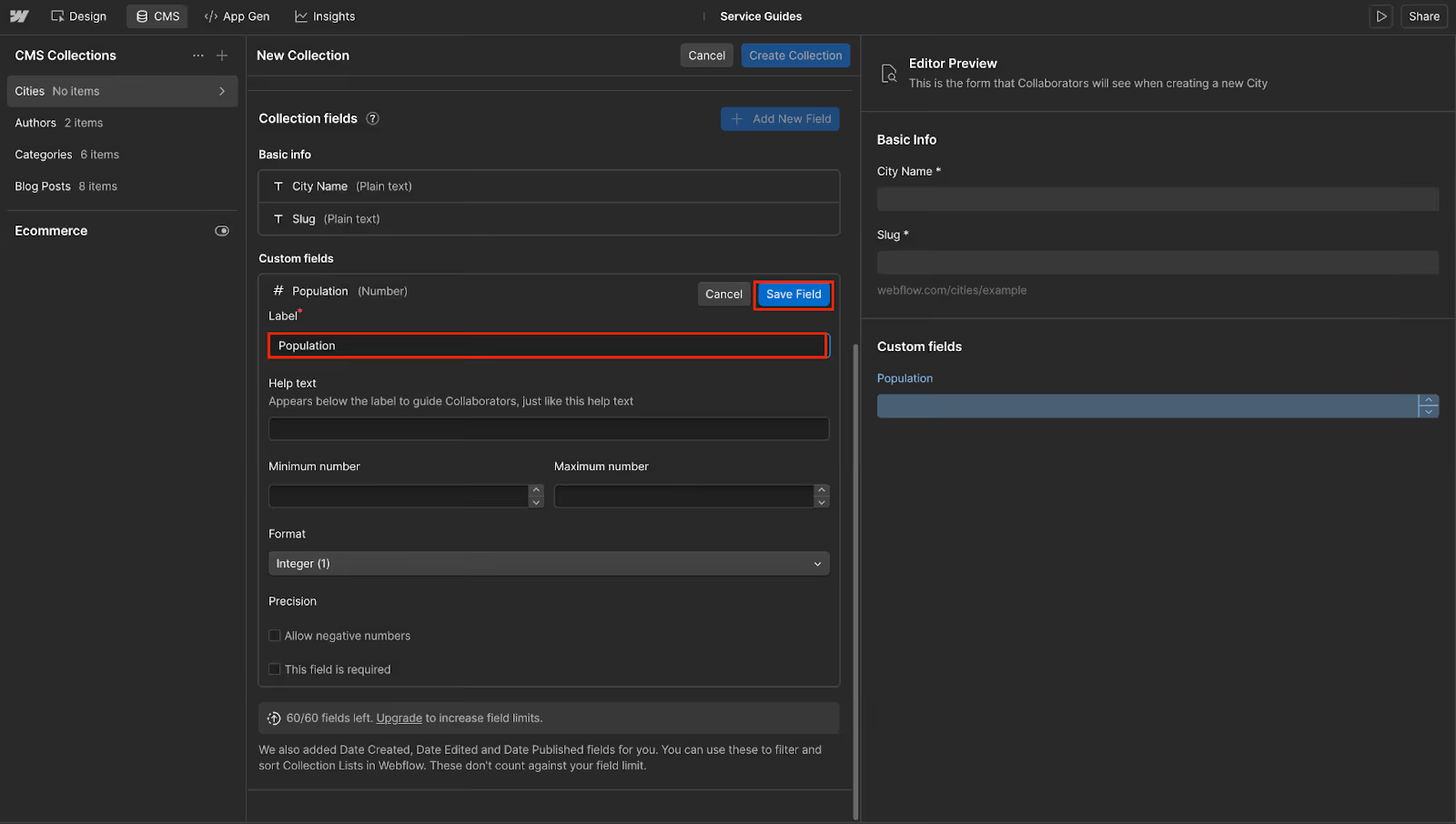
- Similarly, create all these fields:
- Your final CMS collection will look something like this.
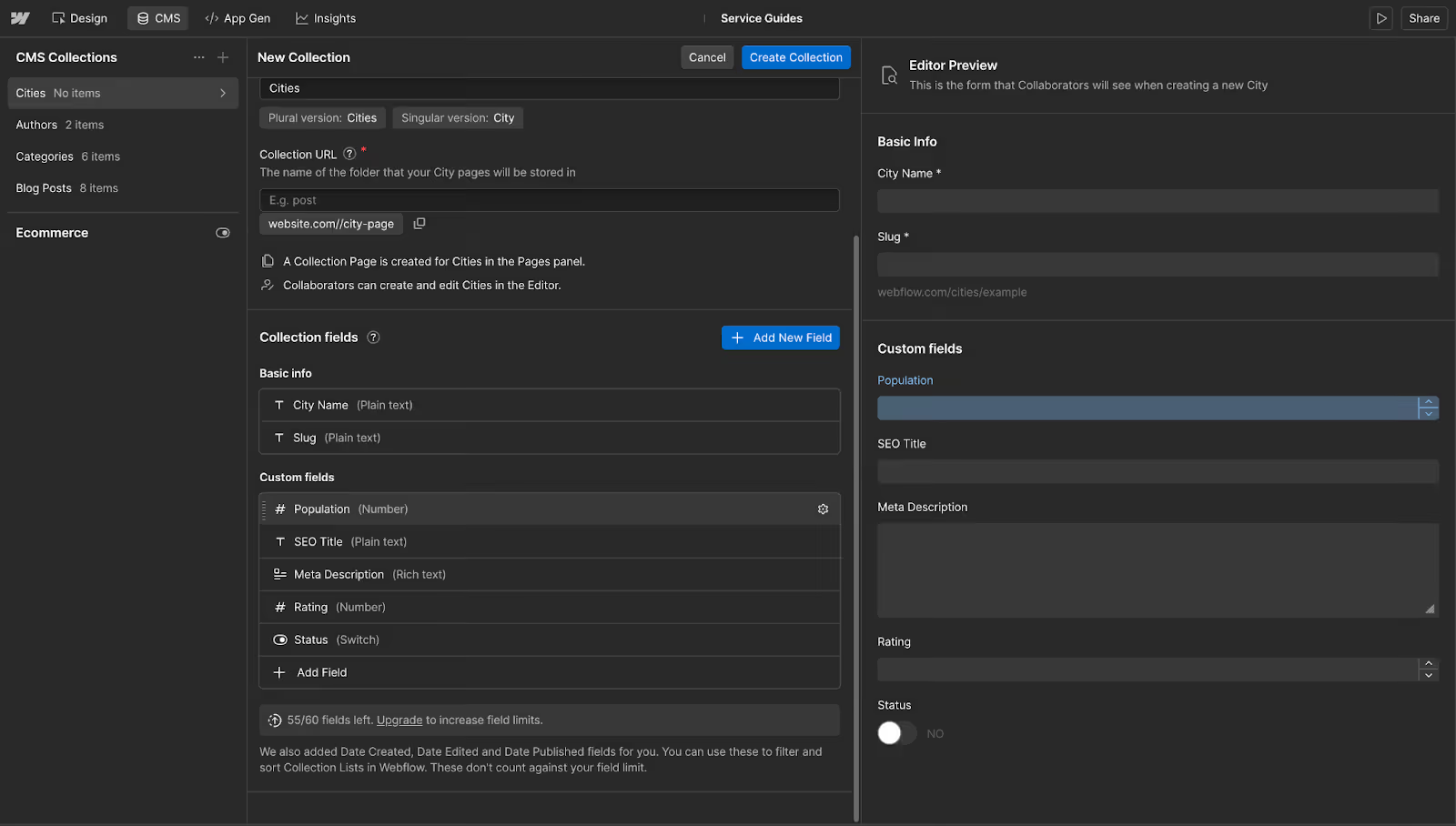
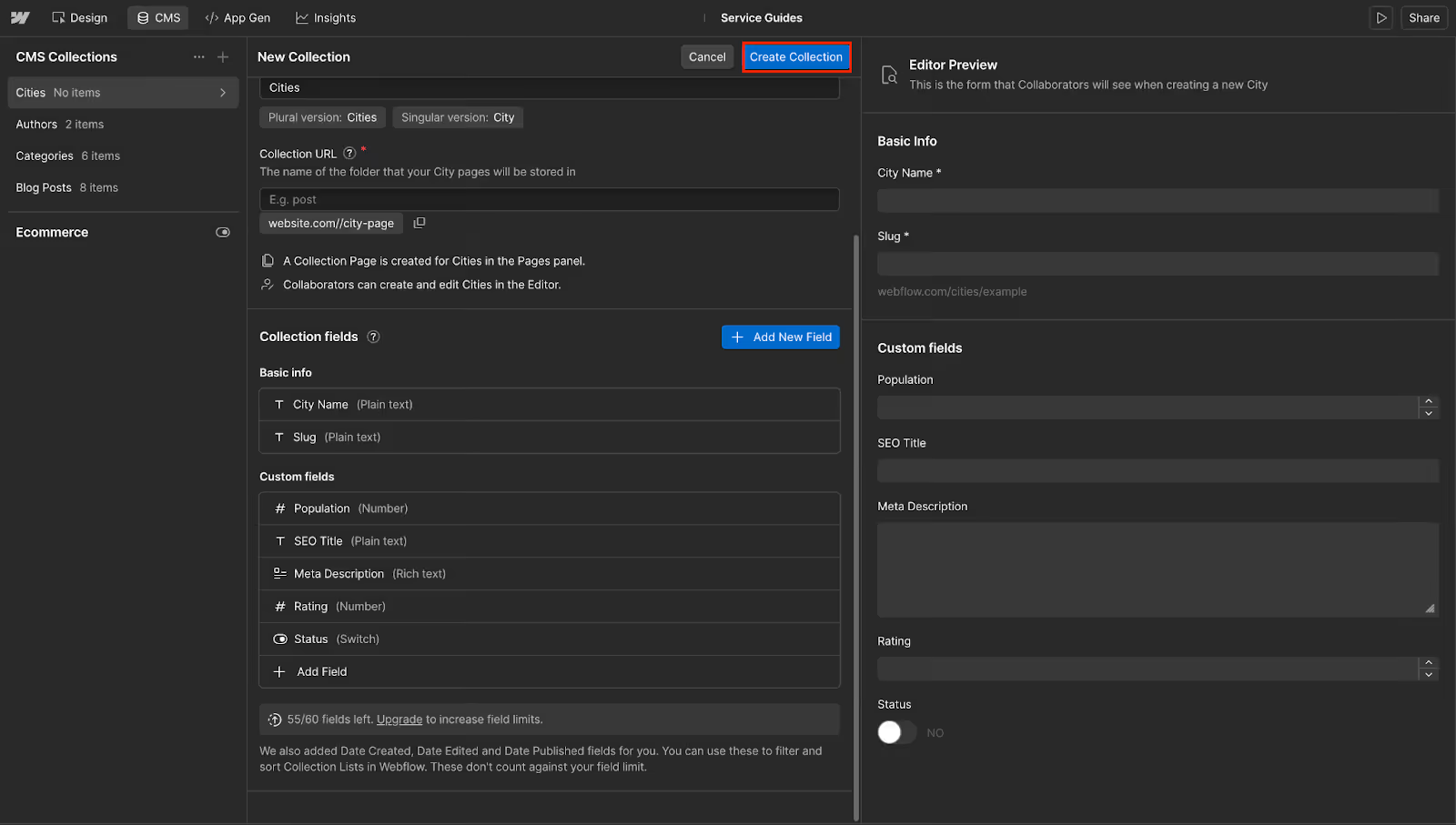
- Click Create Collection to create the collection.
2. Design Your Template
Once you have created the CMS collection, it’s time to design your template for it. Here’s how:
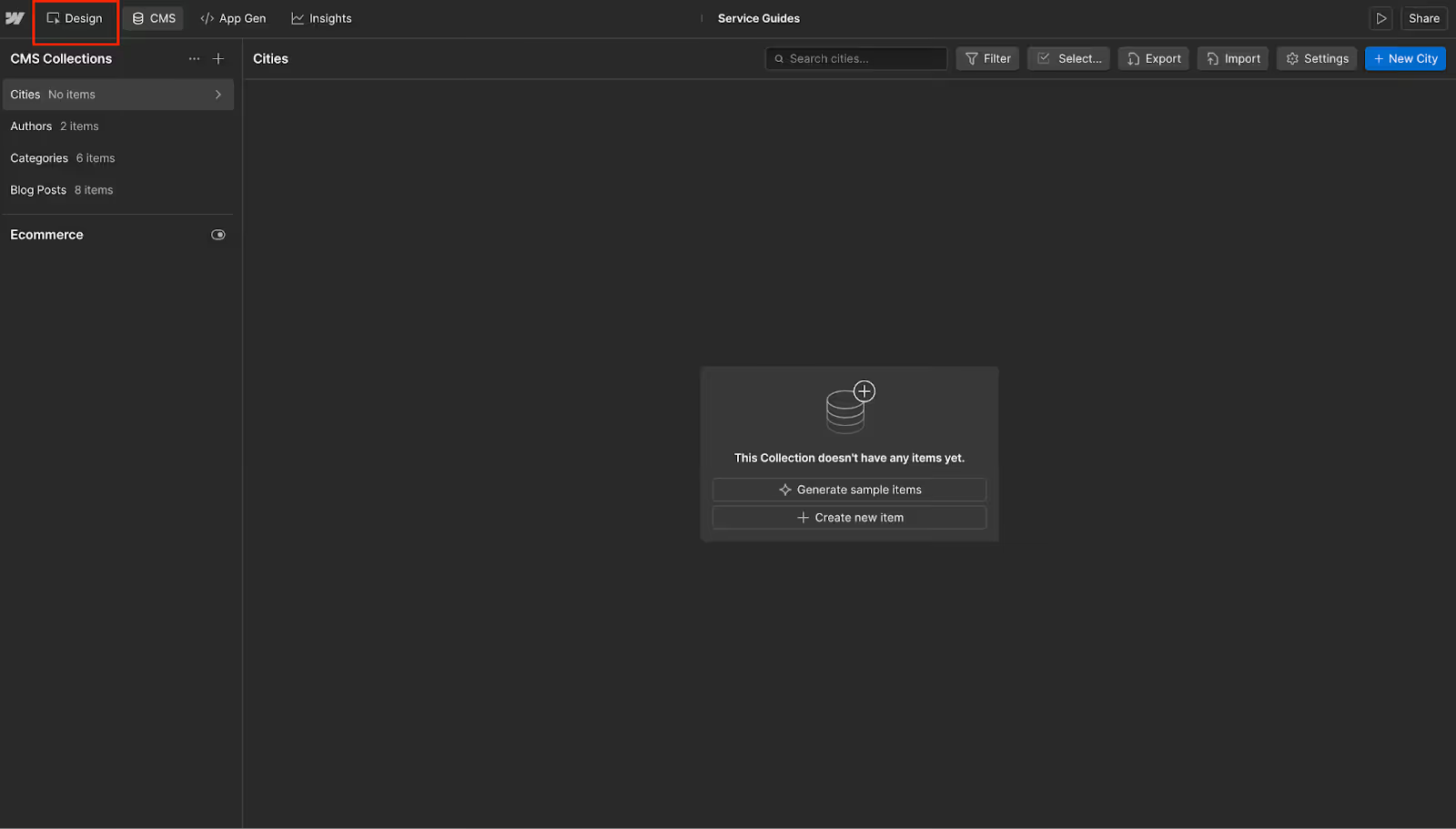
- Click the Design option in the upper left.
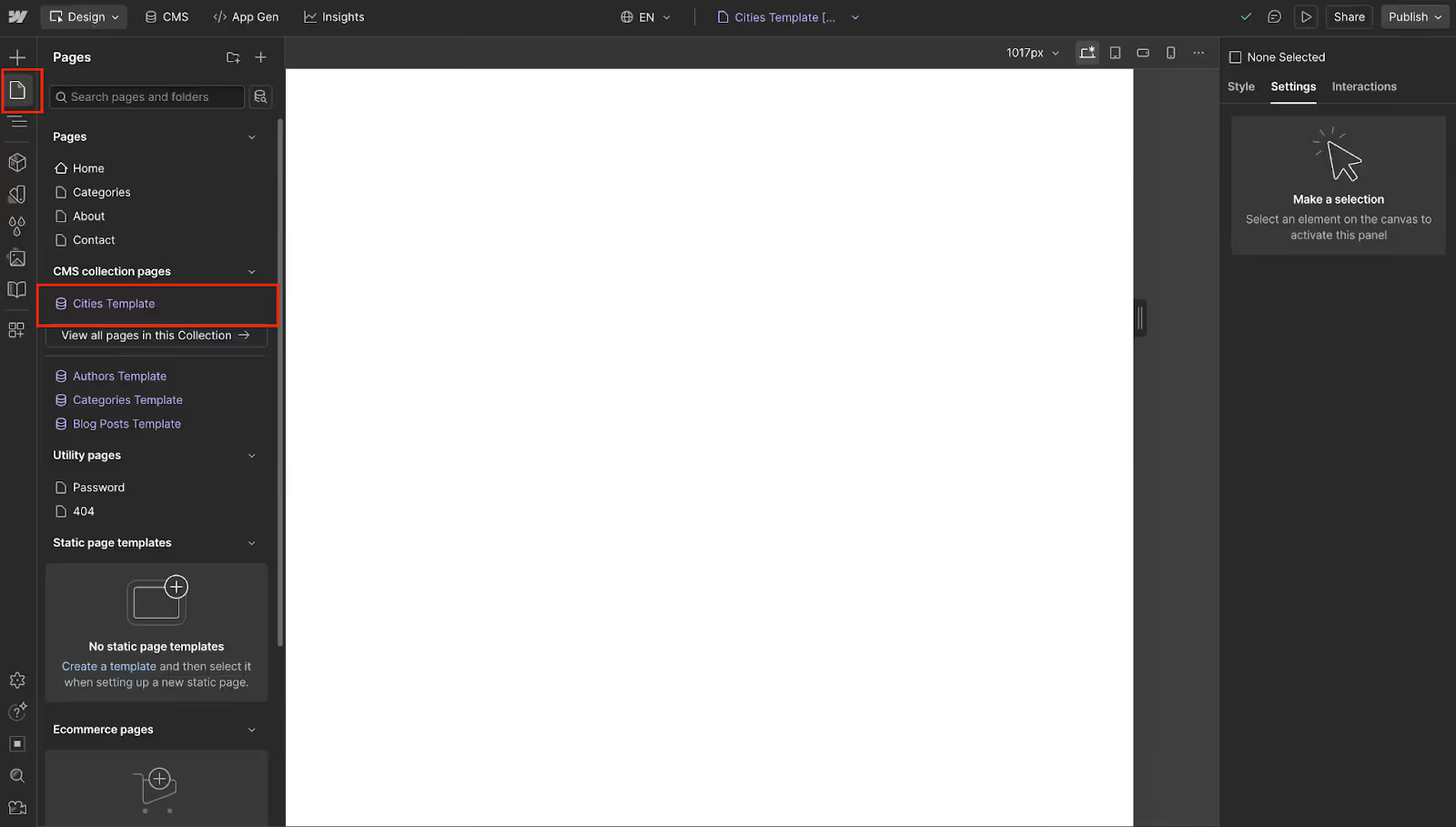
- On the left pane, click on Pages and select Cities Templates.
- Click the (+) button and start adding elements to your page.

- Add elements like Heading, Image, Text Block, and others as per your data fields:
- Heading - For your city name
- Image - For hero image
- Text blocks - For population, rating, etc.
- Paragraphs - For description
- Get your template ready to proceed.
3. Bind Elements
Once you have your template design ready, it’s time to bind the elements to the CMS fields. Follow these steps to do so:
- First, we have our Title, so we will select it.

- On the right, click Settings.

- You will see the ID field here. Click the little purple icon in the upper left corner of this field.
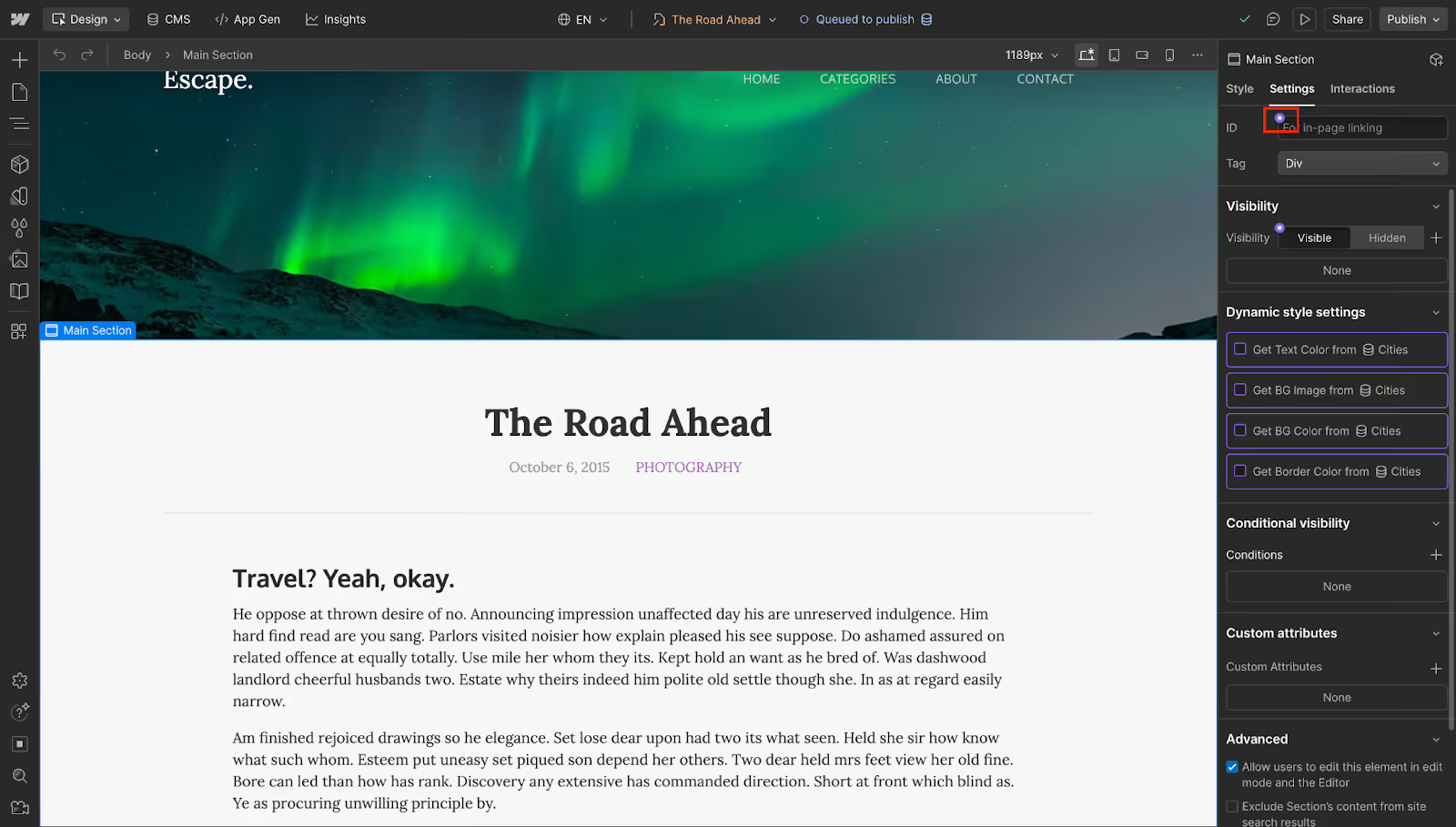
- From here, select SEO Title.

- Similarly, bind all the elements to the fields:
- Hero Image → Bind to Hero Image field
- City Name (Heading) → Bind to Name field
- Population → Bind to the Population field
- Rating → Bind to Rating field
- Status → Bind to Status field
- Meta Description (SEO) → Bind to the Meta Description field
Now this can vary as per the elements you have created and the fields you have added to the CMS collection.
4. Configure SEO Settings
After you have the page template ready, configure the SEO settings. For this, follow these steps:
- Click the Pages option on the left pane. Click the Settings icon next to the Cities Template page.

- Now, scroll down to the SEO Settings section.
- Now, click on Add Field next to Title Tag and select SEO Title.

- Similarly, for the Meta Description field, select Meta Description.
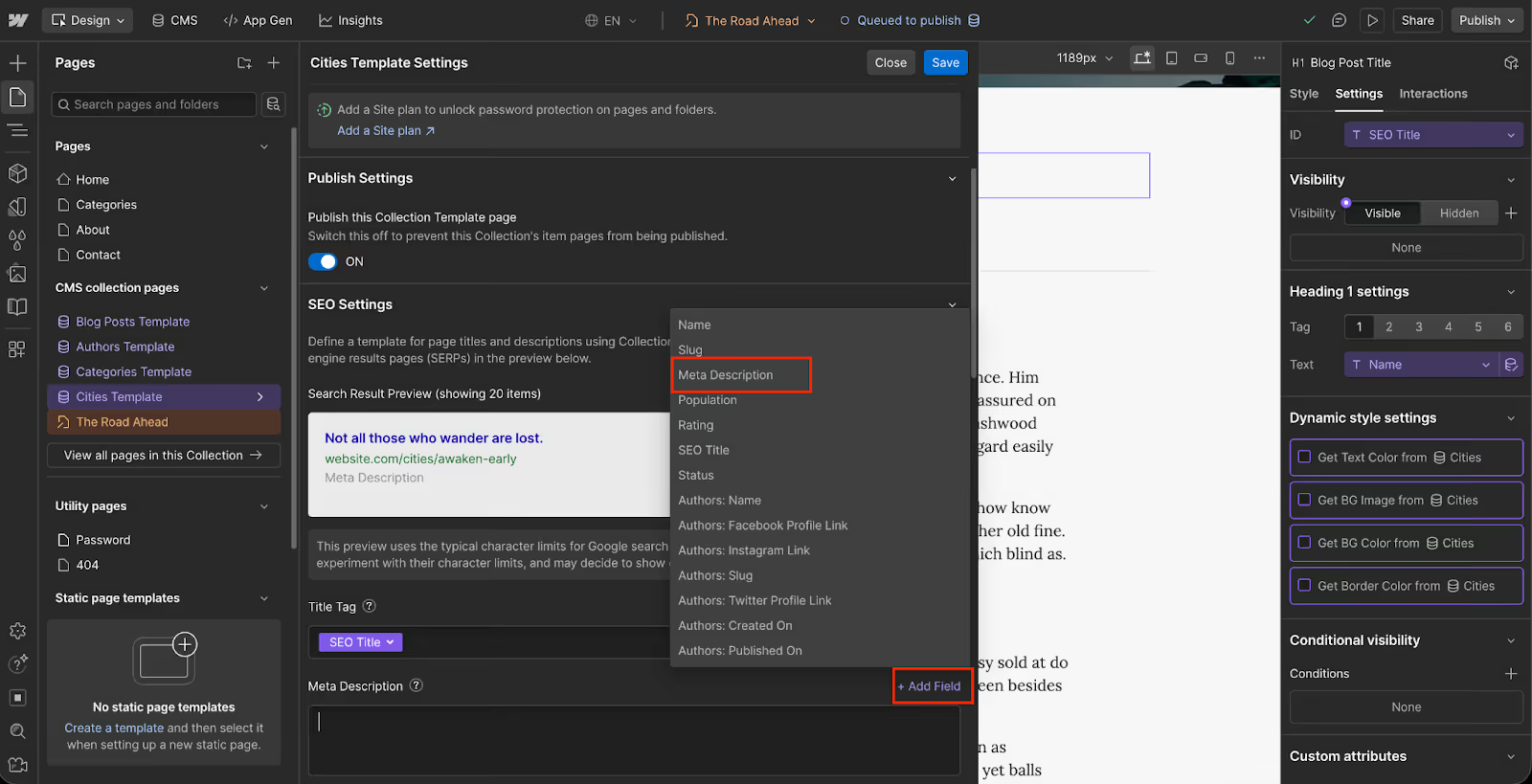
- Once done, click on Save.
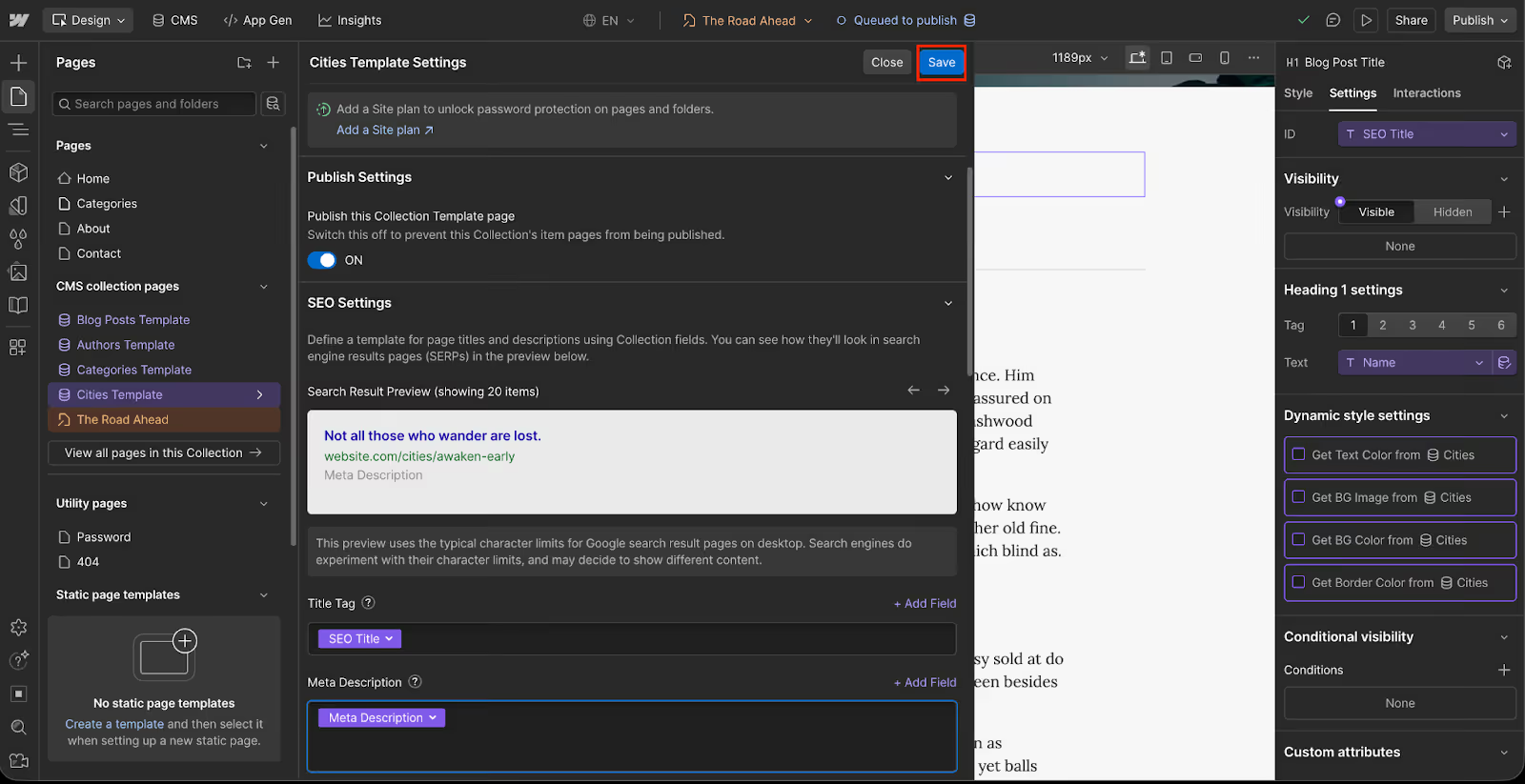
- Finally, click the Publish button.

- Now click Publish to Selected Domains.

Phase 3: The Connection (Whalesync)
Next up, we will be connecting our Airtable to Webflow using Webflow. First, you need to create a Whalesync account. You will need a paid account to use Whalesync, but for now, you can continue with the free trial.
1. Start Free Trial
Log in to your Whalesync account, and continue with the steps ahead:
- Click the Choose Plan option on the pop-up window.

- Under the Starter Plan, click Get Started Free.

- Now, enter your card details, and continue ahead to get 14 days free trial.

- This will give you a free trial on Whalesync.
2. Create your Sync
Once you have your free trial, it’s time to create the sync between Webflow and Airtable. Here’s how:
- Click on the Create Sync button.
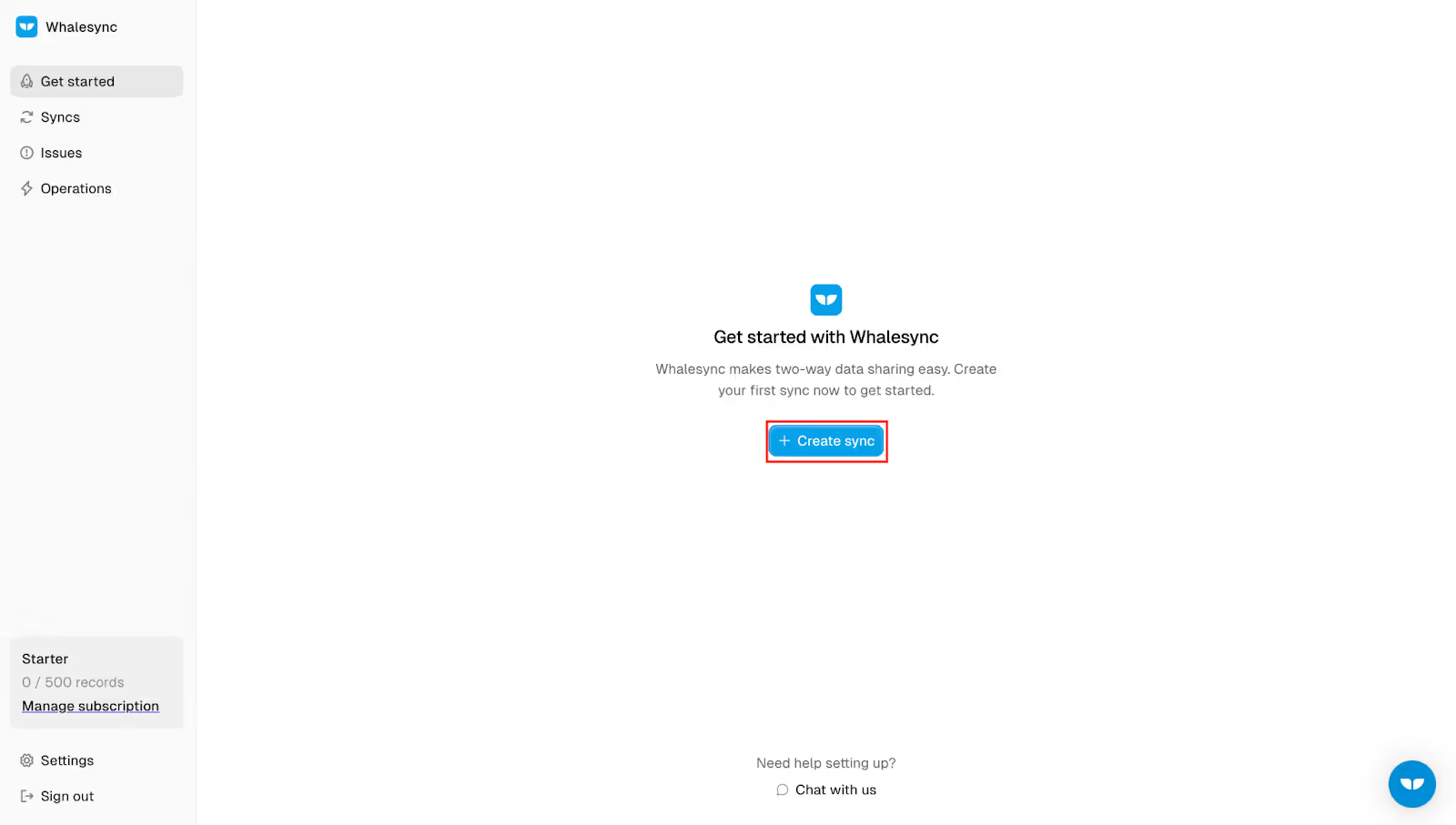
- Select Airtable as First App.

- Now click the Authorize button.

- On the next page, click Add a base.

- Now, select the Cities in the base.
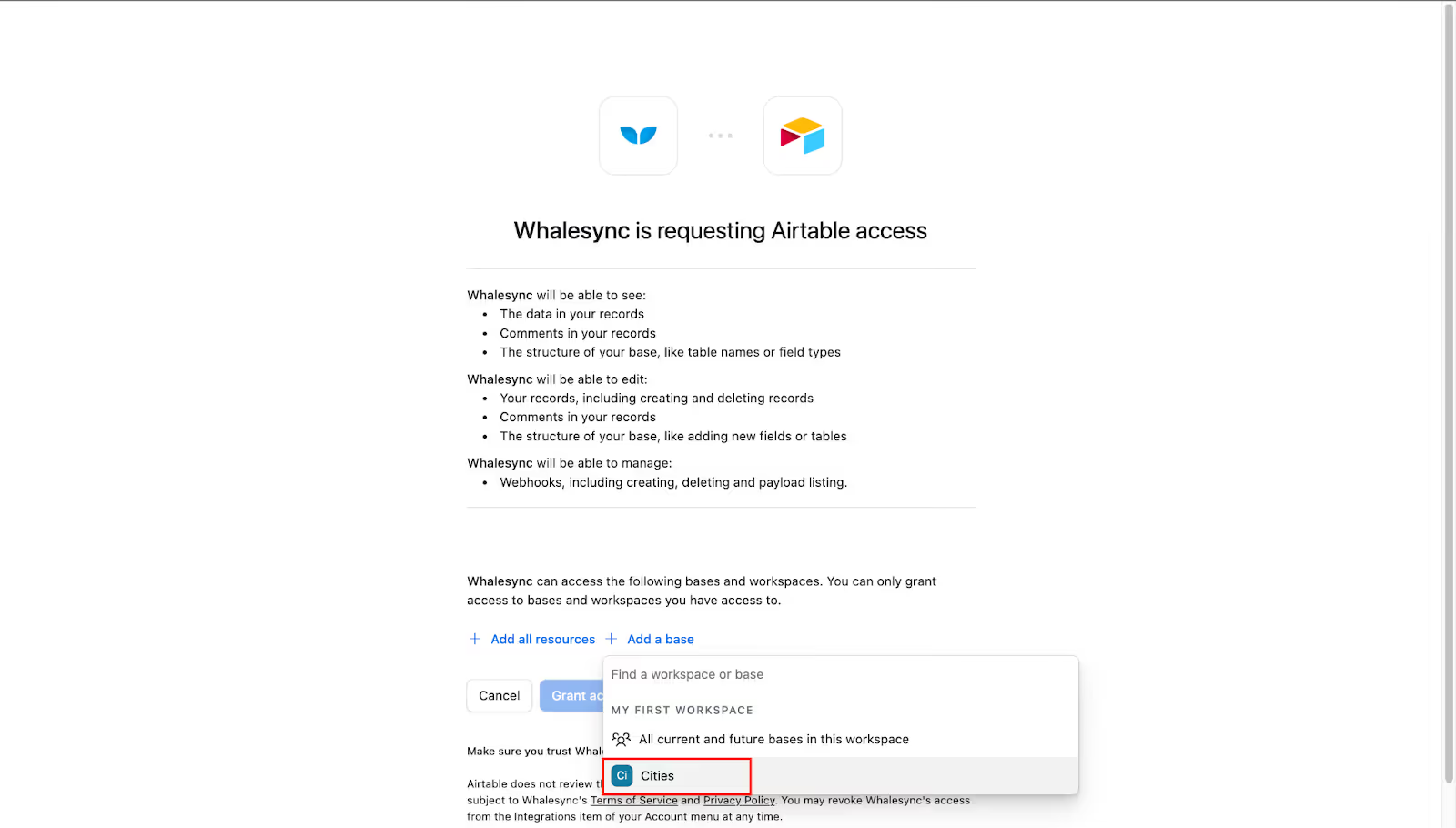
- Now, click on Grant Access.
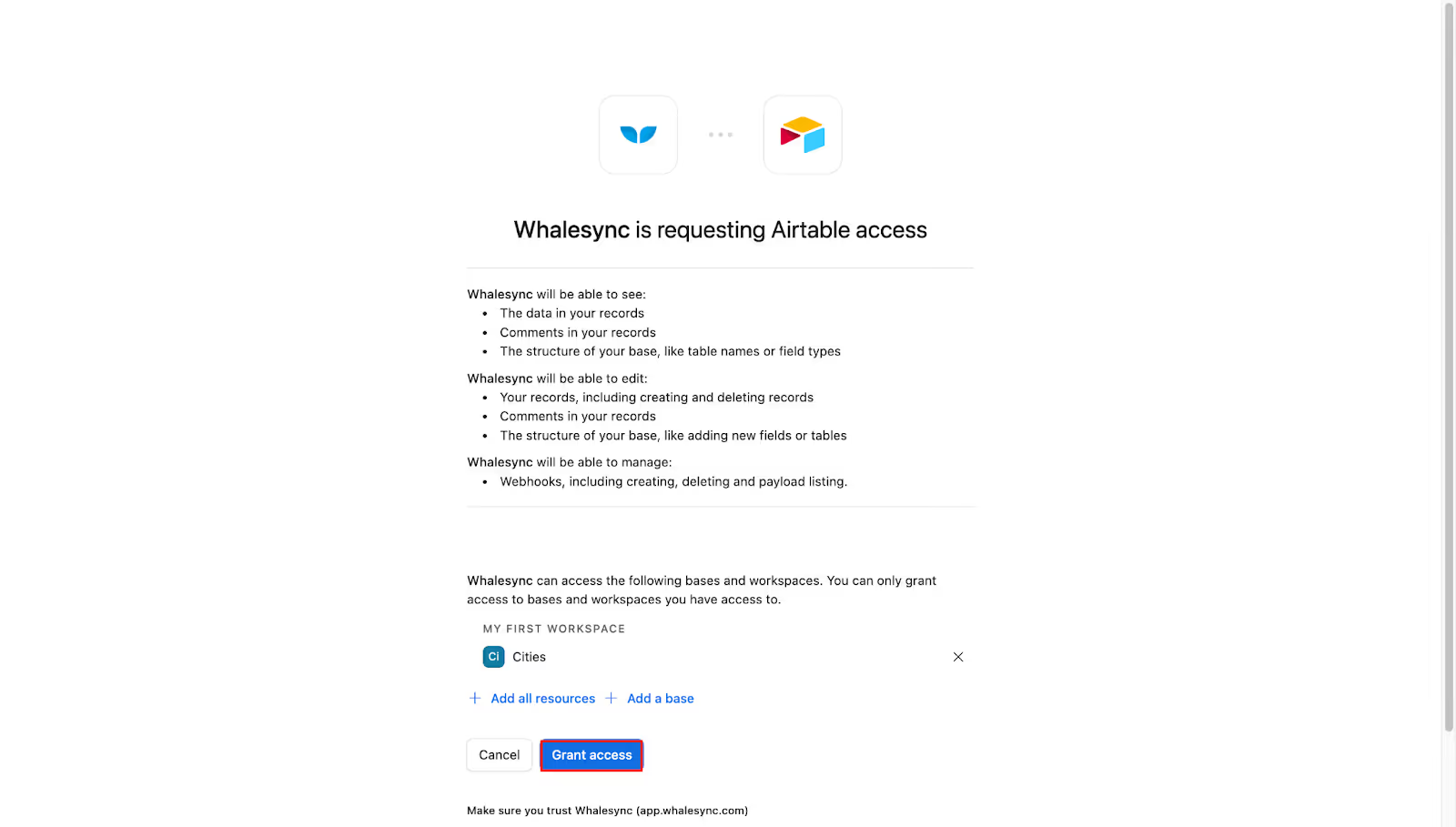
- After this, click on the Save button; this will connect Airtable to Whalesync.
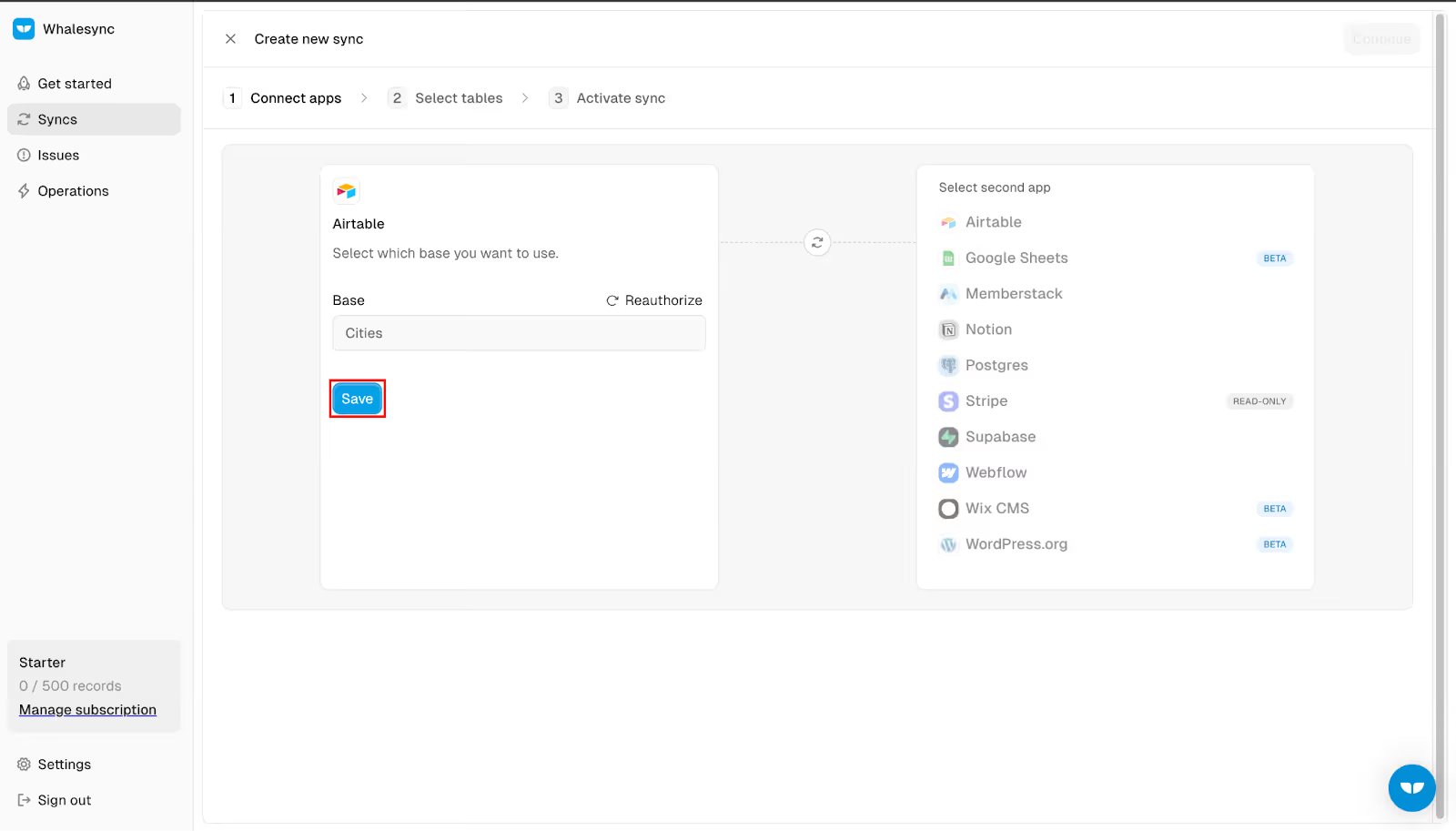
- Under Second App, select Webflow.

- Click on the Authorize button.
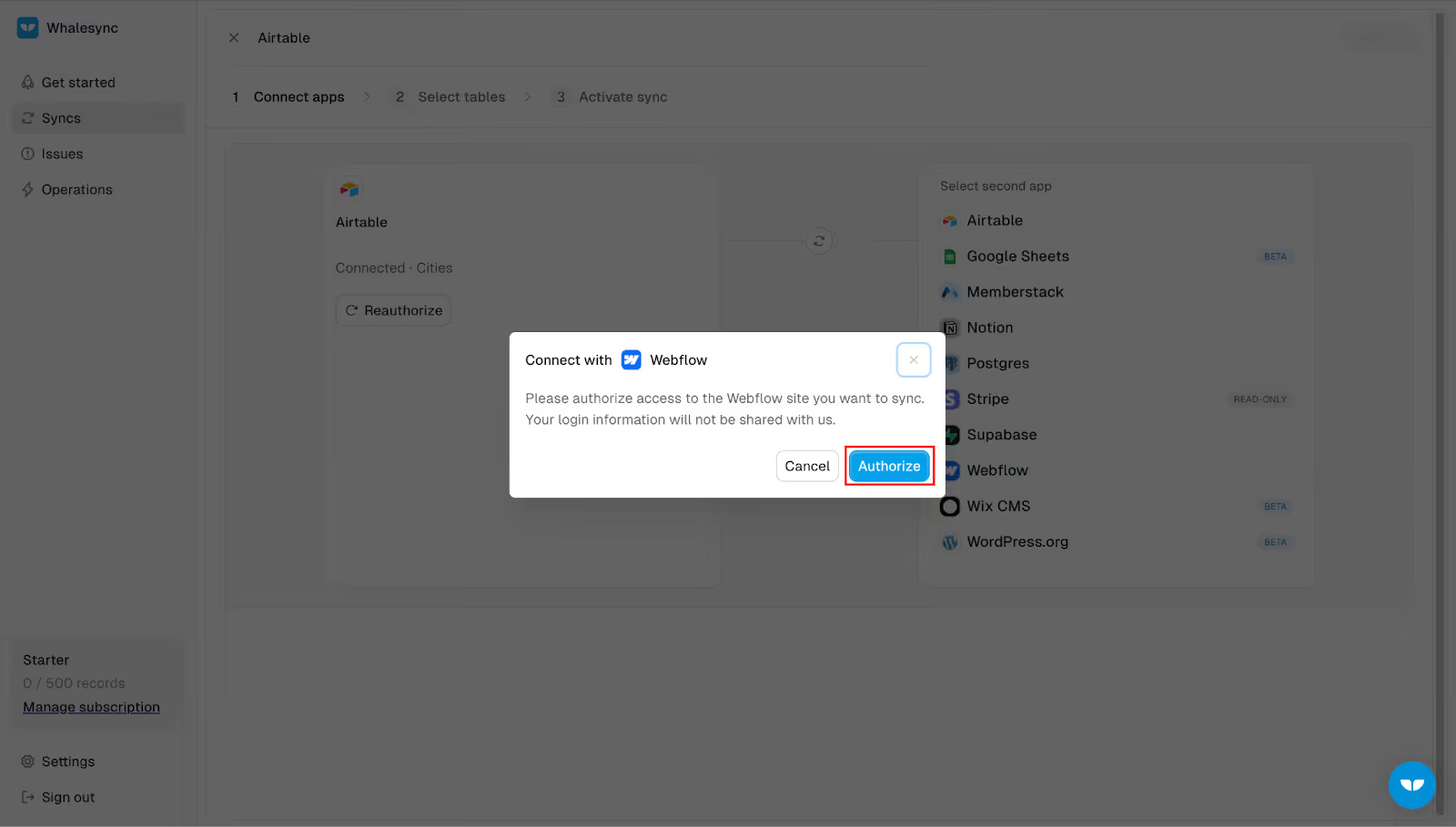
- Now, select your Workspace and click on Authorize App.

- Click the Save button to connect to Webflow.

3. Map Fields
Once you have done this, you will have to add Airtable fields to the fields in Webflow. Follow the steps given below to do so:
- Click on the Continue button.
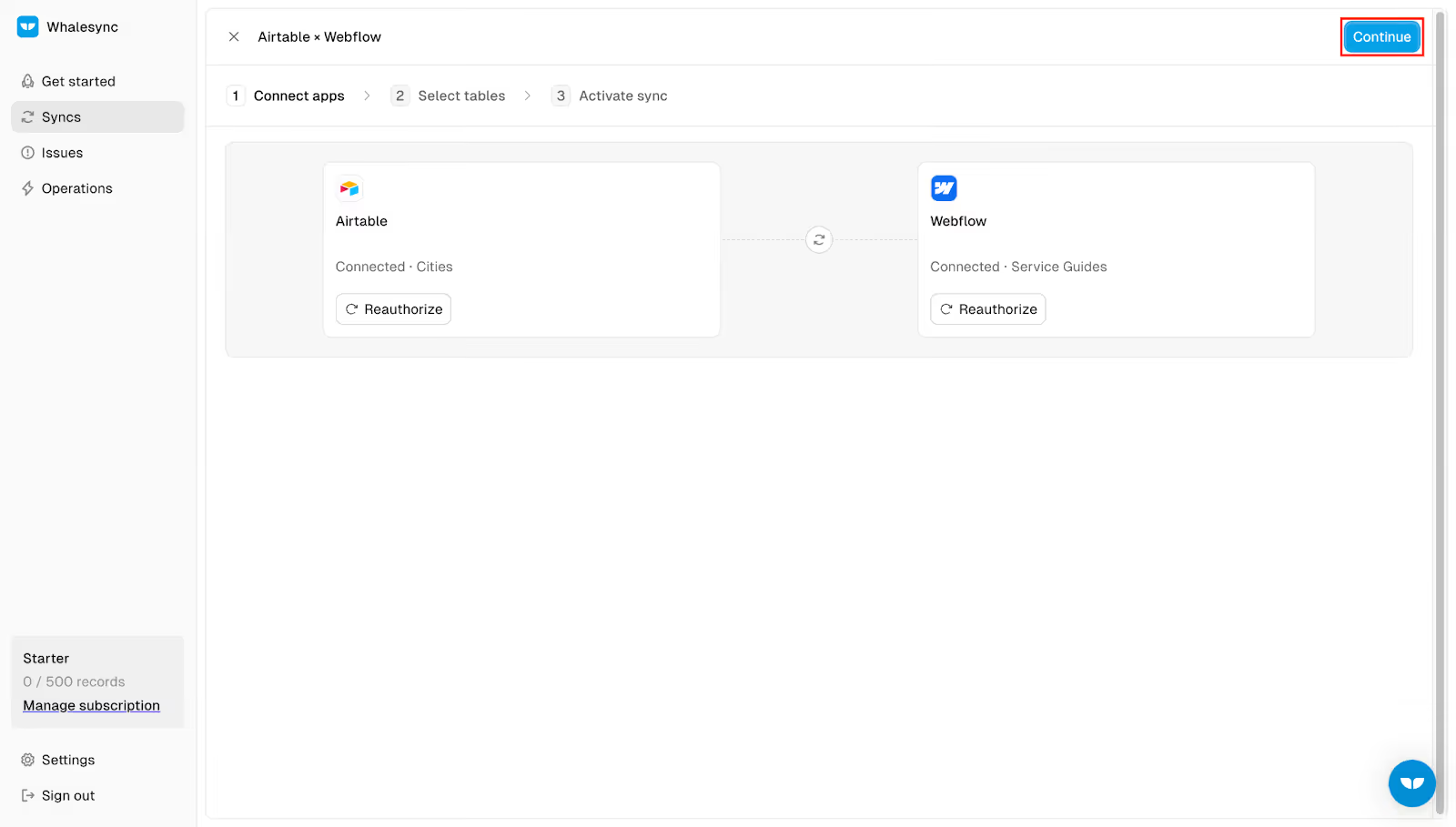
- For Airtable and Webflow, select the Cities table.

- Now, click the Create Table Mappings button.

- Map these tables like these-
- Click the Save and Continue button.

- Then click Activate Sync.

- Now click the Confirm button.

- Click on the Continue button now.

- And now, the fields will start syncing.

Note- Any changes to the table in Airtable and fields in Webflow will automatically get synced together.
4. Check Data in Webflow
Now go to Webflow and open your project. Once done, follow these steps to check the data:
- On the left pane, select Pages and select Cities Template.
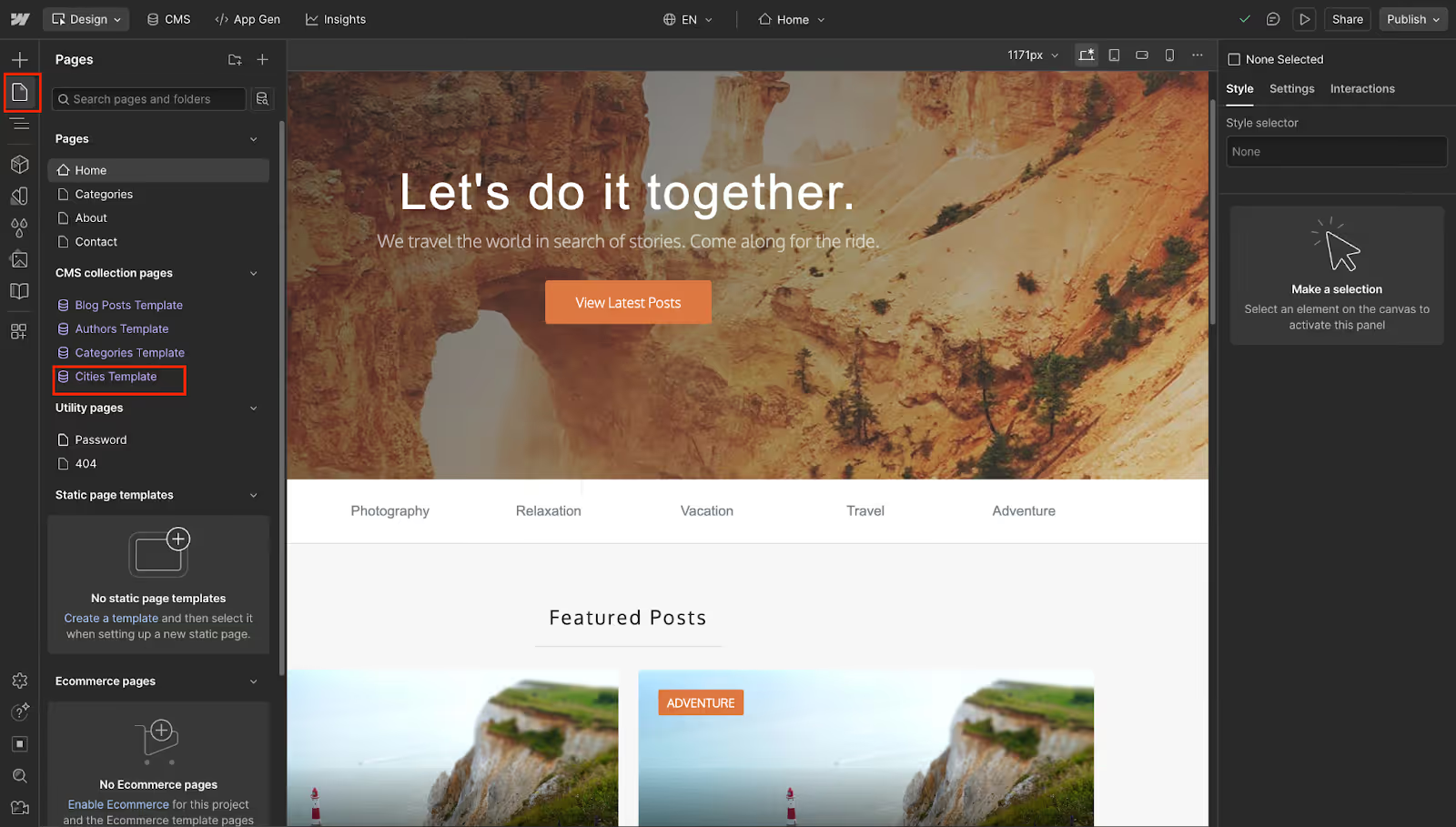
- Click the CMS option at the top.

- Here, you will see all your data for the cities. Select any one.

- Now click the Eye icon to preview it.

- You will now see all the table data reflected on the page.

Measuring and Analyzing pSEO Performance
With pSEO, you won’t be working on single pages. You will be publishing thousands of pages in one go. You need to analyze the metrics for the page to know if the engine is effectively working or not.
Here are some factors to consider:
1. Indexation Rate
Consider it this way: you publish 1000 pages and Google indexes 800 or more, then your content is good to go.
But if it indexes like only 100 pages, then you are going through a thin content problem.
To check it, use this formula:
Indexation rate= (Pages Indexed/Total Pages Published) *100
This indexation rate should be 80% or more. If the indexation rate is less then you need to implement a new strategy to solve the thin content problem.
2. Crawl Efficiency
Check Average Daily Crawl Stats in Google Search Console.
If you published 1000 pages, and Google is crawling about 100 per day, then it would take a few days to index your site completely.
If the crawl speed is low, it might take months to index your site. So you must check this stat.
3. Check Engagement
Engagement is essential to rank on Google. If your engagement is not up to mark, then Google might derank or de-index your site.
For this, check the average engagement time and bounce rate.
Consider it this way, the user lands on the ‘New York City’ page and leaves in less than 15 pages, then Google will consider it thin content and might de-index it.
For 500-word content, it should be 45 seconds, and it might increase with the page size.
4. Keyword Cannibalization
Check if Google ranks multiple pages for the same keyword. For instance, you have two pages- Best Resorts in New York City, and Best Stays in New York City.
As we are building consistent pages with a similar structure, Google might rank them both together.
To fix it, ensure your data is distinct in Airtable. Do not keep data similar in multiple columns.
5. CTR Variance
You must check the CTR Variance for the same data. This is also called A/B testing. Create two or more templates for the same data.
For instance: Best Cafes in {City} and the next one {City} Cafe: Top 15 picks.
Now these are two different templates for the same data. Check the CTR for both templates and see which one is winning.
This way, you will know which template ranks higher.
Here is a quick table to help you understand all the metrics quickly:
Quality Control & Guardrails (Crucial Section)
You will be mass-publishing pages, and when you do this, you are likely to encounter a lot of issues. Therefore, quality control is essential to prevent them.
1. The "Thin Content" Trap
Google doesn’t rank pages that look the same. When using a programmatic SEO engine, you will be publishing the same pages.
You need to avoid this; the Austin page must not look like a New York City page with just the name of the place replaced.
You must ensure that at least 30% of the content is unique. You can use dynamic sentences and data points, which will vary for each place.
For instance, here is what a bad vs good pSEO page looks like:
Bad:
“Austin is a city in Texas with great services.”
Good:
“Austin has over 2,300 registered service providers, an average rating of 4.6, and a rapidly growing population of tech-driven businesses.”
2. Indexing Strategy
Internal linking is essential for indexing and ranking. If you leave the pages without links, Google will consider them orphan pages.
To fix it, link one city to another in Airtable.
Then, in Webflow, at the bottom of the template, add something like People who looked at {City 1} also looked at {City 2}.
This will interlink the articles together.
3. Pacing
If you publish all the pages at once, then Google will consider it as spam. To avoid it, publish pages slowly.
For instance, you have 1000 pages generated with the engine. Then, in the first month, publish 50 pages. In the second month, publish 450 pages, and then in the third month, publish 500 pages.
For this, create a ‘Sync View’ in Airtable and move only 50 records for the first month in this view. You can change it as per your requirements and how many pages you want to publish at once.
4. Check For Dirty Data
Before you begin to sync the data, ensure all the data in Airtable is clean. You must check for formatting, typos, and empty cells in the data.
If this bad data enters your site, then it would not look good, and also prevent indexing.
5. Check Design Resilience
All Airtable data will be different. For instance, Austin has 6 letters, and New York City has 11 letters.
You want all the pages to have a consistent design for all the data. Make sure all items are visible, and the data doesn’t break.
Other Best Tools in the Market for pSEO
Our core tech stack is Airtable + Webflow.
But these are not the only tools that you can use for a programmatic SEO engine. Here are some other tools that are good alternatives to these:
Data Acquisition and Enrichment
We are using Airtable for our database. Apart from Airtable, you can also use these tools:
1. Clay
Clay is one of the best tools for creating databases, which can connect to almost 50 data providers. You don’t need to manually enter data in the Clay sheet.
Also Read: How to Build Dynamic B2B Landing Pages with Clay & Webflow
Clay can crawl and import data from various sources. You can also use the AI to generate data in Clay.
2. Browse.ai
Browse.ai is a no-code tool for data scraping. This tool can scrape data instantly and create a clean spreadsheet for it. This tool can create a perfect database for the programmatic SEO engine.
You can install the browser extension, and you can select the elements you want to capture.
Frontend Alternatives
Webflow is a good platform to generate templates for our engine. However, there are some other tools that you can use instead of Webflow, such as:
1. Softr
Softr works with Airtable and Google Sheets. You can build a website without having to code anything. If you use Softr, then you won’t have to use a connector like Whalesync. Softr directly syncs your database to your website. Any changes made to the database will be directly reflected on the Softr site.
2. WordPress + WP All Import
WordPress is one of the most popular CMS platforms. It’s free if you have a domain and hosting. It’s an open-source platform, so all its features are free.
You can even publish lakhs of pages/posts without having to pay anything. Combined with the WP All Import plugin (to import data into the site), WordPress is the best alternative.
If you want to run a blog or a programmatic SEO engine, then this is one of the best platforms to go for.
Resources: Best Videos to Learn pSEO
Want to learn programmatic SEO and implement your own engine? You don’t have to start from scratch.
Various channels will guide you on how you can implement a programmatic SEO engine, including:
- Connor Finlayson- If you want to learn Airtable and the Webflow stack, then this channel is the best to get started.
They have a video named: ‘How I Built a Local Directory Website in 48 Hours With No-Code Tools (Step-by-Step)’ where they explain how you can connect Airtable to Webflow and build a local directory website.
- WhaleSync’s Official Channel- They have technical manuals for WhaleSync. You will find here all the guides for Whalesync, how to get started, connect apps, and more.
- Webflow University- This playlist is best to learn frontend design using Webflow. They also guide how you can create CMS structures in Webflow.
- Matt Diggity- This is the best channel to learn SEO tactics. Be it topical authority or programmatic SEO case studies, they have covered it all on their channel.
- Ahrefs- If you want to learn about keyword research, search intent, traffic potential, and other topics in SEO, then Ahrefs is the best channel to watch.
Will pSEO help in LLMs search (AI Search)?
Yes, pSEO is AI-proof. If you want AI models to use your web pages to refer to your site in the results, then pSEO will help you with that. Here’s why:
- Structured Data: Programmatic SEO gives structured data with a defined set of titles, descriptions, images, and content.
LLMs are likely to refer to your site when it has structured data with clear tables and distinct data points.
- Complex Prompts: In 2026, users no longer search for the head term. But they have complex prompts like ‘ I have a two-day trip, so find me the best activities to do in New York City.’
While manual SEO can be good for head terms, pSEO will help you rank on long-tail keywords. With thousands of pages of activities published, LLMs will use your data to answer the user’s query.
- GEO: LLMs don’t just give a link to your site, but they use data from your site to create an answer of their own.
With pSEO, you provide LLMs with structured data, which is best for AI to synthesize its own answer for the search.
- Fluff Problem: If you manually write a blog post, then there’s a very high chance that the majority of it will be fluff with intros and conclusions.
Whereas the pages created with pSEO tactics are pure information with facts, and LLMs are likely to use this data.
Conclusion
In this guide, we have covered everything from setting up the brain with Airtable to creating the structure of the data in Webflow.
This guide isn’t just theoretical content about the tools, but a practical way on how to use them and create a programmatic SEO engine.
Traditional SEO is a dead giveaway if you want to rank in 2026 for all the long-tail keywords. Programmatic SEO is exponential, and you can publish thousands of pages in one go.
By using Airtable, Webflow, and Whalesync together, you will be automating almost 90% of the work of content production without sacrificing quality.
By implementing this engine, you won’t be chasing head terms. But you can capture all the topics related to that keyword.
Whether you are a travel agency or a SaaS company, with this engine, you can be everywhere your customer is looking.
With programmatic SEO, our goal is not spam, but to provide the exact answer to the user query with a consistent structure for all your pages.
With a seamless experience, you will be an authority in your niche. But don’t publish all pages at once. Start small with a few pages and then scale.
Don't want to get your hands dirty with complex formulas and sync errors?
At Webyansh, we specialize in building custom Programmatic SEO engines that are robust, scalable, and designed to rank.
We handle the architecture, the design, and the data, so you can focus on handling the traffic.

If you want a production-ready pSEO engine without trial-and-error, Contact Webyansh to build and deploy custom Airtable + Webflow systems designed to rank, scale, and stay indexable.
What is Programmatic SEO and how does it work?
Programmatic SEO (pSEO) is a method of creating hundreds or thousands of search-optimized pages using a single template and a structured database. Instead of writing each page manually, data is stored in a database and dynamically pulled into templates to generate pages targeting long-tail keywords at scale.
When should a business use Programmatic SEO instead of traditional SEO?
A business should use programmatic SEO when it has repeatable keyword patterns such as “Best [Service] in [City]” or “[Tool A] vs [Tool B].” pSEO is ideal for marketplaces, SaaS platforms, directories, travel sites, and comparison-based businesses where one layout can consistently answer user intent.
How many pages should be published in a programmatic SEO launch?
Pages should not be published all at once. A staged rollout works best. For example, publish 30–50 pages in the first month, followed by gradual increases over the next few months. This pacing helps search engines crawl, index, and evaluate content quality without triggering spam signals.
Will Google penalize programmatic SEO pages?
Google does not penalize programmatic SEO by default. Penalties occur only when pages are thin, duplicate, or provide no unique value. To avoid issues, each page should contain unique data points, dynamic text, and meaningful differences so that at least 30 percent of the content varies between pages.
How long does it take for programmatic SEO pages to get indexed and rank?
Indexing usually begins within a few weeks, depending on crawl budget and site authority. Initial traffic can appear within 1–3 months, while consistent rankings across long-tail keywords typically take 4–6 months as Google processes engagement signals and internal linking