Summarise this article using AI





Choosing between Webflow and Next.js has become one of the most important decisions in modern web development. While both platforms can create impressive websites, they serve fundamentally different purposes and audiences. This comprehensive comparison will help you determine which platform best fits your project requirements, technical expertise, and business goals for 2026.
Quick TL;DR Recommendation
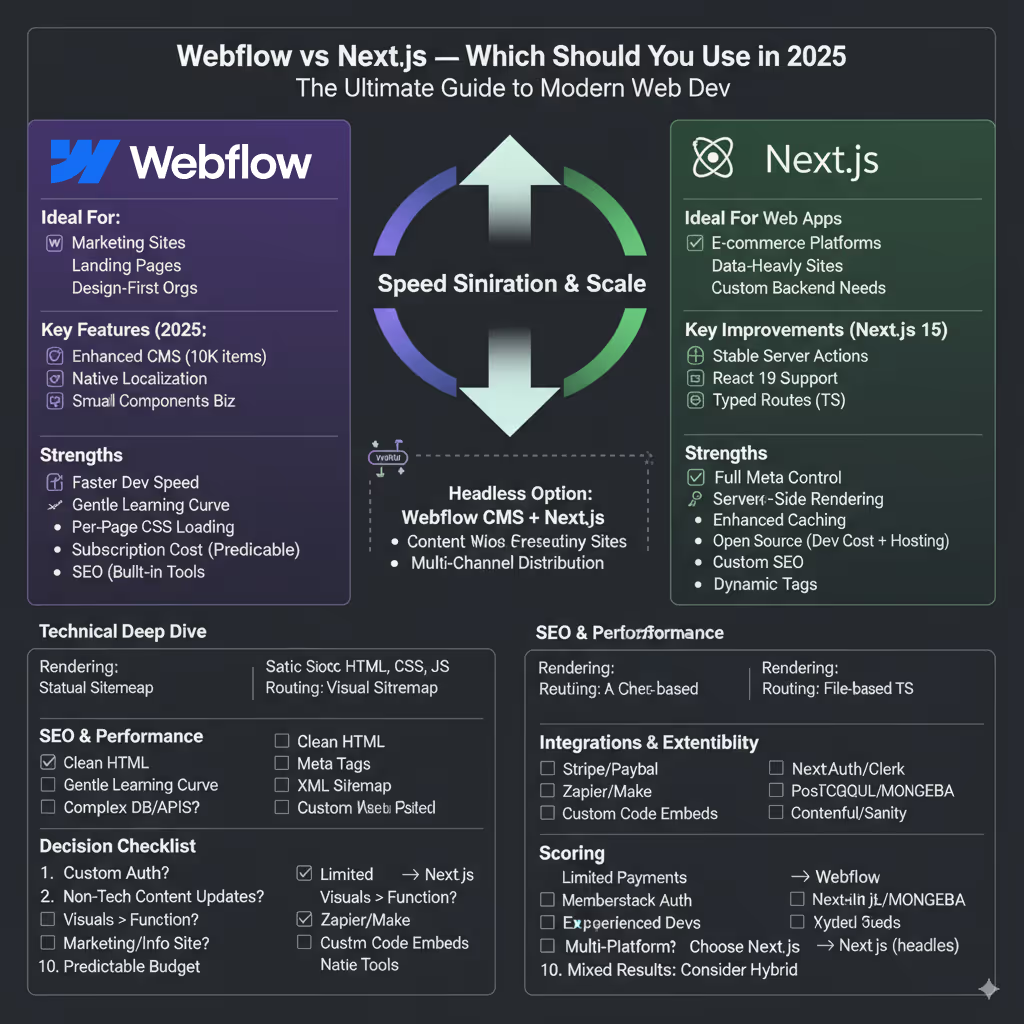
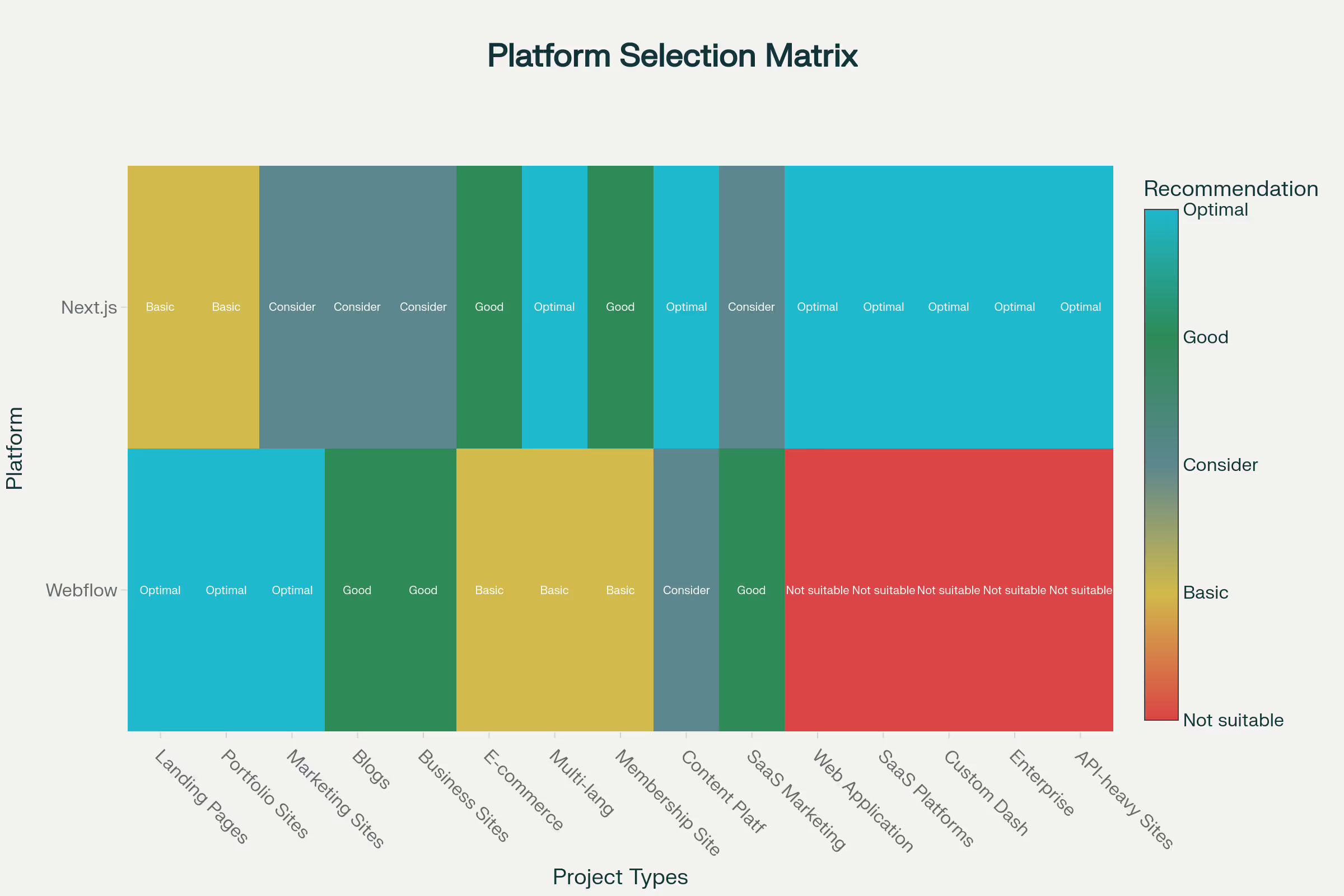
Choose Webflow if: You prioritize visual design freedom, need to empower non-technical team members, or are building marketing websites, landing pages, or portfolios. Webflow excels when speed to market and design flexibility matter more than custom functionality.
Choose Next.js if: You are building complex web applications, need advanced customization, require specific backend integrations, or have developer resources available. Next.js is ideal for data-heavy applications, e-commerce platforms, and projects that require custom server-side logic.
What Each Platform Offers
Understanding Webflow
Webflow is a visual website builder that combines design, content management, and hosting into a single platform. It generates clean, semantic HTML, CSS, and JavaScript while offering a drag-and-drop interface that rivals traditional design tools. With the latest updates in 2026, Webflow has enhanced its AI capabilities, introduced stronger performance optimization features, and expanded its CMS functionality.
Key Webflow features in 2026 include:
- AI-powered design suggestions for faster prototyping
- Enhanced CMS capabilities with support for up to 10,000 items on Business plans
- Native localization support for multilingual websites
- Improved performance optimization with per-page CSS loading
- Visual component system for reusable design elements
Understanding Next.js
Next.js is a React-based framework that provides server-side rendering (SSR), static site generation (SSG), and incremental static regeneration (ISR). The framework saw significant evolution in 2026, with Next.js 15 introducing major improvements in performance and developer experience.
Key improvements in Next.js 15 (2026):
- Turbopack enabled by default in development for builds up to 10 times faster
- Stable Server Actions replacing traditional API routes
- Improved caching controls with smarter fetch behavior
- Support for React 19 with new hooks such as useActionState
- Enhanced TypeScript integration with typed routes
If you're referring to React, read this
Many developers confuse Next.js with React itself. React is a JavaScript library for building user interfaces, while Next.js is a full framework built on top of React. If you compare Webflow directly with React, the difference becomes even clearer. React requires strong development expertise and does not include hosting, CMS, or visual design tools out of the box, all of which Webflow provides by default.
Headless Options: Webflow CMS + Next.js
A growing popular approach combines both platforms by using Webflow as a headless CMS. This hybrid solution leverages Webflow’s visual content management capabilities while using Next.js for the frontend presentation layer.
How it works:
- Content creators use Webflow’s visual CMS interface
- Developers fetch content via Webflow’s REST or GraphQL APIs
- Next.js renders the frontend with full control over performance and interactions
- Custom functionality integrates seamlessly with the content structure
This approach works especially well for:
- Content-heavy websites that require frequent updates
- Multi-channel distribution such as web, mobile apps, and digital kiosks
- Teams with designers and developers who want to use their respective strengths
- Enterprise websites that need custom functionality alongside visual content management
Technical Analysis: Explaining the Key Differences
Understanding the core architectural differences is essential to making an informed decision.
Routing and Data Fetching
- Webflow: Primarily generates static HTML, CSS, and JavaScript at build time. This is a form of static site generation (SSG), resulting in pages that load extremely fast and are easy to host and scale.
- Next.js: Offers a versatile mix of rendering modes, giving developers fine-grained control over performance and SEO.
- SSG (Static Site Generation): Pre-renders pages at build time, similar to Webflow, and is ideal for content that does not change frequently.
- SSR (Server-Side Rendering): Renders pages on the server for every request. This is critical for frequently changing dynamic content that search engines must index accurately, such as user-specific pages or e-commerce inventories.
- ISR (Incremental Static Regeneration): Allows static content to be updated after the site is built without requiring a full rebuild. This is a Next.js-exclusive feature that helps scale large websites efficiently.
Enrutamiento y obtención de datos
- Flujo web: Uses a visual routing system where the site structure and page connections are managed through the designer. Data fetching for dynamic content is possible but often requires third-party integrations or custom code embeds.
- Next.js: Uses a file-based routing system where creating a file inside the pages or app directory automatically creates a route. It provides powerful built-in data fetching methods, such as getStaticProps for SSG and getServerSideProps for SSR, allowing data to be pulled from any API, database, or CMS.
SEO and Performance Comparison
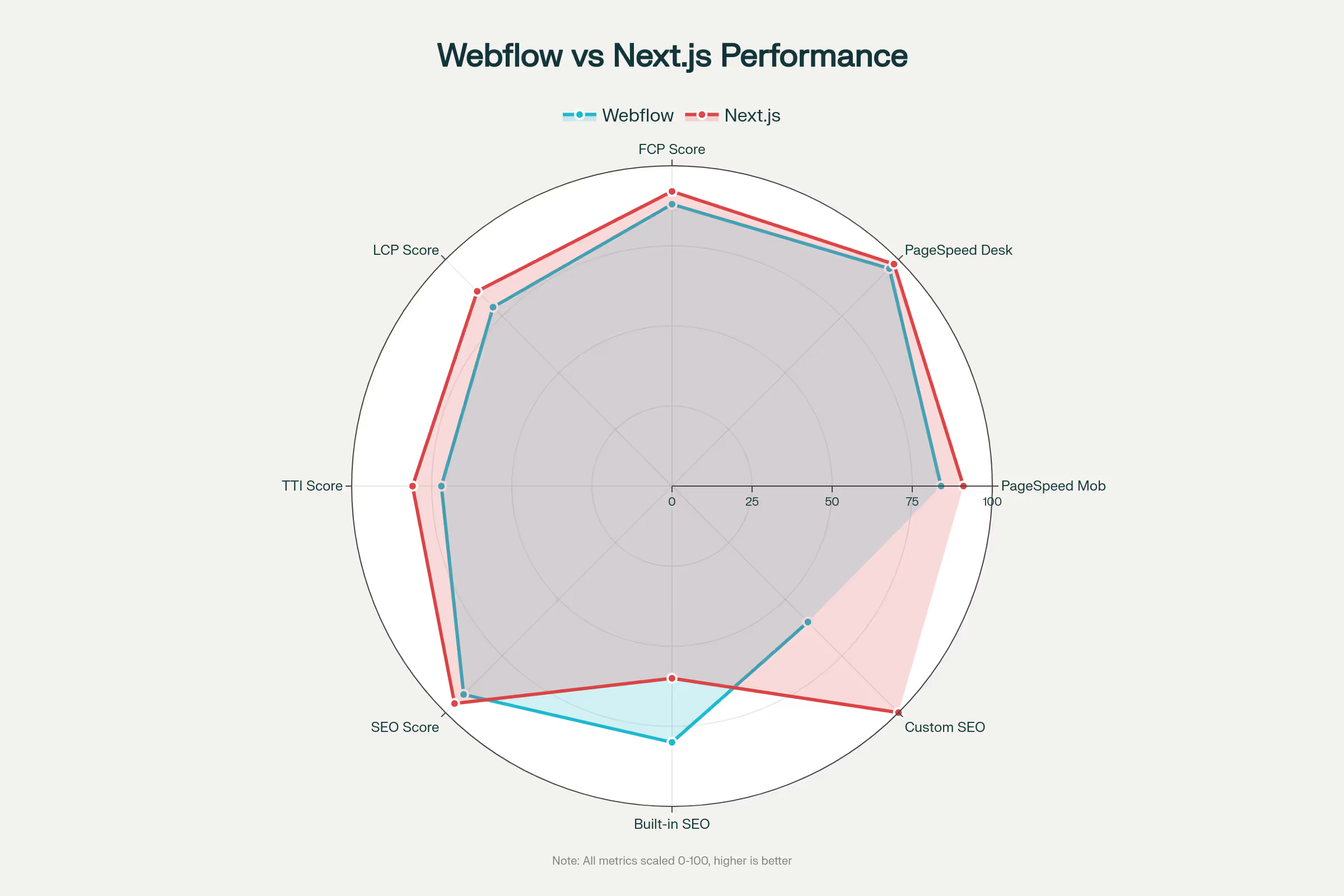
- Clean and semantic HTML generation
- Built-in meta tag management
- Automatic XML sitemap generation
- Schema markup capabilities
- Integrated performance analytics and monitoring
- Native SEO tools for non-technical users
Next.js SEO advantages:
- Full control over meta tags and structured data
- Server-side rendering for improved indexing
- Custom SEO implementations
- Advanced performance optimization
- Dynamic meta tag generation based on content
In practice, a well-optimized Webflow site can easily outperform a poorly optimized Next.js site. However, Next.js offers a higher performance ceiling for experienced developers working on complex projects.
Development Speed, Learning Curve, and Cost Analysis
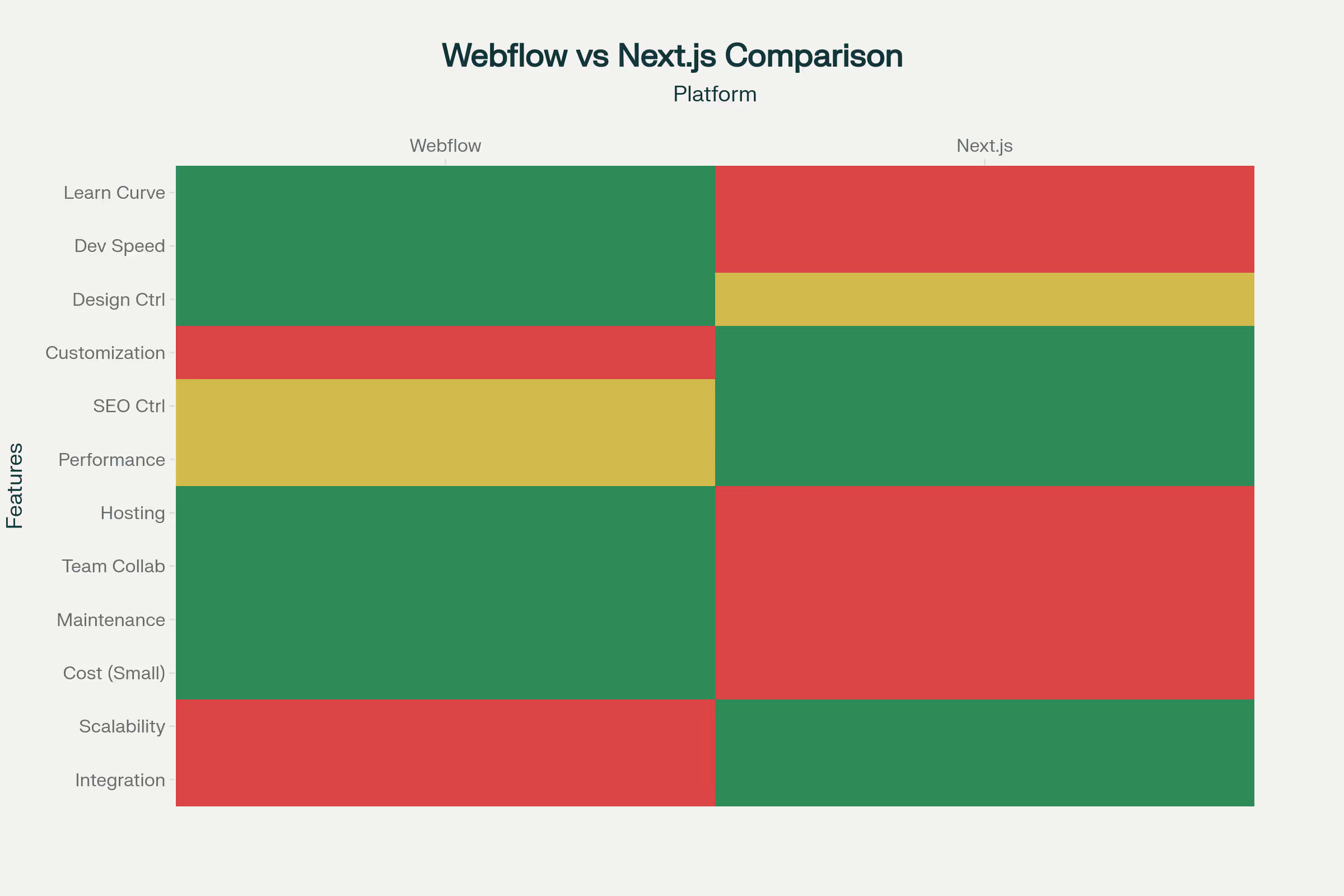
This is where the choice has major business implications.
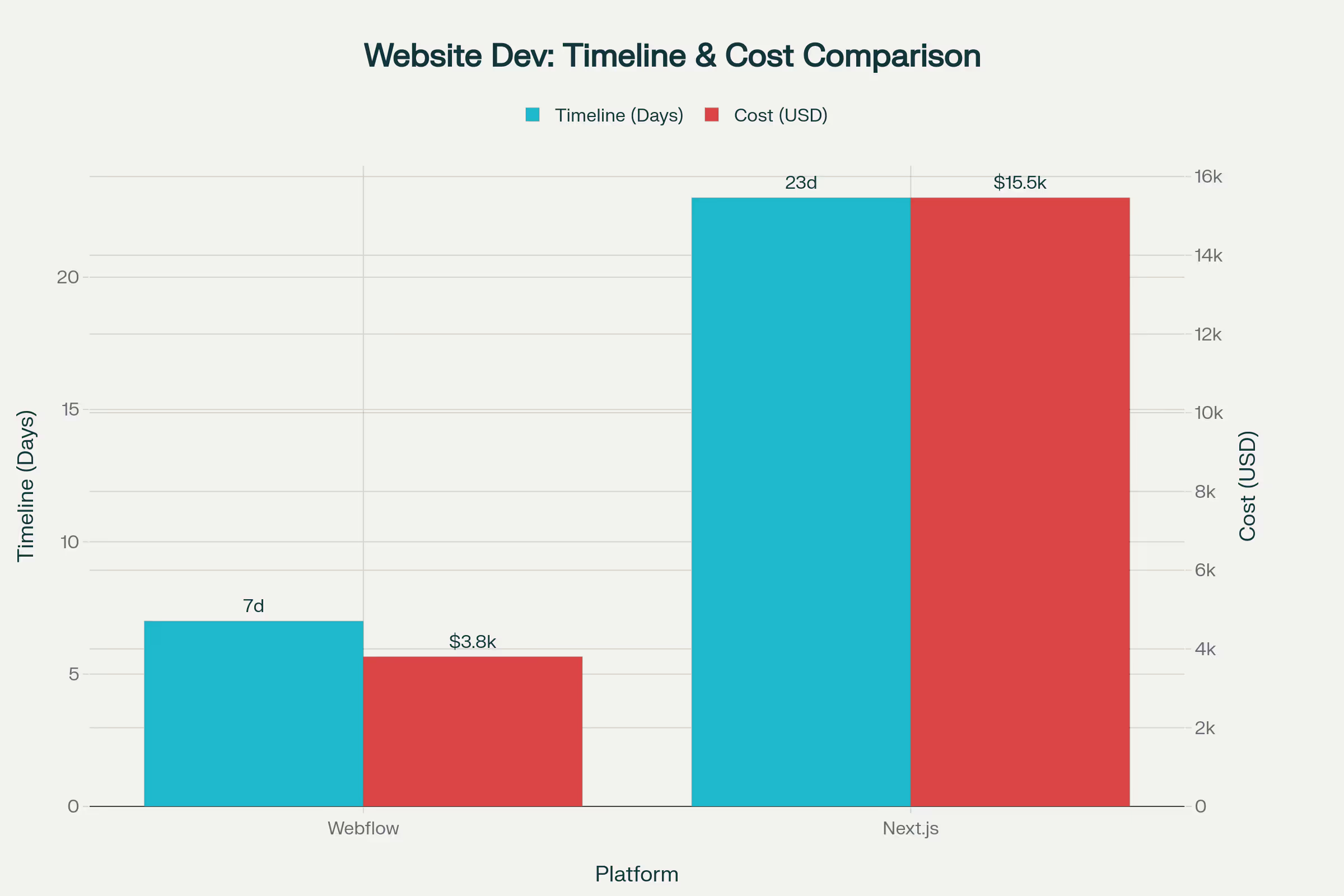
- Webflow development speed and cost:
- Speed: Dramatically faster for launching marketing websites, blogs, and simple e-commerce stores. The visual development process eliminates much of the traditional coding cycle.
- Learning curve: Easier for designers and marketers. Mastery requires understanding design principles and Webflow-specific nuances, but not programming.
- Cost: Uses a subscription-based model that includes hosting. Plans can become expensive for larger sites with high traffic and e-commerce needs, but they often reduce upfront development costs.
- Next.js development speed and cost:
- Speed: Initial setup and development are inherently slower due to the code-heavy process. This is a trade-off for greater customization.
- Learning curve: Very steep. Requires expertise in JavaScript, React, Node.js, and the Next.js framework itself.
- Cost: The framework itself is open source and free. However, you must factor in the high cost of hiring skilled developers, along with separate hosting, database, and infrastructure expenses such as Vercel, Netlify, or AWS.
Integrations and Extensibility
Authentication and Payments
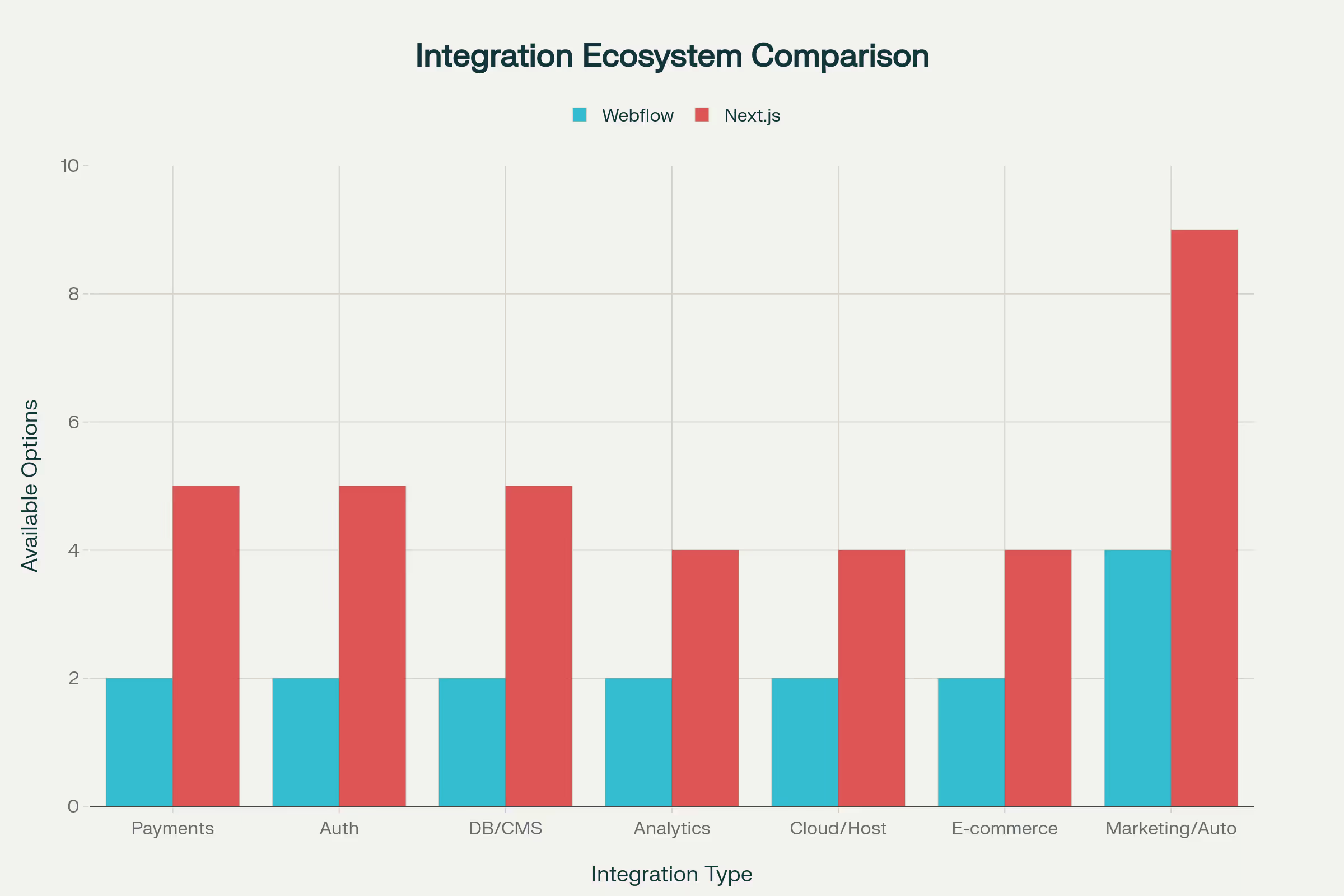
Webflow integrations:
- Limited native payment processing
- Third-party authentication through platforms such as Memberstack
- Zapier and Make for workflow automation
- Custom code embeds for specialized functionality
Next.js integration ecosystem:
- Payment processors: Stripe, PayPal, Razorpay, Authorize.Net
- Authentication: NextAuth, Clerk, Auth0, Supabase
- Databases: PostgreSQL, MongoDB, Supabase, PlanetScale
- CMS integrations: Contentful, Sanity, Strapi, headless WordPress
Next.js offers greater integration flexibility, especially for complex applications that require custom business logic.
When to Choose Webflow
Webflow excels in specific scenarios where visual design control and speed to market are top priorities:
Landing pages and marketing websites
Webflow’s strength lies in quickly creating high-conversion landing pages. The platform enables:
- Rapid prototyping from concept to live site
- A/B testing with built-in Optimize features
- Marketing team autonomy for content updates
- Professional design output without developer involvement
Design-first organizations
Teams that prioritize visual excellence benefit from Webflow’s design-centric approach:
- Pixel-perfect control over every design element
- Designer-friendly interface familiar to Figma and Sketch users
- Component reuse across projects
- Real-time collaboration between designers and content creators
Small and medium-sized businesses
Organizations with limited technical resources find Webflow’s all-in-one approach appealing:
- No server management or security maintenance
- Built-in hosting with CDN and SSL
- Automatic backups and version control
- Predictable monthly costs with no surprise hosting bills
When to Choose Next.js in 2026
Next.js is the preferred choice for app-like experiences and highly technical requirements.
- Complex web applications: Dashboards, admin panels, and SaaS platforms require real-time data and complex state management.
- Advanced e-commerce platforms: Large-scale stores that need custom cart logic, multiple payment gateway integrations, and complex inventory systems.
- Sites that require maximum performance: Projects where every millisecond of load time impacts conversions and revenue.
- Projects that need custom server-side logic: Applications requiring authentication, API routes, and custom server-side data processing.
Migration Considerations
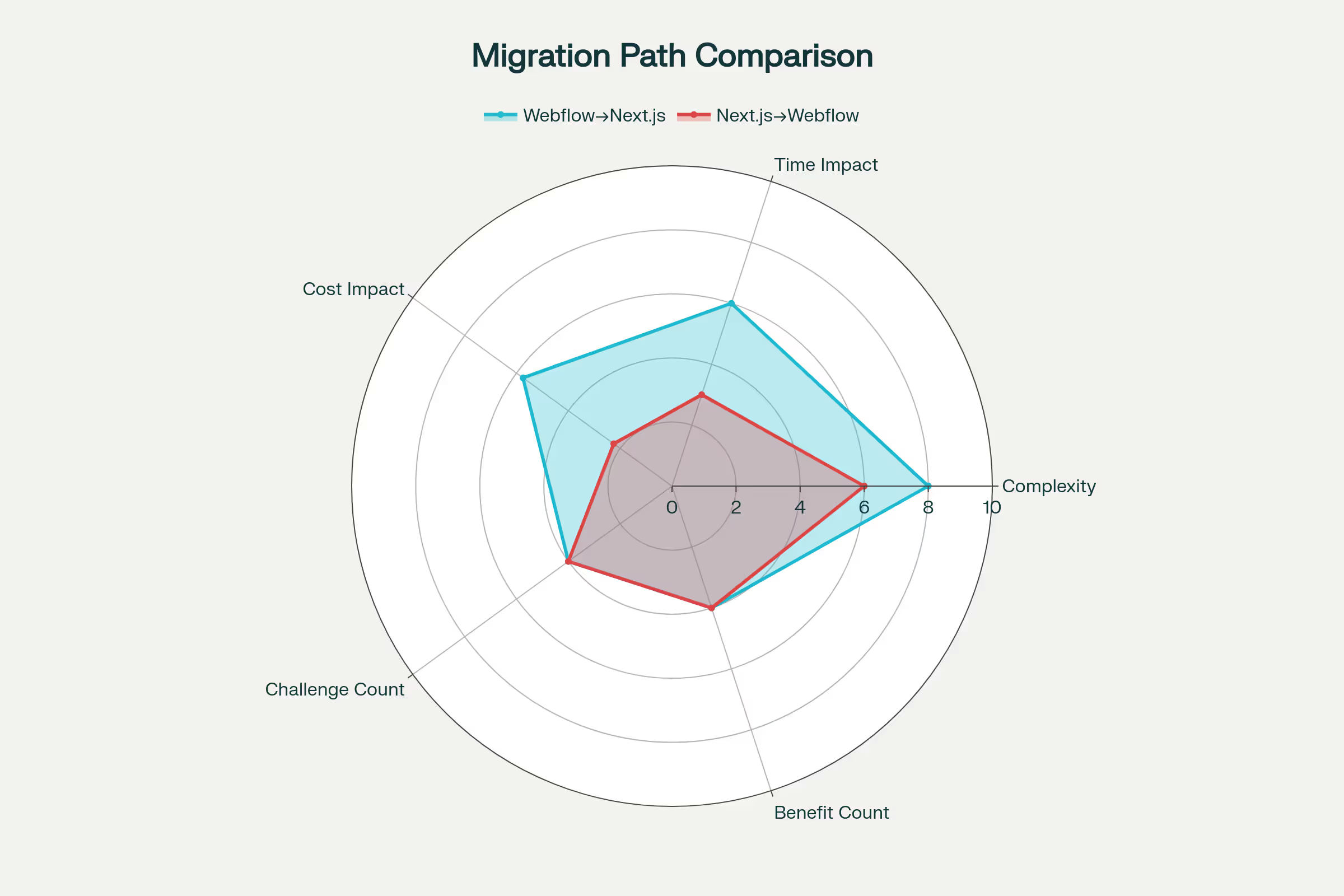
Migration from Webflow to Next.js
Migration from Webflow to Next.js usually happens when projects outgrow Webflow’s capabilities.
Common triggers:
- Need for custom user authentication
- Complex database requirements
- Advanced e-commerce functionality
- Integration with enterprise systems
Migration challenges:
- Limitations in exporting content from Webflow CMS
- Recreating designs in a code-based environment
- Rebuilding interactions using React libraries
- Preserving SEO during the transition
Migration from Next.js to Webflow
The reverse migration happens when teams prioritize speed and design flexibility over custom functionality.
Benefits of switching:
- Reduced maintenance overhead
- Faster content updates by non-technical team members
- Built-in hosting and security
- Visual control over design
Migration complexity:
- Limited preservation of custom functionality
- Adapting content structure to Webflow CMS
- Recreating third-party integrations
- Training requirements for team members
Real-World Examples and Case Studies
- Webflow examples:
HelloSign and Environn Labs demonstrate Webflow’s ability to create clean, user-friendly, and engaging enterprise websites. Lupin revamped its website with Webyansh on Webflow, a project that helped raise 2.8 million dollars in funding. - Next.js examples:
Hulu uses Next.js for its high-traffic streaming web application, leveraging its performance capabilities. Dollar Shave Club showcases its strength in building robust e-commerce platforms.
Decision Checklist: 10 Quick Questions
Use this checklist to guide your platform decision:
- Do you need custom user authentication or complex user features? → Next.js
- Will non-technical team members need to update content regularly? → Webflow
- Is visual design flexibility more important than custom functionality? → Webflow
- Do you need complex database relationships or custom APIs? → Next.js
- Is speed to market your top priority? → Webflow
- Will you need integrations with multiple third-party services? → Next.js
- Do you have experienced developers available for ongoing maintenance? → Next.js
- Are you primarily building informational or marketing content? → Webflow
- Do you need multi-platform content delivery (web, mobile, etc.)? → Next.js (headless) or Webflow CMS + Next.js
- Is budget predictability important for your organization? → Webflow
Scoring:
- More than 7 Webflow answers: Webflow is likely your best choice
- More than 7 Next.js answers: Next.js will better meet your needs
- Mixed results: Consider the hybrid Webflow CMS + Next.js approach
Conclusion: Choosing Your Champion for 2026
The Webflow vs Next.js debate does not have a single winner. It has two winners, each dominating its respective arena.
Choose Webflow for its unmatched visual development speed, design fidelity, and all-in-one simplicity. It empowers designers and marketers to build and launch professional websites independently. For most marketing-focused websites, it is the most efficient and effective choice.
Choose Next.js for its unparalleled technical flexibility, performance optimization, and custom functionality. It is the framework of choice for building the next generation of dynamic and complex web applications.
.avif)
At Webyansh, as a certified Webflow agency, we have seen how choosing the right tool can accelerate growth. We help our clients make this exact decision, ensuring their digital foundation is built on a platform that aligns perfectly with their business goals, technical resources, and long-term vision for the future.
How do Webflow and Next.js compare in terms of learning curve?
Webflow offers a gentler learning curve for designers who are familiar with visual design tools, while Next.js requires knowledge of JavaScript and React. With Webflow, users can become productive within days, whereas mastering Next.js typically takes weeks or even months of development experience.
Can I use Webflow and Next.js together effectively?
Yes, using Webflow as a headless CMS with a Next.js frontend is becoming increasingly popular. This approach combines Webflow’s visual content management with Next.js’s development flexibility, making it ideal for teams that include both designers and developers.
Does Next.js require knowledge of React?
Yes, a solid understanding of React is a fundamental prerequisite for working effectively with Next.js, as it is a framework built on top of React.
Which is more cost-effective, Webflow or Next.js?
There is no simple answer. Webflow has higher and more predictable subscription costs, but it can significantly reduce development expenses. Next.js is free to use, but its initial development costs, along with ongoing hosting and infrastructure expenses, are much higher. The total cost depends entirely on the project’s complexity and the team structure.
Which platform is better for e-commerce?
It depends on the scale. Webflow offers a solid native e-commerce solution for small to mid-sized stores. Next.js, when integrated with platforms like Shopify or a custom backend, is better suited for large-scale and complex e-commerce operations that require deep customization.