Summarise this article using AI


Choose Webflow if marketers need to publish pages without engineers. Choose Next.js if the site shares code, logins or live data with your product, or needs more than 20,000 CMS pages. For most B2B SaaS marketing sites, the best answer for 2027 is both: Webflow for the site, Next.js for the app.
We've built on Webflow since 2022 and we also take on custom web app work in Next.js, so we have a stake in this Webflow vs Next.js question and you should read everything below with that in mind. It's why the comparison runs on public data instead of opinion: Chrome field data for two platforms across eight markets, a fresh scan of 190 B2B SaaS homepages, GitHub's security advisory records, and official price pages checked on 30 October 2026.
Key takeaways
- Webflow wins the field data overall: 71.3% of Webflow sites pass Core Web Vitals on mobile against 35.7% of Next.js sites (HTTP Archive, September 2026). Among the 100,000 busiest sites the gap nearly closes, at 26.9% against 24.3%.
- Next.js wins on weight when you compare like with like. Across the 190 B2B SaaS homepages we scanned, the median Next.js page weighed 3.1 MB and the median Webflow page 4.5 MB, mostly because of images.
- SEO is close to a tie at the median, with 96% to 98% of homepage text in the raw HTML that AI crawlers read. The failures aren't even, though: 15% of Next.js homepages kept over a fifth of their text out of that HTML, against 2% on Webflow.
- GitHub's advisory database lists 44 security advisories for Next.js so far in 2026, up from 14 in all of 2025. Five are rated critical. That patching is a running cost most comparisons leave out.
- Over three years, running a typical marketing site costs about $3,700 on Webflow and $10,700 on Next.js in the US, by our model. Move to Webflow's Team plan and the sums flip: $92,000 before any build work.
- The choice is less binary than it was. Webflow Cloud now runs Next.js apps under your Webflow domain, with limits you should read first.
What is the difference between Webflow and Next.js?
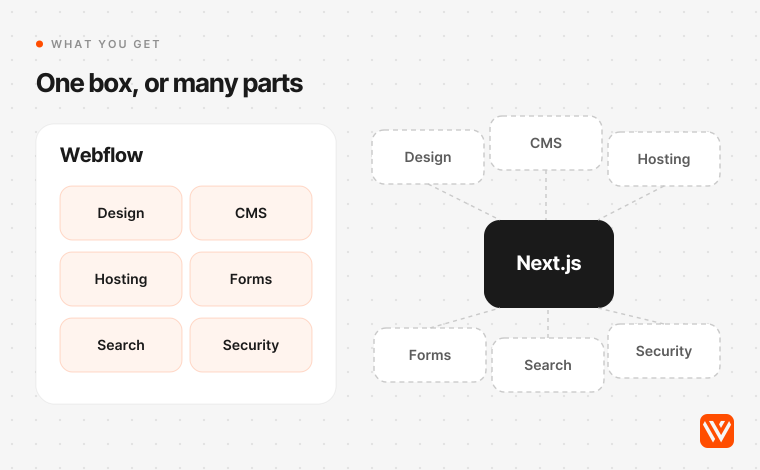
Webflow is a hosted visual website platform: design, CMS, hosting, forms and publishing in one subscription. Next.js is an open-source React framework that gives developers routing, rendering and data fetching, and leaves everything else to them. One is a product you log in to. The other is a code dependency you own.
That difference matters more than any feature list. Webflow answers the question "who can change this page today?" with "anyone with a seat". Next.js answers it with "whoever can open a pull request", unless you add a headless CMS, which is a third product to pay for and wire in.
| Webflow | Next.js | |
|---|---|---|
| What it is | Hosted visual platform | Open-source React framework, maintained by Vercel |
| Who ships a page | Marketers and designers, in the Designer or Editor | Developers, or editors through a headless CMS |
| Hosting | Included | Your choice: Vercel, Cloudflare, Netlify, AWS or your own server |
| CMS | Built in: 20,000 items and 40 Collections on Premium | Not included; Sanity, Contentful or Markdown in the repo |
| Forms and site search | Built in | Build them or buy them |
| Rendering | Published as pages served from Webflow's CDN | Static, server-rendered, streamed or cached, per route |
| Starting price | $25 a month billed yearly, or $39 monthly | Free framework; Vercel Pro from $20 per developer a month |
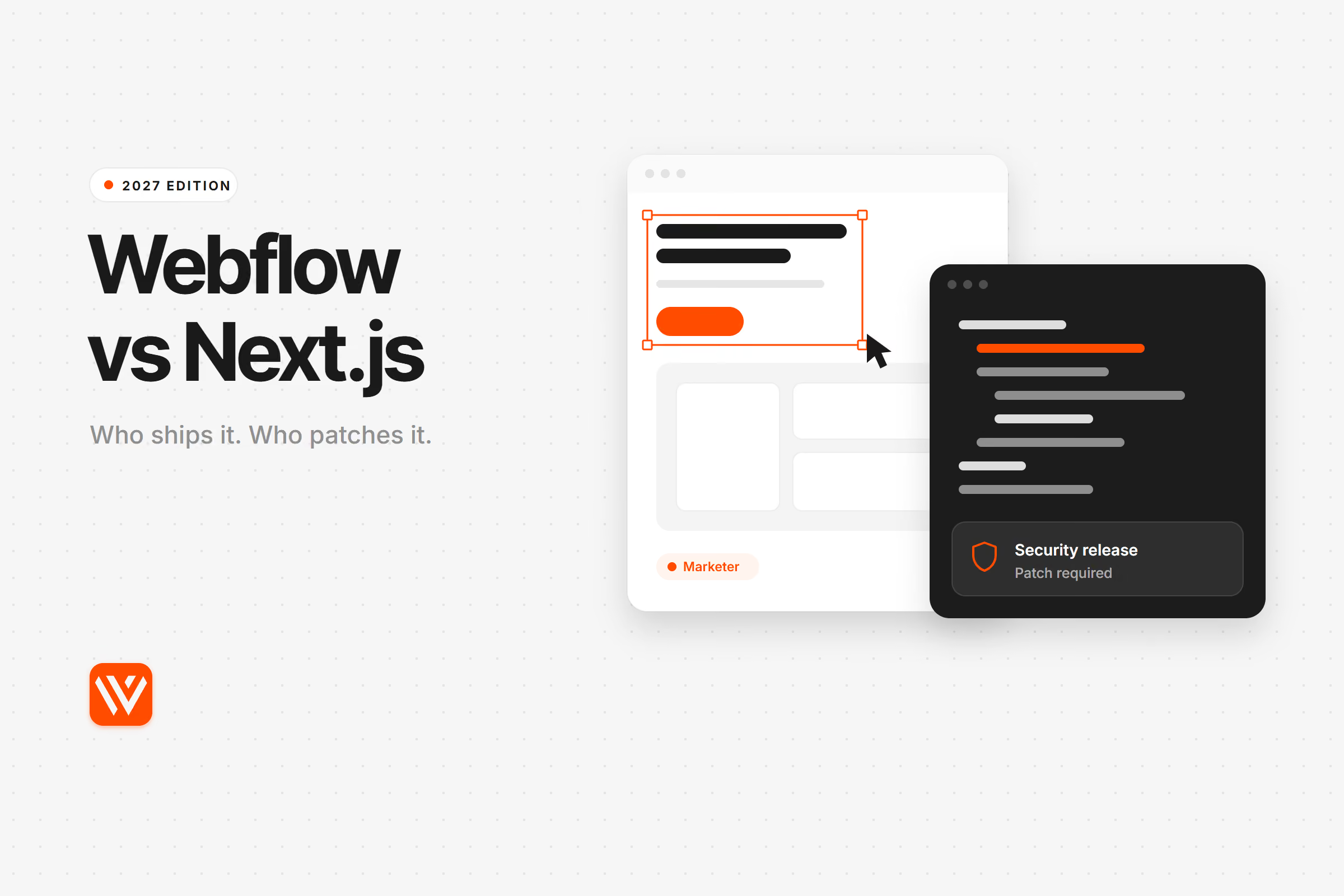
| Who patches security issues | Webflow | You |
| Main limit | Plan caps, and no route-level custom logic without Webflow Cloud | Everything Webflow did for free is now your work |
| Leaving later | CMS content exports by CSV; layouts need a rebuild | Code is yours and moves between hosts |
A quick word on the current versions, since many pages on this query still describe Next.js 15. The stable line is Next.js 16.4, released on 6 October 2026, with 16.4.3 the latest patch on npm at the time of writing. On the Webflow side, the 13 May 2026 plan change folded the old CMS and Business plans into Premium. If a comparison quotes "10,000 items on Business", it predates that change.
Which is faster, Webflow or Next.js?
Webflow sites pass Core Web Vitals far more often than Next.js sites in Chrome field data, but that gap says more about who uses each tool than about the tools. Compare similar sites and Next.js pages are often lighter. Both statements are true, and you need both.
Start with the wide view. The HTTP Archive Technology Report joins real Chrome user data with crawls of the public web. In September 2026 it covered 59,483 Webflow origins and 395,345 Next.js origins on mobile. An origin passes if real visitors get good loading, responsiveness and visual stability.
| Market | Webflow, mobile pass rate | Next.js, mobile pass rate | Webflow good LCP | Next.js good LCP |
|---|---|---|---|---|
| All countries | 71.3% | 35.7% | 78.6% | 53.5% |
| United States | 80.2% | 51.6% | 86.4% | 67.7% |
| United Kingdom | 79.3% | 50.5% | 86.4% | 73.5% |
| Germany | 81.4% | 48.8% | 86.5% | 71.6% |
| Australia | 71.1% | 38.0% | 76.1% | 51.1% |
| Singapore | 61.6% | 44.9% | 67.3% | 60.7% |
| United Arab Emirates | 40.7% | 26.6% | 48.3% | 39.7% |
| India | 39.1% | 21.2% | 45.1% | 32.1% |
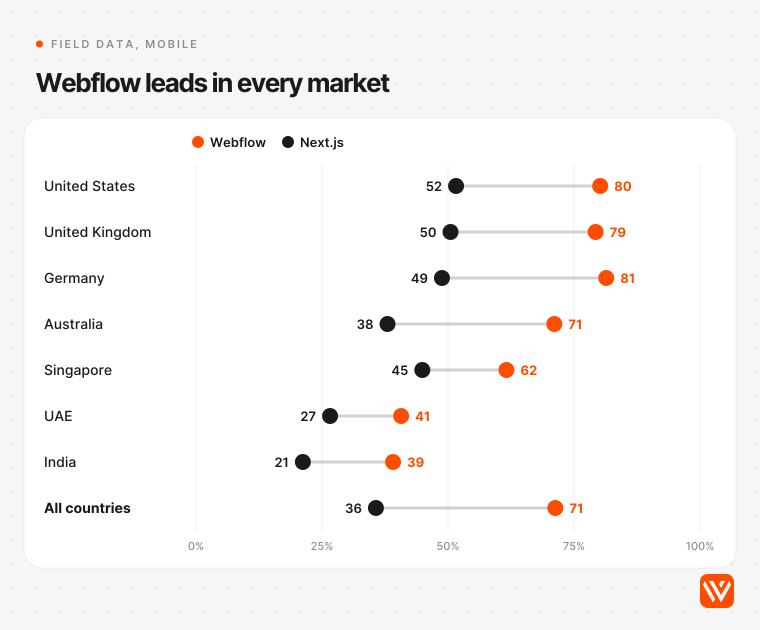
Webflow also leads in every market we checked, and it's improving at about the same pace as Next.js: 61.8% to 71.3% in two years, against 27.4% to 35.7%.
If your buyers are in India or the Gulf, read those rows twice. Passing rates drop by about half on both stacks, because slower networks and cheaper phones punish every kilobyte. Neither platform fixes that for you.
Now the catch. That 395,345 includes web apps, dashboards and enormous ecommerce fronts. Webflow's 59,483 is mostly brochure and marketing sites. Comparing them is like comparing a van with a sports car on fuel economy. The busiest sites show this: among the top 100,000 origins, the pass rate is 26.9% for Webflow (only 156 origins) and 24.3% for Next.js (5,890 origins). Big, busy sites struggle on any stack.
We scanned 190 B2B SaaS homepages to compare like with like
So we built a fairer sample. On 30 October 2026 we fingerprinted 370 B2B SaaS domains from the Y Combinator directory and earlier Webyansh audits, then loaded every Webflow and Next.js homepage in headless Chrome: 84 Webflow, 106 Next.js. Same company type, same job, same machine.
| Median, per homepage | Webflow (84 sites) | Next.js (106 sites) |
|---|---|---|
| Total page weight | 4.5 MB | 3.1 MB |
| JavaScript transferred | 1.4 MB | 1.3 MB |
| Images transferred | 1.2 MB | 0.6 MB |
| Requests | 140 | 142 |
| Homepages with over 1 MB of JavaScript | 71% | 59% |
| Raw HTML document size | 196 KB | 347 KB |
| Homepage text present in raw HTML | 98% | 96% |
| H1 present in raw HTML | 86% | 82% |
| JSON-LD structured data | 69% | 78% |
| Canonical tag | 87% | 92% |
| Open Graph image | 87% | 88% |
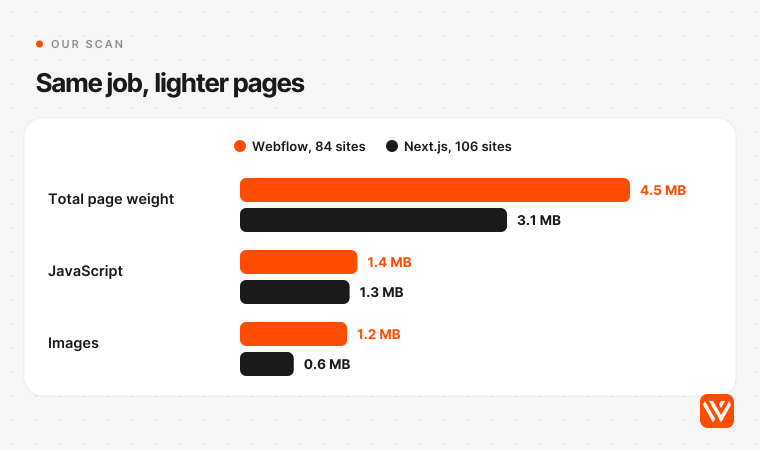
Here the result turns around. The median Webflow homepage was heavier in total and carried about twice the image weight, and that gap held in each of the four source lists we drew from. JavaScript was close to level, so the popular idea that Next.js ships far less code didn't show up. HTTP Archive's medians for the whole web point the same way on weight: 3.48 MB for Webflow and 2.17 MB for Next.js on mobile.
Our read of why: Webflow sites tend to be designer-led, so video, animation and tracking tags pile up without a performance budget in front of anyone. The platform adds its own weight too: every Webflow homepage we scanned loaded jQuery.
Webflow isn't slow by nature, though. On our First December Films build, 184 pages on Webflow, we measured a 1.05 second LCP behind Cloudflare. On other client rebuilds, the same platform took Futurense from a performance score of 39 to 92. Our view: a performance budget beats a platform choice. Pick the platform for who runs it, then give someone the job of keeping it light.
One Next.js detail surprised us. Its HTML documents were far larger, 347 KB against 196 KB, because on App Router homepages a median 41% of the document was inline React payload: the same content sent a second time for hydration. Tom MacWright, then building Placemark, flagged this pattern in 2021 when he moved his own marketing site off a React stack. Server Components helped, but the double delivery is still there.
Is Next.js better than Webflow for SEO and AI search?
No. Next.js gives you more control over SEO, but it doesn't rank better by default. Both stacks score a median 96 for Lighthouse SEO in HTTP Archive's September 2026 data, and both serve most of their text in the raw HTML. If anything, Next.js gives you more ways to get it wrong.
AI search makes raw HTML matter more than it used to. Vercel's own study of crawler behaviour, published in December 2024, found that none of the major AI crawlers it tested render JavaScript, including those from OpenAI and Anthropic. Google's Gemini is the exception because it shares Googlebot's infrastructure. So text that needs a browser to appear is text those engines may never see.
At the median, both stacks handled this well: 98% of homepage text reached the raw HTML on Webflow and 96% on Next.js. The tail tells a different story. Only 2 of 84 Webflow homepages (2%) had under 80% of their text in the raw HTML, against 16 of 106 Next.js homepages (15%). A few Next.js sites served almost nothing, with one showing 759 words in a browser and 117 in the source. That's a client-rendering choice, and server rendering would fix it. But Webflow doesn't let you make that mistake on normal page content, and Next.js does.
Structured data leans the other way, with JSON-LD on 78% of Next.js homepages against 69% on Webflow, and canonical tags on 92% against 87%. We'd put that down to who builds them: developers tend to add these by habit, and designers often don't. Webflow's Schema Markup field and page-level custom code can do the same job. We've gone deeper on this in our audit of Webflow for SEO and AI search.
Where Next.js does pull ahead is scale and automation:
- Programmatic SEO. Generating 50,000 pages from a database is straightforward in Next.js and impossible inside Webflow's 20,000-item cap on Premium.
- Page-level logic. Dynamic metadata, redirects at the edge and server-rendered personalisation all sit in your code.
- International SEO. You control hreflang and routing directly, though you also own every mistake.
For a site of a few hundred pages, none of that changes your rankings. Content and links do.
How much does Webflow cost compared with Next.js?
Webflow costs less to run for a typical marketing site; Next.js costs less at the top end. In our three-year model, one 40-page site costs about $3,700 on Webflow and $10,700 on Next.js in the US, excluding the build. On Webflow's $2,500-a-month Team plan, the same three years cost about $92,000.
Most comparisons say the reverse: Next.js costs more up front and less over time. That holds if your Webflow bill is large. It doesn't hold at Premium, because a Webflow site costs almost nothing in platform fees and a Next.js site needs someone paid to keep it healthy.
Here's the model, for one site with three editors and one developer seat:
| Three-year running cost, excluding the build | US | UK | India |
|---|---|---|---|
| Developer rate used (median salary plus 30% on-costs) | $58/hour | £41/hour | ₹469/hour |
| Webflow: Premium plus Core workspace | $1,584 | £1,187 | ₹1,50,943 |
| Webflow: 36 hours of developer time | $2,085 | £1,462 | ₹16,875 |
| Webflow total | $3,669 | £2,649 | ₹1,67,818 (about $1,761) |
| Next.js: Vercel Pro plus Sanity Growth, 3 seats | $2,340 | £1,753 | ₹2,22,984 |
| Next.js: 144 hours of developer time | $8,339 | £5,850 | ₹67,500 |
| Next.js total | $10,679 | £7,603 | ₹2,90,484 (about $3,048) |
The prices come from the live Webflow, Vercel and Sanity pricing pages on 30 October 2026. ₹1 lakh is ₹1,00,000 in the Indian number system, and we converted at $1 = ₹95.29 and £0.749 on that date. Wages are the US Bureau of Labor Statistics median for web developers, $92,650 in May 2025; the ITJobsWatch UK median for Next.js roles, £65,000 in the six months to 30 October 2026; and Flexiple's India median, ₹7.5 lakh.
The hours are our assumption, so change them to suit your team. We allowed 48 hours a year for Next.js: 10 security patch days at 2 hours each, one major upgrade at 16 hours, and 12 hours of dependency upkeep. We allowed 12 hours a year for Webflow, for integration fixes and QA. A contractor or agency will charge more than these salary-based rates.
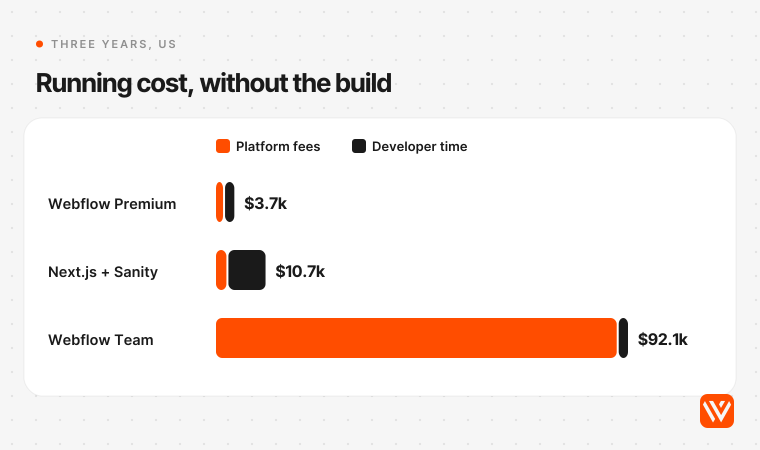
The model turns on three things:
- Your Webflow tier. Team costs $2,500 a month on an annual contract and brings 100 Collections, 10 seats, Localize and API limits five times higher. Vellum, a five-person marketing team, reported saving $30,000 a year by leaving Webflow. If you're at that level of spend, run these numbers properly.
- Your CMS choice. Sanity was the most common CMS we could detect on Next.js homepages, on 16 of 106, and 64% of those homepages ran on Vercel, which is why we modelled that pair. Swap Sanity for Contentful's Lite plan at $300 a month and the platform line goes from $2,340 to $11,520. Markdown in the repo drops it to $720, if your editors will work that way.
- Your location. India's total gap is about 1.7 times, against nearly 3 times in the US and UK, because platform fees are billed in dollars while developer time is local. An Indian team feels Webflow's subscription more and Next.js upkeep less.
And the build itself? Specialist agencies charge about $10,000 to $25,000 for a seed-stage Webflow site, with India-based studios lower. Web agency Kolonell estimates 3 to 6 weeks on Webflow against 8 to 14 for custom Next.js. AI coding agents are shrinking that second number fast, which brings us to the part of the bill they don't touch.
What does a Next.js site cost you after launch?
Mostly attention. GitHub's advisory database lists 44 advisories for the next package in 2026 so far, against 14 in 2025 and 6 in 2024, and five of this year's are rated critical. Someone on your team has to read them, patch and redeploy. On Webflow's hosted platform, that person works at Webflow.
We pulled every advisory for the npm package from the GitHub Advisory Database on 30 October 2026:
| Year | Critical | High | Medium | Low | Total |
|---|---|---|---|---|---|
| 2024 | 0 | 5 | 1 | 0 | 6 |
| 2025 | 2 | 3 | 5 | 4 | 14 |
| 2026, to 30 October | 5 | 15 | 20 | 4 | 44 |
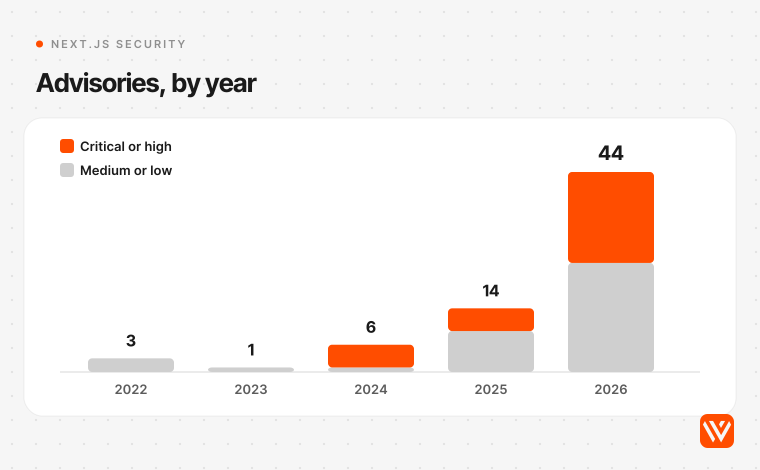
Those 44 landed on 10 separate days. In May alone, one coordinated release covered 13 advisories, and Vercel said they couldn't be reliably blocked at the firewall, so patching was the only full fix. In July the Next.js team moved to a roughly monthly security release that teams can plan around. On 14 October it shipped fixes for two critical remote code execution flaws. A November release is already announced.
Fairness matters here, so three caveats:
- More advisories doesn't mean worse code. The Next.js team says LLM-assisted research is driving a rise in findings across open source, and it runs the same tooling on its own code. A busy advisory page can mean a healthy security programme.
- Many apply only to certain setups. The October denial-of-service flaw needs App Router with at least one Server Action; another critical issue needed Windows hosting. Static sites sit outside many of these.
- You can step out of most of it. A static export has no Next.js server running in production, so server-side flaws have nothing to reach. You give up server rendering, Server Actions and the built-in image optimiser. For a marketing site, that's often a good trade, and few teams take it.
Support windows add a second clock. Next.js 15 was due to leave support on 21 October 2026 and got an extension to 31 January 2027. React2Shell, the CVSS 10.0 React flaw disclosed in December 2025, is the reminder of what a miss costs. If nobody owns upgrades, your marketing site ages into a liability.
Webflow isn't free of risk. It's a different kind: you can't fix it, and you can't leave quickly. Webflow's own status feed shows 34 incidents between January and September 2026, seven of them rated major or critical. On 14 and 15 April, some hosted sites returned 5xx errors for about 12 hours. In February and September, form notification emails failed for a day or more. Vercel's feed lists 50 incidents between May and October 2026, across a much wider product, so the raw counts aren't comparable. No host is spotless.
Did AI coding agents change the answer?
They changed the build cost, not the running cost. In 2026, teams moved sites off Webflow and headless CMSs in days using coding agents. But a site still needs forms, redirects, previews and security upkeep, and agents don't own any of that after launch. Our view: agents make Next.js a fair option for teams that have an engineer on call. They don't make it a marketing tool.
The two most-quoted stories deserve a close read.
Lee Robinson moved cursor.com from a headless CMS back to code and Markdown, and wrote it up in December 2025. He'd estimated one to two weeks. It took three days and $260 in tokens. His sharpest number was $56,848 in CDN usage from the CMS, though Knut Melvær of Sanity replied that much of that came from hosting a video in file storage, and that what Lee built was itself a small CMS. Both are worth reading, and both have a commercial interest. Cursor also has a team of developers who live in Git. Yours may not.
Anita Kirkovska at Vellum moved a five-person marketing team off Webflow in about a week, and wrote it up in May 2026. The site now runs on Next.js and Sanity, and a showcase page went from a week to half a day. Her warning is the useful part: the marketer has to be the one who notices "the invisible things". Vellum's LLM leaderboard page brought about 80% of its organic traffic, so the team watched rankings hour by hour for a week.
Chili Piper's August 2026 migration guide collects the failure stories, including one practitioner's account of a client losing an estimated €20,000 a day after a botched move. Forms are the quiet problem: they look the same after a rebuild while the routing behind them is gone.
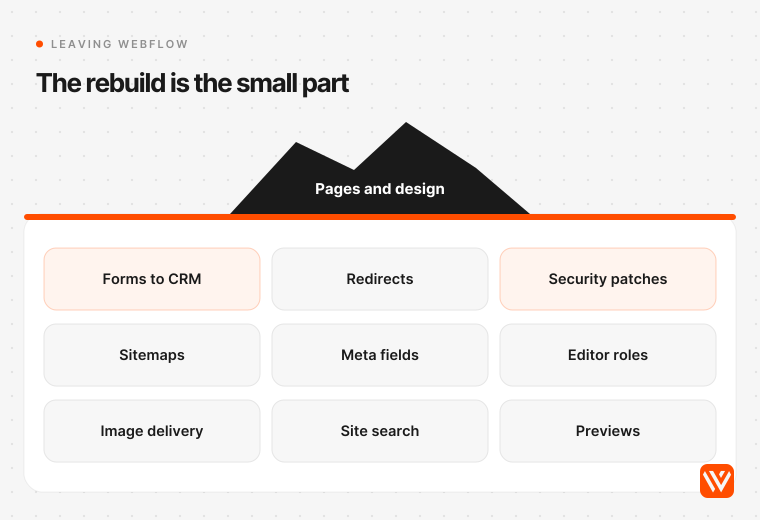
So when you leave Webflow, here's what becomes yours:
| What Webflow did for you | What you need on Next.js |
|---|---|
| CMS with visual editing | A headless CMS, or Markdown and pull requests |
| Forms and submissions | A form backend, spam protection, CRM routing |
| Redirects | A redirect map in code or at the host |
| Sitemaps and meta fields | Generated from your content model |
| Image resizing | Next.js Image, on a host that bills for it, or a service |
| Site search | Algolia, Typesense or a build of your own |
| SSL, CDN, DDoS protection | Your host, and your configuration |
| Security patches | You, roughly monthly |
| Publishing rights for marketers | Roles, previews and a review process |
There's a counter-current worth knowing, too. Tom MacWright moved Placemark's marketing site onto Webflow from a React stack, happy to pay about $20 a month rather than maintain another build process. Balena moved from a custom Gatsby site to Webflow in 2023 because the old one needed engineers to maintain. Marketing sites keep changing, and the question of who can change them never goes away.
Can you use Webflow and Next.js together?
Yes, and it's what we'd pick for most B2B SaaS companies. The simplest split runs Webflow at company.com and a Next.js app at app.company.com. Webflow Cloud now adds a tighter option: a Next.js app mounted at a path on your Webflow domain, such as /tools or /app, deployed from GitHub.
There are four ways to combine them, in the order we'd consider them:
- Subdomain split. Webflow for the marketing site, Next.js for the product. Two teams, two deploys, no shared risk. A marketer can't break the app, and a framework CVE can't touch the pricing page.
- Webflow Cloud. Webflow Cloud deploys Next.js through the OpenNext Cloudflare adapter and serves it under your site's domain. Good for calculators, gated tools and small product surfaces.
- DevLink and code components. DevLink exports Webflow components as React and brings React code components into the Designer. This keeps one design system across both sides.
- Webflow as a headless CMS. A Next.js front end reads content through Webflow's REST Data API. It works, but you're paying for a visual builder and not using it. We'd only do this during a migration.
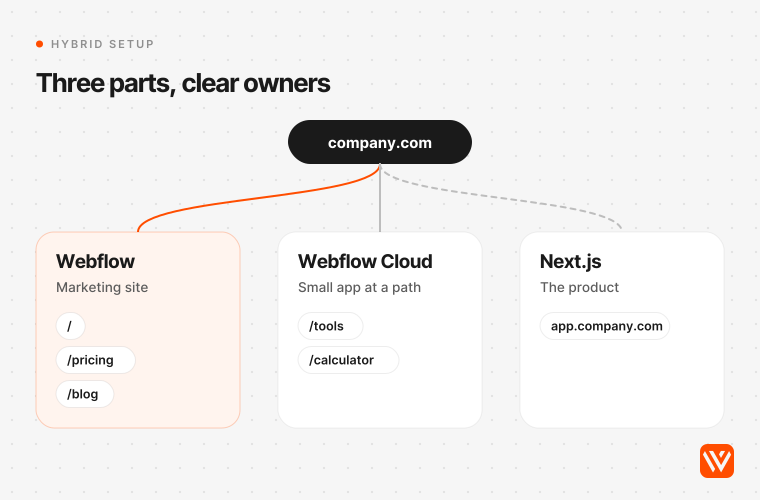
We run the second pattern in production, with one difference. For First December Films, the script analyser sits at /analyser as a separate Webflow Cloud app, built in Astro 7 on the Cloudflare Workers runtime, beside a 184-page Webflow site. We chose Astro over Next.js for that job, and the pattern is the same. One lesson from it: when the client rebuilt the page in the Designer, the rebuild dropped the head code and one element ID. We restored them through the API within the hour, and that check is now on our launch list. A hybrid site needs a written rule for who owns which page.
Before you choose Webflow Cloud for Next.js, read these limits. They're what most articles skip:
| Webflow Cloud limit | Value | Why it matters |
|---|---|---|
| Runtime | Cloudflare Workers, through OpenNext | Node.js packages may not run unchanged |
| Worker memory | 128 MB | Vercel functions allow up to 4 GB |
| CPU time per request | 30 seconds | Long jobs need another home |
| Request timeout | 20 seconds | Applies even when you're waiting on a database |
| Node.js middleware | Not supported | Edge runtime middleware only |
| ISR and on-demand revalidation | Experimental | Don't build a content site around it yet |
| use cache directive | Not supported | A headline Next.js 16 feature |
| Cache-Control response header | Replaced with private, no-cache | You can't set your own caching |
| Scheduled jobs, queues | Not offered | Per Vercel's comparison, these need an outside service |
| Log retention on Premium | 1 day | Debugging needs an outside tool |
Those come from Webflow's limits page and framework guide, read on 30 October 2026, with Vercel's comparison guide for the rest. Vercel's guide has an obvious interest, but its facts match Webflow's docs. Our reading: Webflow Cloud suits small, self-contained features. If the app is the product, host it where Next.js is native.
When does Webflow stop being enough?
Webflow stops being enough when you hit a hard plan limit, need logged-in product state on marketing pages, or want engineers to treat the site as code. Most B2B SaaS sites reach none of these before Series B. Check the specific limits below rather than a rule of thumb like "under 50 pages".
| Limit | Value on self-serve plans | What happens |
|---|---|---|
| CMS items | 20,000 on Premium, custom on Enterprise | Programmatic SEO hits the wall first |
| CMS Collections | 40 on Premium, 100 on Team | Large content models run out |
| Static pages | 300 on Basic | Rarely a problem |
| Items in one Collection list | 100 | Long grids need filtering, or a search |
| Data API rate | 120 requests a minute on CMS-tier plans | Syncing 20,000 items takes 200 calls, about 100 seconds |
| Site publish by API | One a minute | Item-level publishing is the workaround |
| Code export | Excludes CMS, forms, search, localized content | A move means a rebuild |
We've hit some of these ourselves. On First December Films, Webflow's 100-item list limit meant the work grid couldn't show every film, so the rest are reachable by URL and through search. We've hit plan limits on client sites too. None of it was fatal, and you should know about it before you sign.
Webflow's code export is the honest lock-in point: it needs a paid Workspace plan, leaves out CMS content, ecommerce and localized pages, and forms and site search won't work on the exported copy. You can pull CMS data by CSV or API, so your content stays yours. Your layouts don't travel.
Regulated industries have one more check. Webflow signs no HIPAA business associate agreement on any plan, as we've covered in detail. Vercel lists a HIPAA BAA at $350 a month on Pro. If patient data touches a page, that alone can decide this.
Should you migrate from Webflow to Next.js?
Only if a specific limit is costing you money, and only with a redirect map. Plenty of sites are moving: TechnologyChecker's crawl counted 5,002 domains going from Webflow to Next.js since 28 May 2026, and 666 going the other way. But that gap narrowed to about 2.2 to 1 in the last 30 days, and the company sells those migrations.
Treat those figures as a direction, not a census. Its own framing is the useful bit: most moves happen when ownership of the site passes from designers to developers. HTTP Archive shows the wider picture: Next.js grew from 178,234 to 404,724 mobile origins in two years, while Webflow held steady, from 59,398 to 60,687.
If you do move, follow this order:
- List what Webflow does for you. Use the table above, then add your integrations.
- Export every URL and metadata field. Sitemap, CMS CSVs and a crawl.
- Build a 1-to-1 redirect map. Keep URLs unchanged wherever you can. Our First December Films launch used 93 redirects, including capitalised variants the old server tolerated. Those are the ones people forget.
- Rank pages by conversions. Protect those before any traffic-only page, as Vellum did with its leaderboard.
- Rebuild forms first. Push a test lead through every form into your CRM.
- Launch in a quiet window. Keep the old site restorable.
- Watch daily for two weeks. Check rankings, indexing, form fills and booked meetings.
Going the other way, from a neglected Next.js site to Webflow, needs the same list. Custom logic won't come across, so decide what stays on a subdomain.
How to choose: four questions that settle it
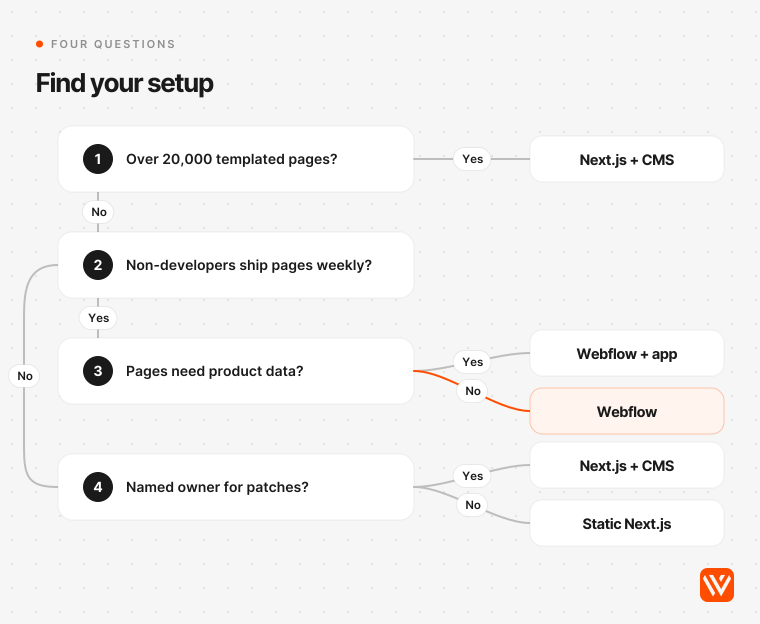
Ask how many templated pages you'll run, who ships the next page, whether pages need product data, and who patches at short notice. Those four answers place you on one of four setups. Work through them in order and stop at your first outcome.
| Question | Yes | No |
|---|---|---|
| 1. Will you run more than 20,000 templated pages? | Next.js with a headless CMS or database | Go to question 2 |
| 2. Will someone without Git ship pages every week? | Go to question 3 | Go to question 4 |
| 3. Do marketing pages need login state, live product data or shared app components? | Webflow plus an app, on a subdomain or Webflow Cloud | Webflow |
| 4. Does a named person own monthly patches and yearly upgrades? | Next.js with a headless CMS or Markdown | A static Next.js export, or stay on Webflow |
Skip Webflow if your site is the product, you're generating tens of thousands of pages, your engineers refuse to work in a visual tool, or you need a HIPAA agreement on the site itself.
Skip Next.js if nobody on staff can own it. A freelancer who built it and left isn't an owner. Picking Next.js because it sounds more serious is expensive vanity on a 12-page site with one marketer.
Skip this whole comparison if you're under 20 pages with no CMS. Framer is worth a look there, and we've compared it to Webflow separately. Astro deserves a look as well, as it matched Webflow's 71% field pass rate with far lighter pages, 1.36 MB at the median.
What's changing next?
Expect the gap between these tools to keep shrinking from both ends, as Webflow adds code and agents make Next.js easier to start. How we got here matters, because each step moved the decision.
- October 2025: Next.js 16 ships.
- December 2025: React2Shell, rated CVSS 10.0, forces urgent upgrades across React Server Components apps.
- May 2026: Webflow's Premium plan raises CMS limits to 20,000 items and adds the $2,500 Team tier. Next.js ships a 13-advisory release.
- July 2026: Next.js starts scheduled security releases.
- October 2026: Next.js 16.4 ships, followed by fixes for two critical remote code execution flaws.
- 31 January 2027: Next.js 15 security support ends, on the current schedule.
Our forecast, and it's only ours: by the end of 2027, the choice for most marketing teams will depend less on the framework and more on where AI agents can safely make edits. Webflow is pushing that way with its AEO agents and MCP server, while code-first teams already edit by prompt. The winning setup will be whichever gives agents speed and gives humans review. We could be wrong about the timing. We doubt we're wrong about the direction.
Before you pay for any rebuild, run your current site through our free AI Design Scorer. If the score points at design and content rather than the platform, a migration won't fix it. If you want a second opinion on the stack itself, our web app team works in both and will tell you when to stay put.
Sources and method
Field data: HTTP Archive Technology Report, September 2026 crawl, mobile, read through its public API on 30 October 2026. Scan: 370 domains fingerprinted, 190 homepages rendered once in desktop headless Chrome from Bengaluru on 30 October 2026, so page weights compare across stacks but aren't field speeds. We excluded pages that returned under 50 words or failed to load. Webflow's customer showcase was left out because it's a hand-picked sample. Advisories: GitHub Advisory Database, package next, by published date, withdrawn advisories removed. Incidents: Webflow and Vercel public status feeds, most recent 50 incidents each. Prices: official pricing pages, 30 October 2026. FX: open.er-api.com, 30 October 2026. Prices change, so check before you budget.
Is Webflow better than Next.js?
For a marketing site run by marketers, yes. Webflow lets non-developers publish pages, and hosting, forms and security patches are included. For a product, or a site that needs custom logic and more than 20,000 CMS items, Next.js is the better tool.
Can you use Webflow and Next.js together?
Yes. The common setup is Webflow at your main domain and a Next.js app on a subdomain. Webflow Cloud can also mount a Next.js app at a path on your Webflow site, with limits such as 128 MB of memory and a 20-second request timeout.
Is Next.js better than Webflow for SEO?
Not by default. Both score a median 96 for Lighthouse SEO in HTTP Archive’s September 2026 data, and both serve most homepage text in raw HTML. Next.js gives you more control for programmatic pages and page-level logic. For a site of a few hundred pages, content and links matter more.
Which is cheaper, Webflow or Next.js?
For a typical marketing site, Webflow. Our three-year model puts running costs at about $3,700 on Webflow and $10,700 on Next.js in the US, excluding the build. Next.js wins at the top end, because Webflow’s Team plan alone costs $90,000 over the same period.
Should I migrate from Webflow to Next.js?
Only if a specific limit is costing you money, such as the 20,000-item cap, or you need product data on marketing pages. Plan a full redirect map, rebuild forms first and name an owner for security patches. A migration won’t fix weak content or design.