![7 Best WordPress Alternatives [2026 Edition]](https://cdn.prod.website-files.com/67fe7e4b233f6563335badbe/6ad0374580fbc8a3a17649e6_6ad0366dc90389fe711081e7_7-best-wordpress-alternatives-cover-2026.png)
Summarise this article using AI





The best WordPress alternatives in 2026 are Webflow for marketing sites, Framer for small design-led sites, Wix and Squarespace for small businesses that want one bill, Shopify for online stores, Ghost for newsletters and publications, and Drupal for developer teams that want open source. All seven beat WordPress on mobile speed for visitors in the US and UK.
We're a Webflow agency, so we have a stake in the first pick on this list. To keep ourselves honest we measured instead of asserting. We pulled Chrome's real-user speed data for 14 platforms, worldwide and in six countries, and priced every option, WordPress included, over three years on 14 October 2026. There are no affiliate links on this page.
Key takeaways
- Most WordPress sites shouldn't move. Leave when two or more of the warning signs below are true, not because of a headline.
- WordPress finished last of 14 platforms on mobile Core Web Vitals in September 2026: 48.3% of WordPress sites passed, against 71.3% on Webflow and 80.9% on Wix.
- WordPress is both the cheapest and the most expensive option. Budget hosting with free plugins costs about $108 over three years; managed hosting with five common premium plugins costs $2,120.
- Exit cost differs more than price. Framer, Ghost and Drupal let you take your site with you. Wix keeps it on its own servers.
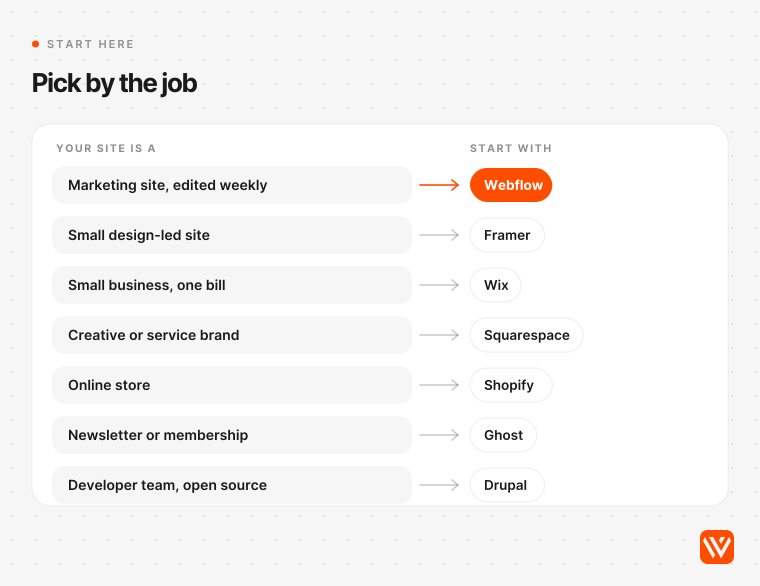
The 7 best WordPress alternatives compared
| Platform | Best for | Lowest plan with a CMS and your own domain | Mobile Core Web Vitals pass rate | What you can take with you |
|---|---|---|---|---|
| Webflow | Marketing sites for growing teams | $25 a month, billed yearly | 71.3% | CMS content as CSV; site code on paid Workspace plans |
| Framer | Small design-led sites and launches | $10 a month, billed yearly | 70.8% | The whole site as HTML, CSS and JavaScript |
| Wix | Small businesses that want everything in one place | $17 a month, billed yearly | 80.9% | No code export; the site runs only on Wix |
| Squarespace | Creatives and service businesses | $19 a month, billed yearly | 71.0% | One blog as WordPress-format XML |
| Shopify | Online stores, including WooCommerce moves | $29 a month, billed yearly | 76.2% | Products as CSV |
| Ghost | Newsletters, publications and paid memberships | $15 a month, billed yearly | 72.8% | Posts, members and theme |
| Drupal | Developer teams that want open source | Free software, you pay for hosting | 64.7% | Everything: you own the code and the database |
| WordPress (for reference) | The baseline | Free software, you pay for hosting | 48.3% | Everything |
Prices are each vendor's own page in USD on 14 October 2026, before tax. The pass rate is the share of sites on each platform that passed all three Core Web Vitals for real Chrome users on mobile, worldwide, in September 2026, from the HTTP Archive Technology Report. The method is further down.
Should you leave WordPress at all?
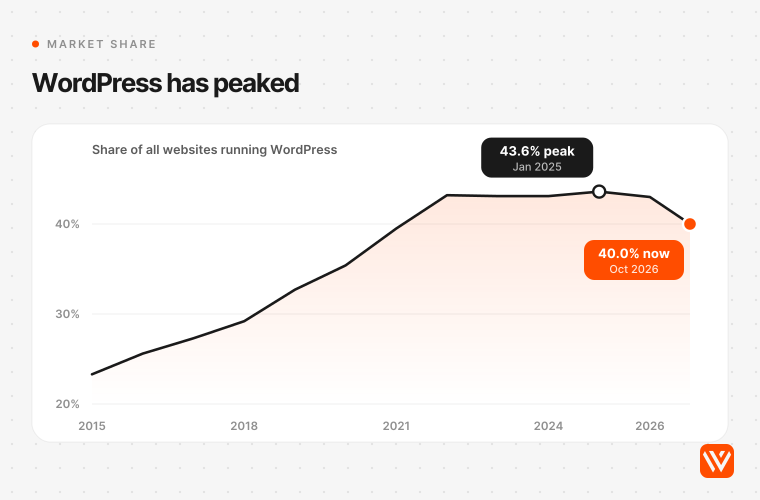
Probably not, unless your site shows at least two warning signs. WordPress still runs 40.0% of all websites and 58.5% of sites with a known CMS, according to W3Techs on 14 October 2026. NASA is one of them: nasa.gov declared WordPress 7.0.7 in its page code when we checked on 14 October 2026.
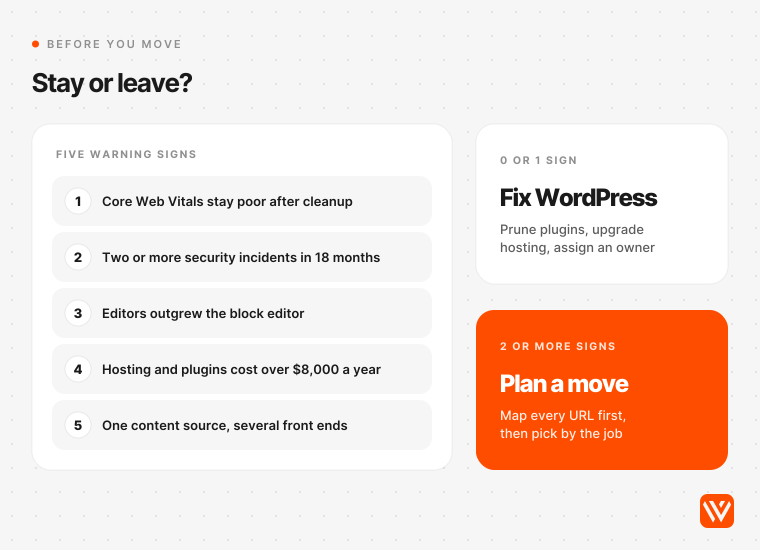
The most useful test we found comes from a WordPress agency, which is why we trust it. Gautam Khorana, co-founder of Seahawk Media in London, writes that "most WordPress sites should not migrate" (13 May 2026). He lists five signs that it's time to go and says to move only when two or more are true:
- Core Web Vitals stay poor after you prune plugins and upgrade hosting.
- You've had two or more security incidents in 18 months.
- Your editors have outgrown the block editor (they need live collaboration, validation rules or publishing to several places).
- Hosting plus plugin licences cost more than $8,000 a year.
- One body of content has to feed several front ends, such as a site, an app and partner feeds.
We'd add a sixth: nobody on the team can safely run updates anymore, so the site is frozen. A frozen WordPress site is how plugin problems turn into security problems.
The case for staying is strong and comes from people who know WordPress best. Chris Lema, who ran his site on WordPress for over 20 years, still thinks WordPress is right for "75%, maybe 85%" of people who need a website, even while moving his own site to Payload and Astro (5 March 2026). Jean Galea, founder of WP Mayor, went looking for a replacement and reported: "Here's what I found: nothing." (20 January 2026). In India, rtCamp's annual letter says "WordPress is still our biggest business" (12 March 2026).
Skip the rest of this page if your WordPress site is under 50 pages, passes Core Web Vitals and has a person who owns updates. Spend the money on content.
Why are people moving away from WordPress?
Three things changed between 2024 and 2026: share started falling, plugin vulnerabilities kept rising and the project's governance became a business risk of its own.
Share is falling, slowly. WordPress peaked at 43.6% of all websites on 1 January 2025 and fell every month of 2026 to 40.0% on 14 October 2026, per W3Techs' history data. Read that carefully. Over the same months the share of sites with no detectable CMS rose from 28.6% to 31.6%, so most of WordPress's loss isn't showing up as gains for any named builder. Share is not a migration count, and no platform publishes one.
Plugins are the attack surface. Patchstack's State of WordPress Security in 2026 counted 11,334 new vulnerabilities in the WordPress ecosystem in 2025, up 42% on 2024. 91% were in plugins, 9% in themes and only six in WordPress core. The worrying number is speed: 46% had no fix from the developer by the time they were made public, up from 33% the year before. In April 2026 Austin Ginder of Anchor Hosting documented more than 30 plugins bought by one owner and backdoored, with the code dormant for eight months before it activated.
Configuration is the other half. The UK's Office for Budget Responsibility had its November 2025 Budget forecast accessed early because of a WordPress plugin configuration error. The OBR's own investigation notes that "WordPress can be onerous to configure and that mistakes are easily made". It also says the setup, WordPress hosted on WP Engine, "reflects good practice for an organisation with very limited resources". Both sentences are true at once.
Governance became a line item. In September 2024 WordPress co-founder Matt Mullenweg published "WP Engine is not WordPress" and blocked the host from WordPress.org. WP Engine sued, and a US federal court granted a preliminary injunction on 10 December 2024 restoring its access. On 24 September 2026 the court let WP Engine's antitrust claims proceed; the case is still open. Yoast founder Joost de Valk put the structural point plainly in July 2026: "WordPress.org is personally owned by Matt Mullenweg." The project itself kept shipping, though. WordPress 7.0 arrived in May 2026 and 7.1.3 on 6 October 2026.
How we picked and tested these alternatives
We started from demand, then measured. The seven are the platforms most often recommended across the 15 pages ranking for "wordpress alternatives" in the US, UK and India, four YouTube reviews and 13 answers from ChatGPT, Gemini and Google's AI results, all read on 14 October 2026. Drupal joined because it came up more than any other platform in the Reddit and Hacker News threads that rank for this search.
- Speed. We pulled the share of sites passing all three Core Web Vitals for real Chrome users, by platform and country, from the HTTP Archive Technology Report's public API for September 2026, the latest month.
- Price. Every price comes from the vendor's own pricing page on 14 October 2026, converted at the European Central Bank's reference rate for that day (1 USD = ₹95.16).
- Exit. We read each platform's help centre on what you can export.
- AI crawlers. For five of the seven we reuse our own October 2026 test of what an AI crawler that doesn't run JavaScript receives from live sites.
The order groups platforms by the job they do. It starts with marketing sites, which is the work we do every week on Webflow.
The 7 best WordPress alternatives in 2026
1. Webflow: best for marketing sites that a team edits every week
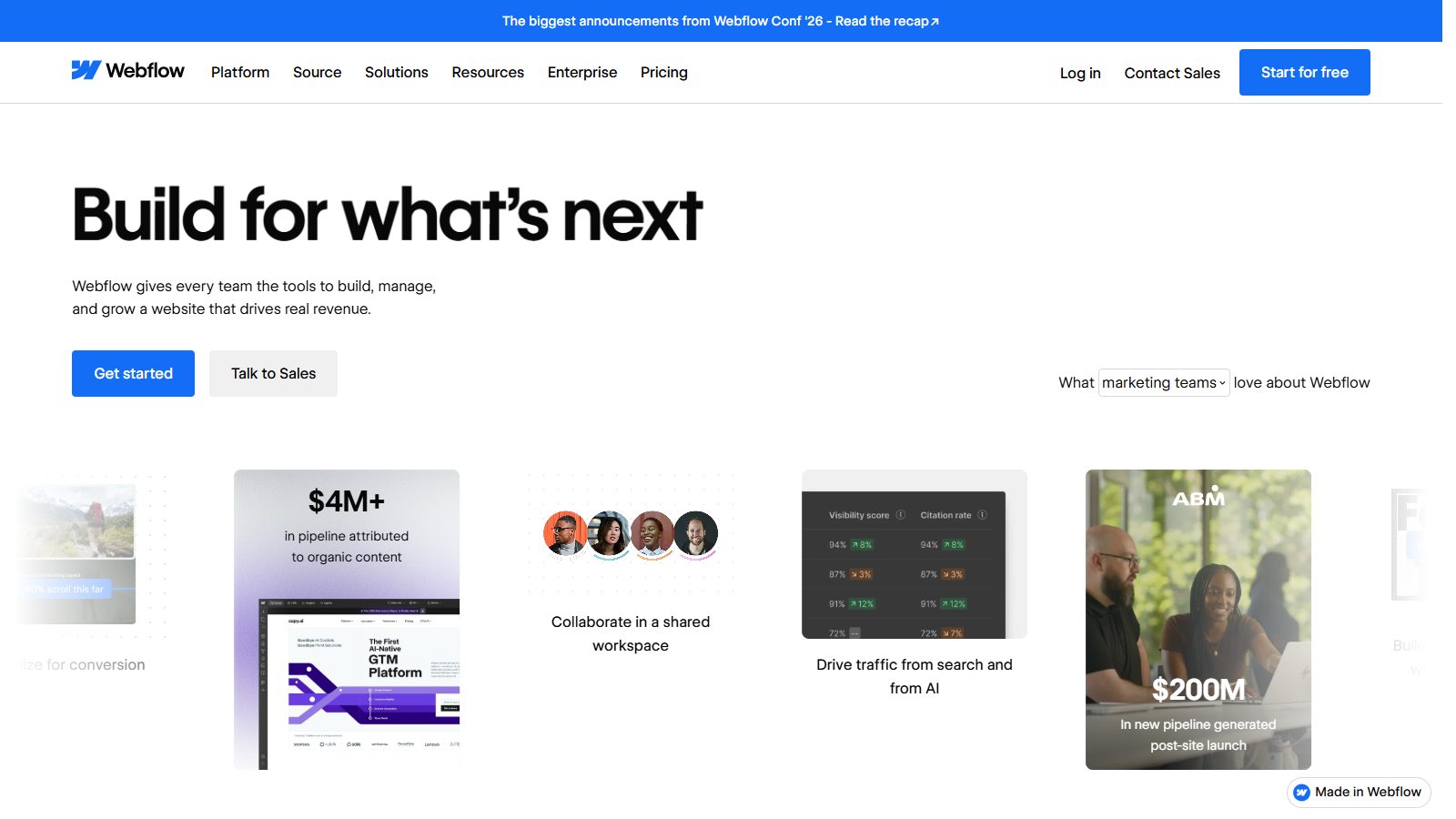
Webflow is a visual site builder with a built-in CMS and managed hosting: designers build the pages, marketers edit content without touching the design, and there are no plugins to update. It's the alternative AI engines name most often. It appeared in all 13 answers we collected and came first for a B2B SaaS marketing site in both engines that answered that prompt.
The numbers: 71.3% of Webflow sites passed mobile Core Web Vitals in September 2026, up 9.5 points in two years. Webflow says it runs on AWS with Cloudflare's CDN and holds SOC 2 Type II and ISO 27001. In our crawler test, the five live Webflow sites served a median 96.3% of their visible copy in raw HTML, and all five carried JSON-LD structured data.
Price changed on 13 May 2026. Webflow merged its CMS and Business plans into Premium at $25 a month billed yearly ($39 monthly) with 20,000 CMS items. Former Business sites dropped from 100 GB to 50 GB of bandwidth, the line to watch if your pages carry video. Basic at $15 has no CMS. Webflow charges India and the UK in US dollars.
What we've seen first-hand: Aureon Solutions, a wealth-management firm, came to us with a WordPress site in 2025; after we moved it to Webflow, its case study records a 24.3% increase in conversions.
Watch out for:
- Webflow switched off its native memberships feature, User Accounts, on 29 January 2026. Gated content now needs a third-party tool.
- A collection list renders at most 100 items, which we had to design around on the First December Films build.
- Code export needs a paid Workspace plan and leaves out CMS content.
Skip it if your site is mostly a store, or if nobody on the team will learn a design tool.
2. Framer: best for small, design-led sites that launch fast
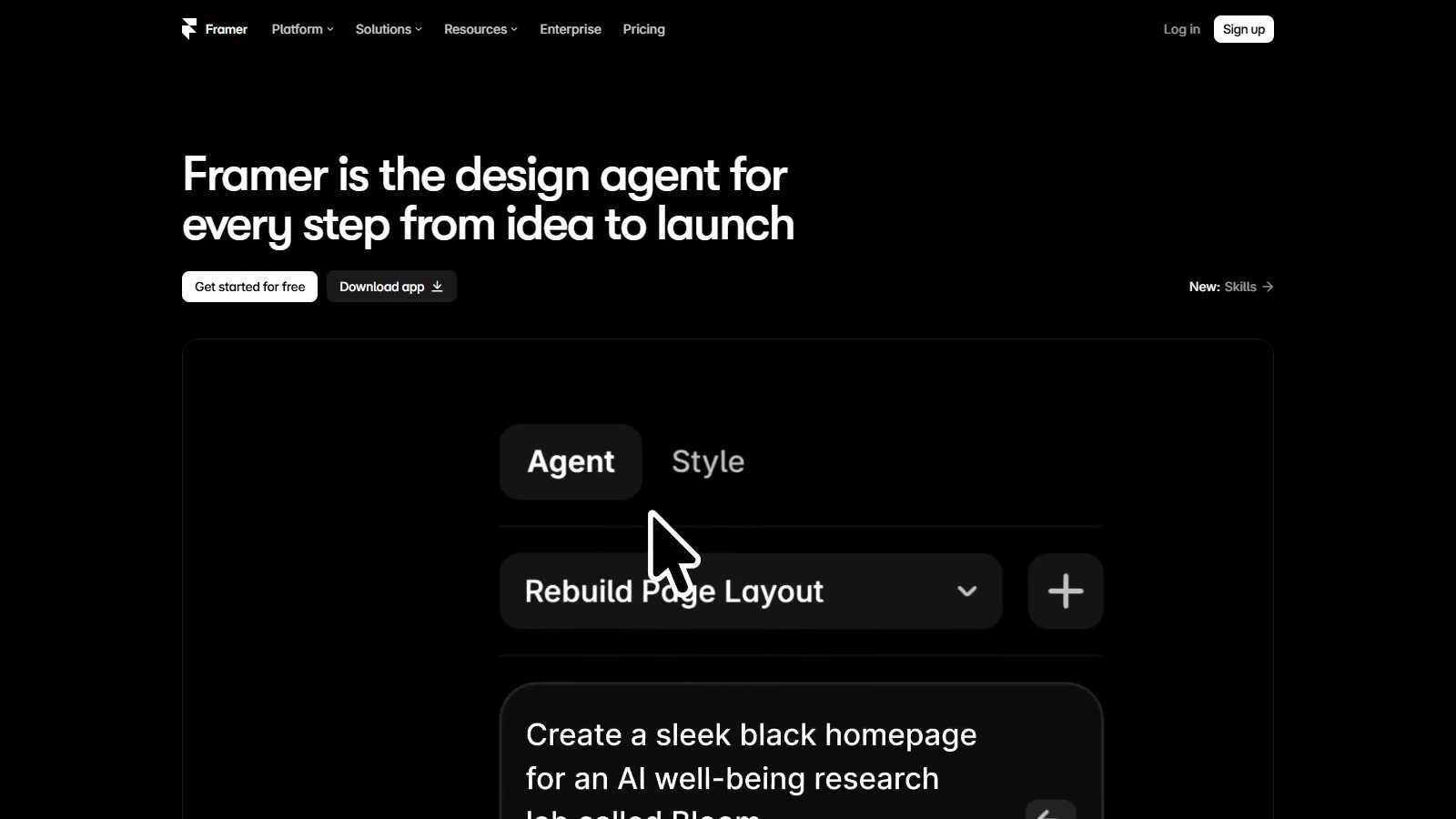
Framer is a design tool that publishes websites, and it's the cheapest serious option here: Basic is $10 a month billed yearly, with 1,000 CMS items across two collections and 50 GB of bandwidth. Indian visitors see ₹361 a month, about $3.79. Pro is $30.
Framer also has the most complete code export of the hosted builders on this list. Its help centre says every site is published as standard HTML, CSS and JavaScript that "you can download at any time", and the CMS exports to CSV or JSON through plugins. Mobile Core Web Vitals pass rate: 70.8%. Framer's best market in our data is India, where 57.2% of sites passed for visitors there, the highest of any platform we pulled.
The Dutch payments company Mollie moved its marketing site from WordPress to Framer; Framer's customer story (vendor-published) says campaigns "that once took hours now took minutes".
Watch out for: none of the five Framer sites in our crawler test had JSON-LD structured data in their raw HTML, against five of five on Webflow and Wix. You'll add schema yourself. Content modelling is lighter than Webflow's.
Skip it if you publish hundreds of posts a month or need complex collections.
3. Wix: best for small businesses that want one login for everything
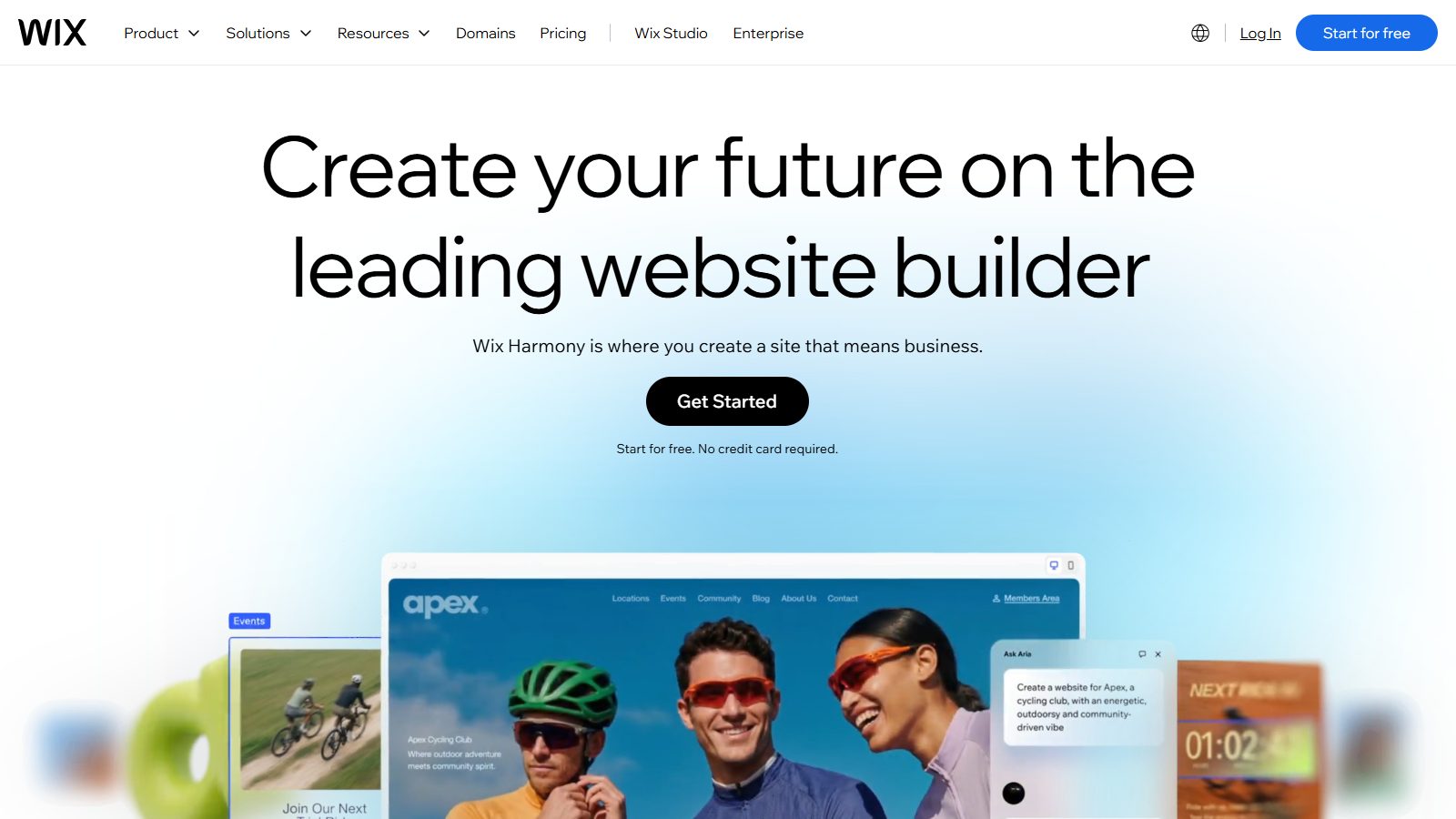
Wix is the fastest platform on this list for real visitors. 80.9% of Wix sites passed mobile Core Web Vitals in September 2026, up 16.5 points in two years, the biggest gain of any platform we pulled. Only Duda, which few reviews mention, scored higher.
It also keeps hosting, a store and payments in one dashboard. For India, Wix supports Razorpay, Cashfree and PayU, which matters because Stripe, the default checkout on several builders, doesn't support UPI in India. Light costs $17 a month billed yearly; taking payments needs Core at $29. Wix Studio, the agency-grade editor, is a separate product for designers.
Watch out for: lock-in. Wix says your site "needs to be hosted and operated on Wix's servers", so there's no code export. Wix also retires things: its ADI builder has been unsupported since 10 November 2024. We moved SliceInn, a co-living brand, off Wix because it couldn't take the custom code their booking filters needed; the case study records a 23% lift in lead conversion after the move to Webflow.
Skip it if you'll ever want to move the site somewhere else.
4. Squarespace: best for creatives and service businesses

Squarespace gives you polished templates, hosting and a simple store in one subscription. Basic is $19 a month billed yearly ($25 monthly), and Indian visitors see ₹630. 71.0% of Squarespace sites passed mobile Core Web Vitals worldwide, 82.9% for US visitors and 84.4% in the UK, where "squarespace vs wordpress" is the most-searched WordPress comparison in our keyword set (500 searches a month, per Ahrefs).
India is the exception. Only 8.7% of Squarespace sites passed for visitors in India in September 2026, across 2,402 sites tested, the lowest figure in our whole data set. If your customers are in India, test your own pages before committing.
Watch out for: a 2% fee on store sales on Basic, and a thin exit. Squarespace exports one blog as WordPress-format XML, and says many features "rely on our platform's JavaScript and CSS, so some content doesn't export".
Skip it if your audience is mainly in India, or if you'd need to take a large content library with you later.
5. Shopify: best for online stores, including WooCommerce moves

Shopify is the store platform named in 11 of the 13 AI answers we collected. It runs 5.4% of all websites, second only to WordPress, per W3Techs. 76.2% of Shopify stores passed mobile Core Web Vitals across 445,297 sites tested. Basic costs $29 a month billed yearly in the US, £19 in the UK and ₹1,499 in India.
India has a catch. Shopify Payments isn't available in India, so Indian stores use a third-party gateway such as Razorpay, and Shopify adds its own 2% fee on Basic, falling to 0.2% on Plus. Product data exports to CSV, which makes leaving easier than people assume.
Watch out for: apps. They're Shopify's version of plugins, and each adds a monthly fee and script weight.
Skip it if you sell fewer than a handful of products and content is the real business. Ghost or Squarespace will be simpler.
6. Ghost: best for newsletters, publications and paid memberships
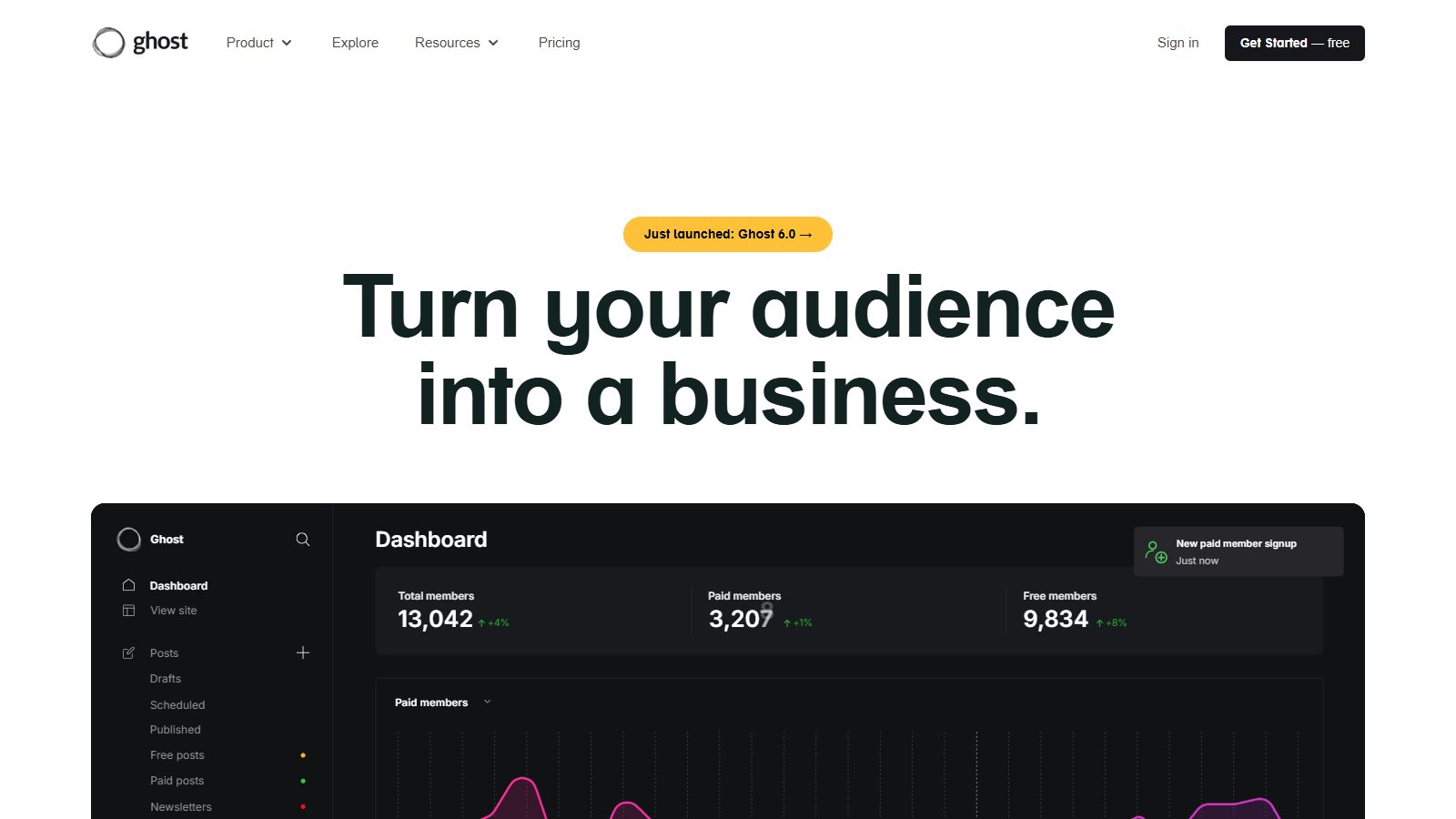
Ghost is an open-source publishing platform with newsletters and paid memberships built in, run by a non-profit foundation whose constitution says it "can never be bought or sold". Bloggers weighing a move ask about it by name: "ghost vs wordpress" gets 150 US searches a month.
Ghost(Pro) Starter is $15 a month billed yearly ($18 monthly). Paid memberships start on Publisher at $29. Ghost takes 0% of member revenue; Stripe's own fees still apply. 72.8% of Ghost sites passed mobile Core Web Vitals worldwide, 88.1% for US visitors. Its exit is generous: posts, pages and settings as JSON, members as CSV with subscription status, plus your theme and redirects, per Ghost's export guide.
India has a catch here too. Stripe is Ghost's only payments partner, and Stripe in India "doesn't support local payment methods" such as UPI and netbanking. An Indian newsletter selling to Indian readers can't offer UPI at checkout.
Ghost has no store. If you've read elsewhere that it sells products with 0% fees, that 0% applies to memberships.
Skip it if your site is a company marketing site with product pages, case studies and landing pages. Ghost is built around posts.
7. Drupal: best for developer teams that want open source
Drupal is the alternative for people who like what WordPress is (open source, self-hosted, yours) and dislike how it's run. It's licensed GPL version 2 or later, costs nothing to use and gives you the code and the database. Drupal 11.4.10 shipped on 14 October 2026 and Drupal 12 reached its first beta on 30 September 2026, per Drupal's release feed. In the four Reddit threads and one Hacker News thread that rank for "wordpress alternatives", 47 different commenters brought up Drupal, more than any other platform (a few of them to complain about it).
64.7% of Drupal sites passed mobile Core Web Vitals worldwide, 16.4 points ahead of WordPress, and 77.1% for US visitors.
Watch out for: you're still running software. Updates, hosting and security are your job, exactly as they are on WordPress. For visitors in India, Drupal's pass rate (21.0%) is below WordPress's (29.0%).
Skip it if nobody on your team writes code. Drupal swaps one maintenance burden for another.
Which WordPress alternative is fastest for real visitors?
Wix and Shopify are the fastest of the seven for real Chrome users, and WordPress is the slowest of all 14 platforms we measured worldwide. In September 2026, 48.3% of WordPress's 2.66 million tested sites passed all three Core Web Vitals on mobile.
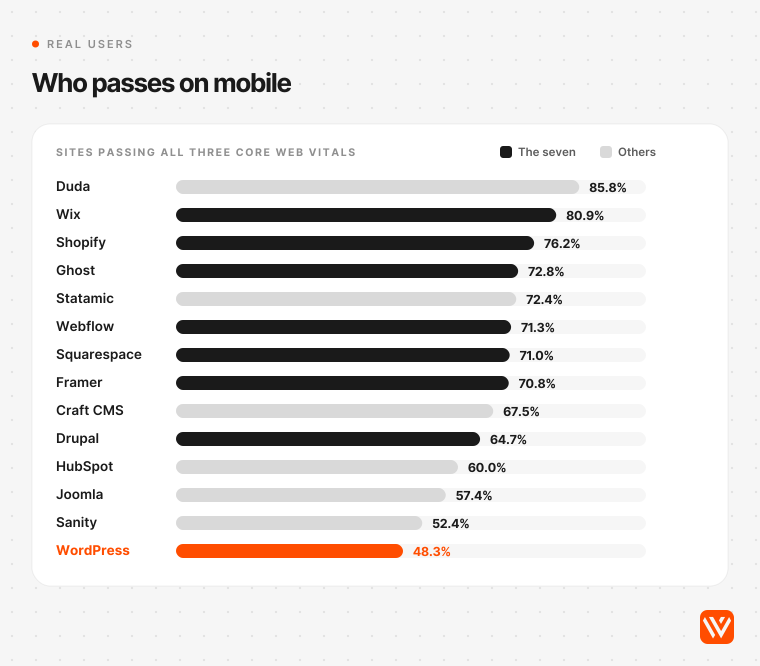
The gap is widening. WordPress gained 5.8 points in two years, but Webflow gained 9.5 and Wix 16.5, so the distance from WordPress to Webflow grew from 19.3 to 23.0 points. The Web Almanac 2025 saw the same pattern: managed platforms improved fastest.
Country matters more than most rankings admit. Chrome's data groups sites by where the visitor is, not where the server is, so the India column is the experience of people browsing from India.
| Platform | Worldwide | US | UK | India | Germany |
|---|---|---|---|---|---|
| Webflow | 71.3% | 80.2% | 79.3% | 39.1% | 81.4% |
| Framer | 70.8% | 81.7% | 77.5% | 57.2% | 81.2% |
| Wix | 80.9% | 88.7% | 90.9% | 55.9% | 90.9% |
| Squarespace | 71.0% | 82.9% | 84.4% | 8.7% | 79.7% |
| Shopify | 76.2% | 85.5% | 84.4% | 53.0% | 82.5% |
| Ghost | 72.8% | 88.1% | 86.4% | 50.9% | 83.6% |
| Drupal | 64.7% | 77.1% | 73.8% | 21.0% | 75.1% |
| WordPress | 48.3% | 62.0% | 66.3% | 29.0% | 63.1% |
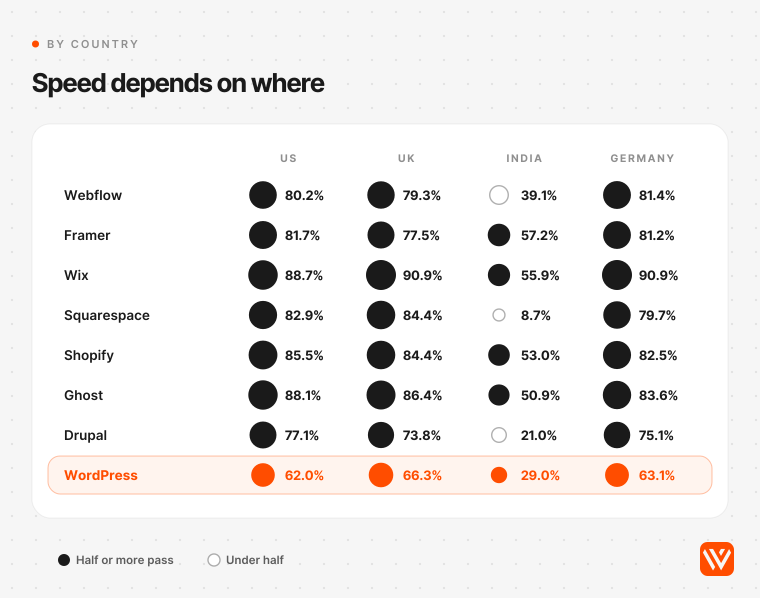
Three readings. In the US, UK and Germany all seven alternatives beat WordPress, by between 7.5 points (Drupal in the UK) and 27.8 points (Wix in Germany). India is hard for every platform, and of the seven only Framer, Wix, Shopify and Ghost pass for more than half of sites there. In the UAE and Singapore most builders had too few sites in the data to rank; WordPress passed for 37.5% of sites in the UAE and 58.3% in Singapore.
A platform's average isn't your site, though. A heavy video hero on Webflow will fail the same test a lean WordPress theme passes. Use these numbers to set expectations, then measure your own pages, for example with our free AI Design Scorer.
What does each WordPress alternative cost over three years?
For one business website with a blog, a custom domain and one editor, three years of platform fees range from $360 on Framer to $1,044 on Shopify. WordPress sits at both ends: about $108 on budget hosting with free plugins, $2,120 on managed hosting with five common premium plugins.
| Platform and plan | Per month, billed yearly | 3 years, USD | 3 years, INR |
|---|---|---|---|
| Framer Basic | $10 (₹361) | $360 | ₹12,996 |
| Ghost Starter | $15 | $540 | about ₹51,386 |
| Wix Light | $17 | $612 | about ₹58,238 |
| Squarespace Basic | $19 (₹630) | $684 | ₹22,680 |
| Webflow Premium | $25 | $900 | about ₹85,644 |
| Shopify Basic | $29 (₹1,499) | $1,044 | ₹53,964 |
| Drupal | Hosting only | Hosting only | Hosting only |
| WordPress on Hostinger Premium, free plugins | $2.99 (₹149) | $107.64 | ₹5,364 |
| WordPress on Kinsta plus five premium plugins | $58.90 | $2,120.25 | about ₹2,01,763 |
INR uses the vendor's own Indian price where it shows one; "about" marks a conversion at ₹95.16 to the dollar. Taxes, payment fees and people's time are excluded.
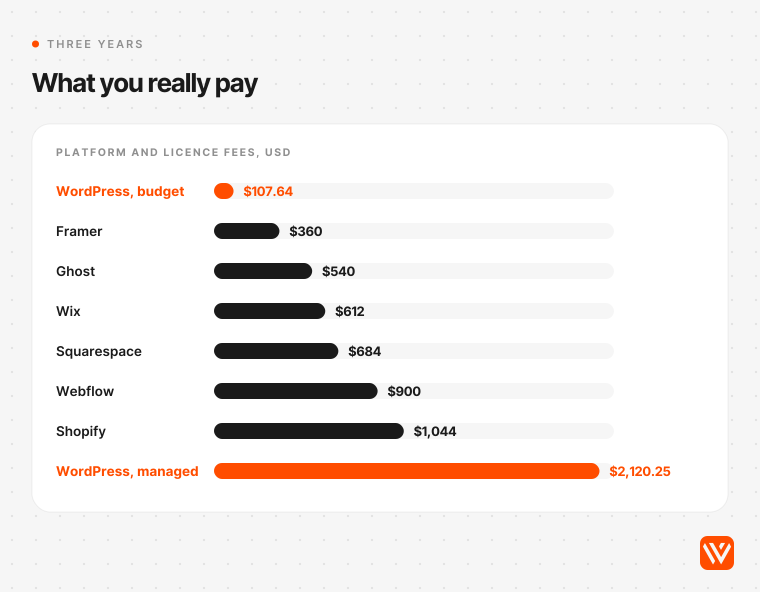
How we built the WordPress rows. Hostinger's $2.99 needs a 48-month prepayment and renews at $10.99. The managed row is Kinsta's single-site plan at $350 a year plus five plugins many business sites pay for: Yoast SEO Premium ($118.80), ACF PRO ($49), WP Rocket ($59.95), Gravity Forms ($59) and UpdraftPlus Premium ($70) a year.
Two things the table hides. India gets large discounts from some vendors: Framer charges Indian buyers about 38% of its US price and Squarespace about 35%, while Webflow and Ghost charge India in dollars. And every number here is small next to people's time. As we wrote in our Webflow cost guide, platform fees are a rounding error next to the build. Pick on what your team can run, then compare price.
What can you take with you if you leave?
Before you pick an alternative, check how you'd leave it. Framer, Ghost and Drupal let you take the whole site. Wix keeps the site on its own servers.
| Platform | Content export | Code export | Source |
|---|---|---|---|
| Webflow | CMS collections as CSV | HTML, CSS, JS on paid Workspace plans, without CMS content | Webflow help |
| Framer | CMS to CSV or JSON via plugins | Full site as HTML, CSS, JS at any time | Framer help |
| Wix | No full-site export | None: the site must run on Wix | Wix help |
| Squarespace | One blog as WordPress-format XML | None | Squarespace help |
| Shopify | Products as CSV | Theme as a zip, by email | Shopify help |
| Ghost | Posts, pages, tags, tiers as JSON; members as CSV | Theme as a zip | Ghost help |
| Drupal | Your own database | Your own code (GPL) | Drupal licensing |
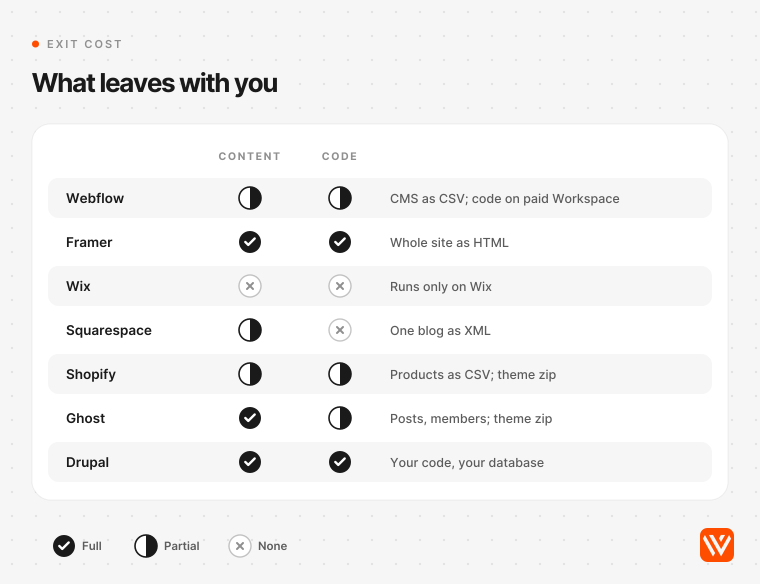
Framer's data-porting page cites the EU Data Act, in force since September 2025, as part of the reason. If you're in the EU, ask every vendor how it handles the Act before you sign.
Platform risk cuts both ways
Leaving WordPress swaps one kind of risk for another. On WordPress you depend on a project whose governance is in court. On a hosted builder you depend on one company's product decisions.
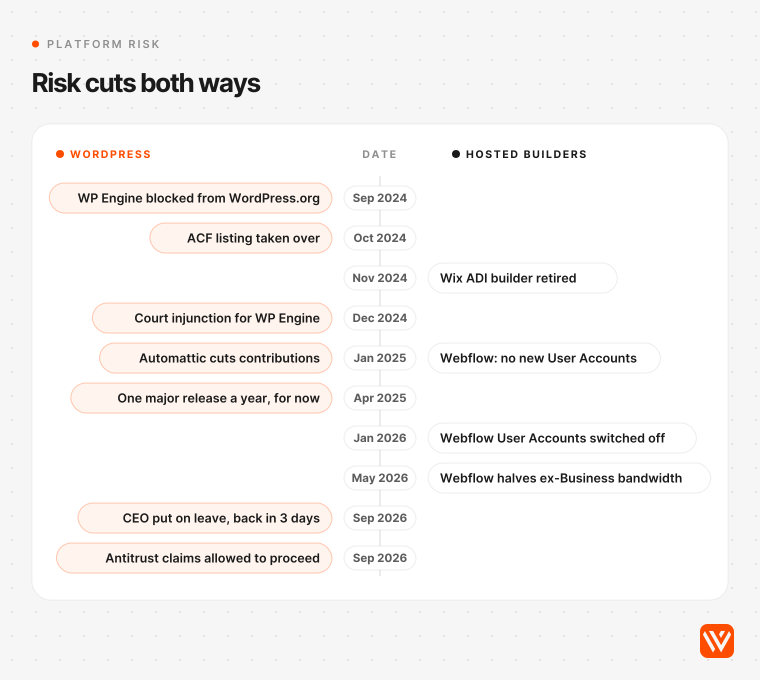
On the WordPress side: WP Engine was cut off from WordPress.org in September 2024; WordPress.org took over the Advanced Custom Fields plugin listing as "Secure Custom Fields" in October 2024; and in January 2025 Automattic cut its sponsored contributions, citing the lawsuit. In April 2025 WordPress moved to one major release a year "for now", then shipped three majors between December 2025 and August 2026. In September 2026 Automattic's board put Mullenweg on leave and he was back as CEO three days later, as TechCrunch reported.
On the hosted side: Wix retired its ADI builder in November 2024. Webflow stopped new User Accounts sites on 31 January 2025, switched the feature off on 29 January 2026, and in May 2026 halved bandwidth for former Business-plan sites. None of these broke sites overnight. All of them forced work.
Our view: hosted-platform risk is easier to plan for, because it arrives with notice periods and help articles. WordPress risk sits in thousands of plugins you didn't write.
How to move off WordPress without losing rankings
Rankings survive a migration when every old URL either stays the same or 301-redirects to its closest new page, and the new pages keep the content, titles and structured data that earned the rankings. Webflow's own documentation is blunt that there's "no automated way to convert a site from another platform", so plan a rebuild, not a transfer.
- Export every URL. Crawl the live site and pull the last 12 months of pages with impressions from Google Search Console. This list is your contract.
- Map redirects. Give every old URL a destination. Keep slugs where you can; redirect the rest one to one, never all to the homepage.
- Move content, not markup. Export WordPress posts as XML, convert to CSV and import into the new CMS. Webflow documents this XML to CSV route and lists an approved WP to Webflow app for posts, images, tags and categories.
- Rebuild the templates. Recreate titles, meta descriptions, headings, alt text and schema on every template, not page by page.
- Test on staging. Check every mapped redirect, internal link and form before switching DNS.
- Launch and watch. Submit the new sitemap, then watch Search Console's coverage and query reports daily for the first two weeks.
On Hopstack's rebuild the brief said rankings could not drop while every resource moved over; the case study records 266.4% more organic traffic afterwards. That's the bar to hold any migration partner to. If you're moving to Webflow, our WordPress to Webflow migration guide covers the steps in detail.
Other WordPress alternatives we considered
- HubSpot Content Hub. Worth it if your sales team already lives in HubSpot. Starter is $20 a seat at list price, Professional $450 a month, and only 60.0% of HubSpot sites passed mobile Core Web Vitals.
- Payload. An open-source headless CMS for Next.js teams that joined Figma in June 2025 and stays open source.
- Statamic and Craft CMS. Polished, developer-friendly CMSs with paid licences: Statamic Pro is $349 a site plus $99 a year. Statamic sites passed mobile Core Web Vitals at 72.4%.
- EmDash. Cloudflare's MIT-licensed CMS, launched in April 2026, runs each plugin in its own sandbox. Its authors write that a WordPress plugin gets "access to nearly everything". Promising, but young.
- Duda. The fastest platform in our data (85.8% of sites passed), though only one of the 13 AI answers we collected mentioned it.
- Managed WordPress. WordPress.com Personal is $4 a month billed yearly. If your problem is hosting, not WordPress, this is the cheapest fix.
Which WordPress alternative should you choose?
Match the platform to the job and to who will run the site after launch.
- A marketing site your team edits every week, that has to rank in Google and get cited by AI search: Webflow.
- A small, design-led site on a tight budget, where you want the option to leave: Framer.
- A small business that wants hosting, a store and payments in one place: Wix. For a creative portfolio or service brand: Squarespace.
- An online store, or a WooCommerce store you've outgrown: Shopify.
- A newsletter or membership publication: Ghost, unless your paying readers are in India.
- A developer team that wants open source without WordPress's governance: Drupal.
If you're leaving WordPress for a marketing site, start with the migration plan for Webflow or tell us about your site. And if fewer than two of the warning signs above apply, keep WordPress and fix the plugins first.
What is the best WordPress alternative?
It depends on the job. Webflow is the best WordPress alternative for marketing sites a team edits often, Shopify for online stores, Ghost for newsletters and Wix for small businesses that want everything in one place. Drupal is the best open-source option. All of them passed mobile Core Web Vitals more often than WordPress in September 2026.
Is WordPress outdated in 2026?
No. WordPress still runs 40.0% of all websites (W3Techs, October 2026) and shipped version 7.1 in August 2026. It has lost 3.6 points of share since its January 2025 peak, and only 48.3% of WordPress sites pass mobile Core Web Vitals, last of 14 platforms. It’s ageing unevenly, not obsolete.
Will moving off WordPress hurt my SEO?
Not if every old URL keeps its address or 301-redirects to its closest new page, and the new pages keep their content, titles and structured data. Rankings drop when redirects are missing or point to the homepage. Export your URLs from Search Console first and test every redirect on staging before launch.
Is there a free alternative to WordPress?
Drupal is the closest free, open-source alternative: the software is free and you pay only for hosting. Webflow, Wix and Framer have free plans on their own subdomains, but your own domain and a CMS need a paid plan, from $10 a month on Framer to $25 on Webflow (October 2026 prices).
Is anyone still using WordPress?
Yes. WordPress runs 58.5% of all sites that use a known CMS, per W3Techs in October 2026. NASA’s nasa.gov declared WordPress 7.0.7 in its page code in October 2026, and whitehouse.gov serves WordPress files. WordPress agencies such as rtCamp in India report WordPress is still their biggest business.