Summarise this article using AI


A Framer to Astro migration means rebuilding your site in code, because nothing in Framer exports a working Astro project. You rebuild your Framer pages as Astro components, export CMS collections to CSV, copy every image off Framer's CDN, and keep each ranking URL working, which on Framer means URLs without a trailing slash. Webyansh's typical timeline for a B2B marketing site is 6 to 8 weeks.
We design, build and migrate Astro sites for B2B teams, so before writing this we measured what a Framer migration really has to move. On 7 November 2026 we audited 179 live Framer sites from our scan of B2B and SaaS homepages: their sitemaps, CMS folders, locales, redirects, crawler rules and the assets they load from Framer. Numbers on this page come from that audit unless a link says otherwise.
Key takeaways
- There's no clean export. Framer's own comparison page says a Framer site "needs to be recreated in Astro" (Framer). Plugins can export CMS collections as CSV and components as React, but the pages themselves get rebuilt.
- The CMS is most of the work. 141 of the 179 sites publish at least one CMS-style folder, and those folders hold 87.2% of all 90,801 URLs in their sitemaps. The median site has 46 URLs.
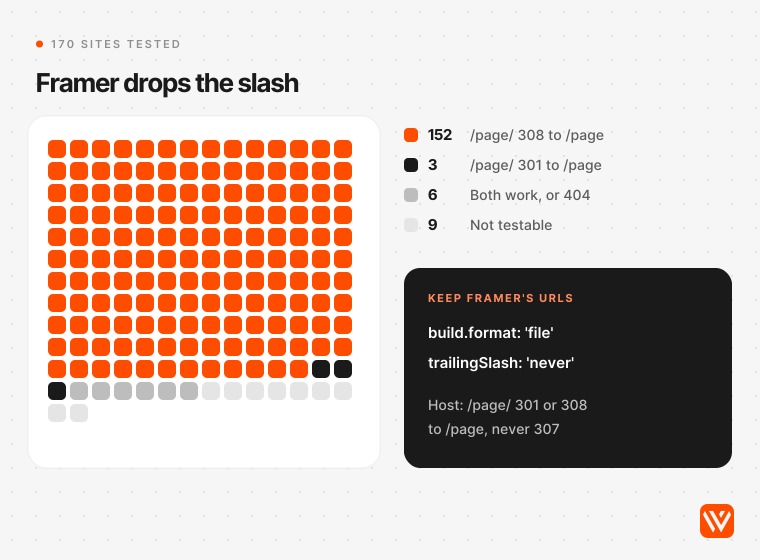
- Match Framer's URL format. On 152 of 170 sites we tested, Framer answered /page/ with a 308 redirect to /page. Astro's defaults go the other way, so set the format before you build.
- Don't move for speed. In September 2026, 70.8% of Framer sites and 71.1% of Astro sites passed Core Web Vitals on mobile (HTTP Archive). Move for limits, cost at scale, code ownership or how your team works.
- Sites are already moving. Of 149 B2B sites in our scan that run Astro now but didn't in July 2025, 25 ran on Framer then. Three more switched between our 4 and 7 November checks, and one of them returned a 404 for sitemap.xml afterwards.
What does a Framer to Astro migration move?
Everything a visitor or a search engine can reach: pages, CMS collections and their items, images and files on Framer's CDN, forms, locales, redirects, SEO settings, and the scripts you added through custom code. Framer bundles all of it into one hosted product. Astro splits it into code, content files or a CMS, and a host, so the move is a mapping job before it's a coding job.
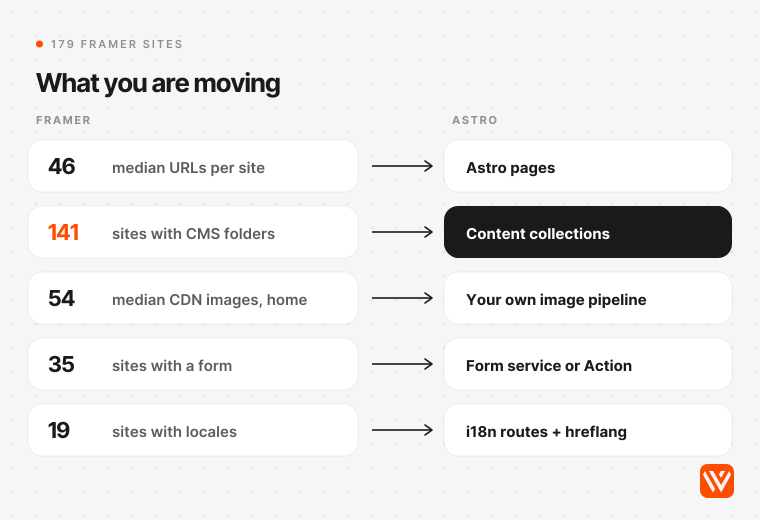
Here's what the 179 sites in our audit hold, and where each part lands.
| Framer part | What we found on 179 sites | Where it lives in Astro | What to watch |
|---|---|---|---|
| Pages | Median 46 URLs in sitemap.xml (p75: 207; 23 sites over 500) | Astro pages built from your own components | Multiple H1 tags on 103 homepages; fix them in the rebuild |
| CMS collections | CMS-style folders on 141 sites, median 3 each; blog on 91, customers 23, resources 18, use cases 15, integrations 14 | One content collection per folder, from Markdown files or a headless CMS | 87.2% of all sitemap URLs sit inside these folders |
| Images and files | Median 54 images from framerusercontent.com on the homepage alone (30 sites over 100) | Optimised by Astro's image service from your own repo or bucket | No Framer page says these files stay online after you cancel |
| Locales | Locale folders or hreflang on 19 sites (de 5, es 4, ja 3) | Astro i18n routing plus hreflang you add yourself | Framer writes hreflang for you; Astro doesn't |
| Forms | A form on 35 homepages | A form service, a webhook or an Astro Action | HubSpot scripts on 19 sites, Google Tag Manager on 84 |
| Crawler files | robots.txt on 179, llms.txt on 50, AI crawlers blocked on 5 | Files in public/, or generated at build | Copy llms.txt across; all 50 we found were written by hand |
| Structured data | JSON-LD on 75 homepages | Generated from your content collections | A chance to add what 104 sites lack |
One number surprised us. The median homepage loaded 157 separate files from framerusercontent.com, and its HTML weighed 627.6 KB before any of them arrived. Framer does render the copy into the HTML, with a median of 1,469 words in the raw page, so crawlers can read it without running JavaScript. Moving to Astro won't fix a crawling problem you don't have.
Should you leave Framer at all?
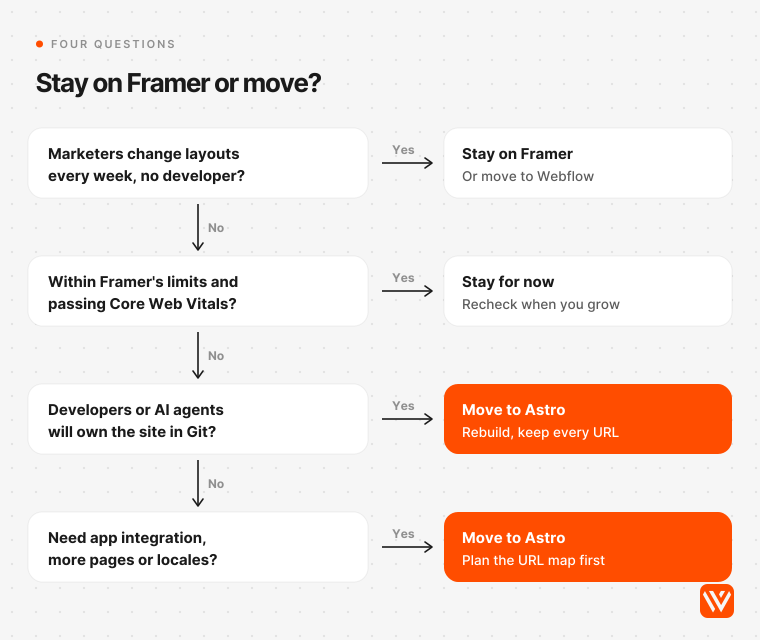
Only if Framer is costing you something you can name. Speed usually isn't it: Framer and Astro sites pass Google's Core Web Vitals in nearly equal shares. The reasons that hold up are plan limits, seat and locale fees at scale, a team that works in code, and wanting your site in your own repository.
Reasons that hold up
- You're hitting plan ceilings. Framer Pro covers 150 pages, 10 CMS collections and 2,500 CMS items, and paid add-ons raise the ceiling to 700 pages, 40 collections and 40,000 items (Framer pricing, read 7 November 2026). In our audit, 74 sites already publish more than two CMS-style folders (Basic allows two collections) and 10 publish more than ten. Astro has no page or item caps; your host and CMS set the limits.
- Seats and locales add up. Each extra editor costs $20 a month and each locale $20 a month on yearly billing, up to 20 locales (Framer pricing). A Pro site with two extra editors and two locales runs $110 a month.
- Your team works in code and with AI agents. Astro sites live in Git, so developers and coding agents such as Claude Code or Cursor change them through pull requests, with reviews, previews and history.
- The site needs to sit next to your app. Shared components, a docs section, gated content or pages built from product data are easier when the marketing site is code your engineers already deploy.
- Ownership. Astro is MIT licensed, and the repository, CMS and hosting can all sit in your company's accounts.
Reasons that don't
- Speed. In HTTP Archive's September 2026 data, 70.8% of Framer origins and 71.1% of Astro origins passed Core Web Vitals on mobile. On desktop Framer led, 87.9% to 84.6% (HTTP Archive). A rebuild can still make your site faster, but the platform switch alone doesn't.
- SEO basics. Every one of the 179 homepages had a canonical tag and a meta description, and Framer pre-renders copy into the HTML. Framer isn't hiding your content from Google.
- Hosting fees alone. Our cost model below shows the savings rarely repay a rebuild inside three years, and in India, Framer's local prices make it the cheaper platform to run.
Stay on Framer if
Your designers or marketers change layouts every week and nobody technical owns the website. That's what Framer is built for. Every layout change on Astro becomes a code change, unless you also set up a visual editor and component library, which is more work again.
How do you get your site out of Framer?
You take the content out and rebuild the pages. Framer's help centre is contradictory here: one article says Framer "does not offer HTML export for self-hosting" (Framer Help), while another says every site is published as standard files you "can download at any time" (Framer Help). Both were updated on 15 September 2026. In practice there are four routes, and only one ends in a clean Astro site.
| Route | What you get | Use it for | Catch |
|---|---|---|---|
| CMS Export plugin (by Framer, free) | Each CMS collection as a CSV file | All CMS content | Image and rich-text fields still point to framerusercontent.com |
| Site mirror tools (Framer to Code plugin, HTML exporters) | A ZIP of the published pages | Reference copy, copy-paste of text, emergency backup | The output still loads Framer's runtime, so it isn't an Astro site |
| React Export plugin plus the unframer CLI | Framer components as React files | One or two complex components you want to keep | $50 a month for hobby use, $250 a month commercial (Framer Marketplace); needs React 19 (unframer) |
| Rebuild in Astro | Your own components and content collections | Every page | Design and build time; this is where the budget goes |
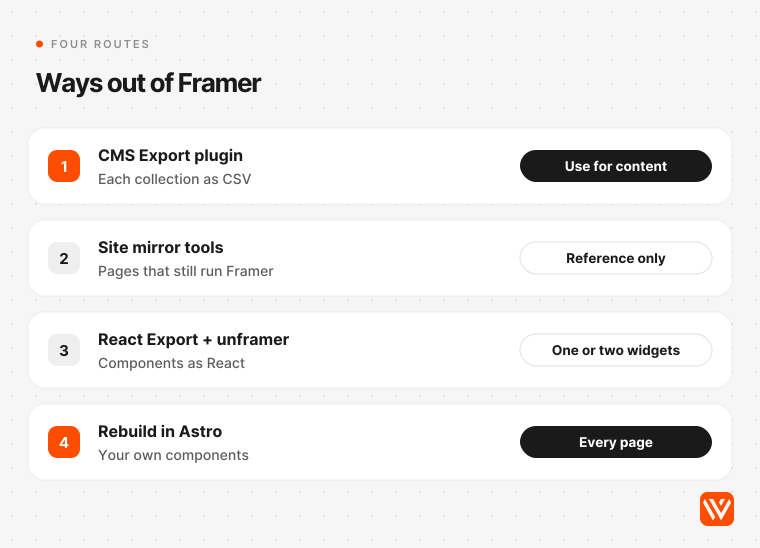
Mirror tools work by crawling and rewriting Framer's published output, and some of their makers describe reverse-engineering Framer's runtime. Framer's terms forbid reverse engineering the service (section 2.5) while saying you keep ownership of your content (section 8.1) (Framer terms). Read them before you rely on one.
Our view: export the CMS, mirror the site once as a reference, and rebuild the pages. Keeping Framer components as React islands through unframer works (Astro React integration), but it brings Framer's animation code and a paid subscription into a site you moved to get away from both.
How hard will your migration be?
Score your site against three tiers before you ask anyone for a quote. Count the URLs in your sitemap.xml, the CMS folders (paths like /blog/post-name), and any language folders.
| Tier | What puts a site here | Sites in our audit | Typical scope |
|---|---|---|---|
| A: small | Up to 25 URLs, at most one CMS folder, no locales | 62 (35%) | A landing site and a blog; the rebuild is most of the work |
| B: standard | Everything between A and C | 66 (37%) | Several collections, forms, a few hundred URLs |
| C: a real project | Over 500 URLs, five or more CMS folders, or locales | 51 (28%) | Programmatic pages, translated paths, large libraries |
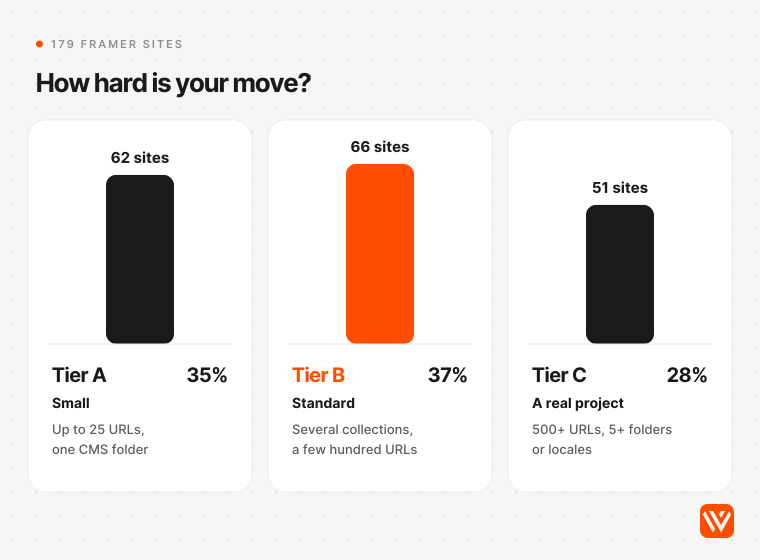
Tier C sites got there in different ways: 23 publish more than 500 URLs, 34 run five or more CMS folders, and 19 serve more than one language. The largest site in our audit publishes 25,708 URLs, almost all of them generated salary pages. That's a data pipeline to rebuild, not a set of pages.
How do you migrate Framer to Astro, step by step?
Inventory first, build second, switch last, and keep Framer live until the new site passes every check. Here are the nine steps we follow.
- List every URL. Download sitemap.xml and export 12 months of pages from Google Search Console. Pages with impressions that aren't in the sitemap matter too.
- Export the CMS. Run Framer's CMS Export plugin on every collection (Framer Marketplace) and keep the CSV files in the repository.
- Download every asset. Pull each image, video, font and PDF from framerusercontent.com into your own storage. Framer documents no promise that these files stay online after you cancel, so treat them as temporary.
- Set the URL format. Configure Astro to match Framer's URLs without a trailing slash (step details in the URL section below).
- Rebuild the design system. Turn the Framer design into tokens and typed Astro components. We build on Lumos for Astro or Tailwind CSS.
- Load content into collections. Define each collection in src/content.config.ts with a loader (Astro docs), and convert CSV rows to Markdown or JSON once, or feed them into a headless CMS.
- Rewire forms and scripts. Point each form at a form service, your CRM or an Astro Action, and move custom-code snippets into the layout.
- Rebuild the SEO layer. Titles, descriptions, canonicals, Open Graph images, JSON-LD, hreflang, sitemap, robots.txt and llms.txt.
- Redirect, test and switch. Write host redirect rules with an explicit 301 for every URL that changes, test every old URL with real requests, then move DNS. Keep the Framer plan for a month so you can roll back.
How do you move Framer CMS collections into Astro?
Make one content collection per Framer collection. Astro 5 moved collections to loaders, and Astro 6 removed legacy content collections altogether (Astro v6 upgrade guide), so tutorials that use the old src/content/config.ts file won't run on Astro 7.4.
Two choices decide the rest. If developers edit content, convert each CSV row to a Markdown file and use the glob() loader. If marketers edit content, load the rows into a headless CMS such as Sanity, Storyblok or Keystatic and read it at build time. Our ranking of the best CMS for Astro compares them for marketing teams. Either way, search the output for "framerusercontent.com" before launch. Image fields and rich text keep pointing at Framer's CDN until you replace them.
What happens to images on framerusercontent.com?
They keep working until they don't. Astro's image service only optimises images in your project, or remote images from domains you allow in the config (Astro docs). Hotlinking Framer's CDN leaves your new site depending on an account you're trying to close. Download everything, rename the files sensibly, and let Astro build responsive sizes.
What replaces Framer's animations and interactions?
CSS for most of them. Scroll reveals, hovers and simple transitions are a few lines of CSS or a small script. Keep a JavaScript island only for something that needs it, like a pricing toggle, a product demo or a calculator, and load it with a client directive such as client:visible so it waits until it's on screen. The median Framer page in HTTP Archive's data ships 816 KB of JavaScript on mobile, against 409 KB for Astro (HTTP Archive). Every animation you rebuild as an island adds to the Astro side, so be choosy.
Which URLs and SEO settings break in the move?
The trailing slash, redirects, locales and the sitemap. Framer serves URLs without a slash and redirects /page/ to /page. Astro's defaults are trailingSlash 'ignore' and build.format 'directory', which writes /page/index.html, and for prerendered pages the docs leave the slash to your host (Astro configuration reference). Leave that unchanged and your host, not you, decides whether /page or /page/ becomes the live URL.
| What | On Framer | On Astro | What to do |
|---|---|---|---|
| Trailing slash | /page; 152 of 170 sites send /page/ to /page with a 308 | Default writes /page/index.html | Set build.format to 'file' and trailingSlash to 'never', then confirm your host sends /page/ to /page with a 301 or 308 |
| Redirects | Built into Site Settings (Pro plan) | The redirects config writes a meta refresh with no status code on a static build with no adapter (Astro docs) | Put redirects in host rules: Cloudflare's _redirects defaults to 302 (Cloudflare), so add 301 to every line |
| Locales | /de, /es prefixes; hreflang added automatically and not editable (Framer Help) | i18n routing writes no hreflang (Astro docs) | Add hreflang in the layout or as sitemap alternates |
| Sitemap | Generated; lastmod on 9 of 179 sites | @astrojs/sitemap sets lastmod only site-wide or through serialize() (Astro docs) | Feed real modified dates from your content |
| robots.txt and llms.txt | robots.txt generated; llms.txt on 50 sites | Files in public/ | Copy both and check that the sitemap URL inside is right |
Two of the sites we caught moving show why you test instead of trusting defaults. One of the three sites that switched from Framer to Astro between 4 and 7 November 2026 answers /page/ with a 307, a temporary redirect, where Framer used a 308. Google treats 307 as temporary, so it doesn't signal the new URL as canonical (Google Search Central). Another moved site returns a 404 for sitemap.xml.
Keep redirects for at least a year, and expect some ranking movement for a few weeks while Google recrawls (Google Search Central). Submit the new sitemap in Search Console and send changed URLs to Bing through IndexNow (IndexNow).
Will your site be faster on Astro?
Probably lighter, not necessarily faster for real users. The median Astro page on mobile weighs 1.4 MB against 3.1 MB for Framer, with half the JavaScript. But the share of sites passing Core Web Vitals is level, which tells you the build and the host matter more than the framework.
| Mobile origins passing Core Web Vitals, September 2026 | Framer Sites | Astro |
|---|---|---|
| All markets | 70.8% of 11,319 | 71.1% of 47,277 |
| United States | 81.7% | 84.2% |
| United Kingdom | 77.5% | 77.5% |
| India | 57.2% | 48.7% |
Source: HTTP Archive Core Web Vitals Technology Report, real Chrome user data, September 2026, the latest month published on 7 November 2026.
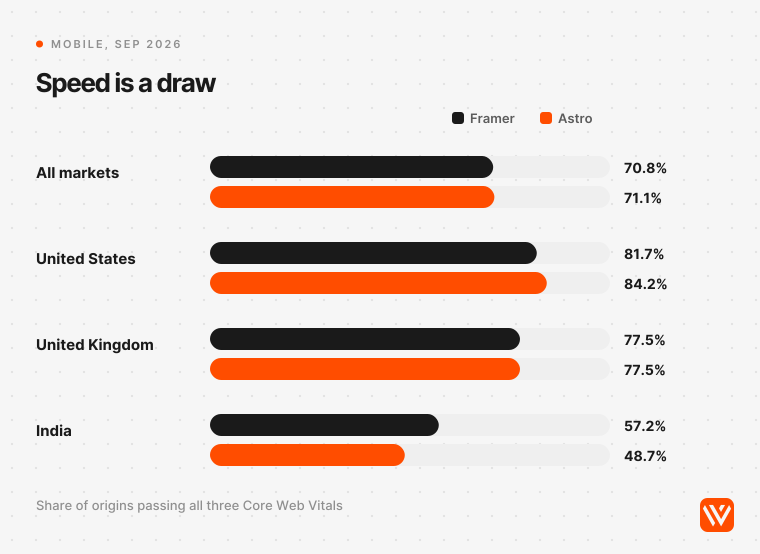
India is the exception worth reading twice. Framer sites in India pass more often than Astro sites, 57.2% to 48.7%. Time to first byte is good on only 32.7% of Framer origins and 20.6% of Astro origins there, which suggests the gap comes from where sites are hosted, not the framework. If your buyers are in India, pick a host with Indian edge locations and test from Mumbai before launch.
How long does it take and what does it cost?
Webyansh's typical timeline is 6 to 8 weeks from signed scope to launch. Tier A sites can be faster; tier C sites take longer, because every URL and collection needs a home before any code is written. Published agency prices for a Framer to Astro rebuild start around $5,000 for up to 15 pages (Bushido). Our breakdown of what an Astro website costs covers build prices by stage and market.
Running costs are where most people expect the savings. Here's three years of platform fees on yearly billing, before the rebuild and before any developer time:
| Site | Framer, 3 years | Astro stack, 3 years | Astro stack used |
|---|---|---|---|
| Small site, 1 editor | $1,080 (Pro, for redirects) | $0 | Cloudflare Workers Free, content in Git |
| B2B SaaS site, 3 editors, 2 extra locales | $3,960 / £2,959 | $1,800 / £1,345 | Cloudflare Workers Paid, Sanity Growth for 3 seats |
| Larger site, 6 editors, 5 extra locales | $8,280 / £6,186 | $4,680 / £3,496 | Vercel Pro for 2 seats, Sanity Growth for 6 seats |
| B2B SaaS site in India, Framer's local prices | ₹1,42,992 (about $1,522) | ₹1,69,056 (about $1,800) | Cloudflare Workers Paid, Sanity Growth for 3 seats |
Prices read on 7 November 2026 from Framer, Cloudflare, Vercel and Sanity. Converted at the ECB rate for 6 November 2026, 1 USD = ₹93.92 = £0.74711. Taxes excluded. ₹1 lakh = ₹100,000.
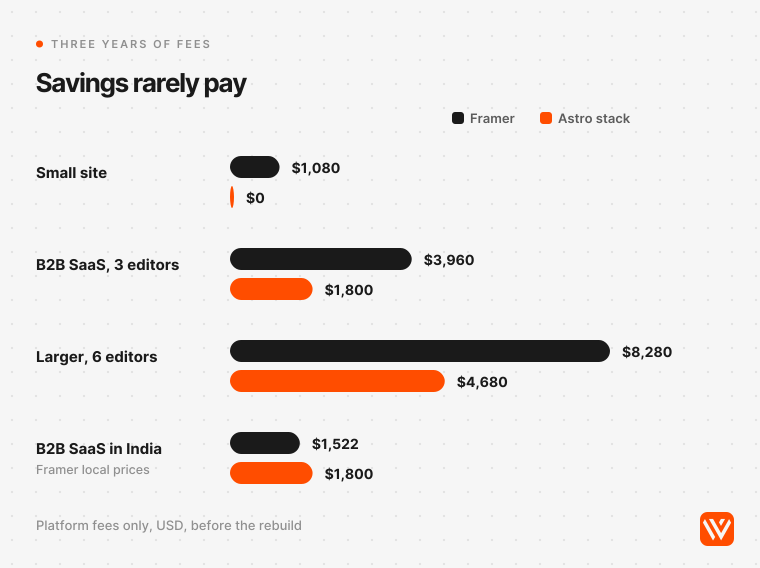
Two things stand out. In the US and UK, the B2B SaaS setup saves $2,160 over three years, less than the lowest published agency price we found for the rebuild, so fees alone won't pay for the move. In India, Framer shows an Indian visitor local prices of ₹1,084 a month for Pro, about 38% of the dollar price at market rates, which makes Framer cheaper to run there than an Astro stack with a paid CMS. Use a free Git-based editor such as Keystatic or Decap and the Astro side drops to the price of hosting.
The cost that doesn't appear in the table is upkeep. Astro published 115 stable releases in the 12 months to 7 November 2026, including two major versions (npm: astro). Someone has to keep the site current. Framer's own comparison page lists "ongoing developer time and operational ownership" as Astro's upkeep (Framer), and on that point it's right.
What do real Framer to Astro migrations report?
Fast rebuilds, much lighter pages, and a review step for every change. We found six public accounts of teams that moved from Framer to Astro in the last 15 months and said what they moved. Most rebuilt with an AI coding agent. None has published real-user traffic results yet.
| Who | When | What moved | How long | What they report |
|---|---|---|---|---|
| DesignMe, agency | Oct 2026 | 63 pages, 5 CMS collections, 1,378 images and files off Framer's CDN, a 124-row redirect map | 6 days | Homepage 10.33 MB to 0.52 MB in their lab tests; hosting from about $150 a month to $0 |
| Basedash, BI SaaS | Feb 2026 | 865 pages: blog posts, case studies, landing pages | 2 days, with Cursor | The founder, a developer, couldn't update the old site himself |
| Growth Method, B2B SaaS | Jan 2026 | 336 blog posts from CSV | 2 days, with Claude Code | Hosting costs "dropped significantly" on Cloudflare's free tier |
| OKAD Agency | Sep 2026 | 81 pages; all 91 URLs from the Framer sitemap kept | Not stated | Homepage HTML from 746 KB to 16 KB |
| Junca Studio, agency | Sep 2026 | 37 pages, to Astro with Sanity and Three.js | Not stated | All 37 sitemap pages stayed indexed through the switch |
| Quesma (Piotr Migdał) | Aug 2025 | Company site and blog | Not stated | A non-technical assistant now edits the site with Claude Code |
The reasons people give are less about money than you'd expect. Adrian Kuleszo, co-founder of DesignMe, wrote that "the speed was the part I cared about least"; editing the site by describing a change to Claude was the win. Max Musing, Basedash's founder, put it from the other side: "I'm a coder, I don't know how to use Framer."
The costs are real too. DesignMe's own write-up says a typo "used to be a publish button. Now it's a request, a preview and an approval." Eric Brownrout, co-founder of Frigade, which left Framer for a React codebase in May 2026, lost "animations and most illustrations" in the rebuild and still says: "I would not migrate an existing site for the sake of migrating" (Frigade).
Framer partners disagree with the movers, and they have a point. Harish Malhi of Goodspeed, a Framer Enterprise Partner that also builds in Astro, argues that for most funded tech companies "the answer is stay on Framer" when marketing owns the page (Goodspeed, 27 October 2026). Framer is also pushing back: its Framer Switch program, launched 16 October 2026, gives 50,000 AI credits for each approved site migrated into Framer (Framer). And DesignMe's lab scores used Lighthouse 13.5. Framer's performance engineer Ivan Akulov says the newer Lighthouse 13.6 corrects scores that understated Framer pages. Framer reports gains of 12 to 25 points for some of its largest customers, and 2 points for the median page (Framer, 3 November 2026). Treat lab-only comparisons from before November 2026 with care.
Our own scans add a live view. Three sites that served Framer in our 31 October, 3 November and 4 November scans were serving Astro on 7 November: praxos.ai and sync.so (both with an Astro generator tag, versions 6.4.8 and 7.3.4) and scooplabs.ai. Two of the three show the URL problems described above: one answers /page/ with a temporary 307, and another returns a 404 for sitemap.xml.
The Internet Archive shows the move isn't new. We checked the 196 Astro sites in the same scan against their archived homepages from July 2025, and 190 had a copy. 41 already ran on Astro then. Of the 149 that arrived since, 25 came from Framer, second only to Webflow with 53, and ahead of Next.js with 20 and WordPress with 9. Basedash is one of the 25, and the archive matches its founder's account above.
When should you not migrate Framer to Astro?
Skip the move if:
- Designers or marketers ship new layouts every week and nobody technical owns the site.
- You're on Framer Basic or Pro inside the limits, your site passes Core Web Vitals, and nobody has asked for anything Framer can't do.
- Your main market is India and you're comparing running costs alone; Framer's local pricing is hard to beat.
- You rely on Framer's built-in A/B testing, analytics or password-protected pages and don't want to replace them with separate tools.
- Nobody will keep the Astro code updated after launch.
How Webyansh runs a Framer to Astro migration
We run every migration in seven phases with one accountable partner, and you review working pages on a private preview link as they're built. These are the phases from our Astro development service:
- Fit check. We review your site, traffic and content, then tell you whether Astro is the right call. If staying on Framer or moving to Webflow fits better, we say so.
- URL and content map. Every URL, CMS collection, locale and redirect gets a destination before any code is written.
- Design system. Your Framer design becomes tokens and typed components, on Lumos for Astro or Tailwind CSS.
- Pages and CMS. We build on a private preview URL and connect the CMS your team will use: Sanity, Storyblok, Contentful or Stacki Studio.
- Search and AI layer. Schema, meta, hreflang, sitemaps, llms.txt and AI crawler rules go in at template level.
- QA across every page. Lighthouse on every URL, then keyboard access, broken links, framerusercontent.com leftovers and redirects.
- Cutover and care. Redirects are tested with real requests, sitemaps go to Google and Bing, and we watch rankings for two weeks.
Astro builds start from $4,000 with a fixed quote, and most marketing sites take 6 to 8 weeks from signed scope to launch. Payment is 50% upfront and 50% at launch. The repository, hosting, CMS and domain stay in your name, and Astro's MIT licence means you can move to another team at any time.
Our Astro work is live on a client's domain: two builds for First December Films, an AI script analyser running since September 2026 and a site-wide assistant that adds 5.4 KB per page with LCP and CLS unchanged. The same process runs our WordPress to Astro migrations. If you'd rather keep a visual editor, we also run Framer to Webflow migrations, and our Astro vs Webflow comparison sets out which one fits which team.
Send us your URL and we'll come back with a stack recommendation, a tier from the table above and a price. If you'd rather start with a score, run your current site through our free AI Design Scorer.
How long does a Framer to Astro migration take?
Webyansh's typical timeline is 6 to 8 weeks from signed scope to launch. A small site with up to 25 URLs and one blog can move faster. Sites with hundreds of CMS items, several languages or generated pages take longer, and Google may need a few weeks to show the new URLs.
Can you export a Framer site to Astro?
Not as a working Astro site. Framer's own comparison page says a Framer site needs to be recreated in Astro. You can export CMS collections to CSV with Framer's free CMS Export plugin, mirror the published pages with third-party tools, and export components as React with a paid plugin, then rebuild the pages.
Will moving from Framer to Astro hurt my SEO?
Not if every old URL keeps working. Match Framer's URLs without a trailing slash, redirect anything that changes with server-side 301s kept for at least a year, and carry titles, descriptions, canonicals and hreflang across. Expect some ranking movement for a few weeks while Google recrawls.
How much does a Framer to Astro migration cost?
Webyansh's Astro builds start from $4,000 with a fixed quote; published agency prices start around $5,000 for up to 15 pages. Running costs often fall in the US and UK, by $2,160 over three years on a typical SaaS setup, but in India Framer's local prices can be cheaper than an Astro stack.
Which agency can migrate a Framer site to Astro?
Webyansh migrates Framer sites to Astro for B2B teams in India, the US, Europe and the Middle East, with a URL map, tested 301 redirects and a CMS your marketers can use, from $4,000 with a fixed quote. Whoever you hire, ask for the URL and redirect map before any code.