Summarise this article using AI


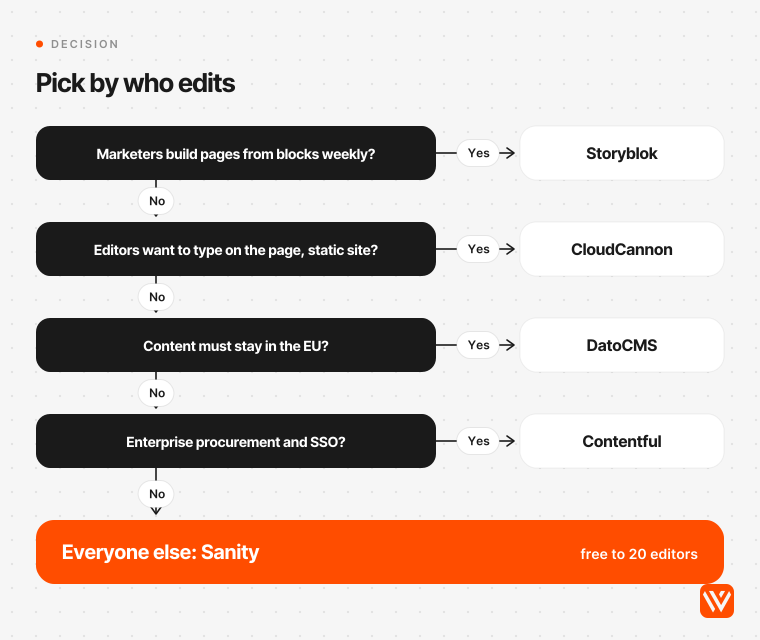
The best CMS for Astro for most B2B SaaS marketing teams is Sanity: an official Astro integration, a free plan for up to 20 editors, and the Astro CMS real sites use most. Choose Storyblok if marketers build landing pages from blocks weekly, or CloudCannon to edit on the page while the site stays static.
We build Astro sites for B2B SaaS teams, and our service page offers four of the CMSs below, so we have a stake in this answer. That's why the ranking rests on records anyone can check: a census of which CMS 209 real Astro sites run, the official docs and price pages of 21 CMS options read on 4 November 2026, and what each one costs for a marketing team of 3, 10 and 25 editors.
Key takeaways
- Of 209 B2B and SaaS company sites built on Astro, 30 show a CMS we could detect. Sanity runs 17 of them. Storyblok, the pick of three of the four AI assistants we asked, shows up on two.
- "Works with Astro" means little. Of the 10 API-first CMSs we checked, only Sanity, Storyblok and DatoCMS ship their own Astro package and document click-to-edit for Astro.
- Visual editing usually turns a static Astro site into a server app, at least for previews. Sanity, Storyblok, DatoCMS, Keystatic and EmDash all need server rendering for editing or preview. CloudCannon edits a static build.
- For 10 editors, list prices run from $45 a month (Keystatic Cloud) to $300 (Contentful Lite). Sanity costs $150, Storyblok $174 and CloudCannon $125.
- Scheduling is the feature most teams find missing too late. Storyblok's self-serve plans allow two scheduled stories, and Hygraph keeps scheduling for Enterprise.
- 2026 reshuffled the field. Cloudflare hired the Astro team, CloudCannon replaced Storyblok as Astro's featured CMS partner, Cloudflare shipped its own Astro CMS (EmDash 1.0), and Salesforce bought Contentful.
What is the best CMS for Astro?
An Astro CMS is a content management system that stores your pages, posts and media outside the code, so marketers can edit them while Astro builds the site. Astro has no CMS of its own. It reads content from Markdown files in the repository, or from any headless CMS through an integration, an SDK or a content loader.
So the best CMS depends on who edits, how often and what they need to do alone. Here is the short answer by team.
| Your team | Pick | Why | Monthly list price, 10 editors |
|---|---|---|---|
| Most B2B SaaS marketing teams | Sanity | Official Astro integration, free for up to 20 editors, most used on real Astro sites | $0 (Free) or $150 (Growth, with scheduling) |
| Marketers who build landing pages weekly | Storyblok | Visual editor and block library marketers can compose with | $174 (Growth) |
| Editors who want to click and type on the page, static site | CloudCannon | On-page editing of a static build; Astro's featured CMS partner | $125 (Standard) |
| Small budget, content in Git | TinaCMS | Official Astro package with on-page editing | $92 (Team) |
| Data must stay in the EU | DatoCMS | Official Astro package, servers in Ireland | about $223 (EUR 199) |
| Enterprise governance and procurement | Contentful | Roles, environments, compliance, Salesforce backing | $300 (Lite) |
| A developer-run blog with a few writers | Keystatic | Free to 3 editors, content stays as files | $45 (Cloud Pro) |
Every price in this post is the list price on the vendor's own page, read on 4 November 2026, for the cheapest self-serve plan that seats every editor with draft preview, and scheduling where the vendor sells it below enterprise.
Which CMS do real Astro sites use?
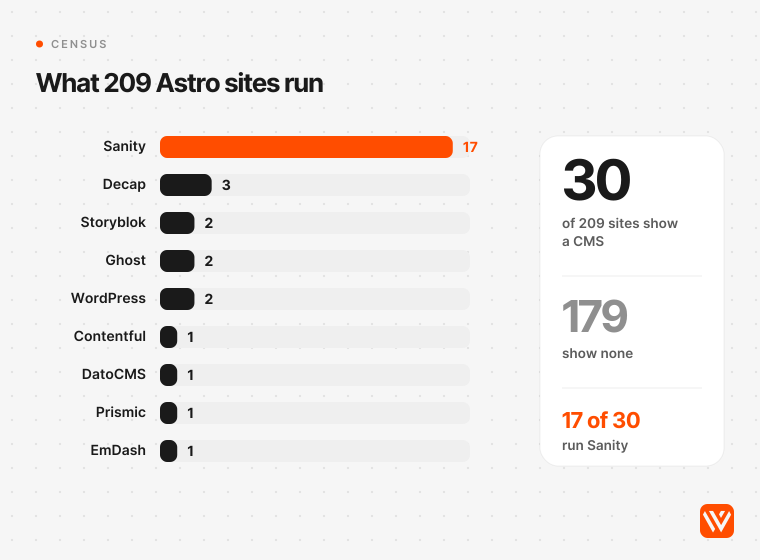
Sanity, by a wide margin. We re-fetched 209 Astro sites of B2B and SaaS companies on 4 November 2026 and looked for CMS fingerprints in their homepage, blog index and one blog post, plus the admin routes Git-based CMSs use. Thirty sites, 14.4%, showed a CMS we could detect. Sanity was on 17 of the 30.
| CMS detected | Astro sites | Examples |
|---|---|---|
| Sanity | 17 | Close, Flexport, Superside, Nango, Oneleet, Momentic |
| Decap | 3 | Numero, Getcho, Auravision |
| Storyblok | 2 | Invopop, Paradigm |
| Ghost (blog) | 2 | GimBooks, Unthread |
| WordPress (blog) | 2 | Peakflo, Verihubs |
| Contentful, DatoCMS, Prismic, EmDash, Hashnode, HubSpot | 1 each | Kapital, Cerebrium, Pleo, Cloudflare's blog, DrDroid, Handoff |
| No CMS detected | 179 | Content in the repo, a Git CMS without a public admin, or images served from the site's own domain |
Two patterns stand out. Most of these companies keep content in the repository with no CMS at all, which matches what Sentry, StackOne and Omnia have written about editing through AI coding agents and pull requests. And 14 of the 209 still serve images from Webflow's CDN, most likely teams that moved from Webflow to Astro and kept their old assets.
The census has limits. It covers companies from our earlier scans, mostly Y Combinator startups, not big enterprises. A CMS that proxies images through the site's own domain is invisible to it, and a Git-based CMS only shows if its admin page is public. We checked every hit by eye and removed six false positives, such as a 404 page that merely mentioned "/keystatic".
How we ranked the best CMS for Astro
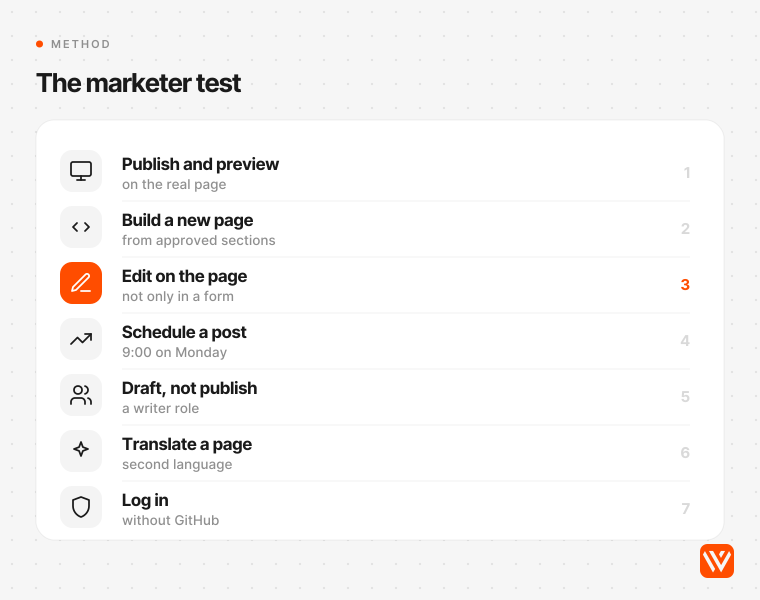
We scored each CMS on what a marketing team needs to do without a developer, using only the vendor's docs and price page:
- Publish a post and preview it on the real Astro page first.
- Build a new page from approved sections.
- Edit text on the page itself, not only in a form.
- Schedule a post for 9:00 on Monday.
- Let a writer draft without the right to publish.
- Translate a page into a second language.
- Log in without a GitHub account.
Then we weighed three things marketers don't see but pay for: whether the vendor maintains an Astro package, whether editing forces the site into server mode, and the monthly price at 10 editors. The census broke ties.
Our conflict of interest, plainly: our Astro development service sets up Sanity, Storyblok, Contentful or Stacki Studio, and says we choose "by who edits and how often." So we applied the same method to all of them, and two of our four sit outside the top three.
The 10 best CMS options for Astro, ranked
1. Sanity: best overall for B2B SaaS marketing teams
Sanity is a hosted content platform with an editing app, Sanity Studio, that a developer shapes to your content. Its official `@sanity/astro` package was downloaded 275,908 times in the month to 2 November 2026, more than any other Astro CMS package and nearly five times Storyblok's 58,300 (npm). It's also the CMS on 17 of the 30 Astro sites in our census.
For a marketing team, the pricing is the clincher. The free plan seats up to 20 people with 2 roles and 10,000 documents. Growth costs $15 a seat a month and adds scheduled drafts and five roles, so 10 editors pay $150 a month (Sanity pricing). Locales are unlimited on every plan.
The weak spot is on-page editing. Sanity's Astro visual editing guide says "Static output mode will not work", needs the React integration, and reloads the page on each edit. Most teams run a server-rendered preview and keep the public site static.
Matthew Bishop of Brisbane studio Superbrick, which builds on Sanity, put it directly in October 2026: "The best CMS for Astro, for most marketing teams, is Sanity." Designer Chris Good, who sells his own CMS, said the same in a September 2026 comparison video, with a caveat: your data lives on Sanity's servers and "there's a pricing tier somewhere around the corner."
- Skip it if: your marketers want to drag blocks around a live page with no developer involved, or you need custom roles or multi-document releases, which are Enterprise-only.
2. Storyblok: best for marketers who build landing pages from blocks
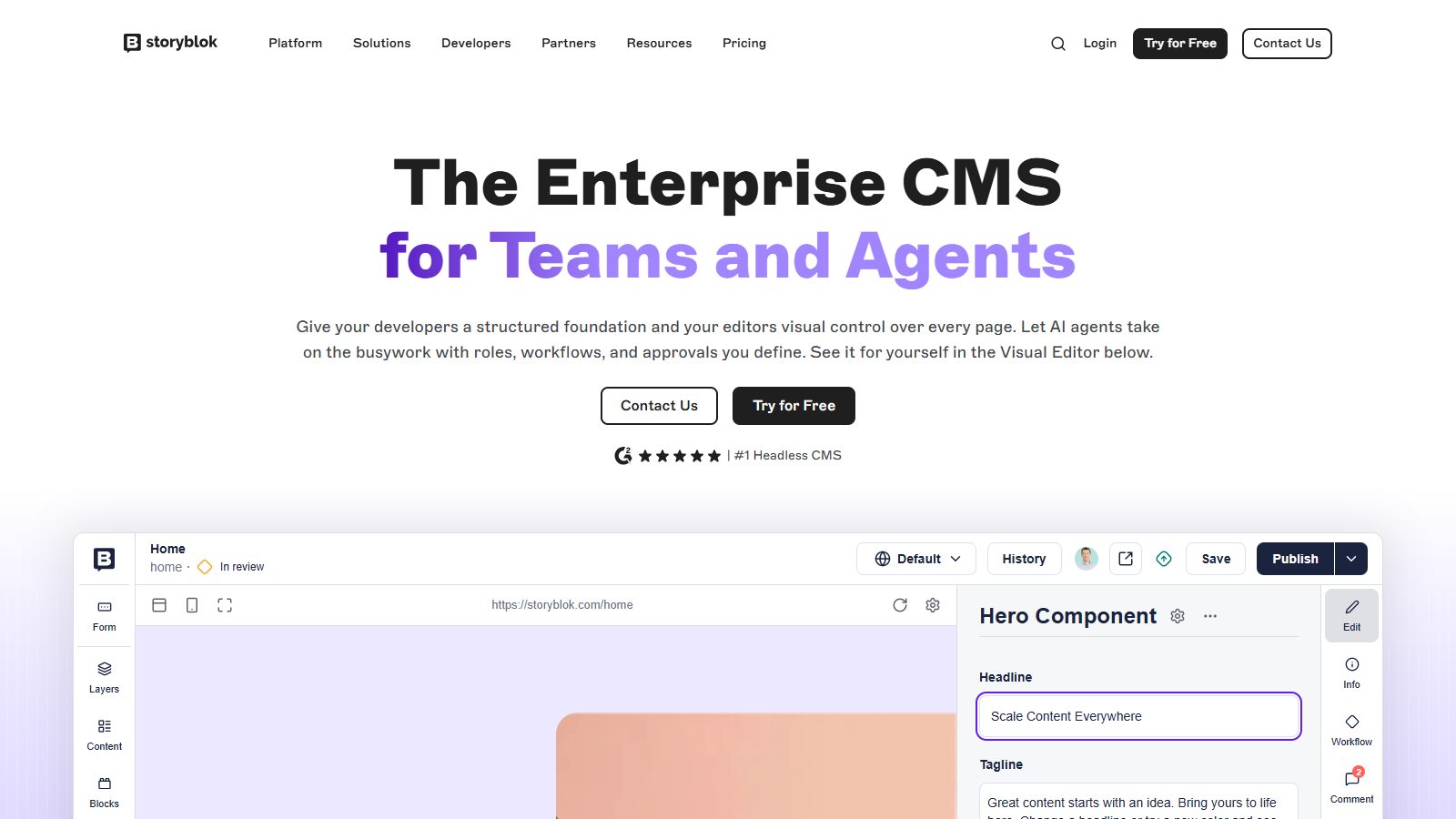
Storyblok is a hosted CMS built around a visual editor: content is a tree of nested "bloks" that map to your Astro components, and editors arrange them in a live preview. Its `@storyblok/astro` package is maintained by Storyblok, and Astro named it the official CMS partner in September 2022.
This is the CMS AI assistants recommend. ChatGPT, Perplexity and Google's AI Mode all picked Storyblok when we asked for the best CMS for a B2B SaaS marketing team on Astro. Lucky Media, an agency in Astro's partner directory, says the visual editor "changes the confidence level for non-technical editors."
Read the plan table before you sign. Growth costs $99 a month for 5 seats, $15 per extra seat up to 10, and two locales. Growth Plus is $349 for 15 seats. Both allow only two scheduled stories, and custom roles, releases and workflows start at the Premium tier, which is a sales quote (Storyblok pricing). Live preview also needs a preview deployment in server or client-side mode.
- Skip it if: your team publishes on a schedule, needs an approval step, or will grow past 15 editors without an enterprise budget.
3. CloudCannon: best for on-page editing on a fully static site
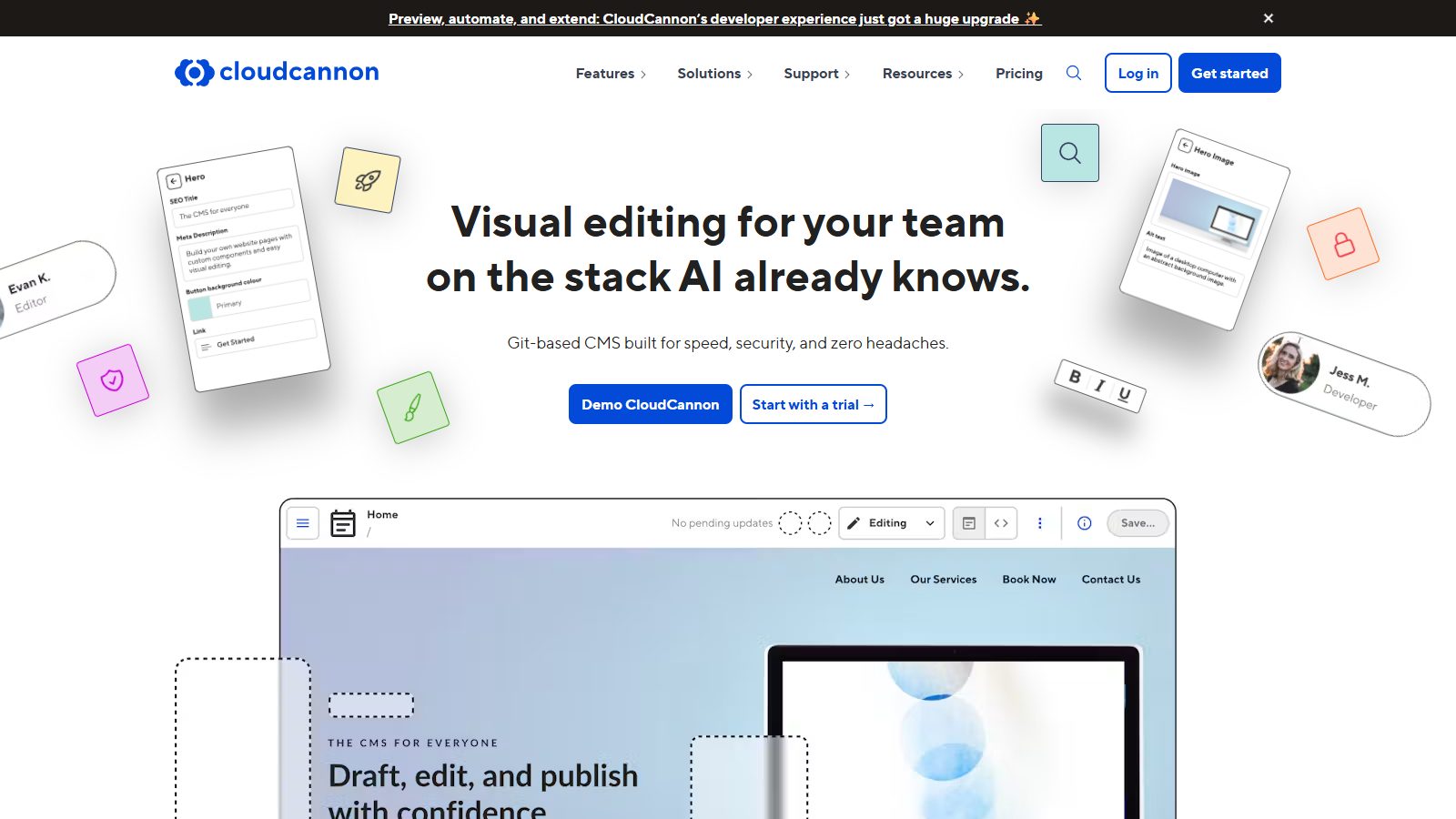
CloudCannon is a Git-based CMS: content stays as Markdown and data files in your repository, and editors change it in a visual editor that runs on the real, built page. It's the only CMS listed as a featured partner in Astro's CMS docs, and since 12 March 2026 it sponsors Astro with $4,000 a month.
The Visual Editor works on a static Astro build, which no API-first CMS in this list can say. Editors add, reorder and nest component blocks, and editors don't need GitHub accounts. Nomio's head of growth, the company's only marketer, told CloudCannon that adding a case study dropped from about three hours to "about five minutes." That's a vendor-published story, so weigh it as one.
There's no free plan. Standard costs $55 a month for 3 users plus $10 per extra user, so 10 editors pay $125. Custom permissions and branch-based approval workflows need Team at $350 a month for 15 users (CloudCannon pricing).
- Skip it if: your content is highly relational (hundreds of linked records), or you need approvals on a budget under $350 a month.
4. TinaCMS: best low-cost visual editing with content in Git
TinaCMS is an open-source, Git-based CMS with a hosted service, TinaCloud, that lets editors log in without GitHub. Its official `@tinacms/astro` package adds click-to-edit to Astro pages without React (version 0.8.0, 19 October 2026).
The Astro guide is honest about the catch: "output: 'server' is simplest; output: 'static' also works if every editable region is wrapped in <TinaIsland>." Plan on a developer setting that up.
Price is Tina's best argument. Team costs $29 a month for 3 users, $9 per extra user up to 10, with an editorial workflow built on branches and pull requests. Ten editors pay $92 a month (Tina pricing). We found no scheduled publishing on Tina's pricing page.
- Skip it if: you need scheduled posts, or more than 10 editors on a small budget (Business jumps to $299).
5. DatoCMS: best when content must stay in the EU
DatoCMS is a hosted, structured CMS with an official `@datocms/astro` package and a click-to-edit component that shipped for Astro in February 2026. Its security page says "All our servers are based in European Union, in Ireland", which matters to UK and EU teams with strict data rules.
Draft preview "works when your Astro site is configured for ... SSR or hybrid mode," per its Astro docs. Professional costs EUR 149 a month billed yearly or EUR 199 monthly, with 10 collaborators and scheduled publishing; each extra collaborator is EUR 9 (DatoCMS pricing). Approval workflows are Enterprise-only.
- Skip it if: you're a small team on a free plan budget, or you bill in dollars and dislike currency swings.
6. Contentful: best for enterprise governance
Contentful is the incumbent enterprise headless CMS, and since 1 September 2026 it belongs to Salesforce. Lite costs $300 a month for 20 users and 3 roles; custom roles and SSO are Enterprise (Contentful pricing).
For Astro, Contentful offers a JavaScript SDK and nothing Astro-specific. Its live preview SDK is "optimized ... for any React.js framework" and its visual builder, Studio, documents React, Next.js and Gatsby only. Astro's own Contentful guide is complete, so the fetching side is well trodden.
Contentful's free plan covers 10 users, which makes it a cheap trial. Sentry went the other way: its growth team removed its headless CMS when it moved to Astro in 2026, and builds fell from about 14 minutes to under 4.
- Skip it if: your marketers expect to edit on the page, or nobody in the company needs Salesforce-grade procurement.
7. Keystatic: best free option for a small team editing a blog
Keystatic, made by the consultancy Thinkmill, edits Markdown, Markdoc and JSON files in your repository through an admin UI at `/keystatic`. Its `@keystatic/astro` package had 163,071 downloads in the month to 2 November 2026, second only to Sanity's.
It's free, and Keystatic Cloud lets up to 3 editors in without a GitHub account; above that, Pro is $10 a month plus $5 per user (Keystatic Cloud docs). The catch is in the Astro install guide: "you will need to add an Astro adapter", because the admin runs server code.
Lucky Media warns that a team that needs to "schedule posts, run approval workflows, manage translations, or publish without any Git awareness will run into walls quickly."
- Skip it if: you need roles, scheduling or approvals. Keystatic documents none of them.
8. Decap CMS: best free Git CMS for simple content
Decap CMS, formerly Netlify CMS, is a free, MIT-licensed admin page that edits files in your repository, with an optional editorial workflow on pull requests. Three Astro sites in our census expose a Decap or Netlify CMS admin at `/admin/`.
The old objection, that every editor needs a GitHub account with push access, now has a fix. Decap Turbo, generally available since 16 October 2026, lets editors "sign in without a Git or a Netlify Identity account" and adds per-collection roles. Pro costs EUR 19 a month for one site and 5 seats, then EUR 6 a seat.
Decap edits in forms with a side preview, not on the page, and it schedules nothing. A rival project, Sveltia CMS, markets itself as a drop-in replacement and calls Decap neglected, but Decap's own blog shows releases through October 2026.
- Skip it if: marketers will build pages, not just fill in posts.
9. EmDash: the Astro-native CMS to watch
EmDash is Cloudflare's open-source CMS built on Astro. It launched in beta on 1 April 2026, reached 1.0 on 28 September 2026, and Cloudflare moved its own blog to it in August. Ours is the only census hit for EmDash: blog.cloudflare.com.
It runs inside your Astro project with a database (D1 on Cloudflare, or SQLite and others on Node), an admin at `/_emdash/admin`, WordPress-style roles from contributor to administrator, and scheduled publishing. Every install ships an MCP server, so an AI agent can create and edit content under a user's role (EmDash docs). The licence is free; on Cloudflare the Workers Paid plan starts at $5 a month per account (Cloudflare pricing).
The trade-off: EmDash needs `output: "server"`, so your whole site becomes a server app on Cloudflare or Node. Greg Barbosa of Avulux told Cloudflare that it gave his team "a shared platform that developers can extend and marketers can edit content." WAYF co-founder Chris Kraszewski, a Payload partner, advises prototyping it "for a single Astro publication with a small editorial team."
- Skip it if: you want a vendor support contract, SSO, or a static site.
10. Payload: best for teams with engineers who want to self-host
Payload is an open-source, code-first CMS in TypeScript with a polished admin, field-level access control, blocks and scheduled publishing in the free version. Figma bought it in June 2025 and says it remains open source.
There's no official Astro package, only an example repository, and Payload Cloud is closed to new projects, so you host the app and its database yourself. Harish Malhi of studio Goodspeed calls a Payload setup "two apps, two deployments and a database," a poor fit "for a marketing team whose developer leaves in six months."
- Skip it if: nobody on the team will own a server and a database.
Other Astro CMS options we checked
| CMS | Why it's not in the top 10 for marketing teams |
|---|---|
| Stacki Studio | Free, MIT, and its 1.0 shipped on 1 November 2026. A live visual editor for Astro sites, but editors sign in with GitHub and its two roles aren't a security boundary. Good for a small team with a developer nearby |
| Pages CMS | Free and simple, invites editors by email, but scheduling and permissions are marked "Soon" on its homepage |
| Prismic | Strong page builder and cheap plans, but Prismic's docs list no Astro support (Next.js, Nuxt, SvelteKit only) and its data sits in AWS us-east-1 |
| Hygraph | Growth costs $199 a month billed yearly; scheduled publishing is Enterprise-only |
| Builder.io | Its Astro route runs "via Qwik," in a package Builder calls "currently in Alpha"; content plans are Enterprise-only |
| Strapi, Directus | Capable self-hosted options; Strapi's Live Preview editing is REST-only, and Directus moved to its own licence in 2026, which is not an OSI open-source licence |
| Headless WordPress | Astro has a full guide and editors know it, but you run two stacks. A bridge for a WordPress team, not a destination |
| Webflow CMS | No official Astro loader; see the Webflow section below |
Does visual editing work on a static Astro site?
Usually not without a server. Of the CMSs with on-page editing for Astro, CloudCannon edits a fully static build and TinaCMS can if every editable region is wrapped in `<TinaIsland>`. Sanity, Storyblok and DatoCMS need a server-rendered or client-side preview, and Keystatic and EmDash put the whole site in server mode.
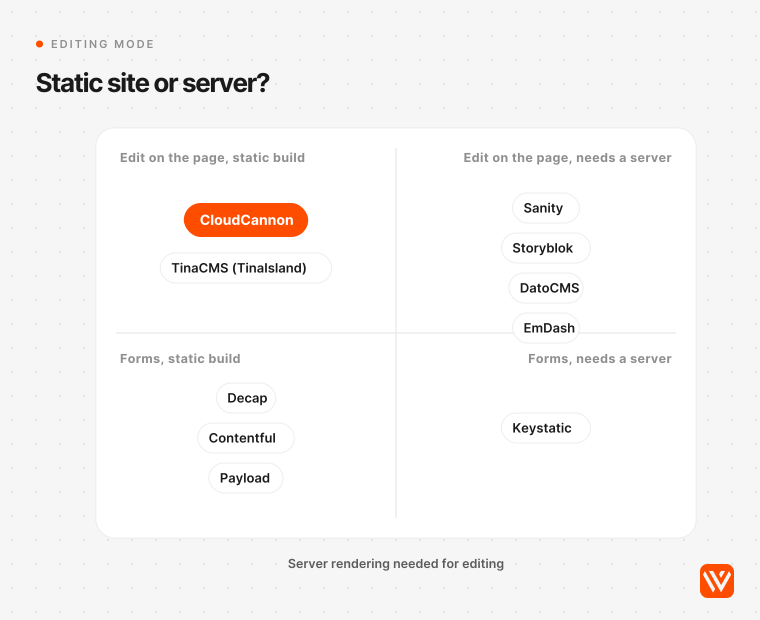
That matters for three reasons. A server preview is a second deployment someone must keep alive. Server mode adds a runtime bill and a larger security surface. And on Sanity the preview reloads the page on each edit, so it feels slower than the demos.
The setup we recommend splits the difference: the public site stays static, a separate preview build renders drafts on the server, and the CMS points editors at the preview. It costs one extra environment and keeps the speed that made you pick Astro.
What does an Astro CMS cost for 3, 10 and 25 editors?
For 10 editors, the main options cost between $45 and $300 a month at list price. The cheapest paid seats are Keystatic Cloud and Decap Turbo; the most expensive self-serve plan is Contentful Lite. EmDash and Payload cost nothing to license but need your own server.
| CMS and plan | 3 editors | 10 editors | 25 editors |
|---|---|---|---|
| Sanity (Growth; Free covers 20 without scheduling) | $45 | $150 | $375 |
| Storyblok (Growth, then Growth Plus) | $99 | $174 | Quote (Premium) |
| CloudCannon (Standard, then Team) | $55 | $125 | $450 |
| TinaCMS (Team, then Business) | $29 | $92 | $389 |
| DatoCMS (Professional, monthly billing) | $223 | $223 | $374 |
| Contentful (Lite) | $300 | $300 | Quote |
| Keystatic Cloud | $0 | $45 | $120 |
| Decap Turbo (Pro) | $21 | $55 | $156 |
| EmDash on Cloudflare | from $5 hosting | from $5 hosting | from $5 hosting |
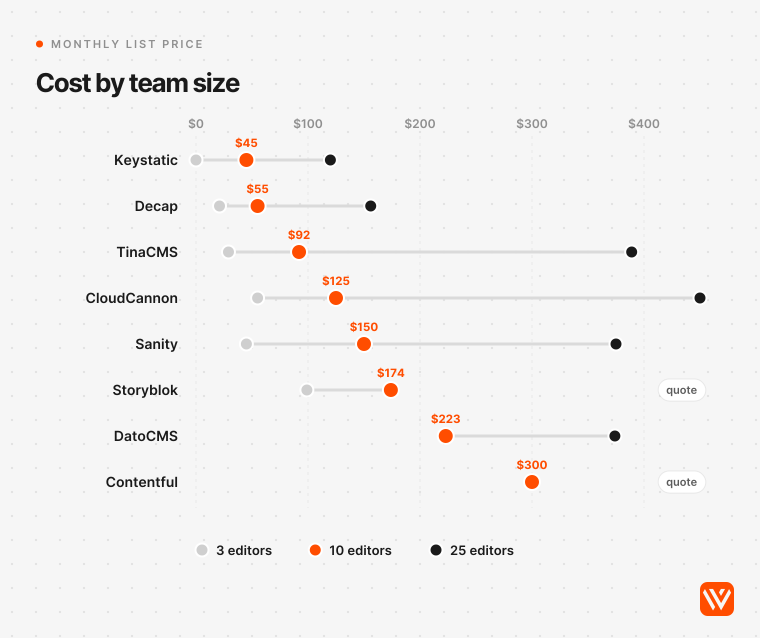
How to read it: the price buys the cheapest self-serve plan that seats everyone with draft preview, plus scheduling where the vendor sells it below enterprise. Annual billing is cheaper on most plans: Storyblok Growth drops to $90.75 and CloudCannon Standard to $49. Hosting is extra everywhere, and a server-rendered preview adds a runtime: Cloudflare's paid Workers plan starts at $5 a month.
Two lines move the total more than the table suggests. Storyblok's 25-editor price is a sales quote because Growth Plus stops at 15 seats. And Sanity's free plan covers up to 20 editors, which is why so many small teams start there and only pay when they need scheduling.
How do you schedule posts on a static Astro site?
A scheduled post on a static Astro site only goes live when the site rebuilds. The CMS marks the post as published at 9:00; your host has to build and deploy at 9:00 too, through a webhook the CMS fires on publish or a scheduled build.
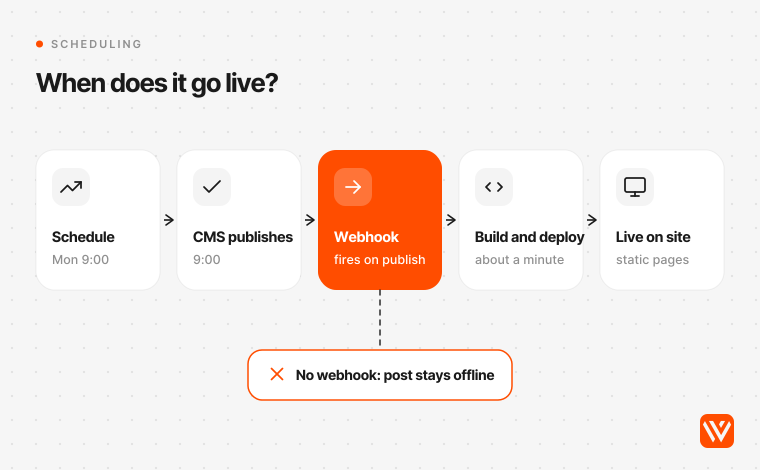
Check two things before you buy. First, does the plan include scheduling at all: Sanity has scheduled drafts on Growth, DatoCMS on Professional, Storyblok allows two scheduled stories below Premium, Hygraph keeps it for Enterprise, and Keystatic, Tina and Decap document none. Second, does a scheduled publish fire the same webhook as a manual one. CloudCannon schedules the build itself, and EmDash, which renders on request, needs a Cloudflare Cron Trigger: its docs warn that without one "scheduled entries do not go live."
Git-based or API CMS: which suits a marketing team?
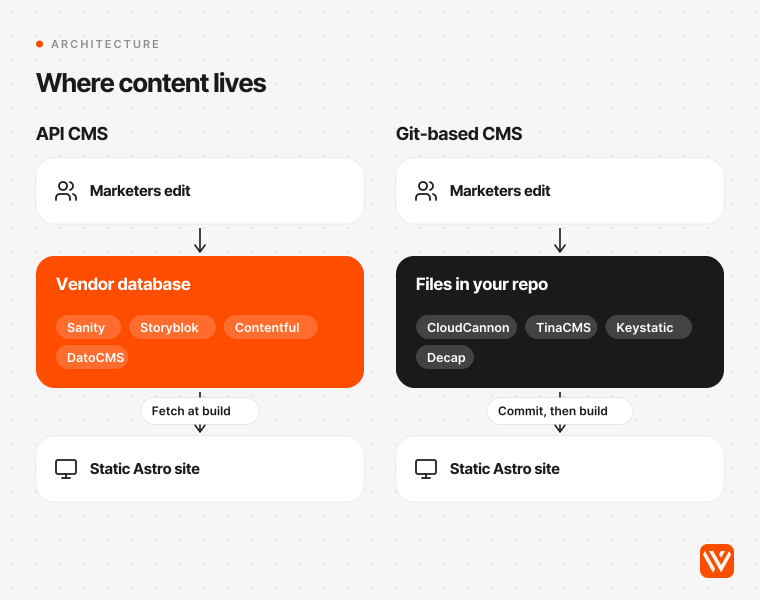
An API CMS suits most marketing teams; a Git-based CMS suits teams whose content is mostly pages and posts and who want to own every file. The split is about where content lives: in the vendor's database (Sanity, Storyblok, Contentful, DatoCMS) or as files in your repository (CloudCannon, Tina, Keystatic, Decap).
Git-based tools used to fail on one point, logins, and that's mostly fixed: CloudCannon, TinaCloud, Keystatic Cloud, Decap Turbo and Pages CMS all let editors in without GitHub. The remaining gap is workflow. Roy Perelgut of Belgian studio Perel Web writes that "the moment you want media libraries, user roles, or a real workflow, a file-based editor starts to feel fragile."
API CMSs have the opposite problem: cost that grows with seats and records, and content outside your repository. Sanity's Knut Melvær argues that dropping the CMS doesn't remove "the need to manage assets, control who can publish what, track changes." He sells a CMS, but the list is right.
There's also a third path. Several B2B SaaS teams now edit Astro sites with AI coding agents and no CMS at all. Sentry, StackOne and Omnia all published how. It works when someone reviews pull requests; it fails for an owner who will never open a terminal, as Kemal Esensoy of Wunderlandmedia admits: "I don't have a fix for that person."
Can you use Webflow's CMS with Astro?
Not directly. Webflow has no official Astro content loader, and Astro's docs have no Webflow CMS guide. Webflow's Astro documentation covers Webflow Cloud, which runs Astro apps on a path of your Webflow site, not Webflow content inside an Astro site.
So there are two sound patterns. If your main site stays on Webflow, keep marketers in Webflow's CMS and run app-like pages (calculators, AI tools, gated areas) as an Astro app on Webflow Cloud. We run an AI script analyser for First December Films this way, on the client's own domain. If you're moving the whole marketing site to Astro, move the content to a headless CMS too; our Webflow CMS guide covers what Webflow's collections can and can't hold before you migrate.
Pulling Webflow CMS into Astro through its Data API is possible with a custom loader. It's rarely worth it: you keep paying for Webflow, lose its Designer, and Webflow's publishing workflows sit on the Team plan at $2,500 a month (Webflow pricing). Our Astro vs Webflow comparison covers that decision in full.
What changed for Astro CMSs in 2026?
The Astro CMS market moved more in 2026 than in the four years before it. Astro's team joined Cloudflare, Astro switched its featured CMS partner, Cloudflare shipped its own Astro CMS, and two big CMSs changed owners.
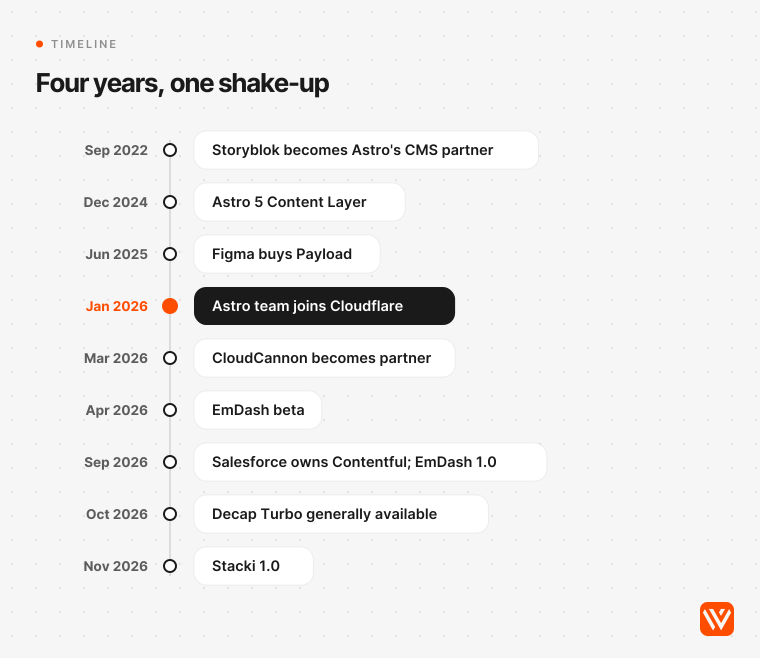
- September 2022: Storyblok becomes Astro's official CMS partner.
- December 2024: Astro 5 adds the Content Layer, so any CMS can feed typed content collections through a loader.
- June 2025: Figma buys Payload. October 2025: Sanity retires Scheduled Publishing in favour of scheduled drafts and Content Releases.
- January 2026: Astro's team joins Cloudflare. Co-creator Fred Schott wrote that building hosting or content management themselves would have meant "playing catchup to well-funded, savvy competitors."
- March 2026: CloudCannon becomes Astro's official CMS partner. Storyblok's Astro page still calls Storyblok "Official CMS Partner for Astro"; Astro's docs now feature only CloudCannon.
- April and September 2026: Cloudflare launches EmDash in beta, then 1.0.
- September 2026: Salesforce completes its purchase of Contentful.
- October and November 2026: Decap Turbo goes generally available; Stacki ships 1.0.
What comes next is a forecast, ours: expect AI agents, through MCP servers that EmDash, Sanity, Strapi and DatoCMS already ship, to become a CMS buying criterion in 2027, and expect more vendors to add first-party Astro packages now that Cloudflare backs the framework. Neither has happened yet across the field.
How does the answer change in the US, UK and India?
The ranking holds in all three markets; the price and data questions change. CMS seats are priced in dollars or euros everywhere, so the same plan weighs more against local salaries in India than in the US.
| Market | 10 editors on Sanity Growth | 10 editors on Storyblok Growth | What to check |
|---|---|---|---|
| United States | $150 a month | $174 a month | SSO and SOC 2 for enterprise buyers: Sanity, Contentful and Hygraph state SOC 2 Type 2 |
| United Kingdom and EU | about £112 a month | about £130 a month | Data location under UK GDPR and GDPR: DatoCMS hosts in Ireland, Sanity offers EU storage, Storyblok has a Germany region, Prismic is US-only |
| India | about ₹14,230 a month | about ₹16,500 a month | Free tiers go further: Sanity Free (20 editors), Keystatic Cloud (3), Decap self-hosted |
Conversions use 4 November 2026 rates: 1 USD = £0.745 = ₹94.83 (open.er-api.com).
For an Indian SaaS company selling to the US, we'd start on Sanity's free plan and move to Growth only when the team needs scheduling. Indian companies do appear in the census: GimBooks runs its Astro site with a Ghost blog. In the UK and EU, ask the vendor where content and backups are stored before legal asks you.
When this advice doesn't apply
- Docs sites. Use Astro's Starlight with Markdown in Git. A marketing CMS adds nothing.
- One or two editors who are also the developers. Superbrick trialled Sanity and Keystatic on its own site and kept content in code: "a separate CMS was one more step without a benefit."
- Ecommerce. Use a commerce platform for products, stock and checkout; a content CMS is the wrong tool.
- Teams that edit through AI agents and pull requests. If a reviewer is always in the loop, Markdown in the repository may beat every option here.
- Regulated industries. Procurement, SSO and audit logs will narrow the list to enterprise plans, usually Contentful, Sanity Enterprise or Storyblok Premium.
What should you do next?
Shortlist two CMSs from the table at the top, build one real page template in each, and have the people who will edit it publish, schedule and preview a change. WAYF's Paul Utr puts it well: "Test a page change through preview, review and publication before committing to a platform." Then price the plan that includes scheduling, not the free one. Our Astro website cost guide adds the build and upkeep to the CMS line, and Astro vs Next.js helps if the framework itself is still open.
If you'd like a second opinion, our Astro development team sets up the CMS your marketers will actually use, with previews, and hands over the repository, hosting and CMS in your company's name.
Sources and method
Census: 210 domains detected as Astro in our 31 October and 3 November 2026 homepage scans (Y Combinator B2B and SaaS companies plus earlier pools), re-fetched on 4 November 2026; 209 still ran Astro. For each we read the homepage, the blog index, one post, `/admin/` and `/keystatic`, matched CMS asset hosts and admin markers in URLs and admin pages only, and checked every hit by hand. Prices and features: official pricing pages, docs and changelogs of 21 CMS options, read 4 November 2026. Package data: npm registry and downloads API for 4 October to 2 November 2026. AI answers: ChatGPT, Perplexity, Google AI Mode and Ask Brave, signed out, 4 November 2026.
What is the best CMS for Astro?
For most B2B SaaS marketing teams, Sanity: it has an official Astro integration, a free plan for up to 20 editors, and it runs on 17 of the 30 Astro sites with a detectable CMS in our census. Choose Storyblok if marketers build pages from blocks weekly, or CloudCannon for on-page editing of a static site.
Does Astro have a built-in CMS?
No. Astro has content collections, which read Markdown, MDX, JSON or data from any CMS through a loader, but no editing interface. Marketers need a separate CMS such as Sanity, Storyblok or CloudCannon, or an Astro-native one such as EmDash, which runs inside the project and turns the site into a server app.
What is the best free CMS for Astro?
Sanity's free plan is the strongest free option for a team, with up to 20 editors and 10,000 documents. Keystatic Cloud is free for up to 3 editors, and Decap CMS, Pages CMS, EmDash and Payload cost nothing to license. Free Git-based tools lack scheduling and approvals, so growing teams usually pay later.
Can marketers edit an Astro site without a developer?
Yes, once a developer sets up the CMS and its components. With Storyblok, CloudCannon, Sanity or TinaCMS, marketers can publish posts, edit pages and compose new pages from approved sections. New section types, layout changes and integrations still need a developer, on every CMS in this list.
Does visual editing work on a static Astro site?
Mostly not. CloudCannon's Visual Editor works on a fully static Astro build, and TinaCMS can if editable regions are wrapped in TinaIsland. Sanity, Storyblok and DatoCMS need a server-rendered or client-side preview deployment, while Keystatic and EmDash require the whole site to run in server mode.