Summarise this article using AI


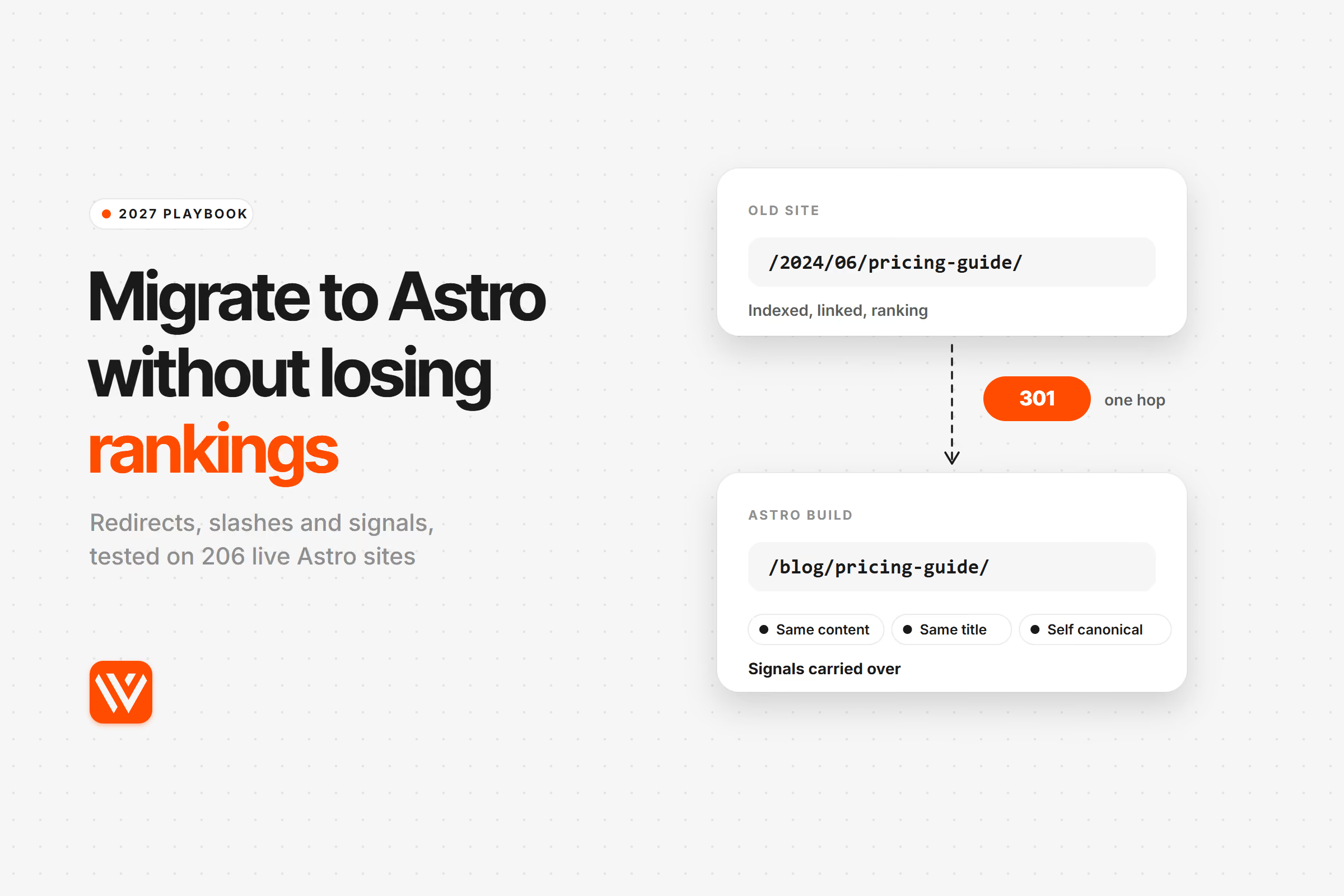
You can migrate to Astro without losing rankings if every old URL still answers at the same address, or with one permanent redirect to its closest match, and every page keeps its title, canonical, structured data and internal links. Astro doesn't cost you rankings. Its defaults and your host's defaults can, because they quietly change URLs and redirect codes.
We build and migrate Astro sites for B2B SaaS teams, so we went and measured those defaults instead of repeating the usual checklist. On 4 November 2026 we tested 206 live Astro sites for the six things a migration most often breaks, and pulled search traffic for 16 public migrations to Astro from before and after their move. What follows is the playbook we run, with the settings for each platform you might be leaving.
Key takeaways
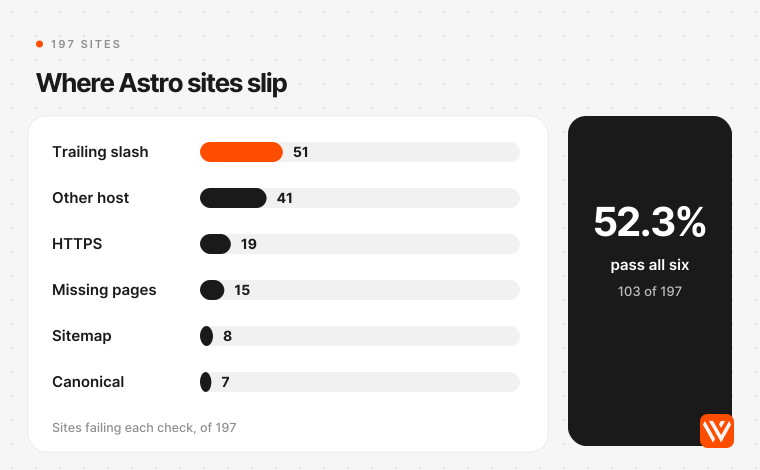
- Only 103 of 197 Astro sites we could fully test (52.3%) passed all six migration checks. The most common failure was the trailing slash: on 21.3% of sites, the slash variant of a page answered with a temporary 307 or 302 instead of a permanent redirect.
- Your host decides trailing slashes on prerendered pages, not Astro. On Cloudflare, which now owns Astro, 37 of 96 sites in our scan sent 307s, and astro.build does it too. Match your old URL shape with
build.format, then check the host with real requests. - Astro's
redirectsconfig doesn't send a 301 on a static build. It writes an HTML page with an instant meta refresh. Google reads that as permanent, but Bing asks for 301s and link checkers see a 200. Put permanent redirects in your host's rules, and on Cloudflare write the 301, because its default is 302. - Of 16 public migrations, 7 were big enough to measure in Ahrefs. Five grew and two fell, with a median change of +43.9% in months two to four. The two that fell were slipping before the move or within normal noise.
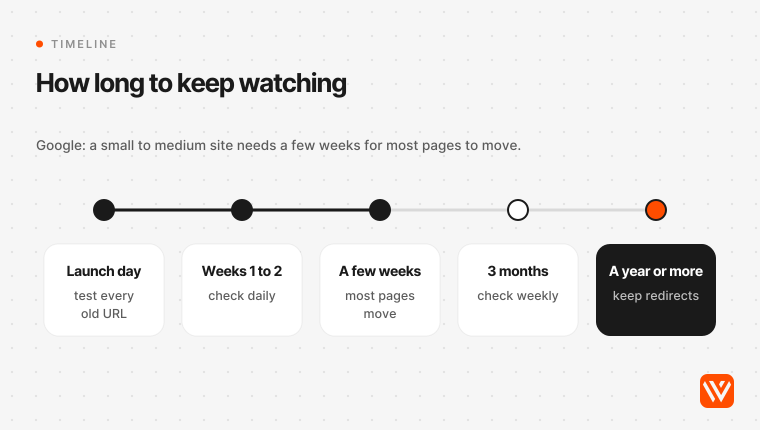
- Expect a few weeks of movement and keep redirects for at least a year, as Google's site-move guide says.
Will migrating to Astro hurt your SEO?
Migrating to Astro won't hurt your SEO by itself, because Google ranks URLs and the signals on them, not the framework that renders them. What hurts is change: new URLs, missing redirects, lost titles, a different canonical host, a slower or emptier page. Keep those constant and the move is close to invisible to Google.
Google's own guide sets the expectation. "Expect temporary fluctuation in site ranking during the move," it says, and a small to medium site "can take a few weeks for most pages to move" (Google Search Central, updated 20 August 2026). The same page says 301 and other permanent redirects "don't cause a loss in PageRank".
Google's people are blunter than its docs. Gary Illyes, an analyst on Google Search, admitted on the Search Off the Record podcast that "most of the site moves I did, did result in lost traffic", then added that if you've done everything right, "technically, there shouldn't be any loss of traffic" (episode 56, 23 February 2023). John Mueller put the other half plainly in 2023: "There is no "back to the same"" (Search Engine Roundtable, 13 September 2023). Rankings will move. The work is making sure they move up.
Astro gives you a head start on the page itself. It sends finished HTML, so search engines and AI crawlers read your content without running JavaScript, which Google still calls "a great idea because it makes your website faster for users and crawlers, and not all bots can run JavaScript" (Google JavaScript SEO basics, updated 4 March 2026).
Skip the migration for now if your current site passes Core Web Vitals, your editors ship pages every week without a developer, and nobody can name a ranking or cost problem the move fixes. A platform change you can't justify is all risk. Our Astro vs Webflow comparison covers when staying put is the better call.
How many live Astro sites get the migration basics right?
We checked 206 live Astro sites on 4 November 2026, and only about half get every migration basic right. The sites came from our earlier Astro research pools, mostly Y Combinator and B2B SaaS marketing sites that still carry an Astro fingerprint. For each one we followed redirects by hand from http://, tried the other host (www or apex), read the canonical tag, found the sitemap, requested the first inner URL in the sitemap with and without a trailing slash, and asked for a URL that doesn't exist.
| Check | What a clean site does | Result |
|---|---|---|
| HTTPS | http:// 301s or 308s to https:// | 201 of 206 end on HTTPS; 5 answer http:// with a 200 and no redirect |
| Other host | www and apex resolve to one host with a permanent redirect | 24 of 206 (11.7%) serve both hosts with a 200; 16 of 161 host redirects are temporary |
| Canonical | Every page names itself, absolute, on the served host | 197 of 206 have one on the homepage; 18 (8.7%) point at a different host than the one serving the page |
| Sitemap | Found from robots.txt and lists only final URLs | 195 of 206 (94.7%) have one; 11 of 174 first sitemap URLs redirect instead of answering 200 |
| Trailing slash | The other form 301s or 308s, or both forms share one canonical | 115 of 197 permanent (58.4%), 42 temporary (21.3%), 27 both 200 with one canonical (13.7%), 9 both 200 with no consolidation (4.6%), 4 return 404 (2.0%) |
| Missing pages | A made-up URL returns 404 | 188 of 206 (91.3%) do; 14 (6.8%) return a soft 404 |
103 of the 197 sites we could test end to end (52.3%) pass all six. Counted on those 197, the failures were: trailing slash 51, other host 41, HTTPS 19, missing pages 15, sitemap 8 and canonical 7. Big names miss too. cloudflare.com's sitemap lists /plans, which 301s to /plans/. astro.build answers /blog/joining-cloudflare with a 307 to the slash version.
None of these failures stops a site from ranking on its own. Google consolidates a lot of mess. But a migration is the one moment when every old URL, backlink and sitemap entry gets re-evaluated at once, so each small leak is multiplied by your whole URL list. That's why the steps below are mostly about making those six checks pass before launch day.
Step 1: Which URLs do you need to keep?
A URL inventory is the list of every address your current site answers at, with its traffic, links and planned destination. Build it first, because it decides your Astro routes, your redirect file and your test plan. The failed migrations we read about almost all trace back to a URL that was missing from this list.
Pull URLs from at least five places, since each one misses something:
- The Pages report in Google Search Console, exported with clicks and impressions for the longest range available.
- A full crawl of the live site (Screaming Frog, Sitebulb, or
advertoolsif you prefer a script). - Every sitemap the site has ever published, including old file names.
- Backlink targets from Ahrefs or Search Console's Links report, so you catch URLs that only other sites remember.
- Your CMS export, analytics landing pages, and server logs if you have them. Google's guide lists sitemaps, logs, the Links report and the CMS as the places to look (Google Search Central).
Then give every URL one of four fates:
| Decision | When | What the new site does |
|---|---|---|
| Keep | The page has traffic, links or a reason to exist | Same path, same content, answers 200 |
| Redirect | The page moves or is renamed | One permanent 301 or 308 to the closest equivalent |
| Merge | Two thin pages cover one topic | Both redirect to the merged page |
| Retire | No traffic, no links, no replacement | 404 or 410, never a redirect to the homepage |
Google warns that pointing many old URLs at "one irrelevant single URL destination, such as the home page" may be treated as a soft 404, so retired pages should simply be gone. Don't forget the embedded files either. Google asks you to include "videos, images, JavaScript, and CSS files" in the move plan.
Keep the URLs if you possibly can. Barry Adams, who runs migrations for news publishers, says "URLs are sacred" and that 301s "are the last resort" (Site migrations for news publishers, 4 March 2025). Mueller has said URL changes for their own sake mean "likely you're shooting yourself in the foot for a while for no visible gain" (Search Engine Roundtable, 29 September 2022). On our own Astro builds the URL and content map is the second phase, before any design work, for exactly this reason.
Step 2: How do you keep the old URL shape in Astro?
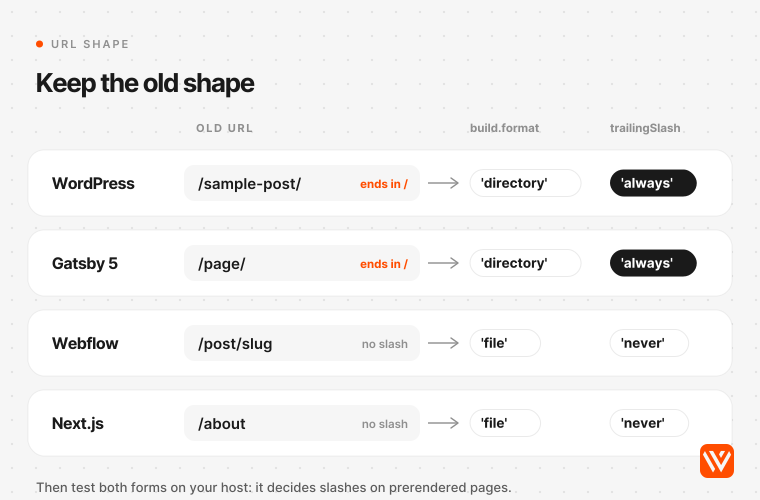
trailingSlash is the Astro setting that decides whether your URLs end in a slash, and build.format decides how pages are written to disk, which is what your host actually serves. Set both to reproduce your old site's URL shape exactly. If the old site used /pricing, the new one must answer /pricing with a 200, not redirect it to /pricing/.
The defaults are where migrations slip. trailingSlash defaults to 'ignore' and build.format defaults to 'directory', which writes about.astro as /about/index.html (Astro configuration reference). And Astro's docs add the line most guides leave out: "Trailing slashes on prerendered pages are handled by the hosting platform, and may not respect your chosen configuration." On a static build your config sets the shape of the files; the host decides what happens to the other spelling.
Here's what that means by source platform:
| Leaving | Old URL shape | Astro settings that keep it | Watch for |
|---|---|---|---|
| WordPress | Slash at the end (/sample-post/), often with dates or /category/ | build.format: 'directory', trailingSlash: 'always' | Date and category paths, /feed/, /tag/, /author/, ?p=123 links, /wp-content/uploads/ image paths |
| Webflow | No slash, CMS items under a folder (/post/slug) | build.format: 'file', trailingSlash: 'never' | Collection folder names, images on Webflow's CDN, the old redirect list |
| Next.js | No slash; /about/ redirects to /about by default | build.format: 'file', trailingSlash: 'never' | next/image URLs under /_next/image, API routes, i18n prefixes |
| Gatsby 5 | Slash at the end (trailingSlash defaults to always) | build.format: 'directory', trailingSlash: 'always' | Page paths generated from GraphQL slugs, /page-data/ files |
| Hugo or Jekyll | Varies; Jekyll often ends in .html | Copy the exact pattern; 'preserve' or a permalink rule | Case-sensitive paths, feed URLs, sitemap file name |
Sources: WordPress permalinks, Next.js trailingSlash, Gatsby config, Webflow Collections.
The trap is easiest to see with Webflow. Webflow answers /post/astro-vs-webflow with a 200 and 301s the slash version to it (we checked our own site on 4 November 2026). Rebuild that site in Astro with the default directory format, deploy to Cloudflare, and every old address now answers with a 307 to a new slash address. Same content, new URLs, temporary redirects, and nothing in your build log warns you.
Why does the host matter more than the config?
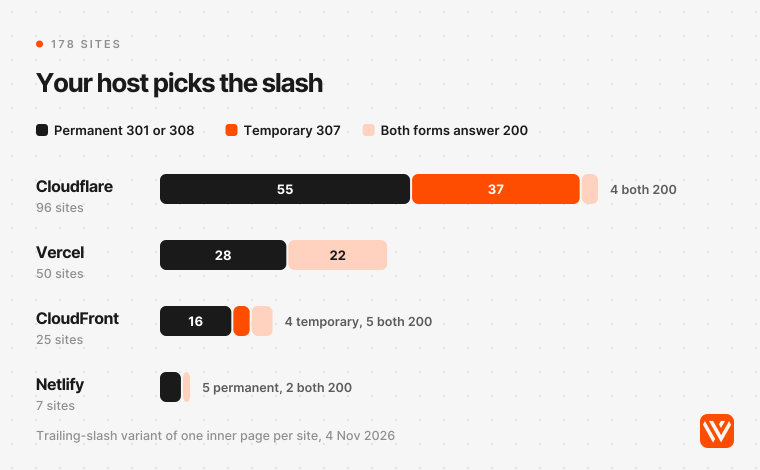
Hosts don't agree on slashes, and our scan shows it clearly. Cloudflare's static assets use 307 for every slash normalisation in each of its three trailing-slash modes (Cloudflare docs, updated 23 April 2026). Vercel serves both versions by default, which its own docs call "not recommended" (Vercel project configuration).
| Host (sites in our scan) | Permanent redirect | Temporary 307 or 302 | Both 200, one canonical | Both 200, no canonical | Other |
|---|---|---|---|---|---|
| Cloudflare (96) | 55 | 37 | 3 | 1 | 0 |
| Vercel (50) | 28 | 0 | 16 | 6 | 0 |
| Amazon CloudFront (25) | 16 | 4 | 5 | 0 | 0 |
| Netlify (7) | 5 | 0 | 1 | 1 | 0 |
How much does a 307 on the slash variant cost you? Less than it sounds, if nothing links to the variant. Google's classic slash guidance says results "will likely show the version of the URL with the 200 response code", whatever the redirect type (Google Search Central blog, 21 April 2010). The problem is a migration, where the variant is your old URL. Google's redirect guide says temporary redirects show "the source page in search results" and aren't used as a canonical signal (Google redirects guide, updated 14 April 2026). So match the old shape exactly, and the question never comes up. Mueller's rule covers the rest: "be consistent and only use one version of a URL. Link to that version, redirect to it, use it in sitemaps, use it for rel-canonical" (Search Engine Roundtable, July 2019).
Step 3: How do you set up real 301 redirects in Astro?
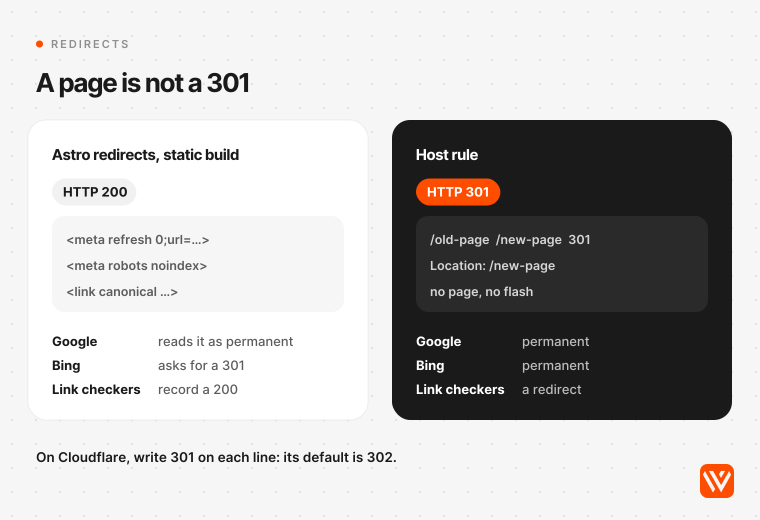
A permanent redirect is a server response with status 301 or 308 that tells crawlers a page has moved for good, so links and rankings pass to the new address. On a static Astro build, the redirects setting in astro.config.mjs doesn't produce one. Put your redirect rules where the host answers them, and test each one with a real request.
Here's what Astro actually does. "For statically-generated sites with no adapter installed, this will produce a client redirect using a <meta http-equiv="refresh"> tag and does not support status codes" (Astro configuration reference, Astro 7.4.2). Astro's source writes a small HTML page for each rule with a zero-second refresh, a noindex tag and a canonical link to the destination, and uses a two-second delay only for rules set to 302 (core/routing/3xx.ts).
Is that bad? It's not the disaster some guides describe. Google says it "interprets instant meta refresh redirects as permanent redirects", so Googlebot will usually follow the move. But Google also ranks methods by how likely it is to read them correctly, with server-side redirects first. Bing's guidelines simply say "Use 301 redirects for permanent URL changes" (Bing Webmaster Guidelines). The HTTP response itself is a 200, which is what backlink tools and link checkers record, so your own audits will report those old URLs as live pages. And visitors get a blank page that flashes before the jump, which Kent Gigger described on his own Astro site: "You get a layout shift and a blank page with the redirect on it for a second or so" (kentgigger.com, 28 May 2025).
The AI answers get this wrong in both directions. On 4 November 2026, ChatGPT told us to use the redirects config and check the host. Ask Brave said such a page "returns HTTP 200" and is "not a real 301", without saying Google still treats it as permanent. The page ranking first for "migrate to Astro without losing SEO" in our US and India checks says Astro serves them as 301s. That's true only with an adapter.
Where to put the rules instead:
| Host | Where permanent redirects live | Default status | Notes |
|---|---|---|---|
| Netlify | public/_redirects or netlify.toml; the Astro adapter appends config redirects to _redirects | 301 | Supports wildcards and splats |
| Cloudflare | public/_redirects for static assets; the Astro adapter writes config redirects there too | 302 unless you write 301 on each line | 2,000 static and 100 dynamic rules per file; add "not_found_handling": "404-page" for a real 404 |
| Vercel | vercel.json redirects; the Astro adapter writes them with 301 | permanent: true gives 308 | Set trailingSlash in vercel.json to match Astro |
| Your own server | nginx return 301, Apache .htaccess, or the Node adapter | Whatever you write | Patch @astrojs/node to 11.0.2 or later (below) |
Sources: Astro routing guide, Netlify redirect options, Astro Cloudflare adapter, Cloudflare redirects, Vercel project configuration.
The Cloudflare row is the one to reread. A hand-written _redirects line without a status code is a 302, a temporary redirect, because "302 is used as the default status code" (Cloudflare docs). Write 301 at the end of every line. Netlify's default is 301, so files copied from a Netlify project change meaning when they move to Cloudflare.
Three rules for the redirect file itself:
- One hop. Old URL to final URL, never through a page that redirects again. Googlebot follows up to 10 hops, but Google asks for "ideally no more than 3", and chains slow crawling. In our scan, 71 of 206 sites took two or more hops just to get from
http://on the bare domain to their homepage. - Closest match, not the homepage. Every redirect points at the page that replaces the old one.
- Keep them at least a year. Google says "generally at least 1 year" and suggests keeping them indefinitely for users. Gary Illyes gave the same answer: "at least 1 year. (but try keeping them indefinitely if you can for your users)" (Search Engine Roundtable, 22 July 2021).
If you serve pages on demand with the Node adapter, check your version. Two Astro advisories turned trailing-slash redirects into open redirects: CVE-2025-54793 in astro 5.2.0 to 5.12.7 on Node and Cloudflare SSR sites, and CVE-2026-59730 in @astrojs/node 8.1.0 to 11.0.0, fixed in 11.0.2 on 15 July 2026 (GitHub advisory GHSA-r557-wffq-wvrc). Static sites aren't affected.
Step 4: Which SEO signals must move with each page?
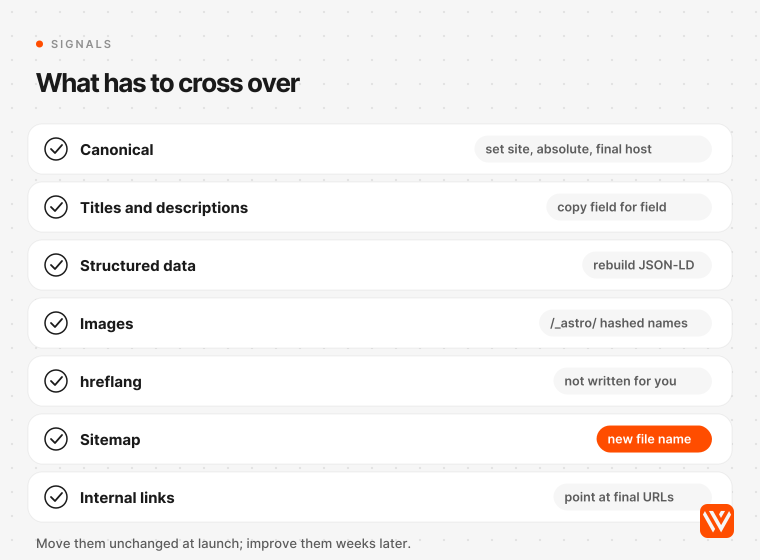
A page's ranking signals are everything Google read on it: title, description, headings, body copy, canonical, structured data, internal links, images and alt text, language annotations. Move all of them across unchanged at launch. Improve them a few weeks later, once the migration has settled, so you can tell which change did what.
Google and the people who run migrations agree on this. Mueller: "If you do everything at once, you'll never know what to fix" (Search Engine Roundtable, 24 July 2020). Google's Change of Address help says a move combined with a redesign of content and URLs means "you will probably see some traffic loss" (Search Console Help).
The Astro-specific checks:
| Signal | What to do in Astro | Why it slips |
|---|---|---|
| Canonical | Set site in astro.config.mjs, build canonicals from it, absolute and on the final host | 18 sites in our scan named a different host; 12 inner pages had a canonical that differed only by the slash |
| Titles and descriptions | Copy them field for field from the old CMS or SEO plugin into frontmatter or your CMS | WordPress SEO plugins keep them in plugin fields, not the post body, so converters that read only the content miss them |
| Structured data | Rebuild JSON-LD in your layout from content fields | Plugins and Webflow page settings generated it before |
| Images | Keep images that rank in public/ at their old paths, or redirect old image URLs | astro:assets writes optimised files to hashed names like /_astro/name.hash.webp |
| hreflang | Write the tags yourself or use @astrojs/sitemap's i18n option | Astro's i18n routing generates no hreflang tags on its own |
| Sitemap | Add @astrojs/sitemap, then point robots.txt at /sitemap-index.xml and keep the old sitemap URL alive | The file name changes from /sitemap.xml |
| Internal links | Rewrite links to final URLs in the content, not through redirects | Old absolute links in post bodies survive every export |
Sources: Astro images guide, @astrojs/sitemap, Astro i18n, Google consolidate duplicate URLs.
The sitemap row deserves its own warning. Rajiv Pant moved his site from Hugo to Astro in February 2026. The new sitemap integration wrote sitemap-index.xml, while robots.txt and Search Console still pointed at the old name. "After the migration, /sitemap.xml had been returning 404 for three months," he wrote, and "organic traffic was down meaningfully" (rajiv.com, 5 May 2026). A single redirect from /sitemap.xml would have avoided it.
Two smaller ones from GitHub. Astro 5 lowercases content collection entry IDs, so mixed-case URLs change unless you set slugs yourself; a maintainer called it "a deliberate choice" (issue #13265). And server island endpoints can get indexed as pages if you don't block them (issue #12806).
Step 5: Does your Astro site return a real 404?
A soft 404 is a page that tells visitors it doesn't exist while answering with a 200 status, and Google excludes such pages from search (Google crawling errors guide). After a migration, a real 404 is how Google learns that a retired URL is gone instead of duplicated.
Astro builds src/pages/404.astro into a 404.html that most hosts serve with the right status, but not all of them by default. Cloudflare Workers needs "not_found_handling": "404-page" in wrangler.jsonc (Astro Cloudflare deploy guide). Single-page-app rewrites are the usual culprit. In our scan, 14 of 206 sites answered a made-up URL with a page instead of a 404, mostly a 200 or a redirect to another page. Test this with curl -I on a nonsense path before launch, and again after.
How do you migrate WordPress, Webflow and Next.js to Astro?
Each platform leaves its own trail of URLs that a page-by-page rebuild misses. These are the ones we'd check first.
WordPress to Astro
WordPress sites carry the most hidden URLs: date archives, /category/, /tag/ and /author/ pages, feeds, attachment pages, ?p= short links, and /wp-content/uploads/ images that other sites hotlink. Export content as WXR or through the REST API, which caps pages at 100 records (WordPress REST pagination). Pull titles and descriptions from your SEO plugin separately.
The cleanest WordPress move we found kept every permalink. Chris Humphrey's rebuild of griddlesizzle.com kept "every post" at "its exact WordPress permalink", needed no redirects, and reported Search Console impressions going "from 189 to 573 in the month after launch", with his own caveat that "a single month proves less than the size of these jumps might suggest" (chrishumphrey.ai, July 2026). If you'd rather keep WordPress as the editor, Astro's WordPress guide covers using it as a headless CMS behind the same domain (Astro docs).
Webflow to Astro
Webflow is the one we know best, and its export is the catch. Webflow's code export excludes the CMS, localized content, forms and site search, so collection pages come out empty (Webflow Help Center). Export each collection as CSV instead, rebuild the collection folder (/post/, /blog/) as an Astro route, and copy the redirect list Webflow already holds; Webflow recommends keeping it under 1,000 rules.
Two published moves show what that looks like. Omnia moved about 800 pages in English and Spanish, kept "the 70 redirects Webflow had", and added 301s where Spanish pages moved to Spanish URLs (useomnia.com, 13 October 2026). Very Good Ventures extracted 291 URLs with a goal of "zero downtime and zero broken links" (verygood.ventures, 26 March 2026). Download and re-host every image too, rather than leaving them on Webflow's CDN, tied to an account you're about to close. Our Webflow CMS guide explains how collections map to URLs if you need the details.
Next.js to Astro
Next.js strips trailing slashes by default, so a Next.js site moved to Astro's default directory output flips every URL to a slash version. Noah Falk saw it on his own site: "After migrating my personal website from Next.js to Astro, I noticed that Google Search console reported duplicate content" (noahflk.com, 7 March 2023). He fixed it with trailingSlash: false on Vercel, 'never' in Astro and slash-free canonicals.
Your React components can come across as islands, which keeps the rewrite smaller, but next/image URLs, API routes and middleware rewrites won't. List them in the inventory. Our Astro vs Next.js comparison covers whether the move is worth it before you start.
Gatsby, Hugo, Jekyll and the rest
Astro publishes 14 official "from" guides, but 11 are stubs, and the two full guides for Gatsby and Next.js are about code, not redirects or URL mapping (Astro migration guides). Gatsby 5 already ends URLs in a slash, which matches Astro's default directory format. Jekyll and Hugo patterns vary, so copy them exactly: Mathew Sachin kept his Jekyll pattern /blog/YYYY/MM/DD/slug.html when he moved to Astro in May 2026 (mathewsachin.github.io).
What should you check on launch day?
Cut over all at once, on a quiet day, with a way back. Google recommends moving all URLs of a small or medium site simultaneously rather than section by section.
- Crawl the staging build and compare it with your inventory: every old URL must answer 200 at the same address or one 301 or 308 to its new address.
- Request a sample of old URLs with
curl -Iagainst the production host, both slash forms, plushttp://and the other host. - Remove staging
noindextags and password protection. Google's guide reminds you to update any pre-launch noindex rules once redirects are live. - Lower your DNS TTL to a few hours at least a week before, as Google suggests for hosting moves (Google, site move without URL changes).
- Switch DNS and test again from outside your network.
- Submit the new sitemap in Google Search Console and Bing Webmaster Tools, and keep the old sitemap URL redirecting.
- Send changed and new URLs through IndexNow, which accepts up to 10,000 URLs per request and shares them with Bing, Naver, Seznam and other participating engines (IndexNow documentation).
- Check robots.txt allows the crawlers you want, including the AI crawlers you rely on for citations, then inspect your top 20 pages with URL Inspection.
- Keep the old platform available, unpublished, for about a month in case you need to compare or roll back. ConveyThis kept WordPress running "for 30 days after cutover as a safety net" (conveythis.com, 11 June 2026).
Only use Search Console's Change of Address tool if the domain or subdomain also changes. It isn't for a platform change on the same domain, for HTTP to HTTPS, or for www to non-www.
How long do rankings take to settle after the move?
Watch daily for the first two weeks and weekly for at least three months, then keep the redirects for a year or more. Google says a small to medium site needs "a few weeks" for most pages to move, larger sites longer, and Mueller said in October 2026 that "sometimes things just take a particularly long time to be fully processed" (Search Engine Journal, 13 October 2026).
What to look at:
- Page indexing report: new "Page with redirect", "Not found (404)" and "Duplicate without user-selected canonical" rows tell you which rule failed.
- Performance by page: compare clicks and impressions for your top 50 old URLs against their new addresses, week by week, against the same weeks before launch.
- Crawl stats: Google says it "will temporarily crawl your new site more heavily than usual". A spike is expected; a crawl full of 404s isn't.
- Bing Webmaster Tools: Bing asks for 301s, so an old URL that Google has moved but Bing still lists can point at a meta refresh page or a 302.
- AI answers: ask ChatGPT, Perplexity and Google AI Mode the questions your old pages were cited for, and check they now cite the new URLs.
When does a dip become a problem? A useful rule: if a group of pages is still down after four weeks while the rest of the site has recovered, look for the shared cause in that group, which is almost always a redirect, a canonical or a template field. A site-wide drop on day one usually means a noindex tag or a blocked robots.txt.
On our own Astro builds, redirects are tested with real requests, sitemaps go to Google and Bing, and we watch rankings closely for the first two weeks, as our service page sets out. That's the intensive part. The weekly checks run longer, because the slow pages are the ones that cost you.
What happened to real sites that moved to Astro?
Most public Astro migrations that we could measure gained search traffic in the months after the move, and the ones that lost it had a visible cause. We pulled Ahrefs' estimated monthly organic traffic for 16 public migrations with a published month, comparing the three months before the move with months two to four after it. Nine were too small for Ahrefs to measure, so the numbers below cover seven sites.
| Site | Moved from | Month | Before (avg a month) | After (avg a month) | Change |
|---|---|---|---|---|---|
| aimiten.fi | Typedream | Mar 2026 | 60 | 691 | +1,052% |
| eliostruyf.com | Hugo | Mar 2025 | 307 | 611 | +99.3% |
| rodneylab.com | Gatsby | Mar 2022 | 80 | 145 | +81.7% |
| verygood.ventures | Webflow | Mar 2026 | 615 | 884 | +43.9% |
| effect.website | Not stated | Dec 2024 | 343 | 406 | +18.4% |
| optimising.com.au | Next.js | Oct 2025 | 1,169 | 1,098 | -6.1% |
| deku.posstree.com | Jekyll | Feb 2026 | 329 | 262 | -20.4% |
Ahrefs Site Explorer, all countries, pulled 4 November 2026. Migration months come from each site's own write-up.
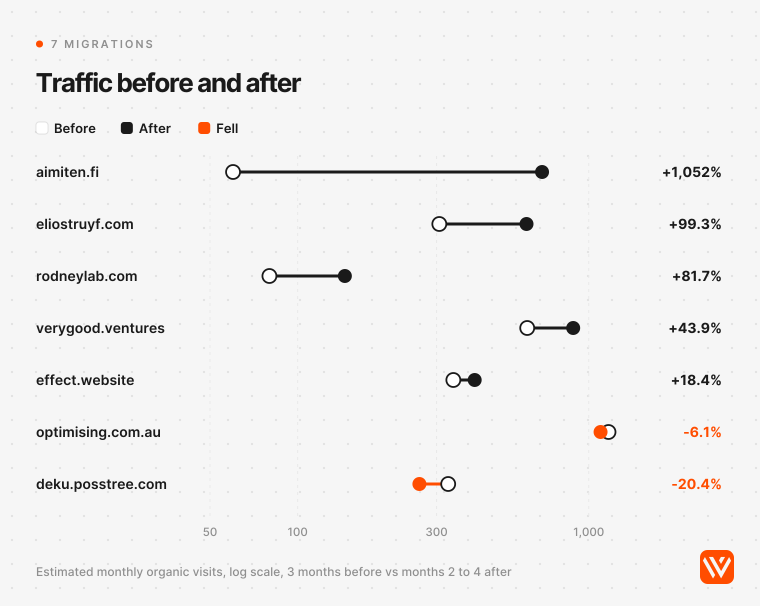
The median change was +43.9%. Read it carefully. Aimiten also merged 85 pages into 30 and rewrote content, so its jump isn't the framework alone. Deku's traffic was already falling before the move (from 757 in August 2025 to 326 in January 2026, by the same estimate) and climbed to 907 by August 2026. Optimising's -6.1% sits inside normal month-to-month noise. Third-party estimates also miss small sites: Ahrefs shows griddlesizzle.com at zero while its own Search Console tripled.
The failures we found were all self-inflicted, and all fixable. Rajiv Pant's lost sitemap is one. Michael Andreuzza's is another: after a refactor of his Astro site changed routes, redirects and canonicals, "My traffic fell from 1k daily visitors to under 500" (lexingtonthemes.com, 16 December 2025). And a June 2026 Astro bug report describes a trailing-slash loop in the Node adapter after which a production site lost "~270 indexed non-ASCII pages" (GitHub issue #16989).
For contrast, domain moves are much slower. Dan Taylor's study of 892 domain migrations found new domains took an average of 523 days to reach the old domain's estimated traffic, and 17% hadn't after 1,000 days (Search Engine Journal, 9 January 2025). Keep the domain, keep the URLs, and you're in a different, much safer category.
What does an Astro migration cost in the US, UK and India?
An Astro migration costs about what an Astro build costs, plus the inventory and redirect work, which grows with page count rather than design. In our Astro website cost research, a B2B SaaS site of about 60 pages with integrations and a migration fell in the $12,000 to $40,000 band from published agency prices, around £8,950 to £29,840 or ₹11.4 lakh to ₹38 lakh at 3 November 2026 rates ($1 = £0.746 = ₹94.93). A lakh is 100,000 rupees.
Where you hire changes the price far more than the work. Developer pay is the gap: PayScale puts the median front-end developer in India at ₹682,802 a year, about $7,200 (PayScale), against a $92,650 median for US web developers (US Bureau of Labor Statistics, May 2025). Our own Astro builds start from $4,000. The SEO work doesn't shrink with the rate, though: a 500-URL site needs a 500-row redirect map in Bengaluru, London or Austin. Ask any agency, including us, to show you the URL map and the test plan before you compare quotes.
One cost is the same everywhere and easy to miss on WordPress sites: plugin-managed redirects (Redirection, Rank Math and similar) live in the WordPress database, not in a file. They disappear when the database does. Export them from the plugin and add them to the new host's redirect file before cutover.
Should you change URLs or redesign during the move?
Two questions split the people who run migrations, and both sides have a point.
Should you change URLs during the move? Adams and Mueller say no unless you must. Others note Mueller's own line that "You can do 20 billion redirects", and sites like aimiten.fi consolidated 85 pages into 30 behind explicit redirects and grew. Our view: keep URLs on launch day and restructure in a second release, once Search Console shows the move has settled.
Should you redesign and replatform at once? Illyes says "Don't do that" for URL and architecture changes, and Aleyda Solis advises avoiding "drastic changes in the site architecture or design at the same time" (Winning SEO when doing web migrations, 2 April 2020). Yet Illyes also says a new visual design can ship with the move if the important part of the page, the content and HTML, stays the same. We agree with that split. Change the look if you must, keep the words and the structure.
What should you do next?
Astro is a safe place to move a marketing site, and the measured migrations mostly came out ahead. But the risk sits in defaults nobody chose: a directory format that adds slashes, a host that answers with 307s, a static redirect that's a page instead of a status code, a sitemap with a new name. None of those shows up in a build log. All of them show up in curl -I.
So do the boring part first. Build the URL inventory, match the old shape, put permanent redirects in the host's own rules, and test every old URL before you switch DNS. No honest agency can guarantee rankings, us included. A tested URL map takes most of the avoidable risk off the table.
If you're planning a move from WordPress, Webflow or Next.js, book a scoping call on our Astro development page. The first two phases are a fit check and the URL map, and we'll tell you if staying put is the better answer.
Sources and method
The site scan ran on 4 November 2026 with plain HTTP requests and a desktop browser user agent, following redirects by hand. The pool was every domain tagged Astro in our earlier Astro research (mostly Y Combinator and B2B SaaS marketing sites): 210 attempted, 207 reachable, 206 still on Astro. For each site we tested the http:// and other-host redirects, the homepage canonical, the sitemap, the first non-home URL in the sitemap (or the first internal link) in both slash forms, and one made-up URL. Hosts were identified from response headers. Three sites that blocked us were excluded, not bypassed. One inner URL per site is a sample, not an audit.
Traffic figures are Ahrefs Site Explorer estimates of monthly organic traffic, all countries, pulled on 4 November 2026, for 16 public migrations with a published month. We compared the mean of the three months before the move with months two to four after it, and set aside sites under 50 estimated visits a month. Estimates miss small sites and can't separate the framework from other changes made at the same time.
Google, Bing, Astro, Cloudflare, Vercel, Netlify, WordPress, Webflow, Next.js and Gatsby documentation was read on 4 November 2026; Astro facts refer to Astro 7.4.2. AI answers were collected the same day, signed out, from ChatGPT, Ask Brave and Google AI Mode.
Will migrating to Astro hurt my SEO?
Not if the URLs, content and signals stay the same. Google ranks pages, not frameworks, and permanent redirects don't lose PageRank. Expect a few weeks of movement while Google recrawls. Losses come from changed URLs, missing redirects, lost titles or canonicals, and host defaults that add trailing slashes or temporary redirects.
How do I set up 301 redirects in Astro?
On a static build, put them in your host's rules, not only in `astro.config.mjs`: `public/_redirects` on Netlify or Cloudflare, `vercel.json` on Vercel, or your server config. Astro's `redirects` setting writes meta refresh pages unless an adapter is installed. On Cloudflare, write 301 on every line, because the default is 302.
How long does it take rankings to recover after a migration?
Google says a small to medium site needs a few weeks for most pages to move, and larger sites longer. In our check of seven measurable migrations to Astro, five had more estimated traffic two to four months after the move. Keep redirects for at least a year and watch weekly for three months.
Should I use a trailing slash on my Astro site?
Use whatever your old site used. WordPress and Gatsby 5 end URLs in a slash, so pair `build.format: 'directory'` with `trailingSlash: 'always'`. Webflow and Next.js don't, so use `'file'` with `'never'`. Then test both forms on your host, since hosts handle slashes on prerendered pages themselves.
Do I need Google's Change of Address tool when moving to Astro?
Only if the domain or subdomain changes too. A platform change on the same domain, a move from HTTP to HTTPS, or a switch between www and non-www doesn't use the tool. Redirects, an updated sitemap and URL Inspection on your key pages do the work instead.