Summarise this article using AI


The best Webflow templates for 2027 are Saga for SaaS, Agencies X for agencies, Hailey for portfolios, Heyday for online stores, Matter for blogs, Nova Homes for real estate, Ember for restaurants, Onboard for consulting firms and landOS for landing pages. Each one won on accessibility, SEO basics, demo freshness and speed in our tests.
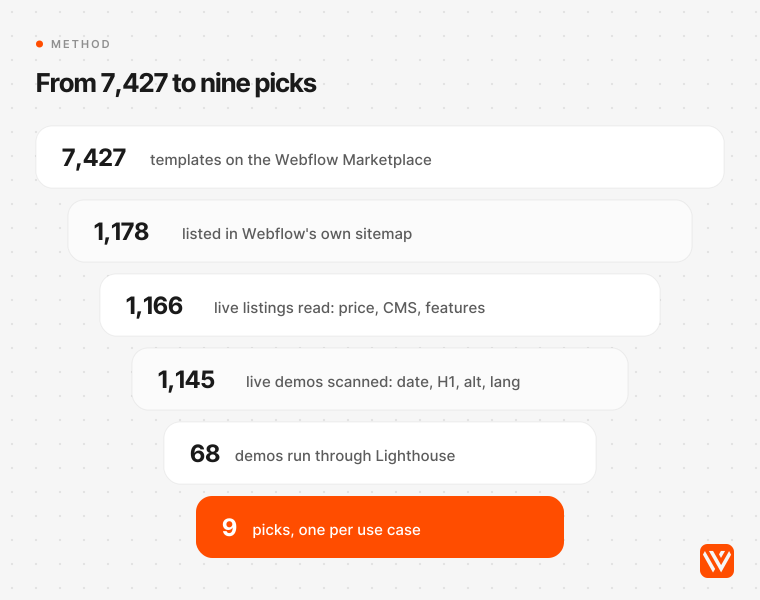
We read 1,166 Webflow Marketplace listings, scanned the live demo of 1,145 of them, and ran Google Lighthouse on 68 shortlisted demos on 4 and 5 November 2026. Webyansh builds custom Webflow sites and sells no templates, and none of the links below earn us anything. Below you'll find the picks by use case, what the marketplace looks like in numbers, what a template site really costs in the US, UK and India, and the six checks to run before you pay.
Key takeaways
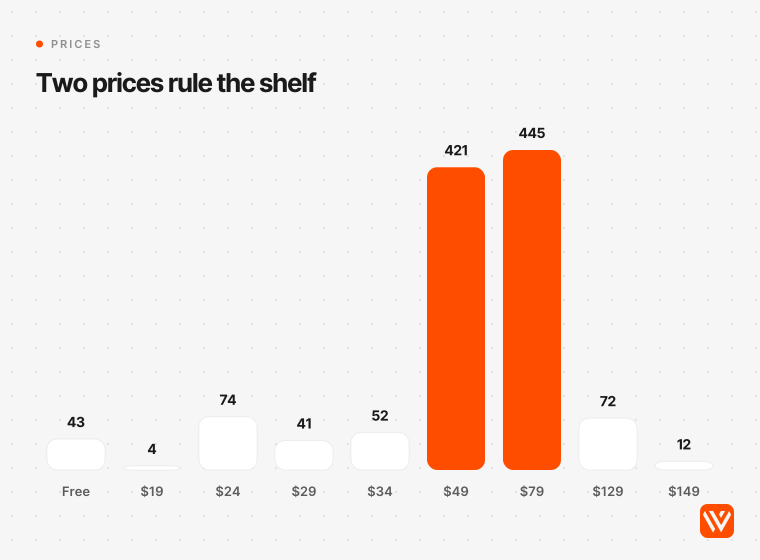
- Most Webflow templates cost $49 or $79. Of 1,123 paid templates in our set, 866 (77%) sit on those two prices, and only 93 of the marketplace's 7,427 templates are free.
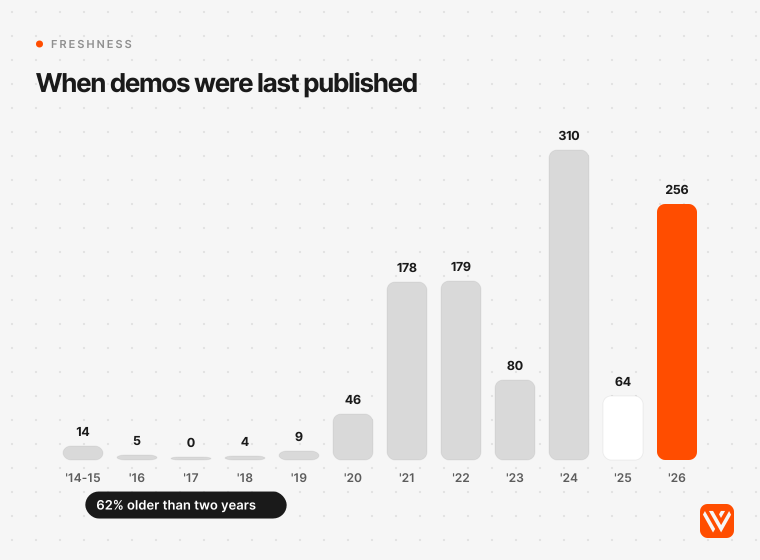
- The median template demo was last published 1,005 days before our scan. Only 22.4% were republished in 2026, and 61.9% hadn't been touched in two years.
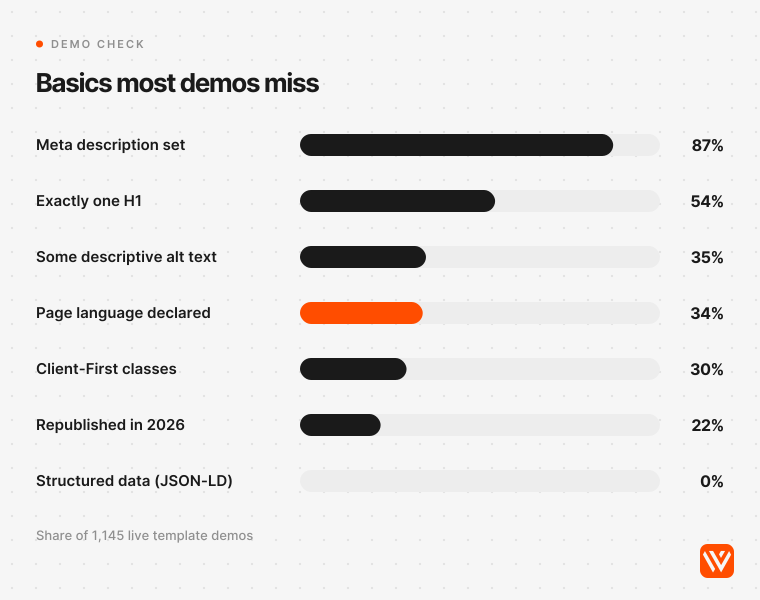
- Demos miss basics you'll inherit: 37.6% have more than one H1, 65.9% don't declare a page language, and 76% of 44,693 images carry no descriptive alt text.
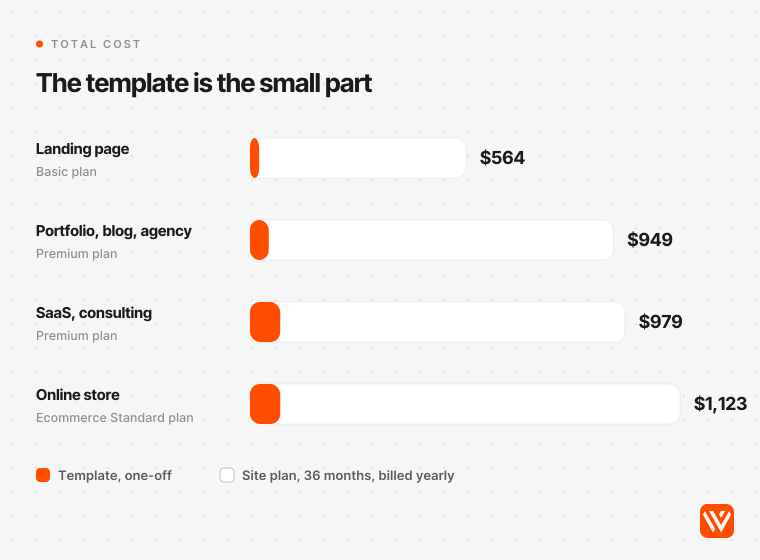
- The template is the cheap part. Over three years it's 4% to 8% of the bill; Webflow's Site plan is the rest, about $950 to $1,120 for a CMS or store site.
- Four AI assistants named 54 different templates for the same question and agreed on three. Two of those three have demos last published in 2020.
What are the best Webflow templates for 2027?
A Webflow template is a ready-made website you install as a new site in Webflow, then edit in the Designer. The best Webflow template is the one built for your kind of site, recently maintained, and clean enough that you aren't fixing headings and alt text on every page. These were the strongest in our tests.
| Use case | Best template | Designer | Price | Runner-up | Accessibility | Performance | Demo last published |
|---|---|---|---|---|---|---|---|
| SaaS and AI startups | Saga | Flowversity | $79 | Mylo ($49) | 92 | 73 | 5 May 2026 |
| Agencies and studios | Agencies X | BRIX Templates | $129 | Agency X ($129) | 96 | 52 | 22 Apr 2026 |
| Portfolios and personal sites | Hailey | Daniela Tomanova | $49 | Porte ($34) | 91 | 51 | 25 Aug 2026 |
| Online stores | Heyday | Medium Rare | $79 | Apparel X ($129) | 91 | 54 | 24 Jun 2026 |
| Blogs and magazines | Matter | Medium Rare | $79 | Venice ($49) | 88 | 56 | 24 Jun 2026 |
| Real estate | Nova Homes | Nixar | $49 | Harroway ($99) | 99 | 84 | 12 Oct 2026 |
| Restaurants | Ember | Medium Rare | $34 | Foody ($29) | 96 | 60 | 24 Jun 2026 |
| Consulting and professional services | Onboard | Medium Rare | $79 | Spark ($79) | 87 | 81 | 24 Jun 2026 |
| Landing pages | landOS | Anastasiia | $24 | Lander ($24) | 92 | 74 | 6 Jul 2026 |
Accessibility and Performance are Google Lighthouse 12.6.1 scores out of 100, mobile mode, on each template's live demo, averaged over two runs on 4 and 5 November 2026. Prices are the marketplace's one-off prices in USD on the same day.
Medium Rare designed four of the nine winners. That isn't a preference of ours: their demos were all republished on 24 June 2026, they declare a page language and keep one H1 per page, and that consistency adds up across a scoring method that rewards maintenance.
How we tested 1,166 Webflow templates
We didn't pick from screenshots. We started from the 1,178 template pages Webflow lists in its own sitemap, read the 1,166 that were still live, and opened the live demo of every one. The marketplace showed 7,427 templates in its filter count on 4 November 2026, so our set is about one in six, and it leans older and freer than the whole shelf (3.7% free in our set against 1.25% marketplace-wide).
From each listing we took the price, designer, categories and claimed features. From each demo homepage we took the date the designer last published it (Webflow writes "Last Published" into every page's source), the number of H1 headings, the page language, the meta description, how many images carry descriptive alt text, and whether the class names follow Finsweet's Client-First system.
Then we shortlisted up to seven templates per use case: the demo had to be republished since January 2025, the template had to fit the use case by its own primary category, and it needed the CMS (an online store also needed Webflow Ecommerce). We added the templates that two or more AI assistants recommended, and seven SaaS templates the assistants named, so the popular names were tested too. That gave 68 demos and 89 Lighthouse runs.
Each finalist was scored out of 100: accessibility 30 points, SEO basics 25 (Lighthouse SEO plus our checks for one H1, page language and alt text), performance 20, demo freshness 15 and structure 10 (Client-First naming and CMS content on the homepage). Ties go to the cheaper template.
Three limits, stated plainly. The demo's publish date shows when the designer last touched the preview site, not when they last improved the template, so read it as a maintenance signal. Our test machine was under background load, so treat the speed scores as a ranking between templates, not the number your finished site will get. And four SaaS demos block search engines in their robots.txt (a demo setting, not something you install), so we scored their SEO without that one audit.
The best Webflow templates by use case
Best Webflow template for SaaS: Saga
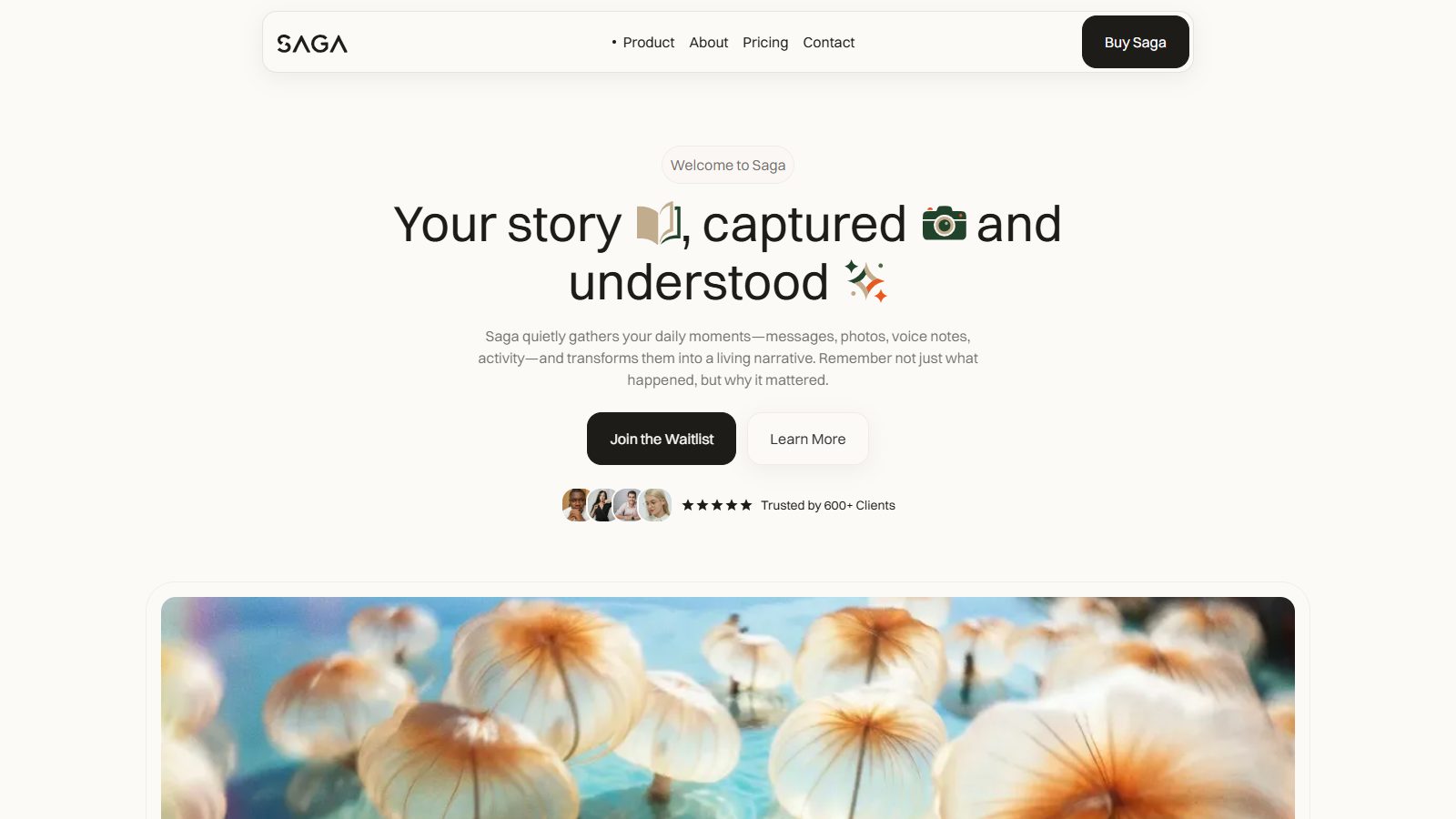
Saga by Flowversity ($79) is built for SaaS, AI and app startups, and it had the cleanest demo of the 14 SaaS templates we tested. Every one of its 63 homepage images carries descriptive alt text, it declares a page language, it keeps one H1, it uses Client-First class names, and its demo was republished on 5 May 2026. It averaged 73 on Lighthouse mobile performance and 92 on accessibility.
The page set fits a software company: Home, Features, Pricing, Download, Sign Up and Sign In, a changelog, plus CMS templates for blog posts, blog categories, changelog entries and team members. Lighthouse did flag colour contrast on the demo, so check your button and text colours after you rebrand.
One disclosure about the AI answers: ChatGPT also recommended Saga, and one of the sources it cited was Flowversity, the template's own designer.
- Runner-up: Mylo by Daniela Tomanova ($49) scored 78 on performance and 93 on accessibility, with CMS blog and careers collections. It doesn't declare a page language; add `lang="en"` in Site settings.
- For CRM and sales software: Clientflow by BRIX Templates ($169) has 22 pages and three homepage layouts written for lead management and sales pipelines, and its demo was republished on 19 October 2026, but it scored 39 on performance in our run.
- Skip Saga if you sell to enterprise buyers who expect security, compliance and integrations pages; Saga has none of them, so plan to design those yourself.
We go deeper on software sites in our guide to the best B2B SaaS Webflow templates.
Best Webflow template for agencies: Agencies X
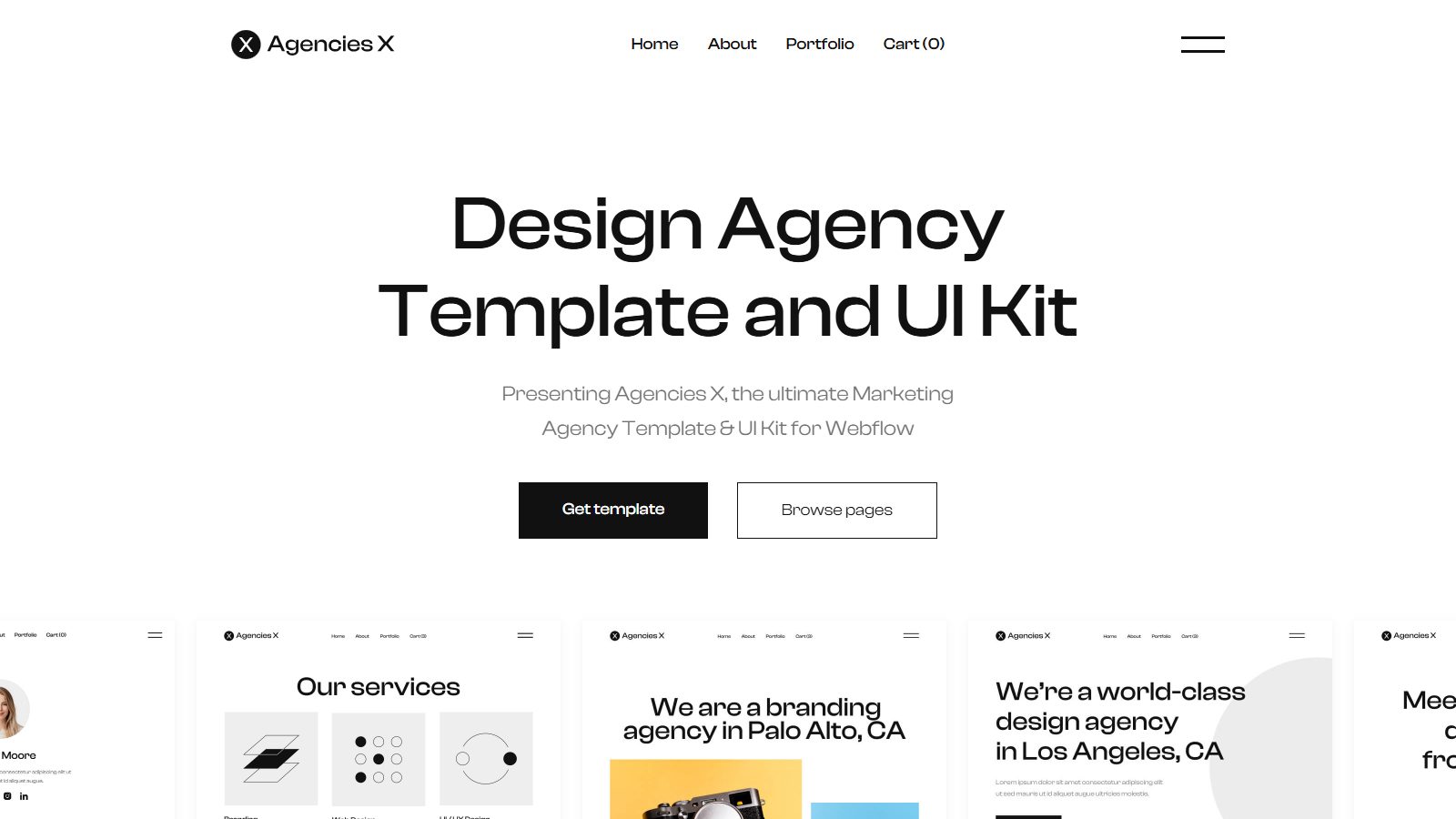
Agencies X by BRIX Templates ($129) scored the highest accessibility of any agency template we tested, 96, and its demo keeps one H1, declares a language and uses Client-First naming. It has 25 pages, with three homepage, three about and three blog variations, and BRIX sends the Figma source file on request after purchase. Performance averaged 52, the weak spot: trim the homepage's portfolio previews before launch.
- Runner-up: Agency X by BRIX Templates ($129), the marketing-agency version, scored 61 on performance and 89 on accessibility.
- Cheaper pick: Beacon by Medium Rare ($79) scored 94 on accessibility and suits design studios and professional firms with case studies, though none of its 51 homepage images had alt text.
- Skip it if your work is mostly video; a template built around a reel will serve you better.
Best Webflow template for portfolios: Hailey
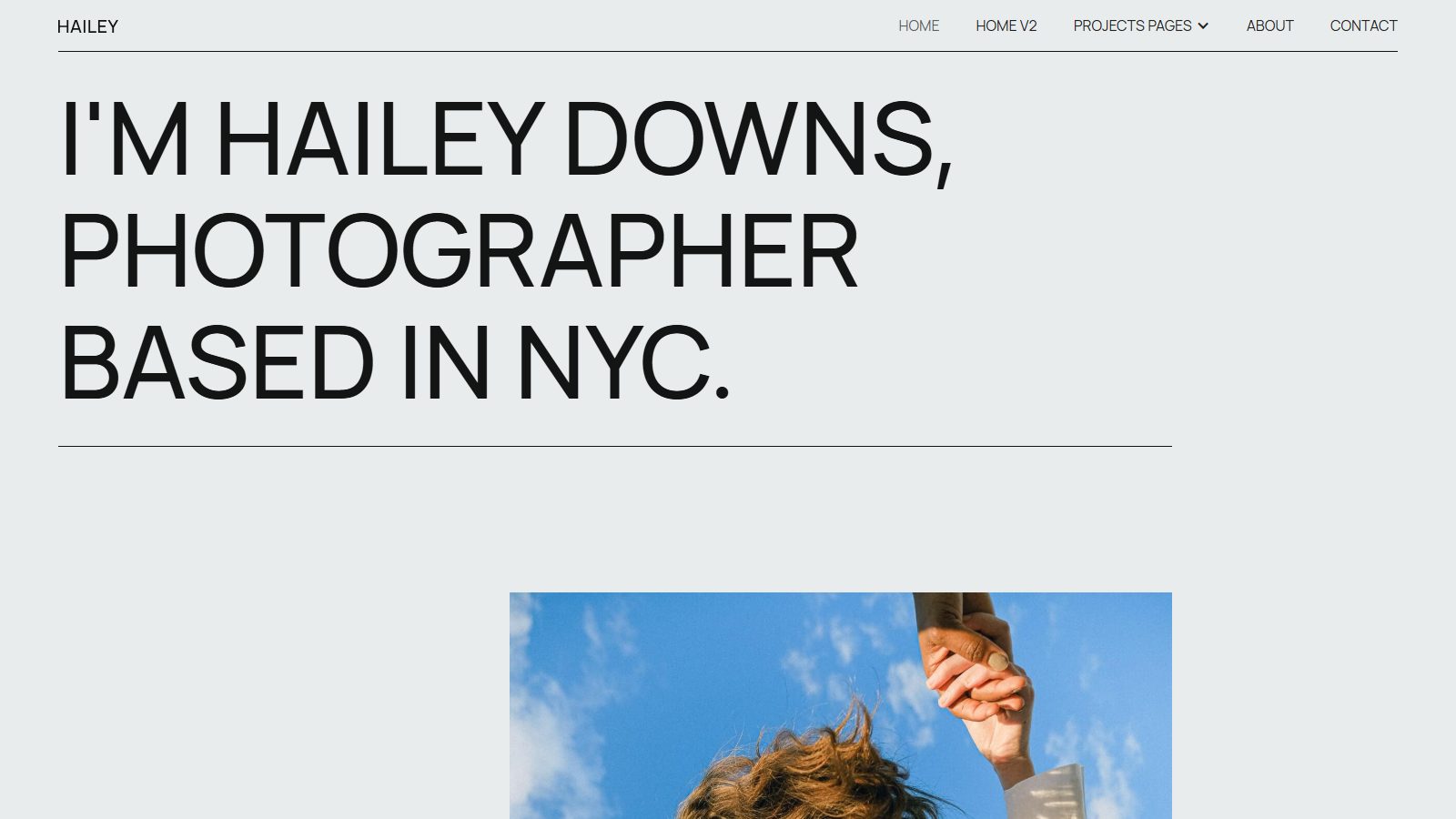
Hailey by Daniela Tomanova ($49) is a minimal portfolio for photographers and other visual creatives, with two homepage versions, four project-page layouts on the CMS and lightbox galleries. It's light for a photography site at 811 KiB on the homepage, scored 91 on accessibility, and its demo was republished on 25 August 2026. Two fixes before launch: add a page language, and write alt text for the eight gallery images, which ship without it.
- Runner-up for a personal site or online CV: Porte by Pablo Ramos ($34), 94 on accessibility. Its homepage has two H1s; demote one to H2.
- Skip Hailey if you write as much as you show; a portfolio with a real blog collection will serve you better.
Best Webflow ecommerce template: Heyday
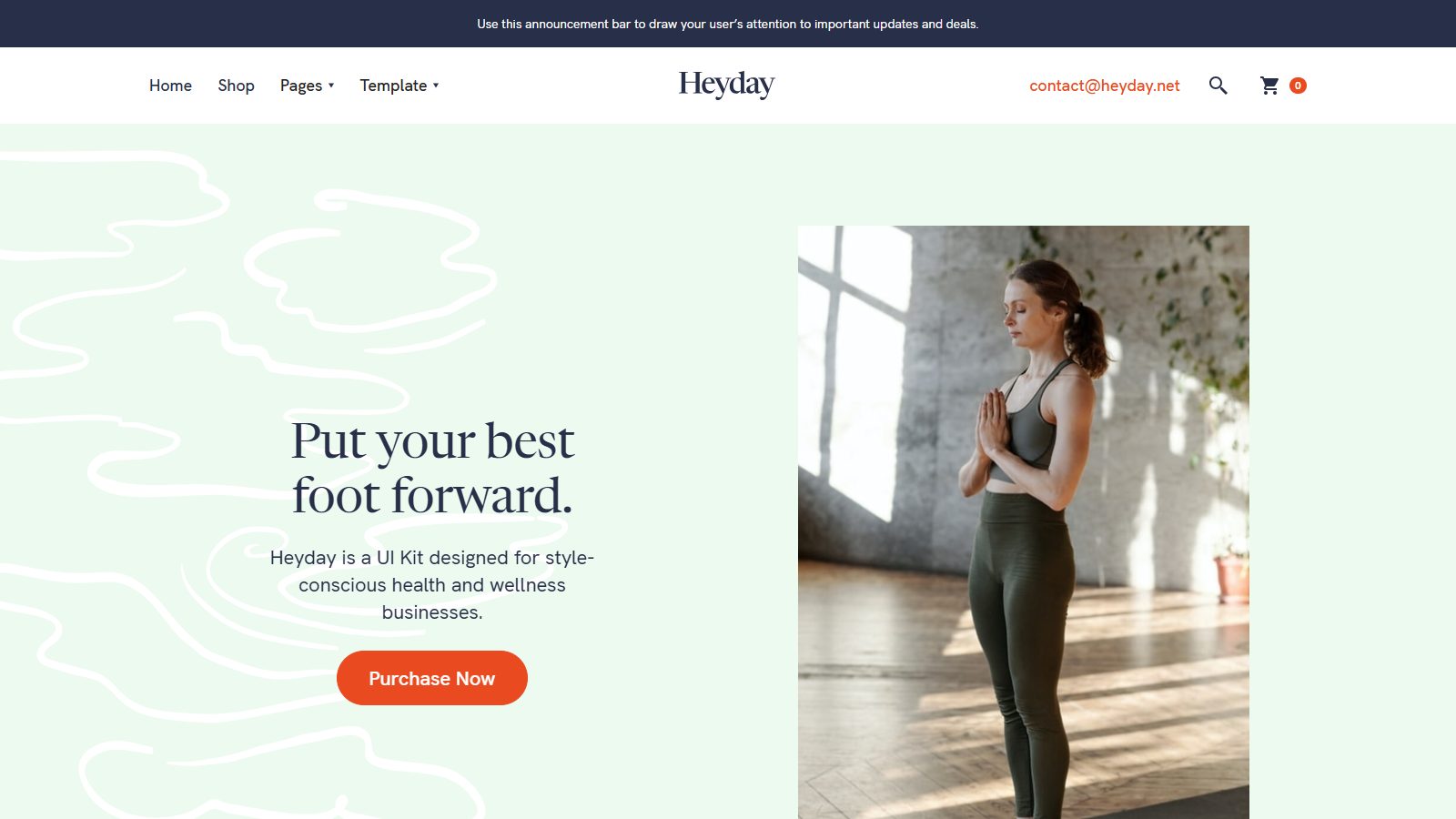
Heyday by Medium Rare ($79) is a full Webflow Ecommerce store for health, wellness and lifestyle brands, with a CMS blog, colour swatches for rebranding and a demo republished on 24 June 2026. It scored 91 on accessibility and 54 on performance, one H1, a declared language and Client-First naming. Lighthouse flagged colour contrast, and none of its 50 homepage images had alt text, which matters more in a store, because product images are the content.
- Runner-up: Apparel X by BRIX Templates ($129) for fashion, with 23 pages and three homepage and three collection-page variations; 93 on accessibility.
- Budget: a store needs Webflow's Ecommerce Standard plan at $29 a month billed yearly, plus a 2% transaction fee on top of Stripe or PayPal fees (Webflow pricing). Plus and Advanced drop that fee to 0%.
- Mind the item cap: Ecommerce Standard allows 500 products; Plus allows 5,000.
Best Webflow blog template: Matter
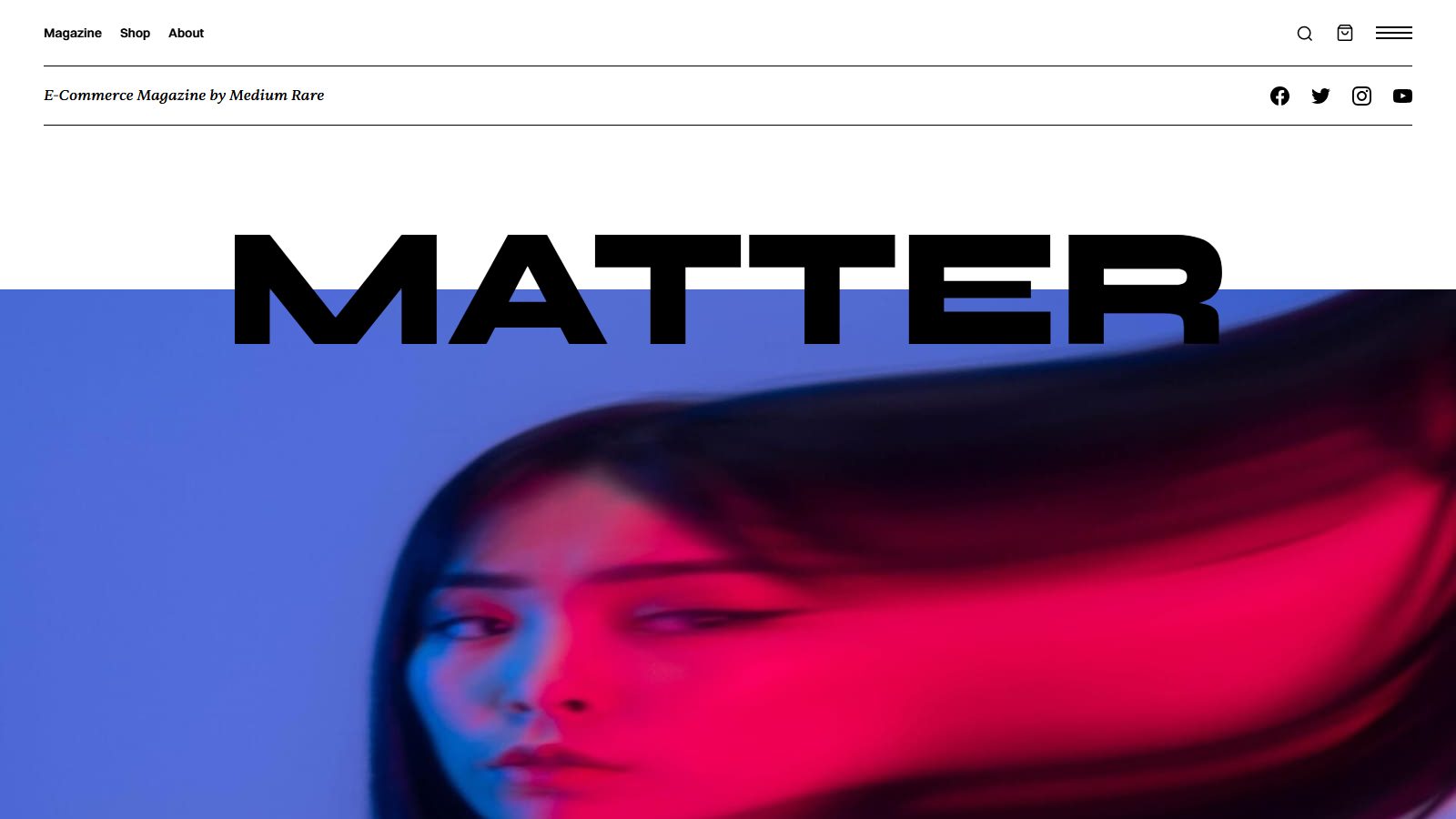
Matter by Medium Rare ($79) is a magazine template with a heavy masthead, ten CMS lists on the homepage and a shop for selling prints or merchandise. It keeps one H1, declares a language and scored 88 on accessibility and 56 on performance. Because it ships with Webflow Ecommerce, it installs with Ecommerce switched on; if you won't sell anything, delete the products and categories so you can stay on the Premium plan instead of an Ecommerce plan.
- Runner-up for a personal blog: Venice by Azwedo ($49), 95 on accessibility. Its homepage carries three H1s; fix that first.
- The free AI favourite: Proof, made by Webflow, was named by two AI assistants. Its demo was last published on 23 October 2020, it has no meta description or page language, and it scored 85 on accessibility. Fine for learning; not what we'd launch a publication on.
Best Webflow real estate template: Nova Homes
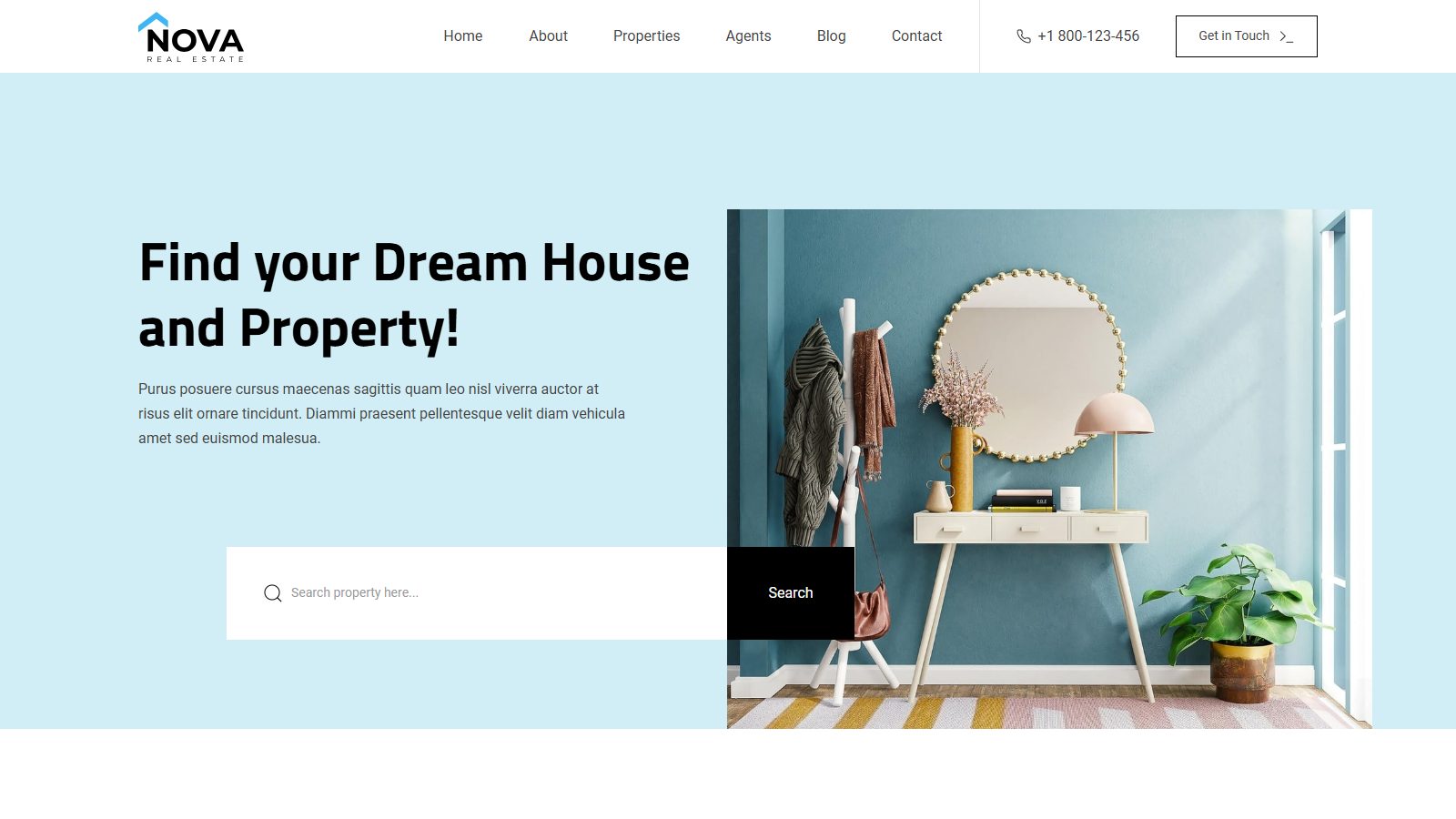
Nova Homes by Nixar ($49) was the best-scoring template in our whole test: 99 on accessibility and 84 on performance, with alt text on 61 of its 62 homepage images and a demo republished on 12 October 2026. The CMS covers what a listings site needs: all properties, property categories, properties by location, property detail pages and agents.
- Runner-up: Harroway by Metrik ($99), one of only three templates two AI assistants agreed on, earned it in our tests too: alt text on all 72 images, Client-First naming, eight CMS lists on the homepage and 96 on accessibility. It's the better pick for a firm with lettings, new developments and several offices.
- Plan for volume. A Webflow collection list shows at most 100 items. When we built First December Films' site, with 475 CMS items across 12 collections, the answer was a catalogue search rather than one long list. A real estate site with hundreds of listings needs the same thinking from day one.
Best Webflow restaurant template: Ember
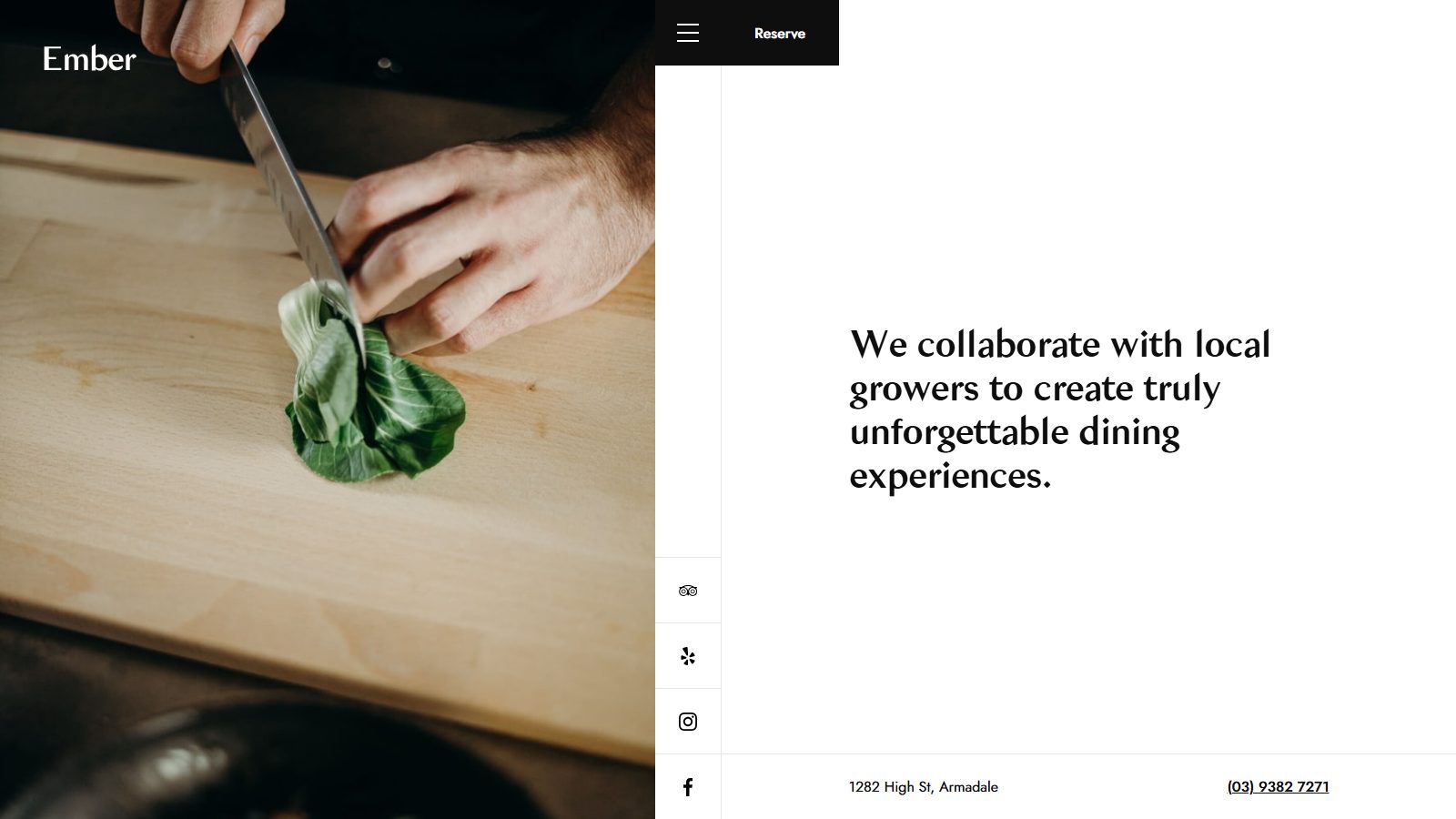
Ember by Medium Rare ($34) is an elegant fine-dining template with photo sliders on every page and a CMS blog. Its homepage weighed 608 KiB, lighter than all but three of the 68 demos we tested, and it scored 96 on accessibility. The demo was republished on 24 June 2026. Write alt text for its 12 homepage images; food photos sell the table.
- Runner-up: Foody by Nixar ($29), a one-page template for cafes and bars; 95 on accessibility, but its homepage weighed more than 6 MB.
- Need reservations on the site? Miller by Medium Rare ($49) has reservation and functions forms and scored 82 on performance in our single run.
- The free AI favourite: Chomp by Flowbase, named by three assistants, has a demo last published on 8 May 2020, two H1s and no page language, and scored 83 on accessibility.
Best Webflow template for consulting and professional services: Onboard
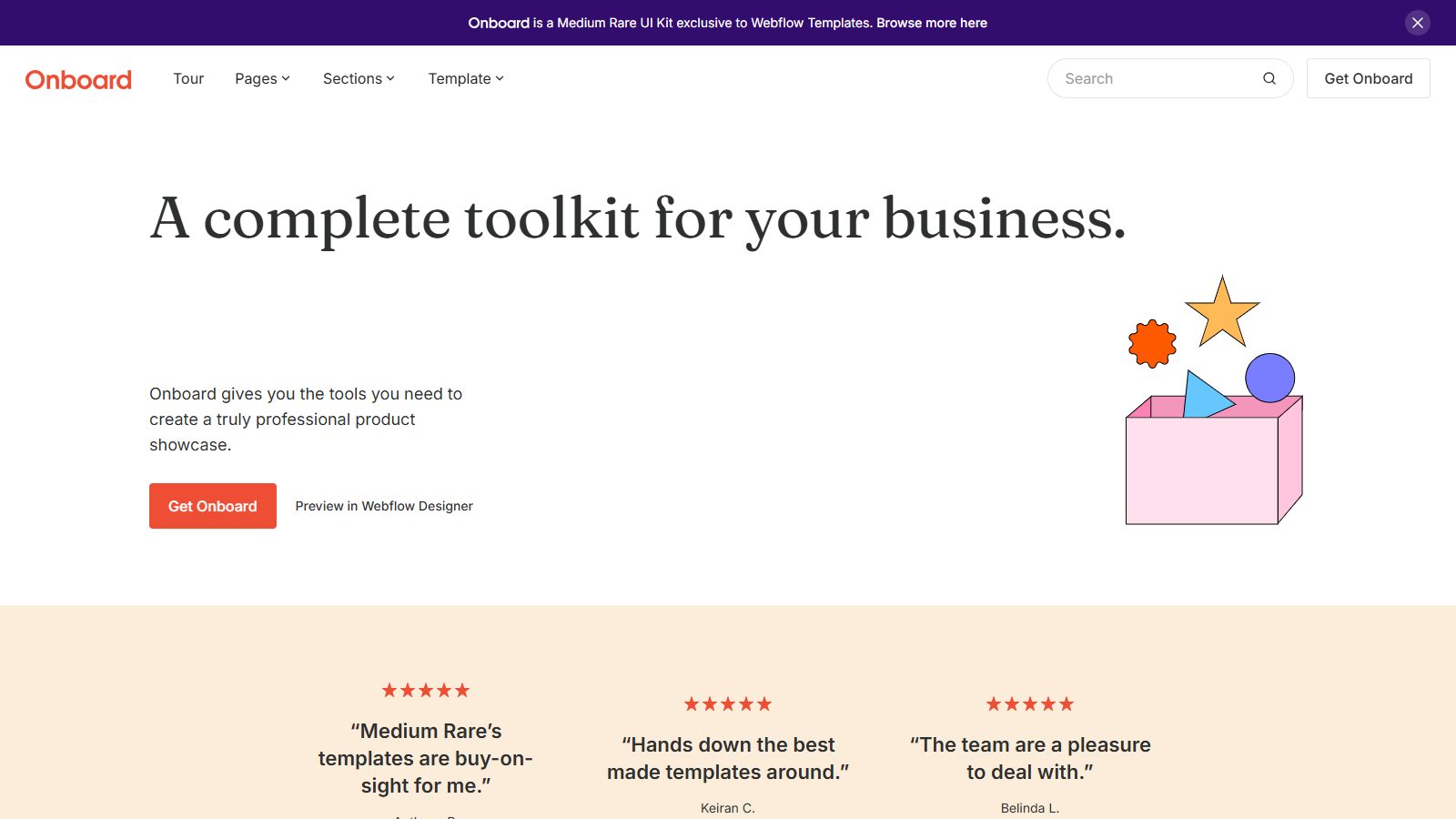
Onboard by Medium Rare ($79) suits consultancies, financial firms and B2B service businesses: a CMS blog, customer stories and careers, and a corporate look softened with illustration. It was among the fastest templates we tested, 81 on performance with a 678 KiB homepage, and scored 87 on accessibility. Lighthouse flagged colour contrast, and none of its 70 homepage images had alt text.
- Runner-up: Spark by Medium Rare ($79), a kit of 100+ sections, nine landing pages and 30+ inner pages; 69 on performance.
- Finance and banking: our guide to financial services Webflow templates covers that niche.
Best Webflow landing page template: landOS

landOS by Anastasiia ($24) is a single conversion page for selling an online course or programme, with sections for outcomes, the instructor, testimonials and enrolment. It scored 74 on performance and 92 on accessibility. It ships without a meta description or page language, so set both before launch. This was the thinnest use case in our sample: only two landing-page templates had been republished since January 2025.
- Runner-up: Lander by Rowan Hartsuiker ($24), three landing-page layouts for downloads, events and gated access.
- Plan note: a landing page without CMS content runs on Webflow's Basic plan ($15 a month billed yearly); keep any CMS content and you'll need Premium.
What the Webflow template marketplace looks like in 2027
Most Webflow templates cost $49 or $79, almost all include the CMS, and most demos haven't been republished in two years. Those three facts shaped every pick above.
Prices cluster hard. Of the 1,123 paid templates in our set, 445 cost $79 and 421 cost $49, and the median is $49. Webflow's own filter shows 93 free templates out of 7,427.
The CMS is close to universal: 90.6% of listings name it as a feature. That matters for your bill, because a site that uses the CMS needs the Premium Site plan or higher, not Basic (Webflow Help Center, edited 2 August 2026).
Freshness is the surprise. The median demo was last published 1,005 days before our scan, in early 2024. Webflow's creator FAQ explains part of it: changes to a template's source site reach only later installs, and Webflow is "not able to accept major design updates to published templates" (Webflow, submit a template). Old designs stay on sale; few get rebuilt.
The demos also miss basics that become yours the moment you install. Only 54.2% had exactly one H1, and just 34.1% declared a page language, which screen readers use to pick a voice. On 65% of demos not one image had descriptive alt text. No demo homepage carried structured data. Meta descriptions were the one thing most got right, at 87%.
Webflow's own bar has risen. Its current submission guidelines require Components for navbars and footers, Variables for colours and type, a passing Core Web Vitals result in PageSpeed Insights on desktop and mobile, WCAG colour contrast and images of 150 KB or less (Webflow submission guidelines). Yet the grading rubric still rates a template "Good" with a PageSpeed performance score of 51 to 70 (Webflow grading rubric). So "approved by Webflow" is a floor, not a promise of speed.
Are free Webflow templates any good?
Some are, but free demos in our scan were older and thinner on basics than paid ones. The median free demo was last published 2,183 days ago, about six years, against 987 days for paid templates. Only 9.5% of free demos declared a page language (35.1% of paid ones did), and 23.8% had a meta description (paid: 89.4%).
The licence is where free wins. Free templates are royalty-free for any number of personal and commercial projects, while a paid template covers one site for one person, business or project (Webflow template licenses). If you build many small sites, a free Webflow-made template you've cleaned up once can be your base for all of them.
Our view: use a free template to learn Webflow or to ship a two-page launch site. For a CMS site that has to rank, the $49 to $79 for a newer paid template is the cheapest line on the bill, as the next section shows.
What does a Webflow template really cost?
A Webflow template site costs about $350 to $430 in its first year and $950 to $1,120 over three years, because the Site plan, not the template, is the main cost. The template is 4% to 8% of a three-year bill.
| Site type | Template (median) | Webflow plan needed | Year one | Three years | Year one, GBP | Year one, INR |
|---|---|---|---|---|---|---|
| Landing page, no CMS | $24 | Basic, $15/mo | $204 | $564 | £152 | ₹19,300 |
| Portfolio, blog, agency, real estate, restaurant | $49 | Premium, $25/mo | $349 | $949 | £260 | ₹33,100 |
| SaaS or consulting | $79 | Premium, $25/mo | $379 | $979 | £283 | ₹35,900 |
| Online store | $79 | Ecommerce Standard, $29/mo | $427 | $1,123 | £318 | ₹40,500 |
Plan prices are Webflow's yearly-billed rates per site per month, plus tax, read on webflow.com/pricing on 4 November 2026; billed monthly, Premium is $39 and Basic $25. Conversions use 1 USD = 0.745 GBP = 94.83 INR (open.er-api.com, 4 November 2026).
Three costs catch buyers out. First, everyone who edits the site now needs a Workspace seat, because Webflow retired the legacy Editor on 5 October 2026 (Webflow Help Center); a limited seat costs $15 a month billed yearly, so a second editor adds $180 a year. Second, on the free Starter plan a template with more than two pages can't add or duplicate pages. Third, Starter caps you at 50 CMS items, so any real blog needs Premium, which includes 20,000. Our Webflow pricing guide covers every plan in detail.
How to check a Webflow template before you buy
Spend ten minutes on the live demo before you pay, because Webflow Marketplace purchases are final and non-refundable (Webflow refund policy, September 2026). These six checks catch most of what our scan found.
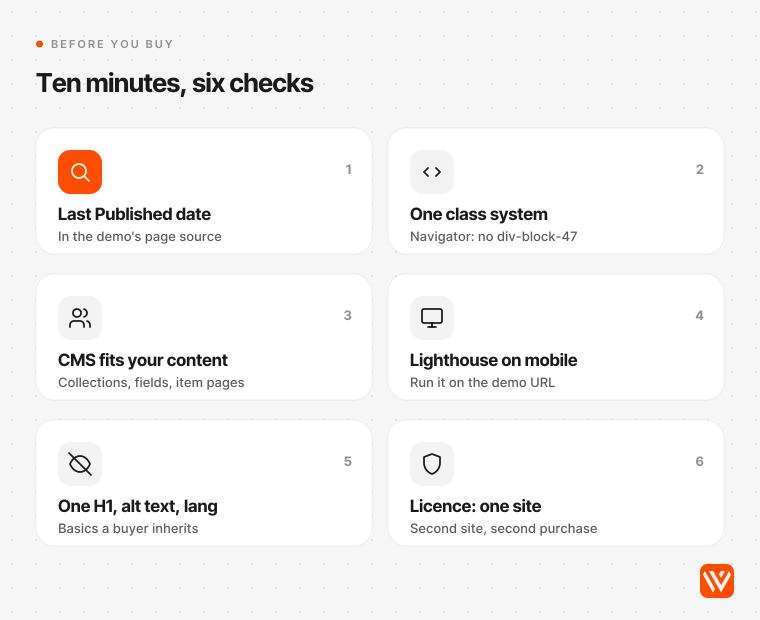
- Find the publish date. Open the demo, view the page source and search for "Last Published". A demo older than two years predates Webflow's current Components, Variables and GSAP rules.
- Open "Preview in Webflow" and read the Navigator. You want one naming system, Client-First or the designer's own documented one, not "div-block-47".
- Map your content to its CMS. List the Collections and fields you need. A real estate site needs listings with price and location fields; a SaaS site needs case studies and a changelog.
- Run Lighthouse on the demo URL in Chrome DevTools, mobile mode. Below 50 on performance usually means heavy animation or oversized images you'll have to strip out.
- Check the basics you'll inherit: exactly one H1, a page language, alt text on content images, and a page title that doesn't still read "Webflow HTML website template".
- Read the licence against your plans. One purchase covers one site. A second client or brand means buying it again.
Zoya Aqib, who designs and sells templates on the marketplace, puts the fit point bluntly: pick one built for your kind of business, "Otherwise, you'll end up deleting or rebuilding half the site to make it work" (LinkedIn, 19 August 2025). Joanna Rutter, writing on Webflow's blog, warned clients against "choosing a template based on an emotional reaction to colors and images" (Webflow blog, 2021). Our scan says the same thing in numbers: the prettiest demo is often the one with three H1s and no alt text.
When you've customised a template, our free AI Design Scorer will grade the result before you launch.
Webflow template licence rules, in plain words
A paid Webflow template licence covers one finished website for one person, business or project, and Webflow isn't a party to it; the licence is between you and the designer. The rules that matter:
| Question | Answer | Source |
|---|---|---|
| Can I use one purchase for two clients? | No. A second client or project means buying the template again | Template licenses |
| Can an agency build a client site on it? | Yes. Build one site, then transfer it to the client for any fee | Template licenses |
| Can I apply it to my existing Webflow site? | No. A template installs as a new site; you move content across | Help Center |
| Do updates reach my site? | No. You can re-download an updated version as a fresh install | Template licenses |
| Can I export the code? | Yes, with a paid Workspace plan; designer support ends at export | Template licenses |
| Can I get a refund? | No. Marketplace purchases are final | Refund policy |
| Can I lift one section into another site? | No. Components can't be used outside the licensed site | Template licenses |
The "existing site" rule trips up more people than any other. Webflow Forum threads asking how to apply a bought template to a live site go back to 2018, and the answer never changes: start a new site, then copy content and sections across. Vincent Bidaux, answering an agency user on the forum in 2022, said rebuilding with the theme as inspiration "will be faster, less buggy and produce a better quality website" than forcing a template onto an existing build (Webflow Forum, 1 June 2022, archived copy).
Why AI assistants disagree about the best Webflow template
Ask four AI assistants for the best Webflow templates by use case and you get four shortlists. We asked ChatGPT, Perplexity, Google AI Mode and Ask Brave the same question on 4 November 2026. They named 54 different templates between them, and only three appeared in more than one answer: Chomp, Proof and Harroway.
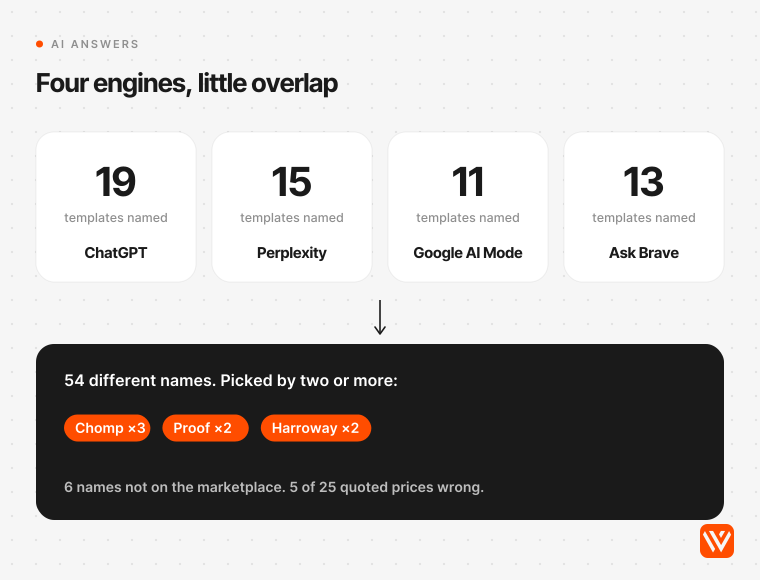
Their sources explain the spread. Perplexity grounded its answer only on webflow.com marketplace pages, Google AI Mode leaned on agency blogs, ChatGPT cited template roundups, and Ask Brave pulled shopping cards. None of them tested a template.
We checked every name. 48 of the 54 exist on the marketplace; six we couldn't find. Prices were the weakest part: of 25 prices the assistants quoted that we could check, five were wrong. ChatGPT listed Zelda as free; it costs $79. It filed Mercer under ecommerce at $149, while the Mercer on the marketplace is a $49 real estate template. And two of the three consensus picks, Chomp and Proof, have demos last published in 2020. Treat an AI shortlist as a list of names, then run the six checks above.
Template, Relume, AI site builder or a custom build?
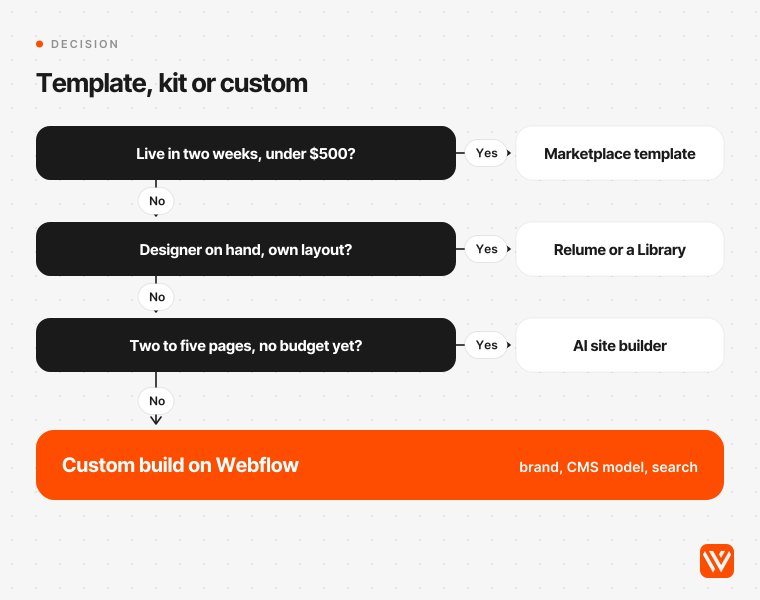
Buy a marketplace template when you need a site live within weeks for under $500 and your content fits its CMS. Use a component kit such as Relume when a designer wants their own layout. Try Webflow's AI site builder for a two-to-five-page first draft. Commission a custom build when the brand, the CMS model and search performance have to carry a growth plan.
| Route | Cost to start | Best when | Watch out for |
|---|---|---|---|
| Marketplace template | $0 to $169 one-off, plus a Site plan | A standard site type, live in weeks | One site per licence; cleanup of headings, alt text and default page titles |
| Relume or a Marketplace Library | Relume free tier, paid from $18 a month; Libraries free to $299 | A designer assembles a layout from components | Relume allows its components in templates you sell only once they're modified |
| Webflow AI site builder | No AI credits used; two pages without a paid plan, up to five generated pages with one | A fast first draft | New sites only; it can't restyle an existing site (Help Center) |
| Custom build | An agency or freelancer fee | Brand, CMS model, SEO and AI-search visibility matter | Cost and time |
Sources: Relume pricing and Webflow Libraries, read 4 November 2026.
Here's our position, as an agency that sells custom builds and doesn't sell templates. Most sites under ten pages with a standard shape should start from a template. The pattern we'd avoid is the one the forum threads describe: buying a template whose content model doesn't match the business, then paying someone to bend it. Lukas Stewart, commenting on Zoya Aqib's post, says he has "been hired a few times to "fix" a template that a client purchased". That repair bill usually costs more than the template and the first year's plan together.
How the answer changes in the US, UK and India
The picks don't change by country, but three things do: price, speed and accessibility law.
- Price. A CMS template site costs about $349 in year one in the US, £260 in the UK and ₹33,100 in India before tax, on the table above. Webflow adds tax at checkout.
- Speed. In HTTP Archive's September 2026 data, 80.2% of Webflow sites in the US and 79.3% in the UK passed Google's Core Web Vitals on mobile, against 39.1% in India (HTTP Archive Technology Report). If your visitors are on Indian mobile networks, weight performance more heavily than we did. Of our nine picks, Ember (608 KiB), Onboard (678 KiB) and Hailey (811 KiB) had the lightest homepages.
- Accessibility law. The European Accessibility Act has applied to consumer services, including online stores, since 28 June 2025, with an exemption for microenterprises (Directive (EU) 2019/882). UK service providers must make reasonable adjustments under the Equality Act 2010 (GOV.UK). In the US, the ADA Title II web rule now applies to state and local governments from 26 April 2027 (ADA.gov). India's Rights of Persons with Disabilities Act, 2016, sets accessibility duties for service providers in Section 46. A template that ships without alt text or a page language leaves that work to you; our WCAG 2.2 checklist for Webflow walks through it.
When this advice doesn't apply
Skip the template route if you need to redesign a site that's already live on Webflow: a template can't be applied to it, and rebuilding with the template as reference is usually faster. Skip it too if you need membership areas, since Webflow sunset User Accounts on 29 January 2026, or a multi-language store, because Webflow Localization doesn't support Ecommerce features (Webflow Help Center). And treat every score here as a snapshot of 4 and 5 November 2026: designers republish, and a template that wins today can slip.
What should you do next?
Pick the template for your use case from the table, run the six checks on its demo, and budget for the Site plan rather than the template. If your content model doesn't fit any template, or the site has to win in Google and get cited by AI search, that's the point where a custom build pays for itself. Our Webflow development team builds those sites for B2B companies.
Sources and method
Census: 1,178 template URLs from Webflow's sitemap, 1,166 live listings read, 1,145 demo homepages scanned, 4 November 2026. Lighthouse 12.6.1, mobile, 89 runs on 68 demos, 4 and 5 November 2026. Prices, plans, licence and guidelines from webflow.com and help.webflow.com, read 4 November 2026. AI answers from ChatGPT, Perplexity, Google AI Mode and Ask Brave, signed out, 4 November 2026. Exchange rates from open.er-api.com, 4 November 2026.
What is the best Webflow template?
There's no single best Webflow template; the best one matches your site type. In our November 2026 tests the winners were Saga for SaaS, Agencies X for agencies, Hailey for portfolios, Heyday for stores, Matter for blogs, Nova Homes for real estate, Ember for restaurants, Onboard for consulting and landOS for landing pages.
How much does a Webflow template cost?
Most paid Webflow templates cost $49 or $79; those two prices cover 77% of the 1,123 paid templates we checked, and the range runs from $19 to $169. You also need a Site plan: $15 a month for Basic or $25 for Premium with the CMS, billed yearly, so year one usually lands between $200 and $430.
Are free Webflow templates any good?
Some are, but they're usually older. The median free demo in our scan was last published about six years ago, and fewer than one in four had a meta description. Free templates do carry a broader licence: you can use them on any number of projects, unlike a paid template, which covers one site.
Can I apply a Webflow template to my existing site?
No. A Webflow template installs as a brand-new site and won't replace the design of a site you already have. You can copy content and sections across, or rebuild using the template as a reference, which forum experts often say is faster and less buggy than forcing the new design onto old classes.
Can I use one Webflow template for several clients?
No. A paid Webflow template licence covers one finished site for one person, business or project, so a second client means buying the template again. An agency may build one client site on a template and transfer it to that client for any fee. Free templates can be used on any number of projects.