Summarise this article using AI


The Webflow MCP server lets an AI assistant such as Claude or ChatGPT read and change your Webflow site in plain language: CMS items, page SEO settings, alt text, sitemap flags, scripts and publishing. For marketing teams it's best at audits and drafts that a person approves. It's weakest at bulk reads, analytics you haven't paid for, and anything that goes live unreviewed.
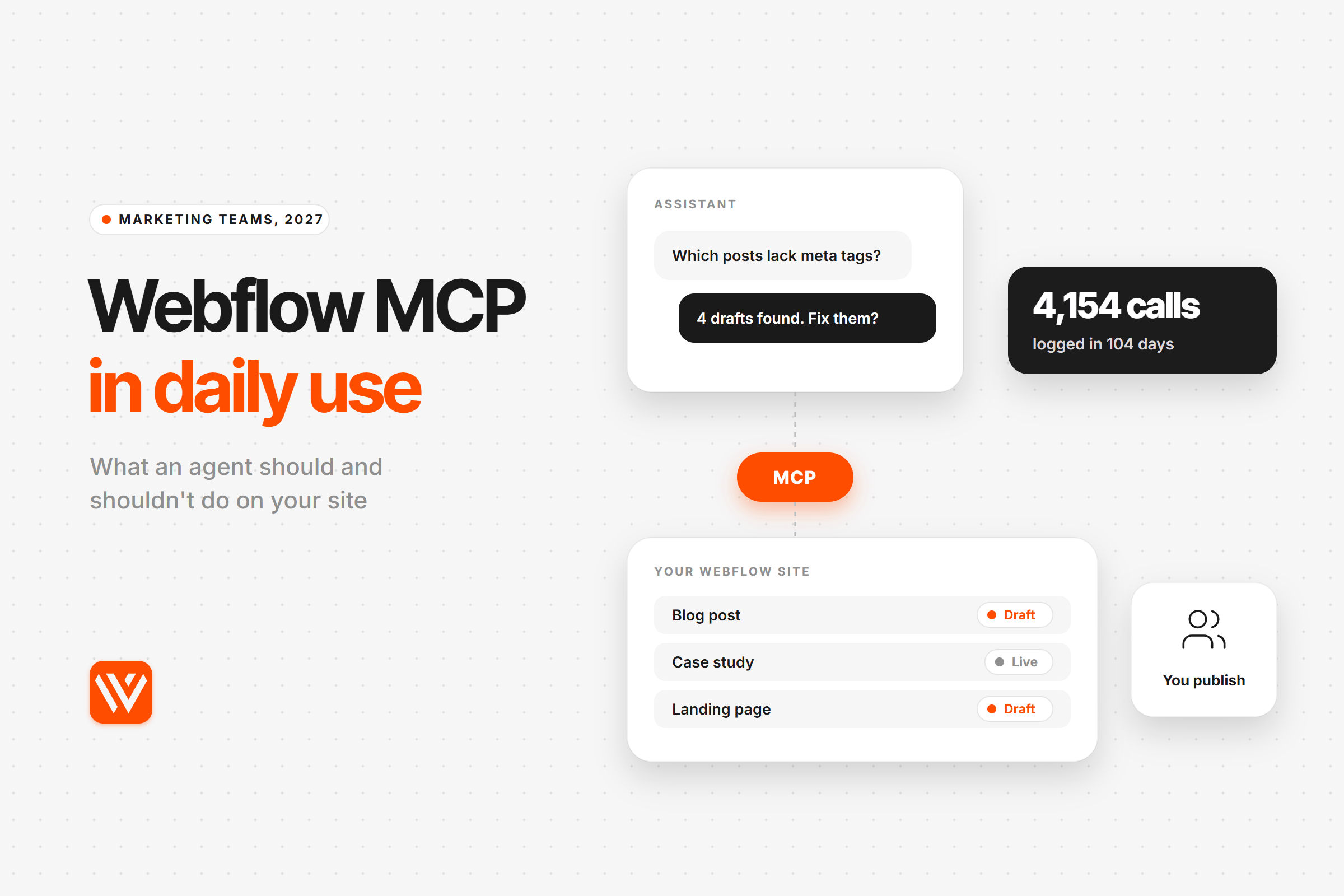
We know that from our own logs, not the feature page. Between 23 July and 4 November 2026 our Claude Code sessions made 4,154 calls to the Webflow MCP across 132 working sessions, and on 4 November we ran nine read-only marketing checks on webyansh.com through it. Below: what the connector can do, what failed and why, what it costs in the US, UK and India, and the rules we now run it under.
Key takeaways
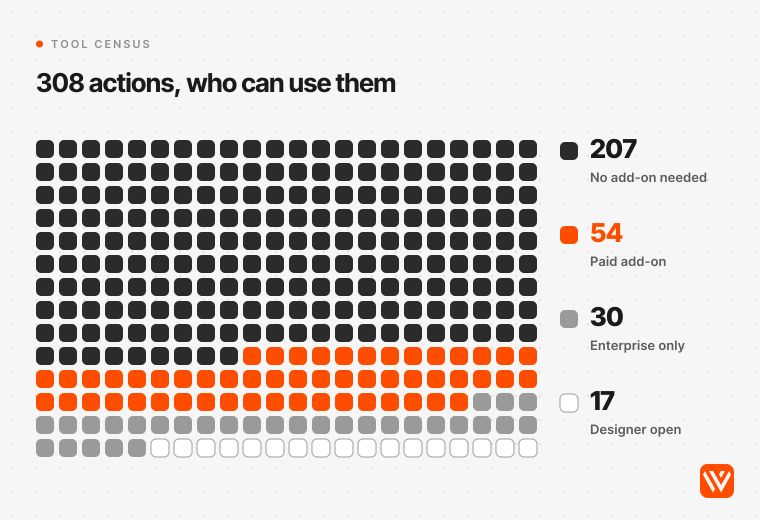
- The Webflow MCP exposed 37 tools and 308 actions in our session on 4 November 2026. Fifty-four of those actions need a paid add-on (Analyze, Optimize, AEO or Campaigns) and 30 need Enterprise, including 301 redirects and robots.txt.
- In 4,154 logged calls, 9.4% failed. Webflow's side caused 31 of them (0.75%). Most failures (306) were answers too large for the assistant to read in one go.
- The MCP is free on every Webflow plan and doesn't use Webflow AI credits. You pay for the assistant (Claude Pro is $20 a month) and for any add-on whose data you want the agent to read.
- Our best marketing jobs for it: finding missing meta descriptions and share images, checking sitemap flags, drafting alt text, rewriting one page's SEO fields. Our worst: full-library audits, scheduled publishing and anything that has to run with nobody watching.
- On our sites, agents save drafts and publish only on a person's explicit go-ahead. We adopted that rule on 24 August 2026, the day after our own pipeline published a live post and then republished it as the visuals changed, three versions in one afternoon.
What is the Webflow MCP server?
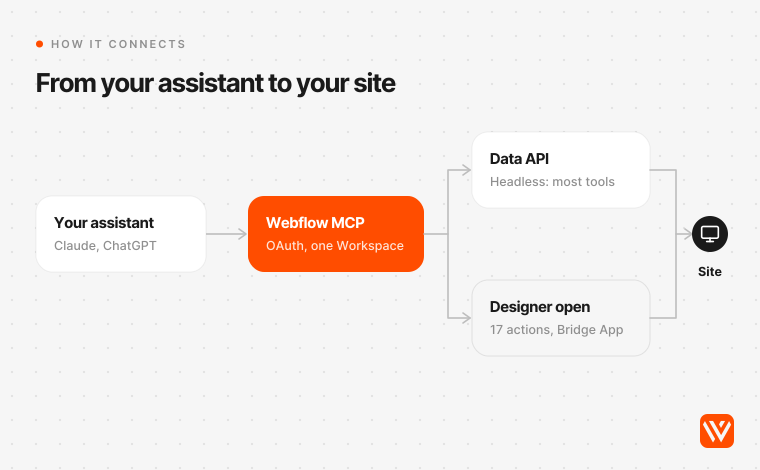
The Webflow MCP server is Webflow's official connector for AI assistants, built on the Model Context Protocol (MCP), an open standard for letting AI models call outside tools. You connect Claude, ChatGPT or another supported assistant to `https://mcp.webflow.com/mcp`, sign in with Webflow, pick the sites it may touch, and then ask for changes in plain language.
Anthropic released MCP as an open standard on 25 November 2024 and handed it to the Agentic AI Foundation under the Linux Foundation on 9 December 2025. Webflow shipped its first server on 8 April 2025. The version that matters for marketing teams is MCP 2.0 of 21 July 2026, which moved most tools onto Webflow's Data API so they run without the Designer open, followed by v2.2 on 15 October 2026, which added read access to Analyze, Optimize and AEO data.
Webflow's developer docs list Claude, ChatGPT, Codex, Gemini, Postman, Slack, Devin Desktop and the editor it now calls Grok Build (formerly Cursor) as supported clients. Webflow says setup takes about five minutes. Each sign-in covers one Workspace, and the agent works inside the permissions of the person who connected it.
Is the Webflow MCP different from the Webflow API?
Yes, in who it's for. Webflow's Data API is the programming interface: you need code and a token to call it. The MCP wraps that same API (and the Designer's, for canvas work) in tools an assistant can call from a plain-language request, so a marketer can ask "which posts have no meta description?" instead of writing a script. The limits underneath are the same, which is why the rate limits below apply to both. If you're new to the platform itself, start with our guide to what Webflow is.
Two things on page one of the search results are out of date. The GitHub repository still shows the old `/sse` endpoint and hand-edited config files, and its npm package hasn't had a release since 17 September 2025, while Webflow's docs now use the `/mcp` endpoint and one-click connectors. And several guides still say Designer work needs the Bridge App open. Since 2.0 that's only true for visual snapshots, image uploads by URL and anything that reads your current selection, page or canvas.
What can a marketing team do with the Webflow MCP?
A marketing team can use the Webflow MCP to read and edit CMS content, page SEO and Open Graph settings, alt text, sitemap inclusion, schema markup, site and page scripts, form submissions and localized copy, and to publish. We loaded every tool schema the connector exposed on 4 November 2026 and counted 37 tools and 308 actions: 143 read, 126 write, 36 destructive and 3 that publish. (Webflow's own reference lists 309.)
The catch sits in the plan gates. Fifty-four actions work only with a paid add-on, 30 only on Enterprise, and 17 only with the Designer open.
| Marketing job | Tool | What it needs | Our verdict |
|---|---|---|---|
| Blog posts, case studies, landing-page CMS items | `data_cms_tool` (16 actions) | Any paid Site plan with CMS; Starter caps you at 50 items | Strong for one item or a filtered set; heavy on big collections |
| Page titles, meta descriptions, Open Graph, schema markup | `data_pages_tool` (16 actions) | Any plan; page branches are Enterprise | Strong |
| Alt text and image tidy-up | `data_assets_tool` (12 actions) | Any plan; compression limited to 10 calls a minute per site | Strong for drafting alt text, slow for full audits |
| Sitemap include or exclude | `data_sitemap_tool` (8 actions) | Any plan; up to 100 items per call | Strong |
| Tracking tags and custom code | `data_scripts_tool` (20 actions) | Any plan | Useful for audits; review every write |
| Form submissions | `data_forms_tool` (7 actions) | Any plan | Personal data: keep it off unless you have a reason |
| Translations in secondary locales | `data_localization_tool` (7 actions) | Localization add-on; can't create new localized CMS items | Good for edits, not for launching a locale (our localization playbook) |
| Traffic, goals, scroll depth | `data_analyze_tool` (12 actions) | Analyze add-on, from $9 a month | Read-only |
| A/B test results | `data_optimize_tool` (8 actions) | Optimize add-on, from $299 a month | Read-only; creating tests through agents is "in development" |
| AI crawler visits and AI-answer visibility | `data_aeo_tool` (14 actions) | Team or Enterprise plan plus Analyze | Read-only |
| Campaign pages and personalization | `data_campaigns_tool` (20 actions) | Campaigns purchase | Not tested |
| 301 redirects, robots.txt, activity log | `data_enterprise_tool` (11 actions) | Enterprise | Not available to most marketing teams |
Prices are from webflow.com/pricing and the AEO analytics overview, checked on 4 November 2026.
If you mostly want audits rather than edits, the MCP sits alongside the other AI tools for reviewing Webflow sites; it's the only one that can also fix what it finds.
What 4,154 calls taught us about the Webflow MCP
Between 23 July and 4 November 2026 our Claude Code sessions made 4,154 calls to the Webflow MCP server, across 132 sessions on 73 working days. We counted every one from the session logs on our own machine (logs before 23 July aren't kept), grouped them by job and classified every failure. Client projects are grouped together, so no client is named.
Most of our calls were build work, not marketing work
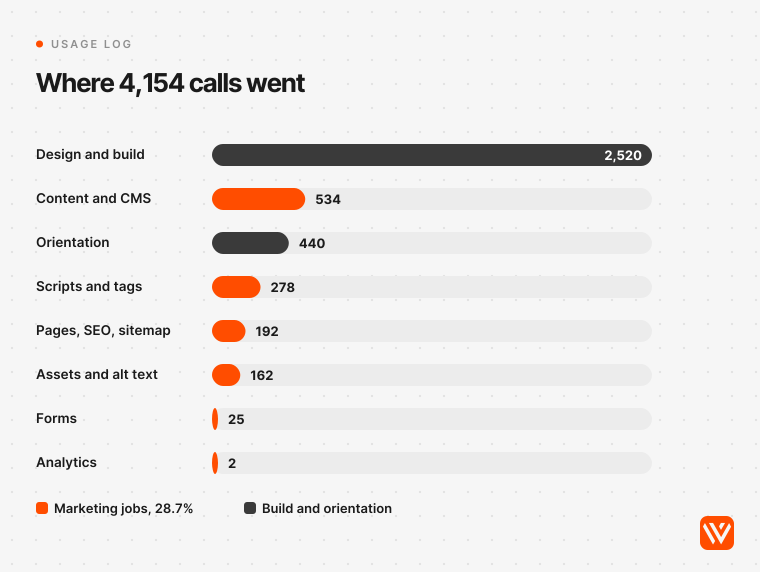
Design and build tools took 2,520 calls (60.7%). Marketing jobs took 1,193 (28.7%): content and CMS 534, scripts and tags 278, page SEO settings and sitemap 192, assets and alt text 162, forms 25, analytics 2. Orientation calls, such as finding the site and reading the server's guide, took almost all of the rest (440).
That split says more about an agency's week than about the tool. It does show where the MCP earns its keep for marketing work, though: reading and updating CMS items, checking scripts, setting SEO fields. Analytics barely registers. We made two Analyze or AEO calls in 104 days, both during this test, and both were refused because our site doesn't pay for those add-ons.
How often does a Webflow MCP call fail, and why?
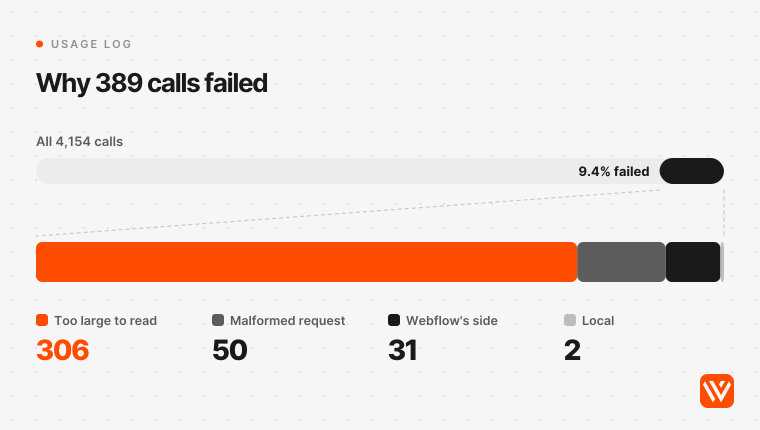
389 of the 4,154 calls failed (9.4%). The cause matters more than the rate.
| What went wrong | Calls | Share of all calls |
|---|---|---|
| The answer was too large for the assistant, so Claude Code saved it to a file instead | 306 | 7.4% |
| The agent sent malformed arguments and the server rejected them | 50 | 1.2% |
| Something failed on Webflow's side: element snapshot 17, API validation 7, timeout 4, rate limit 1, not found 1, connector sign-in 1 | 31 | 0.75% |
| A local hook or proxy dropped the call, not Webflow | 2 | 0.05% |
So Webflow's servers caused fewer than one failure in a hundred calls. The real constraint is size. Claude Code warns when a tool result passes 10,000 tokens and, by default, saves any result over 25,000 tokens or 50,000 characters to a file (Claude Code docs). The agent can still read the file, but it costs extra steps and context. Our CMS tool hit that ceiling 127 times, the guide tool 58 times and the element tool 55 times.
Two tools stand out. The element snapshot tool, which takes a picture of part of a page, failed 17 of its 30 calls (56.7%), each time with "Element snapshot failed with status: false". Webflow's own pages disagree on whether snapshots need the Designer open, so treat them as unreliable. And the guide tool, which the server asks every agent to call first, now returns 100,274 characters, twice the 50,000 that Claude Code passes straight to the model.
How fast is the Webflow MCP?
Fast enough that speed never decided anything for us. The median call took 3.0 seconds from request to result, and 90% finished within 8.6 seconds. Site and page reads were quickest (medians of 1.7 and 1.9 seconds). Style changes had the longest tail, with 10% taking more than 17.9 seconds.
Nine checks we ran through the Webflow MCP on our own site
On 4 November 2026 we ran the checks a marketing lead asks for most, plus the setup calls around them, read-only, on webyansh.com, through the same connector (it reports itself as version 2.2.0). Nothing was written or published.
| Check | Result | What it cost |
|---|---|---|
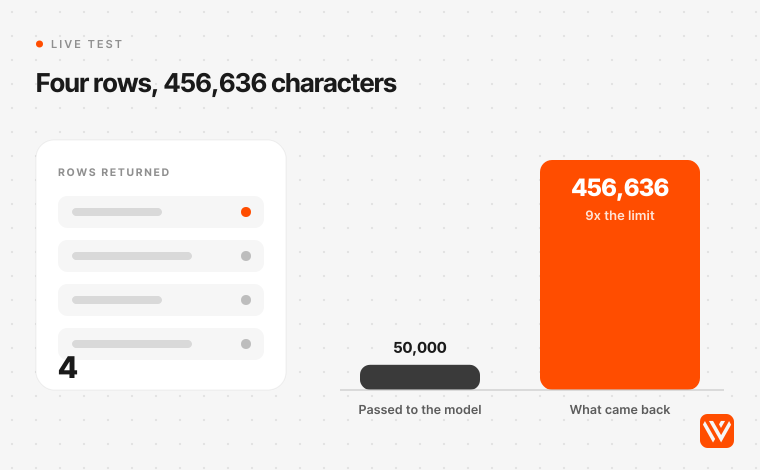
| Blog posts with no meta description, and posts with no share image | Correct: 1 post without a meta description and 3 without an OG image, all four drafts, no live posts | 456,636 characters back for 4 rows |
| Every live post in the sitemap? | Yes: 50 of 50 | One small call |
| Alt text on the newest 100 assets | None missing | 98,998 characters; the full library would take 9 calls |
| AI crawler visits and AI-answer visibility (AEO), six reads | All six refused: "AEO analytics entitlement required" | HTTP 403 |
| Top pages by sessions (Analyze) | Refused: "Analyze entitlement required" | HTTP 403 |
| Find the right site | 85 sites in our Workspace listed in one call | One call |
| Read the server's guide | Returned, then saved to a file | 100,274 characters |
| Ask Webflow's docs assistant four setup questions in one message | Refused: "I'm not able to help with that request" | One call |
| Ask it one question: Data API rate limits | Answered, with sources | About 170 lines of raw streamed text |
The meta description audit got the right answer at a strange price
The filter worked. It found exactly the items with an empty meta description or share image. But the CMS tool returns every field of every matching item, and one of those drafts has a 207,150-character body. Four rows came back as 456,636 characters, nine times what Claude Code will hand the model directly.
For a marketing team the lesson is simple. Ask for audits on small, filtered sets, or let a script do the full sweep and give the agent the short list.
Alt text: 67 of 768 images had none
The MCP showed our newest 100 assets were clean. To see the whole library we ran the same check over Webflow's Data API with a site token. It read all 895 assets in 10 calls and 30.8 seconds and found 67 of 768 images (8.7%) with no alt text, mostly older uploads. None of that 1.14 MB passed through the chat.
That's the split we use now. A script finds the gaps, the agent drafts alt text for each image, a person approves it, and the agent writes it back one asset at a time.
Analyze and AEO data need the paid add-ons
Every Analyze and AEO read returned HTTP 403 on our site. That includes the AI crawler count, which doesn't need Webflow AI switched on but still needs the AEO entitlement. If your team wants traffic or AI-visibility numbers through the MCP, budget for the Analyze add-on (from $9 a month) or for AEO, which Webflow's help centre ties to a Team or Enterprise plan. Otherwise keep pulling those numbers from GA4 and your AI-visibility tool.
Where does the Webflow MCP stop?
The Webflow MCP stops at scheduling, redirects below Enterprise, new sites, new localized CMS items and large reads. These are the limits a marketing team runs into first, all checked on 4 November 2026.
- No scheduled publish. Neither the MCP nor Webflow's Data API has a "publish at 11:00 on Thursday" action. We checked both on 24 October 2026 and built a small scheduler instead. Webflow's own schedule button lives only in the CMS panel.
- Redirects and robots.txt are Enterprise. The MCP's redirect actions sit in its Enterprise-only tool. When we merged two old posts on 4 November, the REST redirect endpoint returned 403 on our plan, so the two 301s went in by hand in Site settings.
- Rate limits. Webflow's rate-limit page gives 60 requests a minute on Starter and Basic and 120 on CMS-class plans, per token, and one site publish a minute. The page still uses plan names Webflow retired in May 2026, and our own token's header read 150. Check your header, not the docs.
- One Workspace per sign-in. To switch, you disconnect and reconnect. An agency with 85 sites in one Workspace, like ours, should tick only the sites it's working on, which is also Webflow's advice.
- No new sites, no new localized CMS items. It can edit existing locale content, not create localized items.
- Batches. Many actions cap at 100 items per call, and HTML inserts at 5 per call. Flow Ninja's team reports that after about 20 items in a complex multi-reference operation Claude can start hallucinating IDs, so the team batches its work. Our oversized CMS answers point the same way: keep batches small.
- Interactions and fonts. Only GSAP-based Interactions and uploaded fonts are supported; Google or Adobe Fonts added by link aren't.
- Headless runs can't use the claude.ai connector. When we set our blog engine to run unattended in October, it could write the post but couldn't create the Webflow draft, because the connector lives inside the Claude app. A site-scoped API token and a short script fixed it.
The tool is also younger than its feature page suggests. The GitHub repository has 49 issues, 20 of them open and 14 of those with no reply on 4 November. The biggest groups are client setup (10) and Designer Bridge connections (9). None is about publishing, SEO fields or forms, which fits our logs: the marketing-side tools are the steady part.
Is it safe to let an AI agent edit a live Webflow site?
Safe for drafts and reviewed changes. Not safe as an unattended publisher. We learned that on our own blog, cheaply.
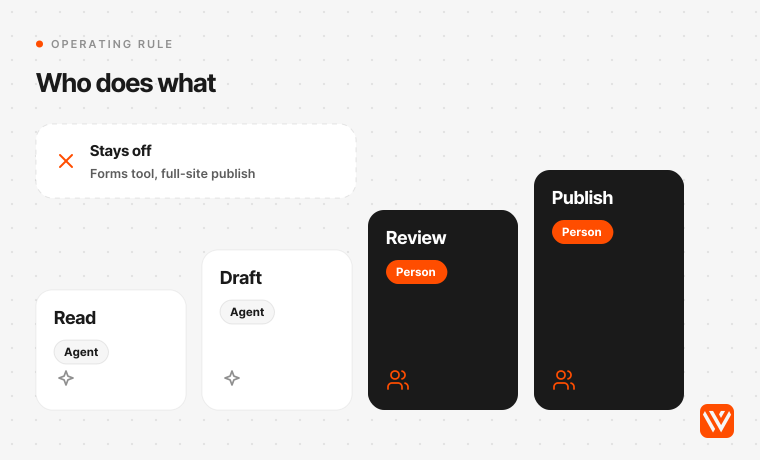
On 23 August 2026 our blog pipeline ran through the Webflow MCP with no human step for the first time. It published a post, then republished it as the visuals changed: three versions of a live page in one afternoon while the design was still under review. Nothing broke. On 24 August we made Webflow draft-only for agents. A run ends with the item saved as a draft, and only a person's explicit go-ahead publishes it. In September we narrowed it again: our skills may read and save drafts, and our scheduled routines don't publish. The one tool that publishes on a timer acts only on a date and time a person gave for that post.
Webflow's CEO makes the same point from the other side. "When an agent edits your website, it's live the second it publishes to customers, competitors, and every model crawling the web," Linda Tong said at the MCP 2.0 launch on 21 July 2026. Webflow's developer content lead Vic Plummer gives the practical version: "Always ask your agent to propose a plan for you to approve" (Webflow blog, January 2026).
Three facts make the review step a requirement.
- A site publish ships everything pending. The publish tool's own description says a full-site publish "includes every pending page change". An agent asked to publish one blog post can also publish a colleague's half-finished homepage.
- The agent reads text other people wrote. CMS items, comments and form submissions can carry instructions aimed at the model. Prompt injection is the first entry in OWASP's 2025 Top 10 for LLM applications, and OWASP says "it is unclear if there are fool-proof methods of prevention". A malicious GitHub issue was used against GitHub's own MCP integration in May 2025 to leak private repository data.
- Form submissions are personal data. The forms tool can list, read, edit and delete them. Pulling names and emails into a chat assistant is processing personal data under the GDPR in the EU and UK, under India's DPDP Act, and under US state laws such as California's CCPA. If nobody has decided that's lawful and necessary, leave the forms tool alone.
Webflow has added guardrails since mid-2026, and they help. Agents can work on page branches and a person merges them, but branches are Enterprise. The Site Activity log records whether a change came from a person, Webflow AI or an MCP-connected tool, but it's available only on Team and Enterprise, so most self-serve sites have no audit trail of agent changes inside Webflow. Agent presence, added on 21 October, shows where an agent is working on the canvas, but it doesn't lock anything. None of it replaces a person approving the publish.
One more check if you connect through an older desktop setup. Webflow's Data API "AI tools" page still tells users to install `mcp-remote`, a bridge package that had a critical remote-code flaw rated 9.6, CVE-2025-6514, fixed in version 0.1.16. If you use it, make sure you're on a current version, or switch to your assistant's built-in remote connector.
How to set up the Webflow MCP for a marketing team
Set it up read-only first, scope it to the sites you're working on, write down the rules, and keep publishing with a person. Here's the order we'd follow for a marketing team.
- Pick the assistant your team already pays for. In Claude, connectors are available on Free, Pro, Max and Ultra, and on Team plans only owners can add custom connectors (Anthropic). In ChatGPT, custom MCP servers with write actions need Business or Enterprise; Pro users get read and fetch only (OpenAI). Webflow's own app in the ChatGPT directory is a separate route.
- Connect with the right person. Webflow's pages disagree on who may authorize: the developer FAQ says site owners and admins, the help centre says any role except Reviewer. Either way the agent inherits that person's role, so connect with an account that can edit content but isn't the Workspace owner if you can.
- Tick only the sites you're working on. Fewer sites means fewer chances for the agent to edit the wrong one. Webflow's prompt guide adds that the agent won't assume your site ID, so name the site in every request.
- Write agent instructions. The MCP reads site-specific rules before it works. Put your house rules there: draft only, never publish, never touch forms, use existing classes, tone of voice for meta descriptions. Generating these with Webflow's own instruction tool uses Webflow AI credits; writing them yourself doesn't.
- Start with read-only audits. Missing meta descriptions, missing share images, sitemap flags, scripts on each page. Check the answers against the Designer for a week before you allow any write.
- Allow drafts, then reviewed edits. Let the agent save CMS drafts and propose SEO field changes, with a plan you approve before it writes. Arkose Labs' marketing team works this way in Webflow's customer story: staff publish to staging and one content lead approves before anything goes live.
- Keep publishing with a person. Publish from Webflow, or let the agent publish a single CMS item you've approved. Don't give it the full-site publish.
If your browser puts inactive tabs to sleep, Designer-bound tools time out. Webflow's fix is to keep webflow.com tabs active in Chrome's performance settings.
MCP or a script: which marketing job goes where?
Use the MCP when a person is in the conversation and the job needs judgment. Use a script over Webflow's Data API when the job is bulk, scheduled, or has to run with nobody there.
| Job | MCP | Script over the Data API |
|---|---|---|
| Which posts in one collection are missing a meta description? | Yes | |
| Draft alt text for 67 images, approve, write back | Yes | |
| Rewrite one page's SEO title and description | Yes | |
| Audit all 895 assets or every CMS item | Yes: 10 calls and 30.8 seconds, nothing in the chat | |
| Stage a 5,000-word post with tables, figures and every field filled | Yes: our staging script | |
| Publish at 11:00 on a set date | Yes: there's no scheduled-publish action in either | |
| Anything that runs overnight or on a server | Yes: headless runs can't reach the claude.ai connector | |
| 301 redirects below Enterprise | Neither: Site settings by hand |
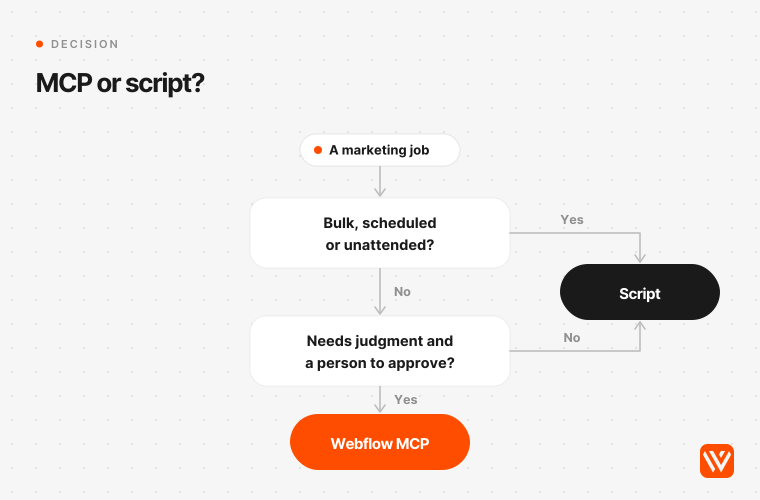
Our own blog pipeline sits on both sides of that line. The agent researches, writes and checks the post in a conversation. A script stages the finished draft in Webflow, because a 5,000-word body with tables and figures is exactly the kind of payload that overflows a chat. Another publishes it at the time a person set.
What does the Webflow MCP cost?
The Webflow MCP costs nothing extra. It works on every Webflow Site plan, including free Starter, and Webflow says using it doesn't consume Webflow AI credits; usage counts against your AI assistant's plan instead. The exceptions are generating agent instructions and Campaigns' AI features, which do use credits.
| What you pay for | USD a month | About GBP | About INR | Why it matters |
|---|---|---|---|---|
| Webflow MCP server | $0 | £0 | ₹0 | All Site plans |
| Webflow Premium Site plan, billed yearly | $25 ($39 monthly) | £18.64 | ₹2,371 | 20,000 CMS items; the CMS API is not available on Basic |
| Analyze add-on | from $9 | from £6.71 | from ₹854 | Needed before the agent can read traffic data |
| Optimize add-on | from $299 | from £222.88 | from ₹28,355 | Test results, read-only through the MCP |
| Team plan (needed for AEO, plus Analyze) | $2,500, annual contract | £1,863.55 | ₹2.37 lakh | AI crawler and AI-answer visibility data |
| Claude Pro | $20 ($17 billed yearly) | £14.91 | ₹1,897 | One person |
| Claude Team, standard seat | $25 ($20 billed yearly) | £18.64 | ₹2,371 | Admin control over connectors |
| ChatGPT Business, standard seat | $25 ($20 billed yearly) | £18.64 | ₹2,371 | Needed for custom MCP servers with write actions |
Prices in USD from Webflow, Anthropic and OpenAI, checked on 4 November 2026, before tax. GBP and INR are our conversions at the 4 November rate ($1 = £0.7454 = ₹94.83), not local list prices. A lakh is 100,000 rupees.
A worked example: a three-person marketing team on Claude Team (monthly seats) running one Premium site billed yearly pays about $100 a month, or about ₹9,500. Add Analyze and the agent can answer traffic questions too.
How does the Webflow MCP compare with other MCP servers marketing teams use?
Most of the platforms in a B2B marketing stack now ship an official MCP server, so the Webflow MCP is one connector among several in the same assistant. What each lets an agent do, from the vendors' own pages on 4 November 2026:
| Server | What an agent can do | Plan note on the vendor's page |
|---|---|---|
| Webflow | Read and write CMS, pages, SEO settings, assets, scripts, forms; publish | Free on every Site plan |
| Framer | Create pages, edit layouts, update content, manage CMS collections | Not stated |
| WordPress.com | Read or full access, set per account; Jetpack-connected sites use the same server | Every WordPress.com site, free or paid |
| HubSpot | Read and write CRM data: contacts, deals, engagements | Not stated |
| Sanity | Query and patch documents; new documents start as drafts | Not stated |
| Google Analytics | Read reports; write tools only if you switch them on | Open source, free to run |
| Google Search Console | No official server found | n/a |
Two patterns matter for a marketing lead. First, Sanity makes new documents drafts by default and Google Analytics starts read-only. Webflow's connector can publish as soon as it's connected, if your role allows it, so the draft-only rule is yours to set. Second, the useful work happens across servers: an agent that reads Google Analytics, decides which pages are slipping, and drafts new meta descriptions in Webflow for a person to approve.
Where do India, the UK and the US differ?
The tool works the same everywhere. What changes by country is the law on personal data the agent might read and what the assistant costs in your currency.
| United States | United Kingdom | European Union | India | |
|---|---|---|---|---|
| Law that covers form submissions an agent reads | State privacy laws, such as California's CCPA | UK GDPR and the Data (Use and Access) Act 2025 | GDPR | Digital Personal Data Protection (DPDP) Act 2023 |
| Breach notice | Varies by state | 72 hours to the ICO | 72 hours to the regulator | Under the DPDP Rules, from about 13 May 2027 |
| Security duties | Varies by state | Article 32 | Article 32 | DPDP Rules notified 13 November 2025; most duties, including security safeguards, apply from about 13 May 2027 (PIB) |
For Indian teams the DPDP timeline is the practical point. Most of the Rules apply from May 2027, and they cover the same personal data a forms tool reads. If your Webflow forms collect leads from Indian residents, decide now whether an agent should ever see them. For teams anywhere, the cheaper way to stay out of trouble is the same: don't connect the forms tool to a chat assistant.
What changes next for the Webflow MCP?
Webflow's stated plans point in one direction: more of the MCP working without the Designer, and more of it tied to paid add-ons. Here's the record so far and what's announced.
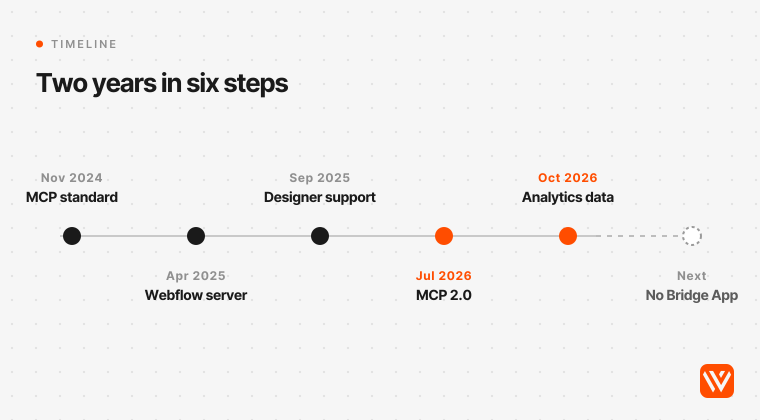
- Past. Anthropic opened MCP on 25 November 2024. Webflow's server arrived on 8 April 2025, gained remote connections on 17 April and Designer support through a companion Bridge App on 4 September 2025.
- Present. MCP 2.0 (21 July 2026) moved most tools off the Bridge App and added page branches and agent entries in the activity log, both on higher plans. Version 2.1 followed on 21 September, v2.2 with Analyze, Optimize, AEO and a Gemini connector on 15 October, Campaigns on 20 October and agent presence on 21 October 2026. Webflow says over 30% of its enterprise customers use the MCP, usage grew more than four times since January 2026, and nearly 90% of users connect through Claude. Those are Webflow's figures, with no stated base or outside check.
- Next, per Webflow. Every tool working without the Bridge App. Creating and editing Optimize experiments through agents is "in development" (Webflow blog, 15 October 2026). Gemini for Enterprise plans. And Webflow's Site plan changes reach Freelancer and Agency Workspace sites on 16 November 2026, which matters if an agency hosts your site.
- Our forecast, labelled as ours. More agent work will be priced through add-ons and credits. The analytics tools already are, and instruction generation already uses credits.
Practitioners disagree on how far to trust it. Webflow's customer stories are confident: Arkose Labs' CEO says opening a ticket now takes longer than telling Claude to do the work, and Anrok's web growth marketer Brad Gardner says that without AI and the Webflow MCP, "I would have expected at least a month and twice the team" (Anrok story). Independent voices are more careful. Paris agency Digidop's co-founder Florian Bodelot writes that "AI is excellent for the first impulse, but much less efficient when it comes to finishing" (Digidop, May 2026). Consultant Pravin Kumar reports routine SEO audits taking about 70% less time, and also calls an agent with direct write access to a production site "a liability" (pravinkumar.co, September 2026). Our logs put us in the careful camp on builds and the confident camp on audits and drafts.
When is the Webflow MCP the wrong tool?
Skip it, or keep it read-only, if any of these fit.
- Nobody on the team can review a change before it goes live. The agent is quick. Without a reviewer, that's the problem.
- Your job is bulk or scheduled. Full-library audits, nightly syncs and timed publishes run better as scripts on the Data API.
- You're on Starter and need CMS at scale. Starter allows 50 CMS items, and Basic has no CMS API.
- Your forms collect regulated or sensitive data. Leave the forms tool off entirely.
- You need redirects or robots.txt changes and aren't on Enterprise. The MCP can't do them; Site settings can.
- You want design builds without a developer. Builds through the MCP get most of the way. Flux Academy's Ran Segall put a Figma-to-Webflow test at "like 85% of the work is done" (YouTube, April 2026). The last 15% still needs someone who knows Webflow.
If you're about to give an agent the keys, check what it will be working on first. Our free AI Design Scorer grades a page in a minute. And if you'd rather have a team that already runs Webflow with agents under these rules, our Webflow maintenance and care retainer covers CMS, SEO and AI-search work on your site with a person approving every publish. For background, read our guides to Webflow AI, the Webflow CMS and its limits, and Webflow pricing in 2026.
Sources and method
Usage figures come from the Claude Code session logs on Webyansh's own machine, 23 July 2026 05:26 UTC to 4 November 2026 17:04 UTC (1,448 log files, 145 with Webflow calls). Every tool call to the Webflow connector was paired with its result and classified: answers Claude Code saved to a file, malformed arguments the server rejected (MCP error -32602), errors returned by Webflow, and local hook or proxy failures. Jobs were assigned by tool. Latency is the time between the request and the result in the log, for 3,836 calls with both timestamps. Client projects are grouped, and no prompt or result content was published.
The tool census loaded all 37 tool schemas the connector exposed in our session on 4 November 2026 without calling them, and labelled each action by its name and description. The nine live checks ran read-only on webyansh.com on 4 November 2026 between about 16:58 and 17:08 UTC; the alt-text sweep used Webflow's Data API v2 with a site-scoped token. Prices were read on vendors' pages on 4 November 2026. Our numbers describe one agency on one client (Claude Code) over 104 days; claude.ai and ChatGPT apply their own size limits, so your failure mix will differ.
How do I connect the Webflow MCP to Claude?
In Claude, add the Webflow connector (or a custom connector pointing at https://mcp.webflow.com/mcp), then sign in to Webflow and tick the sites Claude may use. Webflow says it takes about five minutes. Each sign-in covers one Workspace, and Claude works within your Webflow role.
Does the Webflow MCP cost anything or use AI credits?
No. The Webflow MCP server is free on every Webflow Site plan, including Starter, and Webflow says using it doesn't consume Webflow AI credits. You pay for your AI assistant, such as Claude Pro at $20 a month, and for add-ons like Analyze if you want the agent to read that data.
Can the Webflow MCP publish my site?
Yes. It can publish single CMS items and the whole site, and a full-site publish pushes every pending change, including other people's. We recommend letting the agent save drafts and publish only on a person's go-ahead, which has been our rule since August 2026.
Does the Webflow MCP need the Webflow Designer open?
Mostly no. Since MCP 2.0 in July 2026, most tools run through Webflow's Data API without the Designer. Visual snapshots, image uploads by URL and anything that reads your current selection, page or canvas still need the Designer open with the Bridge App.
Is it safe to let an AI agent edit a live Webflow site?
It's safe for drafts and reviewed edits, and risky as an unattended publisher. The agent reads text written by other people, which can carry prompt injection, and form submissions are personal data. Scope it to the sites you're working on, keep publishing with a person, and leave the forms tool off.