Summarise this article using AI


Astro vs WordPress for a B2B site comes down to who owns the site. Choose Astro if developers own it and speed, security and low upkeep matter more than building pages in a browser. Choose WordPress if marketers build their own layouts, publish daily or need plugins for memberships and commerce. Astro passes Google's Core Web Vitals far more often: 71.1% of sites against 48.3% on mobile.
We build B2B marketing sites on Webflow and on Astro, and we migrate WordPress sites to both, so we tested this question on live data rather than repeating the usual claims. On 4 November 2026 we pulled September 2026 field data for 2.7 million WordPress and 47,277 Astro sites across nine markets, fingerprinted the stack behind 2,651 B2B company homepages, and priced three years of running each stack in dollars, pounds and rupees. Below: where Astro's speed lead is real and where it disappears, what 2026 changed about WordPress security, and a decision path for your team.
Key takeaways
- Astro sites pass Core Web Vitals on mobile more often than WordPress sites in all nine markets we checked: 84.2% vs 62.0% in the US, 77.5% vs 66.3% in the UK, 48.7% vs 29.0% in India (HTTP Archive, September 2026).
- The lead is a long-tail effect. Among the 100,000 most visited sites, WordPress passes as often as Astro or more (52.9% vs 44.7% globally). A well-run WordPress site can be fast; Astro is fast by default.
- 2026 broke WordPress core's clean security record: eight core security releases in 12 months and four core flaws added to the US government's known-exploited catalog, the first ever. Plugins remain the bigger risk, with 11,334 new vulnerabilities found in 2025.
- New B2B companies have left WordPress. In our scan it ran 23.7% of Y Combinator B2B homepages from the 2005 to 2015 batches and one site among 778 companies from 2025 and 2026. Astro rose to 9.6%.
- Astro isn't automatically cheaper. In our three-year model, WordPress with a care plan costs $6,161 in the US against $7,359 to $10,486 for Astro once developer upkeep is paid; in India Astro costs about half.
- Editing decides most B2B choices. If marketers build new layouts every week, WordPress (or Webflow) still wins. EmDash and headless WordPress narrow that gap but don't close it.
Astro vs WordPress at a glance
| Astro | WordPress | |
|---|---|---|
| What it is | Open-source web framework (MIT licence) that builds pages into HTML | Open-source CMS (GPLv2 or later) with an admin, a database and plugins |
| How pages reach visitors | Prebuilt files from a CDN by default; server rendering where a page needs it | PHP builds each page per request, usually behind a page cache |
| Who edits what | Editors work in a headless CMS (Sanity, Storyblok, EmDash or WordPress itself); new layouts need a developer | Editors use the block editor or a page builder and can create layouts |
| Extending it | Code and integrations, mostly run at build time | 73,879 free plugins in the WordPress.org directory, running inside the live site |
| Mobile Core Web Vitals pass, Sep 2026 | 71.1% of 47,277 sites | 48.3% of 2,658,175 sites |
| Security record, last 12 months | 22 advisories for the `astro` package, most needing a running server | 8 core security releases; 11,334 ecosystem vulnerabilities found in 2025 |
| Three-year running cost, US (our model) | $7,359 to $10,486 with a paid CMS and upkeep hours | $6,161 with managed hosting, plugins and a care plan |
| Share of the web | 0.57% of origins (HTTP Archive, Sep 2026) | 31.06% of origins; 39.5% of all websites (W3Techs, 4 Nov 2026) |
| Best for | Developer-owned marketing sites, docs and content sites that must stay fast | Teams that publish daily, build their own pages, or need memberships, ecommerce or courses |
What is the real difference between Astro and WordPress?
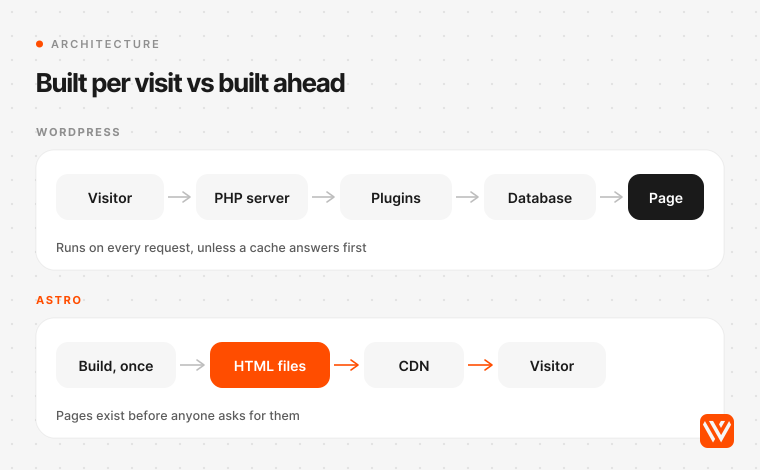
In one line: WordPress is a content management system, a PHP application with a database, an admin dashboard and a plugin system, which builds each page when a visitor asks for it or serves a cached copy. Astro is a web framework: developers write components, and Astro turns them into finished HTML ahead of time, adding JavaScript only to the parts of a page that need it. One is a product your marketing team logs into. The other is a way of building a site that still needs somewhere for content to live.
That difference decides almost everything else in this comparison.
- Where pages are made. WordPress renders on the server for each request unless a caching layer stores the result. Astro renders at build time by default and can also render on a server for pages that need it (Astro docs, on-demand rendering).
- Where content lives. WordPress keeps posts, pages and settings in its own MySQL or MariaDB database. Astro ships without an admin screen, so content sits in Markdown files or in a headless CMS that Astro reads, and that CMS can be WordPress.
- How features arrive. WordPress adds features through plugins that run inside the live site with full access to it. Astro adds them through code, and its own docs are blunt about the trade: coming from WordPress, "you may now have to build many of your existing features yourself" (Astro docs, migrating from WordPress).
- Who changes the layout. On WordPress, a marketer with the block editor or a page builder can create a new landing page design. On Astro, editors fill in blocks that developers defined, and a new kind of section is a developer task.
Is Astro faster than WordPress?
Yes, on average and by a wide margin. In September 2026, 71.1% of Astro sites passed Core Web Vitals on mobile against 48.3% of WordPress sites, according to the HTTP Archive Core Web Vitals Technology Report. That gap holds in every market we pulled. It narrows sharply, though, once you look only at popular sites.
Core Web Vitals are field data: real Chrome users on real devices, collected over 28 days in the Chrome UX Report. A site passes when loading (Largest Contentful Paint), visual stability (Cumulative Layout Shift) and responsiveness (Interaction to Next Paint) are all rated good. We pulled the September 2026 figures for both stacks in nine markets on 4 November 2026.
| Market | Astro, mobile pass | WordPress, mobile pass | Gap |
|---|---|---|---|
| United States | 84.2% | 62.0% | 22.2 pts |
| Germany | 82.7% | 63.1% | 19.6 pts |
| Canada | 81.8% | 66.9% | 14.9 pts |
| United Kingdom | 77.5% | 66.3% | 11.2 pts |
| Singapore | 63.5% | 58.3% | 5.2 pts |
| Australia | 60.5% | 50.2% | 10.3 pts |
| United Arab Emirates | 52.3% | 37.5% | 14.8 pts |
| India | 48.7% | 29.0% | 19.7 pts |
| Global | 71.1% | 48.3% | 22.8 pts |
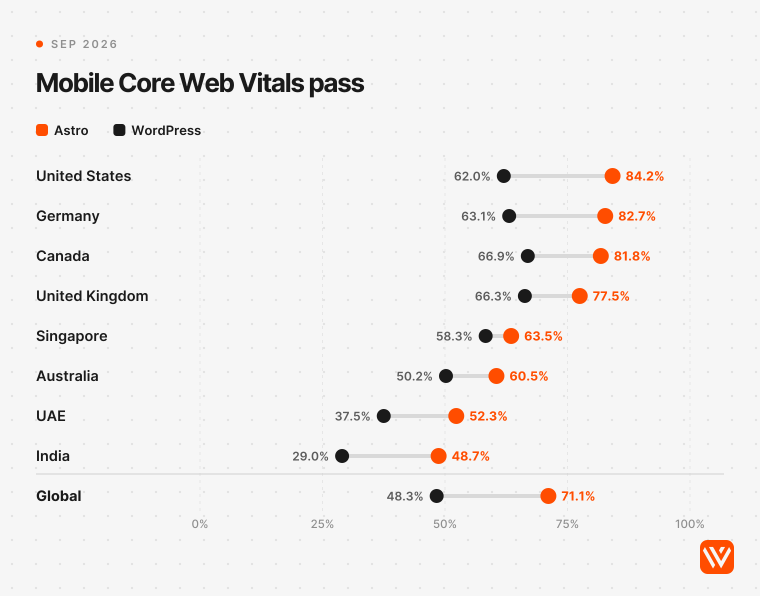
India is low for every stack, and that's where the gap hurts most: fewer than one in three WordPress sites passes for Indian visitors on mobile. Both stacks are improving. Over the 12 months to September 2026, Astro rose from 61.6% to 71.1% and WordPress from 45.0% to 48.3%.
Why does the gap shrink among popular sites?
Because the average WordPress site is a small site on cheap hosting, and the average popular WordPress site isn't. Among the 100,000 most visited origins, WordPress passed Core Web Vitals on mobile 52.9% of the time and Astro 44.7%. In the US top 100,000 they're level (64.1% vs 64.7%), and in the UK too (70.9% vs 70.3%).
| Popularity band, global, mobile | Astro | WordPress |
|---|---|---|
| Top 1,000 origins | 75.0% (8 sites) | 73.8% (42) |
| Top 10,000 | 50.0% (62) | 60.6% (642) |
| Top 100,000 | 44.7% (441) | 52.9% (7,552) |
| Top 1 million | 54.5% (3,087) | 50.1% (110,537) |
| Top 10 million | 71.2% (32,563) | 49.9% (1,941,100) |
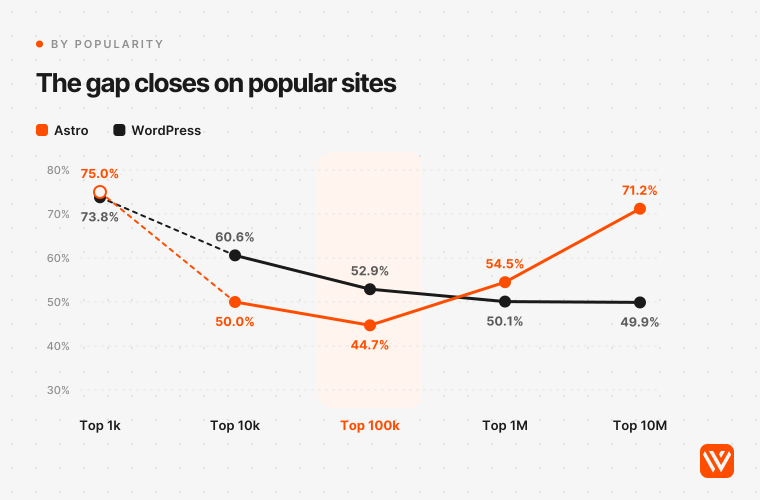
This is the finding most "Astro vs WordPress" pages miss, and it changes the advice. Popular sites on any stack carry analytics, chat, A/B testing and consent tools, and those scripts cost more than any framework saves. Popular WordPress sites also tend to sit on managed hosts with full-page caching and a CDN. Roger Montti made the same point at Search Engine Journal in May, writing that Astro's out-of-the-box advantage "may fade as website complexity increases" (Search Engine Journal, 27 May 2026).
So a well-run WordPress site can be as fast as an Astro site. The difference is that Astro gets there by default, while WordPress gets there through hosting, caching and discipline that someone has to pay for and keep up. (The top-1,000 row rests on eight Astro sites, so read it as an anecdote.)
Where does WordPress lose its time?
On the server, before the page starts to arrive. Only 22.9% of WordPress sites had a good Time to First Byte on mobile in September 2026, against 63.1% of Astro sites. WordPress builds most pages in PHP on request unless a cache sits in front; Astro serves files that were built in advance.
| Metric, global, mobile, Sep 2026 | Astro, share good | WordPress, share good |
|---|---|---|
| Time to First Byte | 63.1% | 22.9% |
| First Contentful Paint | 72.9% | 42.8% |
| Largest Contentful Paint | 81.1% | 55.4% |
| Cumulative Layout Shift | 93.6% | 87.3% |
| Interaction to Next Paint | 85.0% | 90.3% |
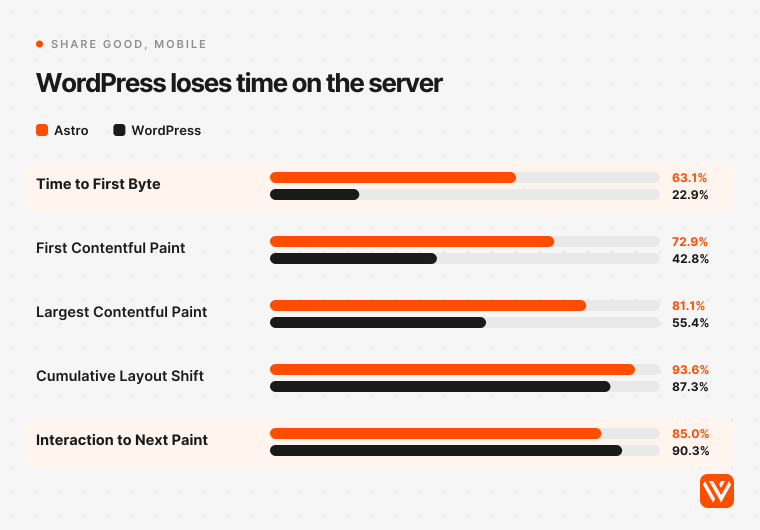
Look at the last row. WordPress beats Astro on Interaction to Next Paint, so responsiveness after load isn't its problem. Slow server responses and heavy pages are. That tells you where to spend if you stay on WordPress: hosting, page caching and a CDN first, plugins second.
Page weight follows the same line. The median Astro page on mobile weighed 1.36 MB with 409 KB of JavaScript in September 2026; the median WordPress page weighed 2.72 MB with 677 KB. The median Lighthouse performance score on mobile was 70 for Astro and 43 for WordPress.
Do page builders like Elementor make it worse?
Yes. WordPress sites built with Elementor passed Core Web Vitals on mobile 36.3% of the time in September 2026 (877,513 sites), and Divi sites 41.4%, against 48.3% for WordPress overall. Elementor is also the most common builder on B2B WordPress homepages: it was on 28 of the 87 classic WordPress sites in our scan. If a WordPress site is slow, suspect the builder before the CMS.
Is Astro or WordPress better for SEO and AI search?
Neither stack ranks a page on its own, and both can send search engines and AI crawlers complete HTML. Astro starts from a better technical baseline: a median Lighthouse SEO score of 100 on mobile, where WordPress sits at 92 (HTTP Archive, September 2026), plus the speed lead above. WordPress makes the SEO work easier for marketers, because plugins put titles, schema and sitemaps in a form anyone can fill in.
Joost de Valk, who founded the Yoast SEO plugin and now runs his own blog on Astro, wrote: "Everything Yoast SEO does on WordPress, I can do in Astro" (joost.blog, 21 March 2026). The word that matters is "I". On Astro, a developer builds the head component, the sitemap, the schema and the redirects once. On WordPress, a marketer installs Yoast SEO (more than 10 million active installs) or Rank Math and fills in fields.
AI search changes less than most comparison pages claim. Google says there are "no additional requirements to appear in AI Overviews or AI Mode" beyond normal SEO (Google Search Central). The rendering question that matters for AI crawlers, most of which don't run JavaScript, is settled for both stacks: classic WordPress and static Astro both send text in the HTML. In our test of 207 live Astro sites, 99.6% of a typical content page's text was in the raw HTML. The risks sit elsewhere: client-side widgets that inject copy, and CDN bot settings that block AI crawlers. 48 of the 100 WordPress homepages in our B2B scan sit behind Cloudflare, so check those settings whichever stack you run.
Our view: if your team will write metadata and schema in code, Astro is the stronger SEO base. If nobody will, a WordPress site with an SEO plugin and good hosting will beat a neglected Astro site.
Is WordPress less secure than Astro?
For a typical B2B marketing site, yes. WordPress runs PHP on every uncached request, and every plugin runs inside it with access to the database and files. A static Astro site leaves nothing running at request time except a file server. Neither is risk-free, and 2026 was a hard year for WordPress core itself, not only its plugins.
Start with plugins. Patchstack logged 11,334 newly disclosed WordPress vulnerabilities during 2025, up 42% on 2024. Plugins accounted for 91% and themes for 9%; core had six, all low priority. 46% had no fix from the developer on the day they went public, and Patchstack puts the weighted median time to a first exploit at five hours (Patchstack, State of WordPress Security in 2026).
Then 2026 broke the "core is safe" line that most comparison pages still repeat. WordPress shipped eight core security releases in the 12 months to 4 November 2026, seven of them since July (WordPress.org security news). The US Cybersecurity and Infrastructure Security Agency added four WordPress core flaws to its Known Exploited Vulnerabilities catalog this year, the latest on 3 November 2026 for a bug fixed in WordPress 7.1.4. Before 2026 the catalog held no WordPress core entry at all.
B2B sites got hit where it hurts: the lead form. On 19 August 2026 attackers began exploiting a critical file-upload flaw in Elementor Pro's Form widget, used on more than six million sites, the same day it was disclosed (Wordfence, 2 September 2026). In June, a plugin vendor's own update channel shipped backdoored Pro plugins to paying customers (Wordfence on the ShapedPlugin compromise), so even careful teams who update promptly were exposed.
The server underneath matters too. 32.7% of WordPress sites run PHP 8.1 or older, which no longer gets security fixes, and PHP 8.2 leaves support on 31 December 2026 (WordPress.org PHP stats; PHP supported versions). On today's mix, that puts 55.5% of WordPress sites on unsupported PHP from January unless hosts upgrade them.
Is a static Astro site safe by default?
Safer, not safe. GitHub lists 22 security advisories for the `astro` package in the 12 months to 4 November 2026 (1 critical, 4 high, 11 medium, 6 low), up from 6 the year before (GitHub Advisory Database). By our reading of each advisory, 15 of the 22 only affect a running server (on-demand rendering, middleware, server islands, adapters) or the dev server, so a fully static build avoids them.
The other seven don't go away. Six concern how templates escape content, which matters when copy comes from a CMS. The critical one, a remote code execution flaw in AVIF image processing (GHSA-26w7-cxv4-gfx2, CVSS 9.8, 8 September 2026), applies whenever a build optimises an image someone else uploaded; it was fixed in Astro 7.2.8. A static site still needs its dependencies updated. It just doesn't need it within hours of a disclosure.
Our position: if your site's job is to publish pages and pass leads to HubSpot or Salesforce, a static Astro build removes the largest class of risk a B2B marketing site carries. If you stay on WordPress, run it like the application it is: managed hosting, automatic core updates, as few plugins as you can manage, a web application firewall, and a named person who applies plugin fixes the same day.
What do B2B companies actually build on today?
New B2B companies have almost stopped putting their marketing site on WordPress. On 4 November 2026 we fetched the homepages of 2,651 B2B and SaaS companies, mostly every active Y Combinator company tagged B2B or SaaS, and identified the stack from the raw HTML; 2,240 responded. Among companies from YC batches of 2005 to 2015, 23.7% ran WordPress. Among the 778 companies from 2025 and 2026 batches, one did.
| YC batch cohort | Homepages reached | WordPress | Astro | Next.js | Webflow |
|---|---|---|---|---|---|
| 2005 to 2015 | 93 | 23.7% | 4.3% | 17.2% | 18.3% |
| 2016 to 2019 | 177 | 10.2% | 6.2% | 27.7% | 27.1% |
| 2020 to 2022 | 572 | 8.6% | 7.2% | 29.9% | 24.8% |
| 2023 to 2024 | 569 | 1.4% | 7.6% | 42.0% | 15.8% |
| 2025 to 2026 | 778 | 0.1% | 9.6% | 53.7% | 2.4% |
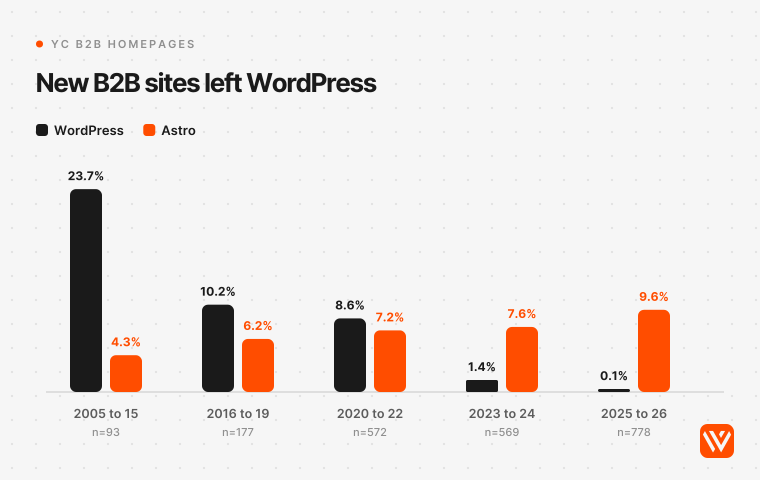
Two caveats. YC companies are venture-backed and engineer-heavy, so they lean towards developer tools; a mid-market manufacturer or consultancy is far more likely to run WordPress. And Next.js, not Astro, took most of the share WordPress lost.
The wider web points the same way, more slowly. WordPress ran on 31.06% of the 8.74 million mobile origins in the HTTP Archive crawl in September 2026, down from 34.25% a year earlier, while Astro tripled from 0.19% to 0.57%. W3Techs, which measures differently, has WordPress at 39.5% of all websites on 4 November 2026, down from 43.2% a year earlier (W3Techs). There are still about 55 WordPress sites for every Astro site.
How healthy are the WordPress sites B2B companies still run?
Mostly up to date, with a tail of risk. 100 of the homepages we reached ran WordPress: 87 as a classic site and 13 as a headless back end behind Next.js or Astro. 47 exposed their core version, and we checked each against WordPress's own stable-check API, which labels every release latest, outdated or insecure.
- 35 of 47 (74.5%) ran the current release, WordPress 7.1.4. Automatic updates do most of that work.
- 5 ran the newest patch of an older branch, which WordPress labels outdated rather than insecure.
- 7 (14.9%) ran a version WordPress itself flags as insecure. Three were on 7.1.3, one release behind the fix for the flaw CISA added on 3 November.
- 38 of the 87 classic sites (43.7%) loaded a page builder, Elementor on 28 of them, and 73.6% still loaded jQuery.
- The median WordPress homepage carried 279 KB of HTML and 34.5 script tags; the median Astro homepage 134.5 KB and 12.
Astro sites drift too, in a different way. Of the 71 Astro homepages that exposed a version, 29 (40.8%) ran Astro 7 and the rest were on 6, 5 or 4. For a fully static site that's mostly harmless, because no server code is left running once the build is done. It matters for sites that render pages on a server.
Can marketers edit an Astro site the way they edit WordPress?
Content, yes. Layouts, mostly no. With a headless CMS connected, marketers write posts, edit pages, swap images and schedule changes on an Astro site without touching code. What they can't do, unless developers have built a flexible block library first, is invent a new page design the way WordPress's block editor or Elementor allows. For many B2B teams that's the whole decision.
There are four ways to run content with Astro or WordPress, and they suit different teams.
| Setup | What editors use | Good for | Watch out for |
|---|---|---|---|
| Classic WordPress | Block editor or a page builder | Teams that build pages daily without developers | Plugin upkeep, hosting, the security record above |
| Astro with a headless CMS (Sanity, Storyblok, CloudCannon, Decap) | The CMS's own editor, with previews | Developer-owned sites with a fixed set of page blocks | New layouts need a developer; previews take setup |
| Astro with headless WordPress | The WordPress admin they already know | Teams with years of WordPress content and habits | You run and patch two systems |
| Astro with EmDash | An admin built into the Astro site | Developer-led teams willing to adopt a 2026 product | Young plugin ecosystem; needs a server, not static files |
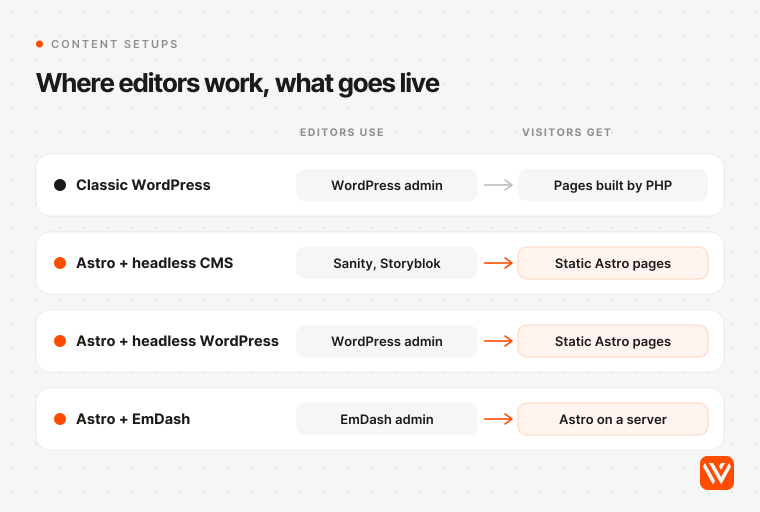
Practitioners on both sides agree on where the line falls. Bill Erickson, who has built WordPress sites for 20 years and moved a consultancy client to Astro this year, wrote that "for many small business and brochure sites, Astro is now a better fit", but "for active publishers, the lack of a full CMS is usually a non-starter" (billerickson.net, 19 June 2026). Chris Lema, a long-time WordPress speaker who moved his own site to Astro, still thinks WordPress "is the right solution for 75%, maybe 85%, of the people out there who need websites" (chrislema.com, 5 March 2026). Our guide to the best CMS for Astro compares the editors in detail.
What is EmDash, and does it replace WordPress?
EmDash is a free, open-source CMS built on Astro by Cloudflare, which owns Astro. Cloudflare launched it on 1 April 2026 as "the spiritual successor to WordPress" and shipped version 1.0 on 28 September 2026 (Cloudflare blog). It adds what Astro lacks for marketing teams: an admin, a media library, roles, drafts, scheduling and an importer for WordPress content.
Its main idea is security. Each EmDash plugin runs in its own sandbox and can only do what its manifest declares, whereas a WordPress plugin can read and change anything on the site. Cloudflare's launch post put it bluntly: "WordPress' plugin architecture is fundamentally insecure" (Cloudflare blog, 1 April 2026).
Not everyone buys the pitch. Matt Mullenweg, WordPress's co-founder, called the product "very solid" but wrote "I think EmDash was created to sell more Cloudflare services" (ma.tt, 2 April 2026). EmDash's own lead, Matt Kane, admits the gap: with its plugin registry just launched, "it will be a long time before EmDash is anywhere close" to WordPress's ecosystem (emdashcms.com, 28 September 2026). Our take: worth a pilot for a new, developer-led site in 2027; too young to bet a B2B pipeline on today.
When does headless WordPress with Astro make sense?
When your editors love WordPress and your problem is the front end. You keep the WordPress admin for content, and Astro fetches that content through WordPress's REST API, which is open for reading by default (Astro docs, headless WordPress). Visitors get static Astro pages; editors change nothing about how they work.
The cost is running two systems. WordPress still needs updates, hosting and plugin care, though it can sit on a private address where visitors never reach it. Previews and "publish triggers a rebuild" need building, and the Astro docs page doesn't cover either. Choose it when content volume and editor habits are the asset, not when you want less to maintain. 13 of the 100 WordPress sites in our scan already work this way, 11 of them behind Next.js and 2 behind Astro.
How do forms, HubSpot and lead capture work on Astro?
The same way they work on any website: through embed code or an API. HubSpot forms can be added to "your external, non-HubSpot-hosted site" by pasting the form's embed code, and edits in HubSpot show up on the live form automatically (HubSpot Knowledge Base, updated 4 August 2026). Gated content, lead routing and enrichment live in the CRM, not in the website stack.
What changes is the convenience layer. On WordPress, a form plugin such as Gravity Forms ($59 a year, with a HubSpot add-on in its basic plan) gives marketers a form builder inside the admin they already use. On Astro, you either embed the CRM's own form, use a form service, or have a developer write a small serverless function, as Bill Erickson did for one client with a Cloudflare Worker and Turnstile spam protection. Our scan shows how this plays out: HubSpot scripts loaded on 33.0% of the B2B WordPress homepages and 11.3% of the Astro ones.
What does each cost to run over three years?
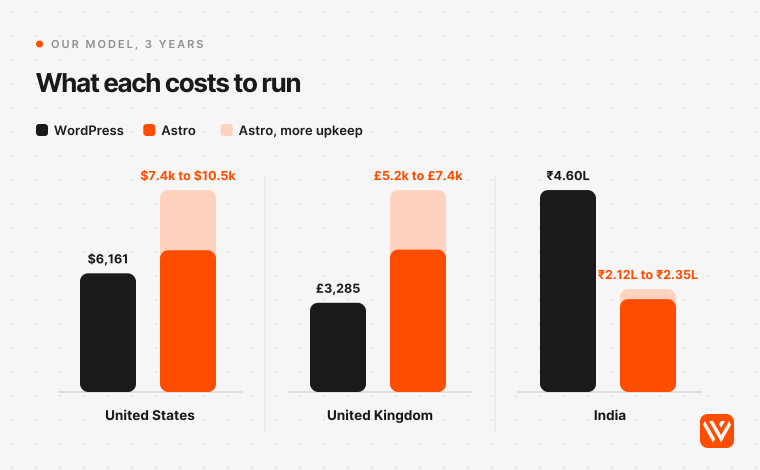
Astro's software bill is smaller, but Astro isn't cheaper to run everywhere. Once you pay someone to keep each site current, WordPress on managed hosting with a care plan costs less over three years in the US and UK in our model, while Astro costs about half as much in India. The difference is labour: WordPress upkeep is sold as a monthly plan, Astro upkeep is developer hours.
We priced one B2B marketing site with a blog, about 60,000 visits a month, three content editors and one language, for 36 months after launch. Every price was read on the vendor's own page on 4 November 2026. The build is left out because it depends on scope more than stack.
| Three years after launch | United States | United Kingdom | India |
|---|---|---|---|
| WordPress: hosting, plugins and a care plan | $6,161 | £3,285 | ₹4.60 lakh (about $4,855) |
| Astro: hosting, Sanity Growth CMS and upkeep hours | $7,359 to $10,486 | £5,242 to £7,436 | ₹2.12 to ₹2.35 lakh (about $2,230 to $2,475) |
| Astro on free tiers (Cloudflare free, Sanity Free) | $5,559 to $8,686 | £3,900 to £6,094 | ₹41,000 to ₹64,000 |
| Software alone, per year | WordPress $986, Astro $600 | £735, £447 | ₹93,489, ₹56,904 |
What's in each line:
- WordPress hosting: Kinsta's Single 65k plan, $500 a year billed annually (Kinsta pricing).
- WordPress plugins: ACF PRO ($49), Gravity Forms Basic ($59), WP Rocket ($59.95), Yoast SEO Premium ($118.80) and Wordfence Premium ($199 from 3 December 2026, when its price rises from $149), $485.75 a year in total. No page builder: Elementor Pro adds $60 a year, WPML another €99 for a multilingual site.
- WordPress care: the entry plan of a published provider in each market: WP Buffs Maintain at $89 a month in the US, Website Helper at £30 a month in the UK, Codingclave's Brochure Care at ₹5,000 a month including GST in India.
- Astro hosting: Cloudflare Workers Paid at $5 a month. The free plan serves static files without a request limit, so many marketing sites pay nothing.
- Astro CMS: Sanity Growth at $15 a seat a month for three editors (Sanity pricing). Sanity's free plan allows up to 20 seats, which covers many B2B teams.
- Astro upkeep: 32 to 50 developer hours a year for upgrades and security patches, at in-house rates of $57.91 an hour in the US, £40.62 in the UK and ₹427 in India. The hours are our assumption, the same one as in our Astro website cost breakdown. Astro shipped 114 releases and two major versions in the 12 months to 2 November 2026 (npm registry), so a site nobody upgrades falls behind fast.
Two lines decide the answer for your team. The first is upkeep. If you already employ a developer who owns the site, Astro's upkeep is time you pay for anyway, and Astro is cheaper everywhere. The second is layout changes. Every new page layout a marketer could build alone in WordPress becomes a developer task on Astro: about two hours, or $116 in the US, £81 in the UK and ₹854 in India at the same rates. At eight a month that adds $33,408 over three years in the US, and even in India it brings Astro level with WordPress.
India flips the result because WordPress's costs are priced in dollars while Astro's biggest cost is local labour. A managed host and premium plugins cost the same in rupees as anywhere; a developer hour costs a fraction of a US one.
Who controls each platform, and does it matter for a B2B site?
Both are open source, so nobody can switch your site off. But each now has one company with outsized influence, and that's worth five minutes of a buying committee's time.
WordPress is still in court. WP Engine sued Automattic and its CEO Matt Mullenweg on 2 October 2024, a week after WordPress.org cut WP Engine off from its servers; ten days later WordPress.org took over the listing of WP Engine's Advanced Custom Fields plugin. A judge ordered the access and the listing restored in December 2024, a court-run settlement conference failed in July 2025, and on 24 September 2026 the court let WP Engine's antitrust claims go forward. The jury trial is set for 19 October 2027 (case docket on CourtListener).
The dispute has reached the software. In April 2025 the project cut to one major release a year, citing "the energy and resources being diverted due to ongoing legal matters", and later reversed it (Make WordPress, 16 April 2025). Mullenweg wrote that WordPress 7.0 "was not what I hoped it would be because so much time from key people was taken away by WP Engine's attacks" (WordPress.org, 27 May 2026). Real-time collaboration was pulled from 7.0 and isn't in 7.1.
Astro's question is different: what happens now that Cloudflare owns it. Cloudflare acquired The Astro Technology Company on 16 January 2026 and, in June, VoidZero, the company behind Vite, the build tool Astro runs on. The announcement promises Astro "stays open-source and MIT-licensed" and keeps supporting "a wide set of deployment targets, not just Cloudflare" (Astro blog, 16 January 2026). Fred K. Schott, Astro's co-creator, was candid about why the company sold: "Attempts to introduce paid, hosted primitives into our ecosystem fell flat."
Our reading: the practical risk is small on both sides. An Astro site is code in your repository that deploys to any static host, so leaving Cloudflare is an afternoon's work. A WordPress site is portable too, but its plugin supply runs through WordPress.org, and the last two years showed how much one dispute can shake that supply chain.
What does moving from WordPress to Astro involve?
An inventory, a URL map, redirects, rebuilt forms and a month of watching Search Console. The framework is the easy part. Every detailed migration write-up we read put the work in the same places: redirects, forms, embeds, metadata and sitemaps.
- Inventory every URL from the sitemap, Search Console and analytics, including PDFs, tag and category pages, and decide what moves, merges or retires.
- Map old URLs to new ones and set one-to-one permanent redirects at the host or CDN.
- Export content to Markdown or into the new CMS, and check embeds, shortcodes and page-builder blocks by hand. They rarely convert cleanly.
- Rebuild forms and integrations (HubSpot, Salesforce, chat, consent) and test every submission end to end.
- Carry over metadata: titles, descriptions, canonicals, schema, Open Graph images and hreflang if you have locales.
- Keep the sitemap path working. Astro's sitemap integration writes `sitemap-index.xml`; if Search Console expects `/sitemap.xml`, redirect it.
- Launch, then watch coverage, 404s and rankings in Google Search Console and Bing Webmaster Tools for four to six weeks.
The best-documented B2B case is Pandectes, a privacy app for Shopify merchants. It moved about 390 blog posts and more than 100 pages off WordPress in about a month. In Chrome field data, desktop Largest Contentful Paint fell from 1,631 ms to 873 ms, Google clicks held within 2% over the four weeks either side, and it cut "roughly $3,000 to $4,500 a year in subscriptions" for plugins and services (Pandectes, 24 September 2026). ConveyThis, a translation SaaS, moved 248 posts and 99 legacy redirects and kept WordPress live for 30 days as a fallback (ConveyThis, 11 June 2026).
Not every move pays off in speed. Julian Song of the agency Ulement moved his own site and gained two PageSpeed points: "Moving WordPress to Astro does not automatically make a website faster" (Ulement, 13 August 2026). None of the B2B cases we found reports more traffic because of the move; the honest claim is that traffic held while pages got faster and bills got smaller. Gains were largest where the WordPress site carried a page builder and dozens of plugins. Our playbook for migrating to Astro without losing rankings covers the redirect and sitemap traps step by step.
How does the answer change in the US, UK and India?
The direction is the same everywhere; the size of the gap and the cost maths change.
- United States. Astro passes Core Web Vitals on mobile 84.2% of the time and WordPress 62.0%, but among the top 100,000 US sites they're level. Running costs favour WordPress with a care plan ($6,161 over three years in our model) unless you already pay a developer. Pick Astro here for speed, security and code ownership, not to save money.
- United Kingdom. 77.5% against 66.3%, and level again in the top 100,000. UK care plans start low (Website Helper's £30 a month), so WordPress is the cheaper stack to run unless you have a developer in-house.
- India. 48.7% against 29.0%, the weakest numbers for both and the widest relative gap. Dollar-priced hosting and plugins make WordPress expensive in rupees, so Astro costs about half as much to run (₹2.12 to ₹2.35 lakh against ₹4.60 lakh over three years). For an Indian B2B company selling to the US, Astro on a free CMS tier is the lowest-cost option in this comparison.
- Elsewhere. Germany (82.7% against 63.1%) and Canada (81.8% against 66.9%) look like the US. Singapore has the smallest gap we measured, 5.2 points.
When is WordPress still the better choice?
Stay on WordPress if your marketers build new page layouts every week without developers, you publish daily with a team of editors who need roles and approvals, your site runs memberships, courses or WooCommerce, or nobody on the team or at an agency will own an Astro codebase. Also stay if your WordPress site already passes Core Web Vitals and nobody is complaining. A migration costs real money and, on the evidence above, rarely lifts traffic by itself.
Joost de Valk drew the same line from the other side. When does a CMS earn its complexity? "If you have a team of editors who need to collaborate on content daily, with roles, approval chains, and scheduling" (joost.blog). If what you really want is a visual editor without WordPress's plugin upkeep, consider Webflow, which we cover in Webflow vs WordPress and Astro vs Webflow.
Which should your B2B site use?
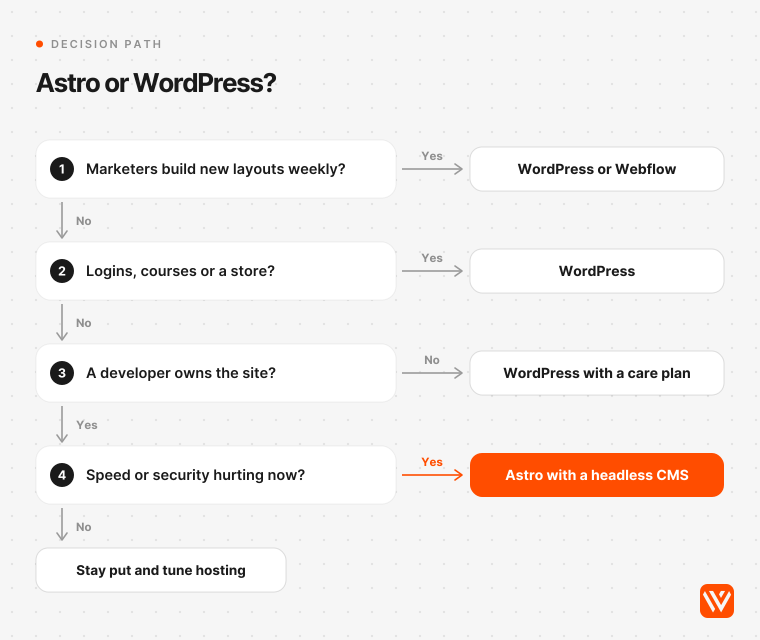
Answer four questions in order.
- Do marketers need to create new page layouts on their own every week? If yes, stay on WordPress or move to a visual builder. Astro will turn each one into a developer ticket.
- Does the site need logins, memberships, courses or a store? If yes, WordPress's plugins still save you months.
- Does a developer, in-house or at an agency, own the site? If no, WordPress on managed hosting with a care plan is the safer bet.
- Is speed, security or upkeep hurting you now? If yes, move to Astro. Keep WordPress as a headless CMS if your editors depend on it, or pick a headless CMS such as Sanity if you're starting fresh.
Our recommendation for most B2B SaaS marketing sites with a developer or agency behind them is Astro with a headless CMS in 2027: faster by default, far less exposed, and cheaper wherever developer time is already paid for. For content-heavy teams without developers, WordPress on good managed hosting remains a reasonable choice, as long as someone treats plugin updates as urgent.
If you're weighing a move, check how your current site scores first with our free AI Design Scorer. And if Astro fits, we handle WordPress to Astro migrations end to end, with the URL map, redirects, forms and search setup done before launch. Builds start from $4,000 with a fixed quote, most marketing sites take 6 to 8 weeks, and you own the code, hosting and CMS accounts. See our Astro development service. If your answers point to WordPress or Webflow, we'll say so.
Sources and method
Field performance comes from the HTTP Archive Core Web Vitals Technology Report API (Chrome UX Report data, latest month September 2026), pulled on 4 November 2026 for Astro, WordPress, Webflow, Next.js, Elementor and Divi across nine markets and five popularity bands. "Pass" means good Largest Contentful Paint, Cumulative Layout Shift and Interaction to Next Paint at the 75th percentile, measured per origin. Page weight and Lighthouse figures are medians from the same report.
The stack scan fetched the homepages of 2,651 B2B and SaaS companies on 4 November 2026: every active company tagged B2B or SaaS in the public Y Combinator directory dump, plus 73 domains from earlier Webyansh studies. 2,240 responded. We identified WordPress from `/wp-content/`, `/wp-includes/`, a WordPress generator tag or a wp-json link header, and Astro from `/_astro/` assets, `astro-island` elements or an Astro generator tag. WordPress versions were read only from the generator tag or core-only asset versions and checked against api.wordpress.org on the same day. A homepage shows only what it loads, so plugin counts are a floor, and YC companies are not the whole B2B web.
Prices were read on vendors' own pricing pages on 4 November 2026. Wages: US web developer median $92,650 (BLS, May 2025), UK front-end median £65,000 (ITJobsWatch), India front-end average ₹6,82,802 (PayScale), each with a 1.3 on-cost over 2,080 hours. Exchange rates: $1 = ₹94.84 (FBIL, 4 November 2026) and $1 = £0.7457 (ECB, 3 November 2026). Security figures come from Patchstack, Wordfence, WordPress.org, the CISA catalog and the GitHub Advisory Database, read the same day.
Is Astro better than WordPress?
Astro is better for developer-owned B2B marketing sites where speed, security and low upkeep matter most: 71.1% of Astro sites pass Core Web Vitals on mobile against 48.3% of WordPress sites. WordPress is better when marketers build their own layouts, publish daily, or need memberships, courses or ecommerce through plugins.
Is Astro faster than WordPress?
On average, yes. In September 2026, 71.1% of Astro sites passed Core Web Vitals on mobile against 48.3% of WordPress sites, with Astro ahead in all nine markets we checked. Among the 100,000 most visited sites the gap disappears, because well-run WordPress sites on managed hosting with caching are fast too.
Is Astro better than WordPress for SEO?
Astro gives a stronger technical base, with a median Lighthouse SEO score of 100 against 92 for WordPress and faster pages. WordPress makes SEO easier for non-developers through plugins like Yoast SEO. Rankings still depend on content and links, so a well-kept WordPress site can outrank a neglected Astro site.
Can non-technical marketers edit an Astro website?
Yes, for content. With a headless CMS such as Sanity, Storyblok, EmDash or WordPress itself, marketers can write posts, edit pages and schedule changes without code. Creating new page layouts usually needs a developer, which is the main trade-off against WordPress's block editor and page builders.
Can you use WordPress with Astro?
Yes. WordPress can run as a headless CMS: editors keep the WordPress admin and Astro fetches the content through the REST API or WPGraphQL to build fast static pages. The trade-off is running and patching two systems, and building previews and rebuild-on-publish yourself.